Adobe
Products

Top destinations

  • Adobe Creative Cloud
  • Creative Cloud for teams
  • Creative Suite
  • Adobe Marketing Cloud
  • Acrobat
  • Photoshop
  • SiteCatalyst

Education

  • For students
  • For schools
  • For higher ed institutions

Adobe Creative Cloud

  • What is Adobe Creative Cloud?

Design and photography

  • Photoshop
  • Illustrator
  • InDesign
  • Adobe Muse
  • Lightroom
  • Elements family

Video

  • Adobe Premiere
  • After Effects

Web development & HTML5

  • Edge Tools & Services [opens in a new window]
  • Dreamweaver
  • Gaming [opens in a new window]
  • Mobile apps

Adobe Marketing Cloud

  • What is Adobe Marketing Cloud?
  • Digital analytics
  • Social marketing
  • Web experience management
  • Testing and targeting
  • Media optimization

Analytics

  • SiteCatalyst
  • Adobe Discover
  • Insight

Social

  • Adobe Social

Experience Manager

  • CQ
  • Scene7

Target

  • Test&Target
  • Recommendations
  • Search&Promote

Media Optimizer

  • AdLens
  • AudienceManager
  • AudienceResearch

Document services

  • Acrobat
  • Acrobat.com [opens in a new window]

Publishing

  • Digital Publishing Suite

  • See all products
Business solutions

By business need

  • Digital analytics
  • Digital publishing
  • Document management
  • Media optimization
  • Social marketing
  • Testing and targeting
  • Video editing and serving
  • Web development [opens in a new window]
  • Web experience management
  • See all business needs

By industry

  • Broadcast
  • Education
  • Financial services
  • Government
  • Publishing
  • Retail
  • See all industries
Support & Learning

I need help

  • Products
  • Adobe Creative Cloud
  • Adobe Marketing Cloud
  • Forums [opens in a new window]

I want to learn

  • Training and tutorials
  • Certification [opens in a new window]
  • Adobe Developer Connection
  • Adobe Design Center
  • Adobe TV [opens in a new window]
  • Adobe Marketing Center
  • Adobe Labs [opens in a new window]
Download
  • Product trials
  • Adobe Flash Player
  • Adobe Reader
  • Adobe AIR
  • See all downloads
Company
  • Careers at Adobe
  • Investor Relations
  • Newsroom
  • Privacy
  • Corporate Social Responsibility
  • Customer Showcase
  • Contact us
  • More company info
Buy
  • For personal and professional use
  • For students, educators, and staff
  • For small and medium businesses
  • Volume Licensing
  • Special offers
  • Find a reseller
  • Adobe Marketing Cloud sales [opens in a new window]
Search
 
Info Sign in
Why sign in? Sign in to manage your account and access trial downloads, product extensions, community areas, and more.
Welcome,
My Adobe
My orders
My information
My preferences
My products and services
Sign out
Privacy My Adobe
Adobe
Products Sections Buy   Search  
Solutions Company
Help Learning
Sign in Sign out Privacy My Adobe
Date Date
Qty:
Subtotal
Promotions
Estimated Shipping
VAT
Calculated at checkout
Total
Checkout
Adobe Creative Cloud /

Illustrator CC / Features

Overview Features Tech specs Reviews FAQ Showcase In depth
Buying guide
Illustrator CC and Creative Cloud

Illustrator CC and Creative Cloud

With all-new Illustrator® CC, you always have the latest version, because access to every future release is built right in. Cloud-enabled features like Sync Fonts, Sync Colors, and Sync Settings turn any workspace into your workspace. And Creative Cloud™ is now integrated with Behance® for real-time inspiration and a seamless way to share your work. Create more, share more, never stop learning. That's Creative Cloud. Learn more ›

Touch Type tool

NEW Touch Type tool

Design with type in a powerful new way. Characters can now be manipulated like individual objects. Experiment with moving, scaling, and rotating, knowing you can change the font or edit at any time. And you can now use multitouch devices as well as a mouse or stylus.

Images in brushes

NEW Images in brushes

Paint with a brush made from a photo. Art, Pattern, and Scatter brushes can contain raster images, so you can create complex organic designs quickly — with simple brush strokes. As with all Illustrator brushes, your strokes can be reshaped and modified at will.

Font search

NEW Font search

Find the perfect font — fast. In the Character panel, type a style such as "bold" or "italic," a font family, or any other part of a font name. You'll get a filtered view that lets you see just the fonts that match your criteria.

Sync Fonts

NEW Sync Fonts

Sync Fonts — part of Creative Cloud — will change the way you work with type. Quickly find the perfect font from the growing library of Adobe® Typekit® fonts, sync it to your system, and have it immediately available for use.

Multiple-file place

NEW Multiple-file place

Import multiple files into your Illustrator layout at the same time and with new control. Now you can define the location and scale of your files — images, graphics, and text — and use new thumbnail views to see where each file will go and how big it will be.

CSS extraction

NEW CSS extraction

Hand-coding web elements such as icons and patterns can be frustrating. Now, create websites faster by letting Illustrator generate CSS code for you, even for a complete logo that includes gradients. Copy and paste the code right into your web editor.

Sync Colors

NEW Sync Colors

Capture color themes out in the world with the Adobe Kuler® iPhone app. Share your themes and explore thousands of others available on the Kuler website. Sync your favorite themes, and they'll be accessible immediately in Illustrator.


Area and point type conversion

NEW Area and point type conversion

Instantly switch between area type and point type. Text object conversion is now instantaneous so you can design freely in your text layouts. And you can work just as easily with imported type, switching formats at any time.

Auto corners for pattern brushes

NEW Auto corners for pattern brushes

Get the corners you want without extra steps. Create pattern brushes swiftly with auto-generated corners that perfectly match the rest of the stroke. No need to tediously create special corners for your sharp angles.

NEW On-art Free Transform

Get hands-on with the power of the Free Transform tool. Move, scale, and rotate objects directly using a touchscreen device. Or use a mouse or other pointer right on the artboard to transform objects in a more immediate and intuitive way.

NEW Faster type performance

Work faster with type, even in your most complicated, type-intensive designs. Text that wraps around objects and type that is set in multiple connected text frames now refreshes quickly when you make a change.

NEW Sync Settings

Work the way you like on any of your computers — Mac or PC. Synchronize your workspace settings to Creative Cloud — including Illustrator preferences, presets, brushes, and libraries — so they go where you go.

NEW File packaging

File packaging automatically gathers and saves the necessary fonts, linked graphics, and a package report into a single folder. Efficiently hand off Illustrator files to production or keep your working files organized by packaging up your project.

NEW Unembedded images

Easily unembed images that have been placed and embedded in an Illustrator file. You can quickly make images available for editing or extract files embedded in artwork you received from someone else. Links to the image files are created automatically.

NEW Expanded Links panel options

Get more complete information about any placed file in the Links panel. All of your placed elements — images, graphics, and text — appear in the Links panel, where you can track them with greater control than ever before.

Sophisticated vector drawing tools

Create compelling vector graphics for print, web, mobile, and video. With precise shape-building tools, painterly brushes, and advanced path controls, you can experiment freely with intricate shapes, complex effects, and elegant typography.

Mercury Performance System

Work with precision, speed, and rock-solid stability on large, complex files. With native 64-bit support on Mac OS and Windows®, the Adobe Mercury Performance System lets you access all your RAM to easily open, save, and export large files and preview intricate designs.

Multiple artboards

Organize and view up to 100 artboards of varying sizes, overlapping or on a grid. Quickly add, delete, reorder, and name. Save, export, and print independently or together.


Gradients and transparency

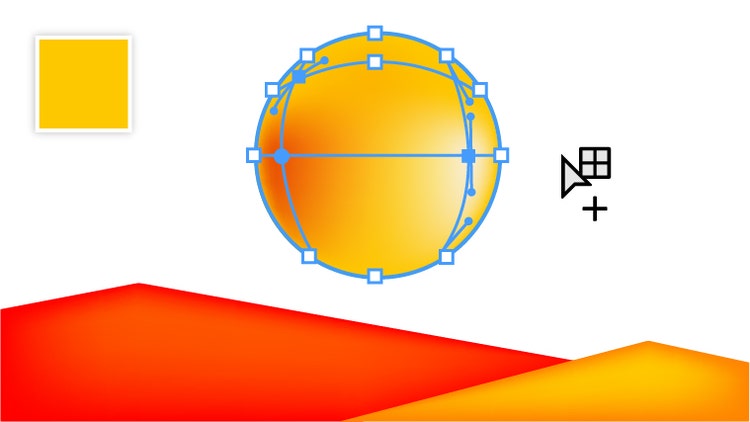
Interact with gradients directly on objects, defining the dimension of elliptical gradients, editing colors, and adjusting opacity. Apply gradients to strokes — along the length, across the width, or within the stroke itself. Even create gradients on meshes.

Variable-width strokes

Draw strokes with variable widths, quickly and smoothly adjusting at any point. Create and save width profiles and apply them to any stroke, or use variable-width presets.

Crisp graphics for web and mobile

Create and align vector objects precisely on your document's pixel grid for clean, sharp raster graphics. Use text anti-aliasing options for precise control over individual text frames.

Image Trace

Convert raster images to editable vectors with a powerful tracing engine that provides exceptional control over colors and shapes. Get clean lines, accurate fitting, and reliable results using simple, intuitive options.

Pattern creation

Easily create seamlessly tiled vector patterns. Experiment freely with different kinds of repeating vector patterns that can be edited at any time for maximum design flexibility.

3D and perspective drawing

Turn 2D shapes into editable 3D objects by extruding and revolving paths. Add lighting and surface imagery to create realistic objects. Use built-in perspective grids to draw in accurate 1-, 2-, or 3-point linear perspective, achieving the look of depth and distance.

Learning

More
  • Adobe MAX 2013
  • Getting started
  • Illustrator tutorials
  • Illustrator how-to guides
  • Training and books
  • Training providers
  • Seminars and events
  • Illustrator User Groups

Help

More
  • Illustrator Help
  • User forums
  • Windows updates
  • Mac OS updates

Resources

  • Adobe Design Center
  • Creative Suite Printing Guide
  • Illustrator plug-ins
  • Illustrator Exchange
  • Illustrator blog

Page Tools

Share on Facebook
Share on Twitter
Share on LinkedIn
Bookmark
Print

Creative Cloud Membership
Log in to Creative Cloud ›
Creative Cloud

Everything you need to create anything.

Creative Cloud
Annual plan for
INR2,70000
per month
Join Plan options
Purchase requires verification of Education Discount eligibility.
All-new CC apps are coming in June.
create-now-event-housead-IN-220x150
Shop Adobe

For home

For education

For small and medium business

Find a reseller

Volume licensing options

For business, education, and government

Products

  • Adobe Creative Cloud
  • Creative Cloud for teams
  • Creative Suite
  • Adobe Marketing Cloud
  • Acrobat
  • Photoshop
  • Digital Publishing Suite
  • Elements family
  • SiteCatalyst
  • For education

Download

  • Product trials
  • Adobe Reader
  • Adobe Flash Player
  • Adobe AIR

Support & Learning

  • Product help
  • Forums

Buy

  • For personal and professional use
  • For students, educators, and staff
  • For small and medium businesses
  • Volume Licensing
  • Special offers
  • Find a reseller

Company

  • News room
  • Partner programs
  • Corporate social responsibility
  • Career opportunities
  • Investor Relations
  • Events
  • Legal
  • Security
  • Contact Adobe
Choose your region India (Change)
Choose your region Close

North America

Europe, Middle East and Africa

Asia Pacific

  • Canada - English
  • Canada - Français
  • Latinoamérica
  • México
  • United States

South America

  • Brasil
  • Africa - English
  • Österreich - Deutsch
  • Belgium - English
  • Belgique - Français
  • België - Nederlands
  • България
  • Hrvatska
  • Česká republika
  • Danmark
  • Eastern Europe - English
  • Eesti
  • Suomi
  • France
  • Deutschland
  • Magyarország
  • Ireland
  • Israel - English
  • ישראל - עברית
  • Italia
  • Latvija
  • Lietuva
  • Luxembourg - Deutsch
  • Luxembourg - English
  • Luxembourg - Français
  • الشرق الأوسط وشمال أفريقيا - اللغة العربية
  • Middle East and North Africa - English
  • Moyen-Orient et Afrique du Nord - Français
  • Nederland
  • Norge
  • Polska
  • Portugal
  • România
  • Россия
  • Srbija
  • Slovensko
  • Slovenija
  • España
  • Sverige
  • Schweiz - Deutsch
  • Suisse - Français
  • Svizzera - Italiano
  • Türkiye
  • Україна
  • United Kingdom
  • Australia
  • 中国
  • 中國香港特別行政區
  • Hong Kong S.A.R. of China
  • India - English
  • 日本
  • 한국
  • New Zealand
  • 台灣

Southeast Asia

  • Includes Indonesia, Malaysia, Philippines, Singapore, Thailand, and Vietnam - English

Copyright © 2013 Adobe Systems Software Ireland Ltd. All rights reserved.

Terms of Use | Privacy | Cookies