Adobe
Prodotti

Destinazioni principali

  • Adobe Creative Cloud
  • Creative Cloud for teams
  • Creative Suite 6
  • Adobe Marketing Cloud
  • Acrobat
  • Photoshop
  • SiteCatalyst

Istruzione

  • Per studenti
  • Per scuole primarie e secondarie
  • Per istituti di istruzione superiore e università

Adobe Creative Cloud

  • Cos'è Adobe Creative Cloud?

Design e fotografia

  • Photoshop
  • Illustrator
  • InDesign
  • Adobe Muse
  • Lightroom
  • Famiglia di prodotti Elements

Video

  • Adobe Premiere
  • After Effects

Sviluppo web e HTML5

  • Edge Tools & Services [si apre in una nuova finestra]
  • Dreamweaver
  • Gaming [si apre in una nuova finestra]
  • Applicazioni mobili

Adobe Marketing Cloud

  • Cos'è Adobe Marketing Cloud?
  • Analisi digitale
  • Marketing sociale
  • Gestione dell'esperienza web
  • Testing e personalizzazione
  • Ottimizzazione multimediale

Analisi

  • SiteCatalyst
  • Adobe Discover
  • Insight

Social

  • Adobe Social

Experience Manager

  • CQ
  • Scene7

Target

  • Test&Target
  • Recommendations
  • Search&Promote

Media Optimizer

  • AdLens
  • AudienceManager
  • AudienceResearch

Document Services

  • Acrobat
  • EchoSign [si apre in una nuova finestra]
  • FormsCentral [si apre in una nuova finestra]
  • SendNow [si apre in una nuova finestra]
  • Acrobat.com [si apre in una nuova finestra]

Editoria

  • Digital Publishing Suite

  • Tutti i prodotti
Soluzioni aziendali

Per esigenza aziendale

  • Analisi digitale
  • Editoria digitale
  • Gestione documenti
  • Ottimizzazione multimediale
  • Marketing sociale
  • Testing e personalizzazione
  • Editing e distribuzione video
  • Sviluppo web [si apre in una nuova finestra]
  • Gestione dell'esperienza web
  • Tutte le esigenze aziendali

Per settore

  • Standard di trasmissione
  • Istruzione
  • Servizi finanziari
  • Pubblica Amministrazione
  • Pubblicazione
  • Vendita al dettaglio
  • Tutti i settori
Supporto e formazione

Ho bisogno di aiuto

  • Prodotti
  • Adobe Creative Cloud
  • Adobe Marketing Cloud
  • Forum [si apre in una nuova finestra]

Voglio imparare

  • Corsi di formazione ed esercitazioni
  • Certificazione [si apre in una nuova finestra]
  • Adobe Developer Connection
  • Adobe Design Center
  • Adobe TV [si apre in una nuova finestra]
  • Adobe Marketing Center
  • Adobe Labs [si apre in una nuova finestra]
Download
  • Versioni di prova
  • Adobe Flash Player
  • Adobe Reader
  • Adobe AIR
  • Tutti i download
Società
  • Opportunità di lavoro presso Adobe
  • Relazioni con gli investitori
  • Sala stampa
  • Privacy
  • Responsabilità sociale d'impresa
  • Vetrina dei clienti
  • Contatti
  • Ulteriori informazioni sulla società
Acquista
  • Per uso personale e professionale
  • Per studenti, docenti e personale tecnico-amministrativo
  • Per piccole e medie imprese
  • Acquisto di più licenze
  • Offerte speciali
  • Vendita di Adobe Marketing Cloud [si apre in una nuova finestra]
Cerca
 
Info Accedi
A cosa serve l'accesso?L'accesso consente di gestire il proprio account e di usufruire di download ed estensioni di prodotti, aree della community e altro ancora.
Benvenuto/a,
Il mio Adobe
I miei ordini
Le mie informazioni
Le mie preferenze
I miei prodotti e servizi
Esci
Il mio carrello
Privacy Il mio Adobe
Adobe
Prodotti Sezioni Acquista   Cerca  
Soluzioni Società
Assistenza Formazione
Accedi Esci Privacy Il mio Adobe
Disponibilità preordine prevista Date. L’addebito sulla carta di credito verrà effettuato solo dopo la spedizione del prodotto. La data di disponibilità prevista è soggetta a modifiche. Disponibilità preordine prevista Date. L’addebito sulla carta di credito verrà effettuato solo quando il prodotto sarà pronto per il download. La data di disponibilità prevista è soggetta a modifiche.
Qtà:
(incl.IVA )
Per l’acquisto è necessaria la verifica dell’idoneità accademica.
Subtotale (IVA esclusa)
Promozioni
Data di spedizione prevista
IVA
Calcolato al momento del pagamento
Totale
Verifica e pagamento
Adobe FrameMaker 11 /

Features

Panoramica Features Tech specs Reviews Buying GuideXML Authoring FAQ Showcase CMS Integration


Completely transform your XML/DITA authoring experience with a slew of features for structured content creation. Perform a comprehensive list of XML-related activities natively, and create content without having to switch windows.

Native XML Code View

Native XML Code View

Dive directly into XML code using the Code View. Exercise complete control over XML documents with a host of editing features, including customized toolbars, inline attribute editor, automated tracking of errors, Intelliprompt of attributes and elements, search using XPath, and advanced XSLT features.

XSLT 2.0 support

XSLT 2.0 support

Create a variety of transformation scenarios by applying pre-defined or customized XSLT to XML files. Execute these transformations using a range of JAXP-compliant processors, such as Xalan and Saxon. Define the scope of the transformation—a file, all files of a folder, DITA map or all children of a book.

XPath 2.0 support

XPath 2.0 support

Eliminate the need to browse through numerous lines of XML code. Use the XPath Pod to find your elements and automatically apply functions to them. Customize your query builder, get suggestions, define the scope of queries, use the history dropdown feature, and save search results for greater productivity.

Comprehensive DITA support

Comprehensive DITA support

Meet consistency and authoring needs as well as specific output requirements. Create customized information models with automatic generation of DITA 1.2 elements (such as titles, tables of content and indexes), page rounding and numbering. Easily publish DITA maps to various output formats.∆

Author View

Author View

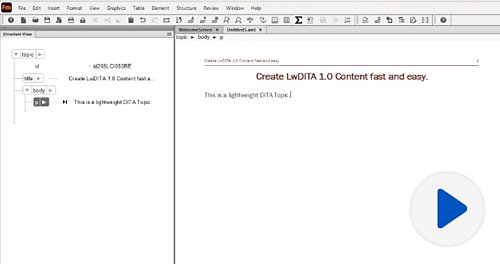
Focus on writing without bothering about page breaks and text formatting. Use the Author View to speed up content creation prior to customizing appearance and output.

Smart Paste

Smart Paste

Author structured content faster. Convert unstructured content to a structured format with Smart Paste (Microsoft Word and Excel and HTML to DITA, and HTML tables to FrameMaker tables). 

Quick Catalogs

Quick Catalogs

Use Quick Catalogs for single-click insertion of the entire linear tree hierarchy of an element and applying styles to paragraphs, characters, variables, and conditional text.

WYSIWYG View

WYSIWYG View

Prepare your documentation for publishing and sharing with the user community. Use the WYSIWYG View to apply and modify styles, themes, and formats. Render your content as intended and see it as your users will.

Assisted authoring with Banner Text

Assisted authoring with Banner Text

Speed up authoring with customizable Banner Text suggestions for various content elements that eliminate the need for constantly referring to the document structure. Help authors of different backgrounds and skill levels create content consistently in a multi-authoring environment. 

Book and structured book capabilities

Book and structured book capabilities

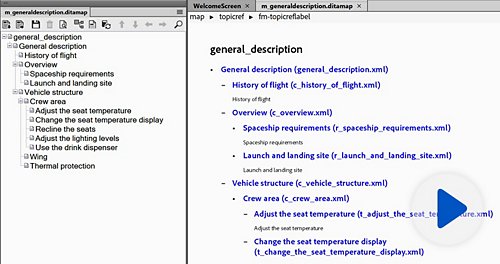
Employ a new user interface for books, as well as tools for hierarchical books and books within books. Incorporate XML files and other structured Adobe® FrameMaker® documents, and reference DITA maps or bookmaps.

Intuitive user interface

Intuitive user interface

Work more efficiently thanks to a highly user-oriented interface design. Use floating toolbars and control bars, dock your most frequently used dialog boxes for quick access, and create workspaces customized to your workflow.

Fully integrated authoring environment

Fully integrated authoring environment

Create, edit, and publish technical content with powerful features for automatic numbering, cross-referencing, creating tables of contents, indexes, books, and more. Automate formatting via templates, and easily integrate tables, graphs, and images.

Powerful, scalable single sourcing

Powerful, scalable single sourcing

Effortlessly single-source variations of the same document for different channels and purposes. Build and use complex Boolean expressions to define output filters in topic-based, structured, and unstructured modes.

Filtering by attribute

Filtering by attribute

Enable better management and reuse of content by taking advantage of support for multivalued attributes and the ability to import expressions from one document to another.

Formats and format overrides

Formats and format overrides

Manage formats for paragraphs, characters, and tables from the existing catalog or create displayable custom lists. Create new formats and delete or override those that are unused or not useful.

Enhanced attribute editor

Enhanced attribute editor

Define and edit attributes for declarations in markup to perform multiple functions: record the status of content within elements, allow cross-referencing between elements, or specify how to format an element.

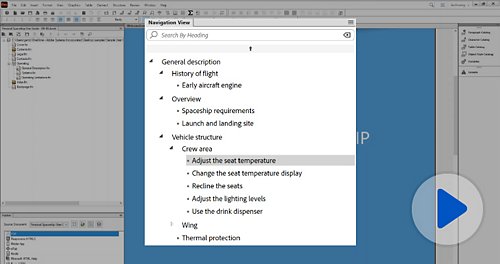
Enhanced tag view

Enhanced tag view

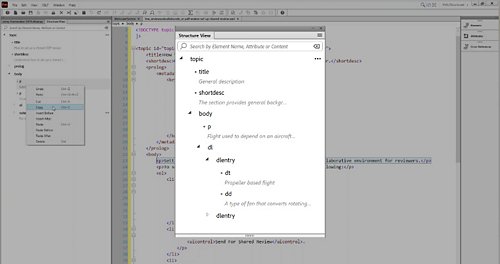
Easily view all elements in a collapsible format, even in document view. Hide or collapse parent and child elements individually or simultaneously. Search through and open elements, including those that are collapsed.

Text drag-and-drop and background color

Text drag-and-drop and background color

Drag text, elements, and rows and columns from tables and drop them into new documents or applications to save time. Emphasize and highlight important sections of text by adding color to the background.

Table catalog creation

Table catalog creation

Manage and apply table formats with enhanced table catalog creation. View all table formats present in your document and apply or delete them easily.

Structured Application Creation Wizard

Structured Application Creation Wizard

Benefit from a basic infrastructure for working with structured FrameMaker. With this highly intuitive, UI-based tool, users can start working with structured FrameMaker even if they don’t have any prior knowledge or training.

Change tracking at book level

Change tracking at book level

Save time with a host of powerful features to review and track changes across an entire book. Navigate through a review by accepting individual changes or all changes, using review icons, and view and edit changes from selected users. 

Learning

More
  • Upcoming eSeminars
  • On-demand eSeminars
  • Whitepapers
  • Adobe TV
  • TechComm Central Blog
  • Product Evangelist Blog
  • Training
  • Join us on LinkedIn

Help

More
  • FrameMaker Development center
  • FrameMaker Support center

Resources

  • Request for Information
  • FrameMaker 11 Datasheetfile
  • FrameMaker 11 Reviewer’s Guidefile
  • FrameMaker 11 Upgrade Guidefile
  • FrameMaker 11 Quote Sheetfile
  • FrameMaker 11 User Guidefile
  • FrameMaker 11 CMS Integrationfile
  • Contact Adobe TechComm Team

Strumenti pagina

Condividi su Facebook
Condividi su Twitter
Condividi su LinkedIn
Segnalibro

∆This feature requires Adobe FrameMaker Publishing Server 11 or Adobe Technical Communication Suite 4. Adobe FrameMaker Publishing Server 11 is a separate product from Adobe FrameMaker 11, and must be purchased separately. Adobe Technical Communication Suite 4 is a separate product from Adobe FrameMaker 11 and includes Adobe FrameMaker 11 as one of the components of the suite.

∑Adobe FrameMaker 11 allows users to create content compliant with popular industry standards such as XML, DITA 1.2 and S1000D.

ΩThis feature applies to FLV and SWF.

 *Adobe FrameMaker Publishing Server 11 is a separate product from Adobe FrameMaker 11, and must be purchased separately. Adobe Technical Communication Suite 4 is a separate product from Adobe FrameMaker 11 and includes Adobe FrameMaker 11 as one of the components of the suite.

#Subject to Apple's current requirements and approval.

Adobe FrameMaker 11

Author, enrich, manage, and publish XML/DITA and unstructured content

x
Adobe FrameMaker 11
Versione per studenti e docenti
Aggiornamento da
Buy Try
Aggiungi al carrello
Per l’acquisto è necessaria la verifica dell’idoneità accademica.
Request for Information
Do even more with...
Adobe Technical Communication Suite 4

Extend the frontiers of technical content creation and consumption

x
Adobe Technical Communication Suite 4
Versione per studenti e docenti
Aggiornamento da
Buy Try
Aggiungi al carrello
Per l’acquisto è necessaria la verifica dell’idoneità accademica.
Request for Information
Prezzi per studenti e docenti ›
Non sei studente o docente?
Other ways to buy

Education Store

Students, educators, and staff

Business Store

Small and medium businesses

Enterprise Purchasing

Licensing options

800 919208

FrameMaker ROI Calculator
Related Products
Technical Communication Suite 4
FrameMaker Publishing Server 11

Prodotti

  • Adobe Creative Cloud
  • Creative Cloud for teams
  • Creative Suite 6
  • Adobe Marketing Cloud
  • Acrobat
  • Photoshop
  • Digital Publishing Suite
  • Famiglia di prodotti Elements
  • SiteCatalyst
  • Per uso didattico

Download

  • Versioni di prova
  • Adobe Reader
  • Adobe Flash Player
  • Adobe AIR

Supporto e formazione

  • Guida ai prodotti
  • Forum

Acquista

  • Per uso personale e professionale
  • Per studenti, docenti e personale tecnico-amministrativo
  • Per piccole e medie imprese
  • Acquisto di più licenze
  • Offerte speciali

Società

  • Sala stampa
  • Iniziative per partner commerciali
  • Responsabilità sociale d'impresa
  • Opportunità di lavoro
  • Relazioni con gli investitori
  • Eventi
  • Settore legale
  • Sicurezza
  • Contatta Adobe
Scegli il paese Italia (Cambia)
Scegli il paese Chiudi

North America

Europe, Middle East and Africa

Asia Pacific

  • Canada - English
  • Canada - Français
  • Latinoamérica
  • México
  • United States

South America

  • Brasil
  • Africa - English
  • Österreich - Deutsch
  • Belgium - English
  • Belgique - Français
  • België - Nederlands
  • България
  • Hrvatska
  • Česká republika
  • Danmark
  • Eastern Europe - English
  • Eesti
  • Suomi
  • France
  • Deutschland
  • Magyarország
  • Ireland
  • Israel - English
  • ישראל - עברית
  • Italia
  • Latvija
  • Lietuva
  • Luxembourg - Deutsch
  • Luxembourg - English
  • Luxembourg - Français
  • الشرق الأوسط وشمال أفريقيا - اللغة العربية
  • Middle East and North Africa - English
  • Moyen-Orient et Afrique du Nord - Français
  • Nederland
  • Norge
  • Polska
  • Portugal
  • România
  • Россия
  • Srbija
  • Slovensko
  • Slovenija
  • España
  • Sverige
  • Schweiz - Deutsch
  • Suisse - Français
  • Svizzera - Italiano
  • Türkiye
  • Україна
  • United Kingdom
  • Australia
  • 中国
  • 中國香港特別行政區
  • Hong Kong S.A.R. of China
  • India - English
  • 日本
  • 한국
  • New Zealand
  • 台灣

Southeast Asia

  • Includes Indonesia, Malaysia, Philippines, Singapore, Thailand, and Vietnam - English

Copyright © 2013 Adobe Systems Software Ireland Ltd. All rights reserved.

Termini di utilizzo | Privacy (Aggiornato) | Cookie

Opzioni pubblicitarie