Adobe
Producten

Toplocaties

  • Adobe Creative Cloud
  • Creative Cloud voor teams
  • Creative Suite
  • Adobe Marketing Cloud
  • Acrobat
  • Photoshop
  • SiteCatalyst

Onderwijs

  • Voor studenten
  • Voor scholen in het primair en voortgezet onderwijs
  • Voor instellingen in het hoger onderwijs

Adobe Creative Cloud

  • Wat is Adobe Creative Cloud?

Ontwerp en fotografie

  • Photoshop
  • Illustrator
  • InDesign
  • Adobe Muse
  • Lightroom
  • Elements-reeks

Video

  • Adobe Premiere
  • After Effects

Webontwikkeling & HTML5

  • Edge Tools & Services [wordt in een nieuw venster geopend]
  • Dreamweaver
  • Games [wordt in een nieuw venster geopend]
  • Mobiele apps

Adobe Marketing Cloud

  • Wat is Adobe Marketing Cloud?
  • Digitale analyse
  • Sociale marketing
  • Web experience management
  • Tests en targeting
  • Mediaoptimalisering

Analyses

  • SiteCatalyst
  • Adobe Discover
  • Insight

Sociaal

  • Adobe Social

Experience Manager

  • CQ
  • Scene7

Targeting

  • Test&Target
  • Recommendations
  • Search&Promote

Media Optimizer

  • AdLens
  • AudienceManager
  • AudienceResearch

Documentservices

  • Acrobat
  • EchoSign [wordt in een nieuw venster geopend]
  • FormsCentral [wordt in een nieuw venster geopend]
  • SendNow [wordt in een nieuw venster geopend]
  • Acrobat.com [wordt in een nieuw venster geopend]

Publicaties

  • Digital Publishing Suite

  • Alle producten weergeven
Bedrijfsoplossingen

Per bedrijfsbehoefte

  • Digitale analyse
  • Digitale publicaties
  • Documentbeheer
  • Mediaoptimalisering
  • Sociale marketing
  • Tests en targeting
  • Videobewerking en -bediening
  • Webontwikkeling [wordt in een nieuw venster geopend]
  • Web experience management
  • Alle bedrijfsbehoeften weergeven

Per sector

  • Omroepbedrijf
  • Onderwijs
  • Financiële services
  • Overheid
  • Publicaties
  • Detailhandel
  • Alle sectoren weergeven
Ondersteuning & leren

Ik heb hulp nodig

  • Producten
  • Adobe Creative Cloud
  • Adobe Marketing Cloud
  • Forums [wordt in een nieuw venster geopend]

Ik wil leren

  • Training en lesbestanden
  • Certificering [wordt in een nieuw venster geopend]
  • Adobe Developer Connection
  • Adobe Design Center
  • Adobe TV [wordt in een nieuw venster geopend]
  • Adobe Marketing Center
  • Adobe Labs [wordt in een nieuw venster geopend]
Downloaden
  • Proefversies van producten
  • Adobe Flash Player
  • Adobe Reader
  • Adobe AIR
  • Alle downloads weergeven
Bedrijf
  • Vacatures bij Adobe
  • Relaties met investeerders
  • Redactie
  • Privacy
  • De sociale verantwoordelijkheid van bedrijven
  • Praktijkvoorbeeld van klanten
  • Contact opnemen
  • Meer bedrijfsinformatie
Kopen
  • Voor persoonlijk en professioneel gebruik
  • Voor studenten, docenten en onderwijspersoneel
  • Voor kleine en middelgrote bedrijven
  • Volumelicenties
  • Speciale aanbiedingen
  • Verkoop van Adobe Marketing Cloud [wordt in een nieuw venster geopend]
Zoeken
 
Info Aanmelden
Waarom aanmelden? Meld je aan om je account te beheren en toegang te krijgen tot downloads van proefversies, productuitbreidingen, secties voor gemeenschappen en nog veel meer.
Welkom,
Mijn Adobe
Mijn bestellingen
Mijn gegevens
Mijn voorkeuren
Mijn producten en services
Afmelden
Mijn winkelwagen
Privacy Mijn Adobe
Adobe
Producten Secties Kopen   Zoeken  
Oplossingen Bedrijven
Help Leren
Aanmelden Afmelden Privacy Mijn Adobe
Geschatte beschikbaarheid vóór de bestelling Date. Het product wordt niet in rekening gebracht op je creditcard alvorens het wordt verzonden. De geschatte beschikbaarheidsdatum is aan verandering onderhevig. Geschatte beschikbaarheid vóór de bestelling Date. Het product wordt niet in rekening gebracht op je creditcard alvorens het kan worden gedownload. De geschatte beschikbaarheidsdatum is aan verandering onderhevig.
Aantal:
(incl.btw )
Voor de aankoop van deze academische software is een bewijs van geschiktheid vereist.
Subtotaal
Aanbiedingen
Verzending
btw
Calculated at checkout
Totaal
Overzicht en betaling
Adobe FrameMaker 11 /

Features

Overzicht Features Tech specs Reviews Buying GuideXML Authoring FAQ Showcase CMS Integration


Use role–based views, such as XML Code View, Author View, and WYSIWYG View. Power up your XML workflow with rapid authoring, XSLT, XPath, and comprehensive DITA 1.2 support. Enrich content with Hotspots, and enhanced 3D and video support. Publish HTML5 content virtually anywhere.

Native XML Code View

Native XML Code View

Dive directly into XML code using the Code View. Exercise complete control over XML documents with a host of editing features, including customized toolbars, inline attribute editor, automated tracking of errors, Intelliprompt of attributes and elements, search using XPath, and advanced XSLT features.

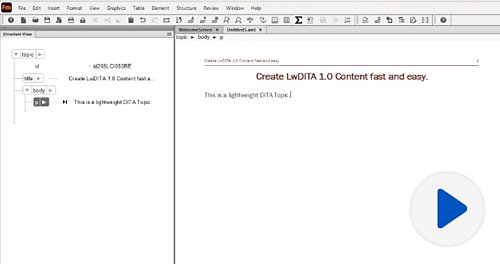
Author View

Author View

Focus on writing without bothering about page breaks and text formatting. Use the Author View to speed up content creation prior to customizing appearance and output.

XSLT 2.0 support

XSLT 2.0 support

Create a variety of transformation scenarios by applying pre-defined or customized XSLT to XML files. Execute these transformations using a range of JAXP-compliant processors, such as Xalan and Saxon. Define the scope of the transformation—a file, all files of a folder, DITA map or all children of a book.

XPath 2.0 support

XPath 2.0 support

Eliminate the need to browse through numerous lines of XML code. Use the XPath Pod to find your elements and automatically apply functions to them. Customize your query builder, get suggestions, define the scope of queries, use the history dropdown feature, and save search results for greater productivity.

Rapid authoring

Rapid authoring

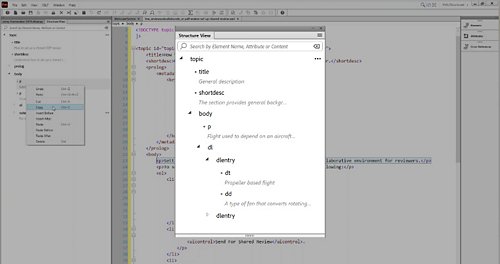
Speed up XML authoring with a range of productivity features such as Intelliprompt of elements and attributes, template based structure suggestions, automatic insertion of end tags, dynamic validation, and pretty printing. Work faster with large XML/DITA files and DITA maps in multiauthoring environments. 

Comprehensive DITA support

Comprehensive DITA support

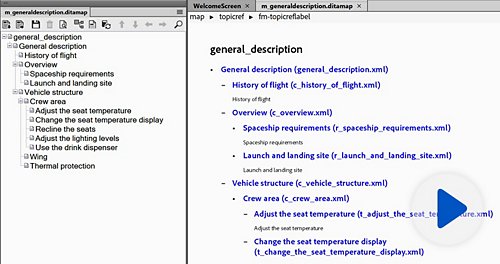
Meet consistency and authoring needs as well as specific output requirements. Create customized information models with automatic generation of DITA 1.2 elements (such as titles, tables of content and indexes), page rounding and numbering. Easily publish DITA maps to various output formats.∆

Integration with Content Management Systems (CMSs)

Integration with Content Management Systems (CMSs)

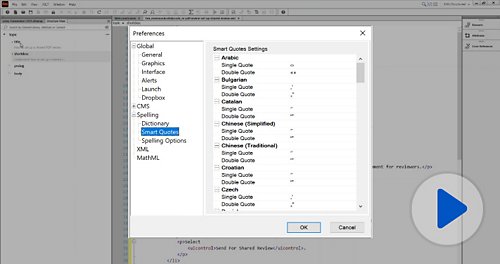
Smoothly integrate with best-of-breed CMSs like EMC Documentum and Microsoft SharePoint via built-in connectors, and others using third-party plug-ins. Get a set of APIs to connect your enterprise authoring environment with virtually any CMS. Improve searchability of content with custom metadata.


Publishing virtually anywhere

Publishing virtually anywhere

Publish content to multiple channels, formats, and screens using HTML5 integration built into Adobe FrameMaker Publishing Server 11 or Adobe Technical Communication Suite 4.* Deliver content to iPad# and other tablets, smartphones, and desktops in a wide range of popular formats. Create print-ready CMYK PDFs.

Smart Paste

Smart Paste

Author structured content faster. Convert unstructured content to a structured format with Smart Paste (Microsoft Word and Excel and HTML to DITA, and HTML tables to FrameMaker tables). 

WYSIWYG View

WYSIWYG View

Prepare your documentation for publishing and sharing with the user community. Use the WYSIWYG View to apply and modify styles, themes, and formats. Render your content as intended and see it as your users will.

Object Styles

Object Styles

Create, save, and apply Object Styles to give your content a consistent look and feel. Apply a wide variety of predefined styles to objects such as images, anchored frames, graphic objects, text frames, text lines, and equations. Easily update properties and change the styles of multiple objects by applying Object Styles to them.

Enhanced video support

Enhanced video support

Develop richer, more engaging technical content by adding a variety of high-impact multimedia features. Enjoy robust support for video content in MP4, FLV, and SWF formats. Customize videos by selecting posters and creating linksΩ with text, to play, pause, or jump.

Hotspots

Hotspots

Create linked documents with better readability and usability by inserting Hotspots over images, vector illustrations, and objects, or parts of them. Also convert shapes to Hotspots. On clicking on these Hotspots, your users will be guided to other relevant parts of the document.

Assisted authoring with Banner Text

Assisted authoring with Banner Text

Speed up authoring with customizable Banner Text suggestions for various content elements that eliminate the need for constantly referring to the document structure. Help authors of different backgrounds and skill levels create content consistently in a multi-authoring environment. 

Linked 3D graphics

Linked 3D graphics

Create a richer user experience when working with 3D graphics by linking them with relevant parts of a document. Enable users to switch between parts of 3D graphics and the associated descriptions by inserting bi-directional links. Play 3D animations by clicking on the text.

Learning

More
  • Upcoming eSeminars
  • On-demand eSeminars
  • Whitepapers
  • Adobe TV
  • TechComm Central Blog
  • Product Evangelist Blog
  • Training
  • Join us on LinkedIn

Help

More
  • FrameMaker Development center
  • FrameMaker Support center

Resources

  • Request for Information
  • FrameMaker 11 Datasheetfile
  • FrameMaker 11 Reviewer’s Guidefile
  • FrameMaker 11 Upgrade Guidefile
  • FrameMaker 11 Quote Sheetfile
  • FrameMaker 11 User Guidefile
  • FrameMaker 11 CMS Integrationfile
  • Contact Adobe TechComm Team

Paginatools

Delen op Facebook
Delen op Twitter
Delen op LinkedIn
Bladwijzer maken

∆This feature requires Adobe FrameMaker Publishing Server 11 or Adobe Technical Communication Suite 4. Adobe FrameMaker Publishing Server 11 is a separate product from Adobe FrameMaker 11, and must be purchased separately. Adobe Technical Communication Suite 4 is a separate product from Adobe FrameMaker 11 and includes Adobe FrameMaker 11 as one of the components of the suite.

∑Adobe FrameMaker 11 allows users to create content compliant with popular industry standards such as XML, DITA 1.2 and S1000D.

ΩThis feature applies to FLV and SWF.

 *Adobe FrameMaker Publishing Server 11 is a separate product from Adobe FrameMaker 11, and must be purchased separately. Adobe Technical Communication Suite 4 is a separate product from Adobe FrameMaker 11 and includes Adobe FrameMaker 11 as one of the components of the suite.

#Subject to Apple's current requirements and approval.

Adobe FrameMaker 11

Author, enrich, manage, and publish XML/DITA and unstructured content

x
Adobe FrameMaker 11
Student & Teacher Edition
Upgrade van
Buy Try
Toevoegen aan winkelwagen
Voor de aankoop van deze academische software is een bewijs van geschiktheid vereist.
Request for Information
Do even more with...
Adobe Technical Communication Suite 4

Extend the frontiers of technical content creation and consumption

x
Adobe Technical Communication Suite 4
Student & Teacher Edition
Upgrade van
Buy Try
Toevoegen aan winkelwagen
Voor de aankoop van deze academische software is een bewijs van geschiktheid vereist.
Request for Information
Student & Teacher-prijzen ›
Ben je geen student of leerkracht?
Other ways to buy

Education Store

Students, educators, and staff

Business Store

Small and medium businesses

Enterprise Purchasing

Licensing options

0800 0200164

FrameMaker ROI Calculator
Related Products
Technical Communication Suite 4
FrameMaker Publishing Server 11

Producten

  • Adobe Creative Cloud
  • Creative Cloud voor teams
  • Creative Suite
  • Adobe Marketing Cloud
  • Acrobat
  • Photoshop
  • Digital Publishing Suite
  • Elements-reeks
  • SiteCatalyst
  • Voor het onderwijs

Downloaden

  • Proefversies van producten
  • Adobe Reader
  • Adobe Flash Player
  • Adobe AIR

Ondersteuning & leren

  • Hulp bij producten
  • Forums

Kopen

  • Voor persoonlijk en professioneel gebruik
  • Voor studenten, docenten en onderwijspersoneel
  • Voor kleine en middelgrote bedrijven
  • Volumelicenties
  • Speciale aanbiedingen

Bedrijf

  • Persruimte
  • Partnerprogramma’s
  • De sociale verantwoordelijkheid van bedrijven
  • Carrièremogelijkheden
  • Relaties met investeerders
  • Evenementen
  • Juridisch
  • Beveiliging
  • Contact opnemen met Adobe
Kies uw regio Nederland (Wijzigen)
Kies uw regio Sluiten

North America

Europe, Middle East and Africa

Asia Pacific

  • Canada - English
  • Canada - Français
  • Latinoamérica
  • México
  • United States

South America

  • Brasil
  • Africa - English
  • Österreich - Deutsch
  • Belgium - English
  • Belgique - Français
  • België - Nederlands
  • България
  • Hrvatska
  • Česká republika
  • Danmark
  • Eastern Europe - English
  • Eesti
  • Suomi
  • France
  • Deutschland
  • Magyarország
  • Ireland
  • Israel - English
  • ישראל - עברית
  • Italia
  • Latvija
  • Lietuva
  • Luxembourg - Deutsch
  • Luxembourg - English
  • Luxembourg - Français
  • الشرق الأوسط وشمال أفريقيا - اللغة العربية
  • Middle East and North Africa - English
  • Moyen-Orient et Afrique du Nord - Français
  • Nederland
  • Norge
  • Polska
  • Portugal
  • România
  • Россия
  • Srbija
  • Slovensko
  • Slovenija
  • España
  • Sverige
  • Schweiz - Deutsch
  • Suisse - Français
  • Svizzera - Italiano
  • Türkiye
  • Україна
  • United Kingdom
  • Australia
  • 中国
  • 中國香港特別行政區
  • Hong Kong S.A.R. of China
  • India - English
  • 日本
  • 한국
  • New Zealand
  • 台灣

Southeast Asia

  • Includes Indonesia, Malaysia, Philippines, Singapore, Thailand, and Vietnam - English

Copyright © 2013 Adobe Systems Software Ireland Ltd. All rights reserved.

Gebruiksvoorwaarden | Privacy | Cookies

Advertentiekeuzes