



Adobe
Products
Creative Suite
Photoshop Family
Acrobat Family
Flash Platform
Digital Marketing Suite
Digital Enterprise Platform
Digital Publishing Suite
More products
Solutions
Content authoring
Education
Financial services
Government
Digital marketing solutions
More solutions
Learning Help Downloads Company
Store
Adobe Store for home and home office
Education Store for students, educators, and staff
Business Store for small and medium businesses
Other ways to buy
Search
 
Info Sign in
Welcome, My cart My shipments My support
My account
Sign out
Why sign in? Sign in to manage your account and access trial downloads, product extensions, community areas, and more.
Adobe
Products Sections   Search  
Solutions Company
Help Learning
Sign in Welcome, My shipments My support
Qty:
Subtotal
Checkout
Adobe Creative Suite family /

Adobe Photoshop CS5 Extended

Overview Features Tech specs Reviews FAQ Showcase
Buying guide

What’s new in Photoshop Extended?

The newest version of Adobe® Photoshop® CS5 Extended software delivers all the state-of-the-art editing, compositing, and painting capabilities in industry-standard Photoshop CS5 plus breakthrough tools for 3D and motion editing. And now, use it with creativity-boosting mobile apps.1

Show me:
All features
All features New Top
New since CS4 New since CS3
For design For web design For motion graphics or visual effects For interactive design


3D extrusions with Adobe Repoussé

3D extrusions with Adobe Repoussé

Create stunning 3D logos and artwork from any text layer, selection, path, or layer mask with Adobe Repoussé technology. Twist, rotate, extrude, bevel, and inflate your designs.

Rich 3D materials library and picker

Rich 3D materials library and picker

Explore different looks for your 3D objects by applying materials like chrome and gemstones from a rich materials library. Select and apply materials using intuitive tools, and add to your library by downloading materials from the web.

Ability to wrap 2D data around 3D geometry

Ability to wrap 2D data around 3D geometry

Use convenient presets to wrap 2D images around common 3D geometric shapes, such as cylinders and spheres.

3D mesh creation

3D mesh creation

Quickly generate 3D objects from grayscale depth maps.

More ›
Complex selections made easy

Complex selections made easy

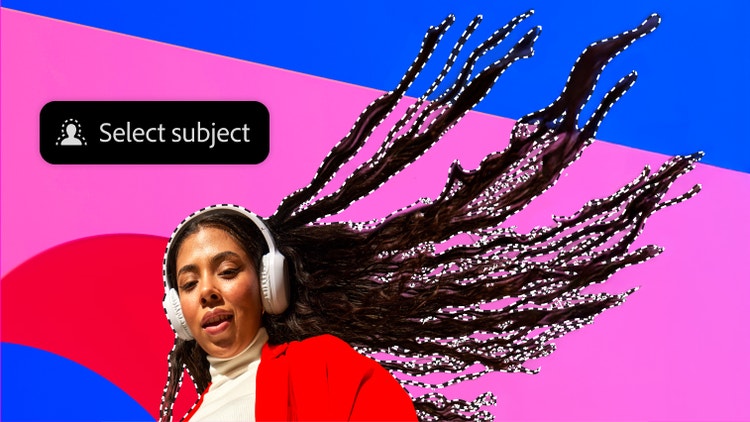
Get better-than-ever results when selecting tricky image elements, such as hair, and eliminate background color around selection edges. Automatically vary selection edges and perfect masks using new refinement tools.

3D extrusions with Adobe Repoussé

3D extrusions with Adobe Repoussé

Create stunning 3D logos and artwork from any text layer, selection, path, or layer mask with Adobe Repoussé technology. Twist, rotate, extrude, bevel, and inflate your designs.

Content-Aware Fill

Content-Aware Fill

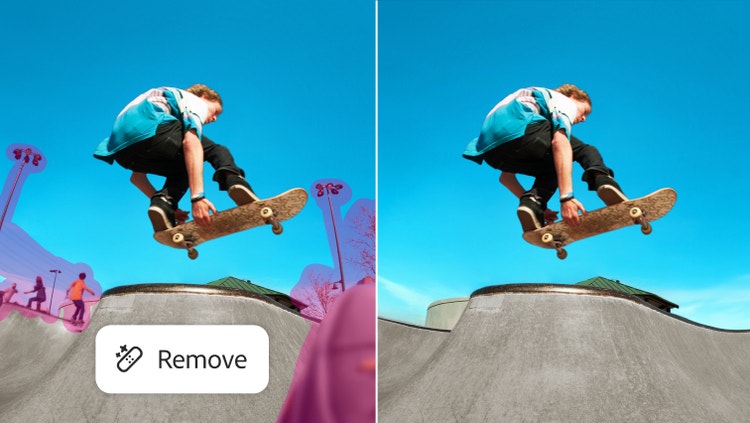
Remove any image detail or object and watch as Content-Aware Fill magically fills in the space left behind. This breakthrough technology matches lighting, tone, and noise so it looks as if the removed content never existed.

Superior HDR imaging

Superior HDR imaging

Create photo-realistic or wildly surreal high dynamic range (HDR) images with unprecedented speed and accuracy. Get stunning results thanks to automatic ghost removal and greater control for tone mapping and adjustments.

More ›
3D extrusions

3D extrusions

Easily explore new creative directions: Create 3D logos and artwork with Adobe Repoussé technology. Twist, rotate, extrude, bevel, and inflate these designs, and then apply rich materials like chrome, glass, and cork.

Advanced 3D editing capabilities

Advanced 3D editing capabilities

Push your creative boundaries with powerful 3D editing tools—even paint directly on 3D objects. Add 3D objects to your designs and create amazing composites. Illuminate your scene with real lighting, and animate your objects.

Motion content editing

Motion content editing

Paint, add text, and clone over multiple frames of an imported video sequence using your favorite Photoshop tools.

Content-Aware Fill

Content-Aware Fill

Remove any image detail or object and watch as Content-Aware Fill magically fills in the space left behind. This breakthrough technology matches lighting, tone, and noise so it looks as if the removed content never existed.

More ›
Complex selections made easy

Complex selections made easy

Get better-than-ever results when selecting tricky image elements, such as hair, and eliminate background color around selection edges. Automatically vary selection edges and perfect masks using new refinement tools.

3D extrusions with Adobe Repoussé

3D extrusions with Adobe Repoussé

Create stunning 3D logos and artwork from any text layer, selection, path, or layer mask with Adobe Repoussé technology. Twist, rotate, extrude, bevel, and inflate your designs.

Content-Aware Fill

Content-Aware Fill

Remove any image detail or object and watch as Content-Aware Fill magically fills in the space left behind. This breakthrough technology matches lighting, tone, and noise so it looks as if the removed content never existed.

Superior HDR imaging

Superior HDR imaging

Create photo-realistic or wildly surreal high dynamic range (HDR) images with unprecedented speed and accuracy. Get stunning results thanks to automatic ghost removal and greater control for tone mapping and adjustments.

More ›
3D extrusions with Adobe Repoussé

3D extrusions with Adobe Repoussé

Create stunning 3D logos and artwork from any text layer, selection, path, or layer mask with Adobe Repoussé technology. Twist, rotate, extrude, bevel, and inflate your designs.

Advanced 3D editing capabilities

Advanced 3D editing capabilities

Push your creative boundaries with powerful 3D editing tools—even paint directly on 3D objects. Add 3D objects to your designs and create amazing composites. Illuminate your scene with real lighting, and animate your objects.

Complex selections made easy

Complex selections made easy

Get better-than-ever results when selecting tricky image elements, such as hair, and eliminate background color around selection edges. Automatically vary selection edges and perfect masks using new refinement tools.

Content-Aware Fill

Content-Aware Fill

Remove any image detail or object and watch as Content-Aware Fill magically fills in the space left behind. This breakthrough technology matches lighting, tone, and noise so it looks as if the removed content never existed.

More ›
Extraordinary painting effects

Extraordinary painting effects

Paint natural, realistic backdrops and digital mattes with the Mixer Brush, which offers on-canvas color blending, and Bristle Tips, which let you create lifelike, textured brush strokes.

Content-Aware Fill

Content-Aware Fill

Remove any image detail or object and watch as Content-Aware Fill magically fills in the space left behind. This breakthrough technology matches lighting, tone, and noise so it looks as if the removed content never existed.

Complex selections made easy

Complex selections made easy

Get better-than-ever results when selecting tricky image elements, such as hair, and eliminate background color around selection edges. Automatically vary selection edges and perfect masks using new refinement tools.

Puppet Warp

Puppet Warp

Precisely reposition or warp any image element. Swing a raised arm to a person's side in a photo, stretch text to create new effects, and more.

More ›
Content-Aware Fill

Content-Aware Fill

Remove any image detail or object and watch as Content-Aware Fill magically fills in the space left behind. This breakthrough technology matches lighting, tone, and noise so it looks as if the removed content never existed.

3D extrusions with Adobe Repoussé

3D extrusions with Adobe Repoussé

Create stunning 3D logos and artwork from any text layer, selection, path, or layer mask with Adobe Repoussé technology. Twist, rotate, extrude, bevel, and inflate your designs.

Extraordinary painting effects

Extraordinary painting effects

Achieve natural and realistic painting effects with the Mixer Brush, which offers on-canvas color blending; Bristle Tips, which let you create lifelike, textured brush strokes; an onscreen color picker; and more.

Puppet Warp

Puppet Warp

Precisely reposition or warp any image element. Swing a raised arm to a person's side in a photo, stretch text to create new effects, and more.

More ›
3D extrusions with Adobe Repoussé

3D extrusions with Adobe Repoussé

Create stunning 3D logos and artwork from any text layer, selection, path, or layer mask with Adobe Repoussé technology. Twist, rotate, extrude, bevel, and inflate your designs.

64-bit performance

64-bit performance

Speed up day-to-day imaging tasks and process very large images up to 10 times faster by taking advantage of cross-platform 64-bit support.

Superior HDR imaging

Superior HDR imaging

Create photo-realistic or wildly surreal high dynamic range (HDR) images with unprecedented speed and accuracy. Get stunning results thanks to automatic ghost removal and greater control for tone mapping and adjustments.

Extraordinary painting effects

Extraordinary painting effects

Paint natural, realistic backdrops and digital mattes with the Mixer Brush, which offers on-canvas color blending, and Bristle Tips, which let you create lifelike, textured brush strokes.

More ›
Complex selections made easy

Complex selections made easy

Get better-than-ever results when selecting tricky image elements, such as hair, and eliminate background color around selection edges. Automatically vary selection edges and perfect masks using new refinement tools.

3D extrusions with Adobe Repoussé

3D extrusions with Adobe Repoussé

Create stunning 3D logos and artwork from any text layer, selection, path, or layer mask with Adobe Repoussé technology. Twist, rotate, extrude, bevel, and inflate your designs.

Puppet Warp

Puppet Warp

Precisely reposition or warp any image element. Swing a raised arm to a person's side in a photo, stretch text to create new effects, and more.

Content-Aware Fill

Content-Aware Fill

Remove any image detail or object and watch as Content-Aware Fill magically fills in the space left behind. This breakthrough technology matches lighting, tone, and noise so it looks as if the removed content never existed.

More ›

News

Video series: Photoshop hidden gems

Explore the practical, powerful, and unexpected ways you can create stunning, high-quality images faster than ever before.

12.0.4 update for Photoshop CS5

Download this free update to integrate Photoshop CS5 with new companion apps as they become available for devices like the iPad.1
Windows | Mac OS

Photoshop Touch apps for iPad

Tap into new connectivity between Photoshop CS5 and the iPad to mix colors, paint, activate Photoshop tools, and more.

Twitter updates

Follow
02/04/2012 Photoshop: #NYC #Photoshop users – you’re invited to an exclusive sneak peek this Thur. 2/9 (http://t.co/Ce7WHUr3) OR Sat. 2/11 (http://t.co [...]
02/03/2012 Photoshop: #POLL: What sort of training do you have in #art, #design, or #photography?
02/02/2012 Photoshop: Attn: Young artists and #youthmedia mentors! Submit your work today for the @AdobeYV Aspire Awards: http://t.co/HcCiS3fQ

Showcase

More
Zee Design

Zee Design

Fabio Sasso, co-founder of the web studio Zee Design and founder of the design blog Abduzeedo, takes his work in new directions with Photoshop CS5 Extended.

Learning

More
  • MAX 2011 Online
  • Getting started
  • Tutorials on Adobe TV
  • Photoshop performance (PDF, 656k) /etc/pagetables/link_icon/pdf/jcr:content/image/file
  • Training and books
  • Training providers
  • Seminars and events
  • User groups

Resources

  • Photoshop family
  • Camera Raw support
  • DNG support
  • Photoshop Marketplace
  • Photoshop Exchange
  • Photoshop blog
  • Photoshop Marketplace
  • Photoshop Exchange
  • Photoshop blog
  • For companies

Help

More
  • Help and support
  • User forums
  • Windows updates
  • Mac updates

Page tools

Share on Facebook
Share on Twitter
Share on LinkedIn
Bookmark
Print

1Photoshop CS5 Extended (version 12.0.4 or later) and wireless Internet connection required. Mobile and tablet applications require a separate download and agreement to additional terms. Such applications may not be available in all countries or languages and may be subject to change or discontinuation without notice. Additional fees or subscription charges may apply.

Photoshop Extended CS5

Discover new dimensions in digital imaging

Photoshop Extended CS5
Upgrade from
Buy Try
incl. VAT
Upgrade and save 20%
Do even more with...
Creative Suite 5.5 Design Premium

Deliver innovative ideas in print, web, interactive, and mobile design

Creative Suite 5.5 Design Premium
Upgrade from
Buy Try
incl. VAT
Step up from CS2/CS3 or CS4 and save 20%.
Upgrade from a previous version and save 20%
Save 30% on Lightroom 3 when purchased with Photoshop CS5, Photoshop CS5 Extended or any Creative Suite 5.5 edition
Other ways to buy

Adobe Store

For home and home office

Education Store

Students, educators, and staff

Business Store

Small and medium businesses

Enterprise purchasing

Volume licensing options

Call 0800 028 0148

Related products
Photoshop
Photoshop Lightroom
Photoshop Elements
Photoshop.com
Photoshop family
Photoshop companion apps
Adobe Eazel
Adobe Nav
Adobe Color Lava
Adobe Photoshop Touch
365 days of big ideas. 12 small monthly payments. Affordable annual subscriptions to CS software. Learn more >

Products

  • Creative Suite
  • Photoshop Family
  • Acrobat Family
  • Flash Platform
  • Digital Marketing Suite
  • Digital Enterprise Suite
  • Digital Publishing Suite
  • Mobile apps

Solutions

  • Customer experience management
  • Content authoring
  • Digital marketing

Industries

  • Education
  • Financial services
  • Government

Help

  • Product help centers
  • Orders and returns
  • Downloading and installing
  • My Adobe

Learning

  • Adobe Developer Connection
  • Adobe TV
  • Training and certification
  • Forums
  • Design Center

Ways to buy

  • Adobe Store
  • For students and educators
  • For small and medium businesses
  • For enterprises
  • Special offers

Downloads

  • Adobe Reader
  • Adobe Flash Player
  • Adobe AIR
  • Adobe Shockwave Player

Company

  • News room
  • Partner programs
  • Corporate social responsibility
  • Career opportunities
  • Investor Relations
  • Events
  • Legal
  • Contact Adobe
  • Report Piracy
Choose your region United Kingdom (Change)
Choose your region Close

North America

Europe, Middle East and Africa

Asia Pacific

  • Canada - English
  • Canada - Français
  • Latinoamérica
  • México
  • United States

South America

  • Brasil
  • Africa - English
  • Belgium - English
  • Belgique - Français
  • België - Nederlands
  • България
  • Česká republika
  • Danmark
  • Eastern Europe - English
  • Eesti
  • España
  • France
  • Deutschland
  • Hrvatska
  • Ireland
  • Israel - English
  • Italia
  • Latvija
  • Lietuva
  • Luxembourg - Deutsch
  • Luxembourg - English
  • Luxembourg - Français
  • Magyarország
  • Middle East and North Africa - English
  • Moyen-Orient et Afrique du Nord - Français
  • Nederland
  • Norge
  • Österreich - Deutsch
  • Polska
  • Portugal
  • România
  • Россия
  • Schweiz - Deutsch
  • Suisse - Français
  • Svizzera - Italiano
  • Slovenija
  • Slovensko
  • Srbija
  • Suomi
  • Sverige
  • Türkiye
  • Україна
  • United Kingdom
  • Australia
  • 中国
  • 中國香港特別行政區
  • Hong Kong S.A.R. of China
  • India - English
  • 日本
  • 한국
  • New Zealand
  • Pacific - English
  • 台灣

Southeast Asia

  • Includes Indonesia, Malaysia, Philippines, Singapore, Thailand, and Vietnam - English

Copyright © 2012 Adobe Systems Incorporated. All rights reserved.

Use of this website signifies your agreement to the Terms of Use and Online Privacy Policy (updated 07-14-2009).