
TL;DR? Turn docs into podcasts.
Catch up on your docs the way that works for you. With Acrobat, you can generate podcasts from your docs and listen online or on your desktop.
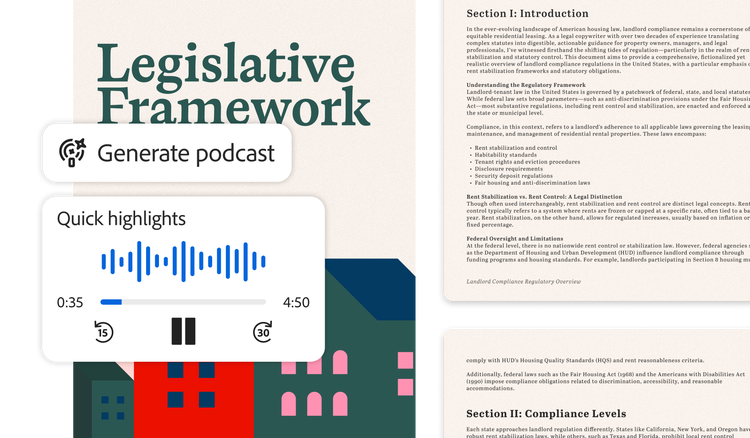
How to create an AI-generated podcast.
Turn your documents into podcasts and get up to speed fast.
https://main--da-dc--adobecom.aem.page/dc-shared/assets/images/campaign/icon-number-1.svg

Launch Adobe Acrobat.
Open the file you want to convert into a podcast.
https://main--da-dc--adobecom.aem.page/dc-shared/assets/images/campaign/icon-number-2.svg

Pick your style.
Click the headphones icon in the top menu or select “Generate podcast.” Choose “Highlights” for a summary or “Deep dive” for a more detailed audio overview.
https://main--da-dc--adobecom.aem.page/dc-shared/assets/images/campaign/icon-number-3.svg

Control how you listen.
Once your podcast is generated, you can adjust the speed or use the play, pause and skip buttons to listen how you want.
https://main--da-dc--adobecom.aem.page/dc-shared/assets/images/campaign/icon-number-4.svg

Listen across devices.
Switch seamlessly between your web, mobile and desktop apps.
Skip the scroll. Listen on the go.
All those docs don’t have to slow you down. Stay on top of work with quick audio overviews of reports, metrics and updates, so you’re always prepared for what’s next.


Save time. Catch up with podcasts.
Turn lengthy docs into podcasts that help you to get the info you need faster. Choose between a summary or detailed format and adjust the speed to learn more in less time.
Learn your way. Just hit play.
Generate podcasts in conversational voices that make it easier to comprehend docs, whether you’re an auditory learner, remote teammate or new to a project.

