Adobe Acrobat
The four-hour advantage: what a 48% time-saving trend reveals about the new pace of business operations.
Time has become a measurable business advantage. With AI-powered workflow productivity tools, Australian teams are reclaiming hours each week, accelerating decisions, and reducing bottlenecks across finance, HR, and operations.

Published by Adobe Acrobat Australia on 13 April 2026
Artificial Intelligence, Generative AI, Digital Transformation
In today's business landscape, speed has become a competitive differentiator. According to Adobe Acrobat data, 48% of professionals report saving four or more hours per week using AI tools (with 15% saving over eight hours). This data shows that for a significant portion of professionals, document based AI is effectively creating an additional half day or full day of operational capacity each week, particularly through automated document processing and documentation automation that streamline repetitive tasks.
This signals a shift where time itself becomes a scalable resource, allowing businesses to absorb growth, compliance demands, and customer volume without proportional increases in staffing.
By leveraging AI productivity solutions tailored to specific business needs, SMBs, enterprise leaders, and advisors throughout Australia can enjoy faster decision-making, fewer bottlenecks, and a stronger ability to respond to market changes.
The value of time savings for Australian businesses.
Australian businesses face rising labour costs, skills shortages and increasing regulatory and operational complexity. While adding more staff has traditionally been a solution, hiring does not always scale efficiently with workload. Businesses are now exploring ways to free capacity within their existing teams.
Key pressures include:
- Talent shortages making recruitment more challenging and expensive
- Increased compliance and reporting obligations
- Growing volume and complexity of financial, HR, and contractual documentation
- The need to deliver faster business decisions to remain competitive
This demonstrates how time savings are no longer optional. They are a strategic lever that can drive resilience, work productivity, and agility.
Where are businesses losing hours every week?
Like organisations globally, many Australian businesses still rely on manual, fragmented document processes that drain time and energy across on-site, remote, and hybrid teams. As these inefficiencies build, they lead to substantial hours lost each week and reduced operational momentum.
Manual document handling across finance, HR, and contracts
- Reading lengthy reports, policies or contracts line by line
- Searching for key clauses, figures or obligations across multiple files
- Reconciling version differences during approvals
Slow approvals and fragmented collaboration
- Email based workflows that require multiple follow-ups
- Confusion over document ownership and access permissions
- Delays caused by siloed tools and unclear responsibilities
Data entry, formatting, and compliance checks
- Manually entering financial or HR data into multiple systems
- Formatting documents for internal or regulatory standards
- Cross checking for compliance, accuracy, and completeness
- Repeating tasks across multiple teams due to a lack of integrated tools
Creating and adapting everyday business assets
- Building presentations, internal updates, or social posts from scratch
- Reformatting content for different platforms
- Lack of reusable templates and shared assets
Adobe Acrobat Studio functionalities that contribute to significant time savings.
Adobe Acrobat Studio integrates AI and automation directly into document workflows, allowing teams to reclaim hours each week without compromising accuracy or compliance. For finance, HR, and operations teams, these capabilities make it possible to focus on high value tasks rather than repetitive document work.
PDF Spaces
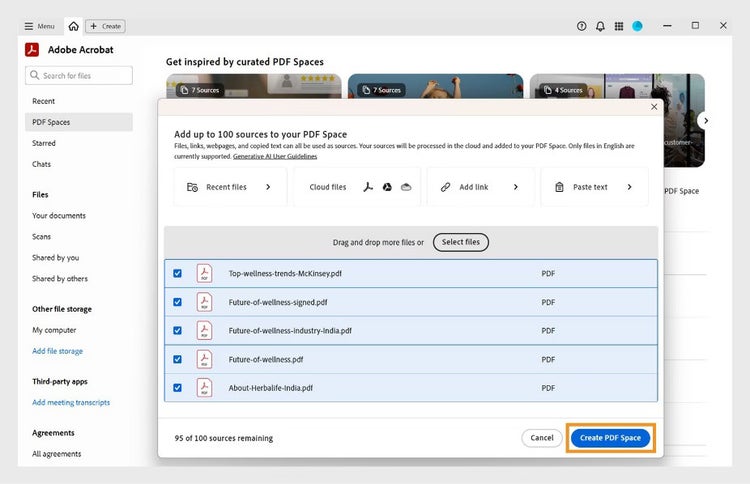
Paperwork has the tendency to become cluttered and overwhelming to handle over time. With PDF Spaces, you can consolidate all your files into a single, interactive workspace, eliminating the need to flip through countless pages or tabs. Each PDF Space serves as a conversational knowledge hub, where all information related to a specific task or project is stored in one place.
Within a PDF Space, you can ask questions, surface critical information on demand, compare documents, or create new materials with ease. You can view and organise up to 100 files at once, then share the entire workspace with colleagues so they can access your notes and AI Assistant insights, helping teams collaborate faster and more effectively.
AI Assistant
Adobe Acrobat's AI Assistant acts as a conversational engine. It allows you to interact directly with your documents, so you can quickly find answers, generate one click summaries, draft emails, brainstorm ideas, and create talking points for presentations. By converting static PDFs into dynamic, interactive resources, the AI Assistant enables teams to save time, work more efficiently, and make faster, more informed decisions. AI Assistant suggestions are generated by AI and should be reviewed by users before final use to ensure accuracy and suitability.
This can be useful in many ways, such as simplifying legal documents into easy-to-digest summaries, shortening the time needed to brief stakeholders, generating materials for onboarding new hires, creating minutes of the meeting for company-wide distribution, and the list goes on.
Compare PDFs
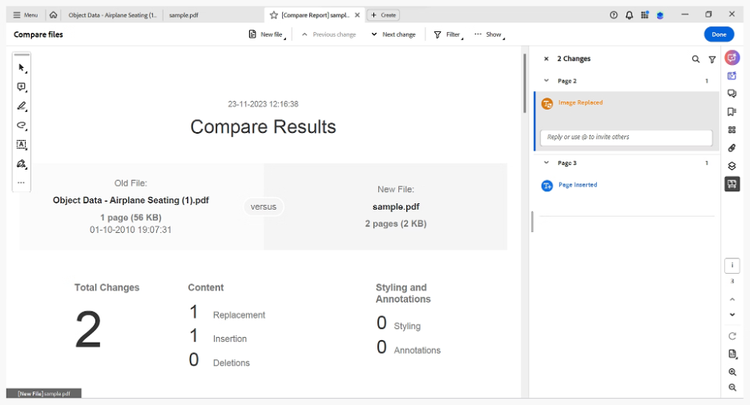
Keeping track of document changes can slow down approvals and create unnecessary risk. With Adobe Acrobat's Compare Files tool, teams can quickly and accurately identify differences between two versions of a PDF. You can use side-by-side or single page views to see every change clearly. Text, images, and graphics are all highlighted automatically, so you immediately know what has been added, removed, or modified.
This eliminates manual line-by-line checks, reduces errors, and supports faster reviews, while ensuring that compliance and legal teams still perform the necessary human validation. AI supports, but does not replace, human validation, allowing teams to focus only on meaningful differences rather than trivial edits.
E-signatures
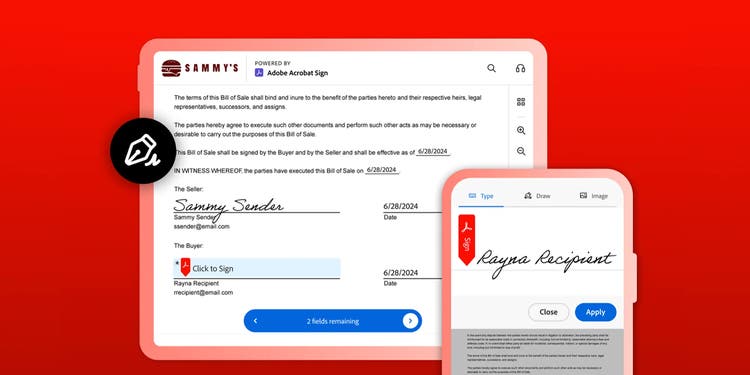
Approvals and signoffs can easily get slowed down by back-and-forth emails and manual processes. With Adobe Acrobat e-signatures, you can complete, sign, and share documents entirely online, removing delays and keeping workflows moving efficiently.
Using Fill & Sign, you can add text, checkmarks, or a signature directly within the PDF. Once complete, the document can be shared instantly via a secure link, ensuring everyone involved can access and approve it quickly. This approach simplifies approvals, reduces administrative friction, and allows teams to maintain compliance without extra steps or tools.
Adobe Express
Designing presentations, social posts, or marketing materials can be time-consuming, especially when teams are juggling multiple priorities. With Adobe Express, you can create professional content quickly using free templates and a wide range of assets tailored for different platforms.
Adobe Express provides ready-to-use layouts, images, icons, and fonts, allowing you to assemble polished visuals without starting from scratch. You can customise content effortlessly and maintain a consistent brand look that can be used for decks, social media plans, memos, or other business related communication. This greatly reduces time spent on design and formatting and shifts the focus on strategy and messaging instead.
The quick and easy app to create on-brand content.
Turning time into a competitive advantage.
AI-powered workflow productivity tools are reshaping how businesses measure success. By freeing up hours that can be reinvested into high value tasks, teams across finance, HR, and operations can make more informed decisions, improve compliance, and reduce errors or delays. At the same time, employees benefit from less repetitive work and intelligent processes, leading to better engagement and productivity.
For Australian SMBs and enterprises, this shift signals a new way to compete and succeed. It shows that in this perpetually changing market, the organisations that remain at the top are not necessarily the biggest, but the smartest with their time.
Frequently asked questions.
More resources
Content as a Service v3 - Thursday, 9 April 2026 at 16:04