6_6_2023 (June 2023 updates)
New and changed preferences for this release.
This preference category contains the following subfeature(s):
 Upsell
Summary table
| MerchandizingEnabled |
Specifies whether to show the Express Templates options in Acrobat's Create PDF UI. |
|
|
| Data type |
0 (bool)
|
| Default |
Enabled but not locked |
| Version # |
June 2023, Continuous track |
| Lock Path |
~/Library/Preferences/com.adobe.Acrobat.Pro.plist/Root/(track)/FeatureLockdown |
| Summary |
Specifies whether to show the Express Templates options in Acrobat's Create PDF UI. |
| Details |
This feature is an experiment not shown to all users. Possible values include:
- 0: Do not show the templates
- 1: Show the templates
|
| GUI mapping |
N/A |
Combine PDFs
Summary table
| RCMCombineFeatureKey |
Specifies whether to display the Combine Files item in a document's right-click context menu. |
|
|
| Data type |
0 (bool)
|
| Default |
Enabled but not locked |
| Version # |
June 2023, Continuous track |
| Lock Path |
Not lockable |
| Summary |
Specifies whether to display the Combine Files item in a document's right-click context menu. |
| Details |
This preference only applies to machines that display the Modern Viewer (a phased rollout over 2023). When the Modern Viewer is disabled, admins can toggle the Combine Files UI off/on. Possible values include:
- 0: Don't show the Combine Files UI.
- 1: Do show the Combine Files UI.
|
| GUI mapping |
N/A |
Accessibility
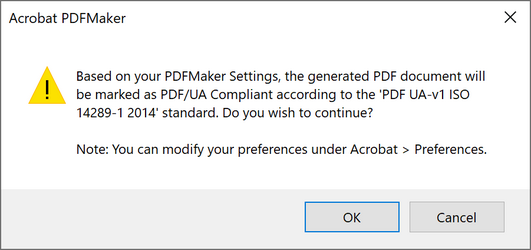
Admins can disable the following dialog when converting a Microsoft Word document to PDF:
Summary table
|
|
| Data type |
0 (bool)
|
| Default |
|
| Version # |
June 2023, Continuous track |
| Lock Path |
~/Library/Preferences/com.adobe.Acrobat.Pro.plist/Root/(track)/FeatureLockdown |
| Summary |
Specifies whether to show the new auto tagging experience or revert to the old experience. |
| Details |
Possible values include:
- 0: Disable the new auto tagging feature in the accessility UI.
- 1: Enable the new auto tagging feature in the accessility UI.
|
| GUI mapping |
N/A |
|
|
| Data type |
0 (bool)
|
| Default |
|
| Version # |
June 2023, Continuous track |
| User Path |
Access |
| Lock Path |
Not lockable |
| Summary |
Specifies whether to enable cloud-based auto-tagging. |
| Details |
When enabled, the app uses an API to call the cloud-based auto-tagging feature.
 Possible values include:
- 0: Disable cloud-based auto-tagging
- 1: Enable cloud-based auto-tagging
|
| GUI mapping |
Preferences > Accessibility > Other Accessibility Options > Enable cloud-based auto-tagging for accessibility |
Create PDF
Summary table
|
|
| Data type |
0 (bool)
|
| Default |
0 |
| Version # |
June 2023, Continuous and Classic track |
| Lock Path |
~/Library/Preferences/com.adobe.Acrobat.Pro.plist/Root/(track)/FeatureLockdown |
| Summary |
Specifies whether to show the Create Split Menu under Create a PDF menu item. |
| Details |
 Possible values include:
- 0: Don't show the Create Split menu.
- 1: Show the Create Split menu.
|
| GUI mapping |
N/A |
Modern Viewer
Summary table
|
|
| Data type |
0 (bool)
|
| Default |
null |
| Version # |
June 2023, Continuous track |
| Lock Path |
~/Library/Preferences/com.adobe.Acrobat.Pro.plist/Root/(track)/FeatureLockdown |
| Summary |
Specifies whether to enable the Modern Viewer. |
| Details |
The new app UI is rolling out in phases over 2023. As of June, 25% of users will see the updated user interface. Possible values include:
- 0: Don't show the Modern Viewer
- 1: Show the Modern Viewer
|
| GUI mapping |
In the Modern Viewer, see File > Disable New Acrobat. In the classic viewer, see View > Enable New Acrobat |


