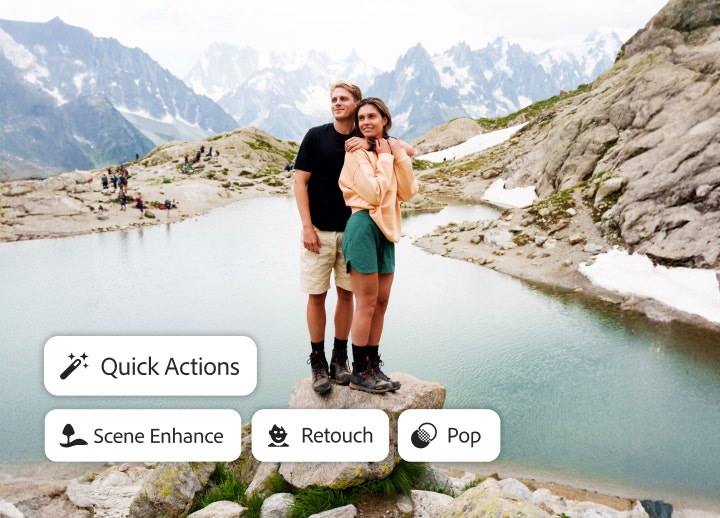
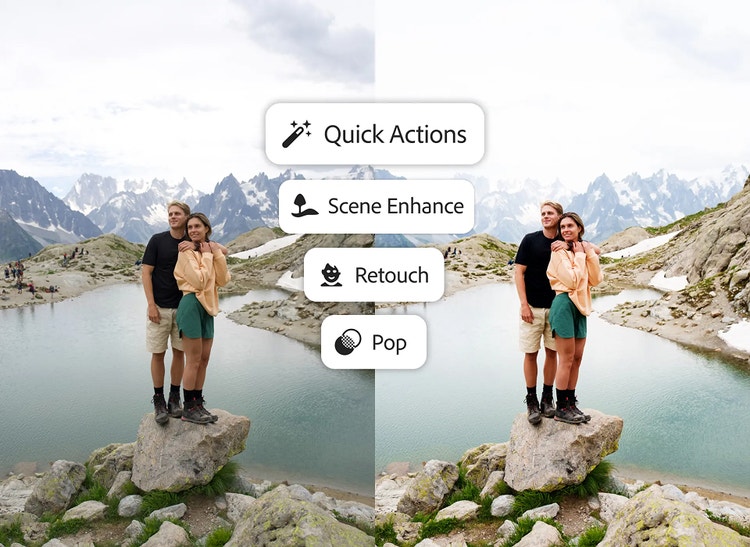
Muutke oma fotod paremaks kui kunagi varem, olenemata teie oskuste tasemest. Uued kiirtoimingud pakuvad teile loomingulist abi, mis on kohandatud teie ainulaadse foto jaoks. Ja generatiivse eemaldamise abil saate soovimatud elemendid ühe puudutusega eemaldada.
Pakettide hinnad alates 15,10€kuuskäibemaksuga paketi aastapakett, arve esitatakse igakuiselt eest.
Generatiivse eemaldamise funktsioon rakenduses Lightroom muudab fotodelt mis tahes objektide kiire ja jäljetu eemaldamise lihtsamaks kui kunagi varem.
Täpne töötlemine
Viimistlege igat detaili.
Reguleerige kiiresti valgust ja värve, lisage valmissätteid ja efekte, kärpige pilte ning tehke muud. Rakendage muudatusi tervele pildile või valige konkreetsed osad, et saada täiuslik välimus lauaarvutis, mobiilis või veebis.
Töödelge tehisintellekti abil
Keskenduge hetkele.
Tänu uuele täiustatud tehisintellektipõhisele objektiivihägu funktsioonile saate hetkega lisada hägustusefekti. Uute valmissätete abil saate hõlpsasti oma subjekti esile tuua ja kõik muu hägustada.
Säästke 44% esimesel aastal enam kui 20 loomingulise rakenduse pealt, sh Lightroom, Lightroom Classic ja Photoshop, lisaks Adobe Firefly loominguliselt tehisintellektilt piltide, video ja heli jaoks. Makske 45,50€kuuskäibemaksuga esimesel aastal ja seejärel 81,27€kuuskäibemaksuga. Pakkumine on saadaval vaid uutele tellijatele. Vaadake tingimusi | Vaadake, mida see sisaldab
Säästke 75% enam kui 20 rakenduselt, mille hulgas on ka Lightroom, lisaks veel Firefly loominguline tehisintellekt piltide, video ja heli jaoks. Makske esimesel aastal 20,15€kuuskäibemaksuga ja seejärel 41,66€kuuskäibemaksuga
Lightroom on pilvepõhine teenus, mis annab teile kõik, mida vajate oma fotode loomiseks, töötlemiseks, korrastamiseks, talletamiseks ning jagamiseks mis tahes seadmes.
Jah, saate Lightroomi osta üksikrakendusena. Ostke Lightroom kohe.
Saate osta Lightroomi aastapaketina hinnaga alates 15,10€kuuskäibemaksuga paketi aastapakett, arve esitatakse igakuiselt eest või 147,91€aastaskäibemaksuga.
Jah, teie üksiklitsents võimaldab installida Lightroomi rohkem kui ühte arvutisse. Saate selle aktiveerida kahes, kuid kasutada korraga ainult ühes arvutis.
Õppige põhitõdesid või täiustage oma oskusi Lightroomi inspireerivate õpetuste abil, mis on loodud inspireerima. Avastage kõik Lightroomi õpetused.
Jah, Lightroom mobiilseadmetele on tasuta rakendus iOS-ile ja Androidile, mis pakub teile fotode jäädvustamiseks, töötlemiseks ja jagamiseks võimsat, aga lihtsat lahendust. Saate üle minna ka tasulisele versioonile ja töötada, kasutades seda mis tahes seadmes. Vaadake, kuidas minna üle tasulisele versioonile
Nii Lightroom kui ka Lightroom Classic pakuvad suuremalt jaolt samu funktsioone, kuid Lightroom võimaldab teil fotosid töödelda ja korrastada arvutis, mobiilseadmes ja veebis, samas kui Lightroom Classic on mõeldud arvutis kasutamiseks. Lightroom Classic on Lightroomi plaani osa. Vaadake lisateavet Lightroomi ja Lightroom Classicu vaheliste erinevuste kohta.
Lightroom ja Photoshop on võimsad pilditöötluse tööriistad. Kasutage Lightroomi, et hõlpsalt fotosid enda äranägemise järgi töödelda. Suuremateks muudatusteks, nagu kompositsioonide loomine või peenem retušeerimine, proovige Photoshopi. Vaadake lisateavet Lightroomi ja Photoshopi vaheliste erinevuste kohta.
Kui Lightroom esmakordselt turule tuli, kandis see nime Lightroom CC. Nüüd on selle nimi lihtsalt Lightroom.
Jah, õppurid ja õpetajad saavad Lightroomi Creative Cloud Pro plaani osana esimesel aastal soodushinnaga 20,15€kuuskäibemaksuga. Plaan sisaldab üle 20 töölaua- ja mobiilirakenduse, sealhulgas Lightroom, Photoshop, Acrobat Pro, Illustrator, InDesign, XD, Premiere ja palju muud. Esimese aasta lõpus esitatakse tellimus arve automaatselt standardhinnaga, praegu 41,66€kuuskäibemaksuga, välja arvatud juhul, kui otsustate oma tellimust muuta või tühistada. Vaadake lisateavet Creative Cloud Pro paketi kohta õppuritele ja õpetajatele.
Lightroomi tellimuse tühistamiseks minge oma Adobe konto lehele. Leidke plaani nimi ja klõpsake nuppu Manage Plans (Plaanide haldamine). Seejärel klõpsake valikut Cancel Plan (Plaani tühistamine). Tooge ära tühistamise põhjus ja seejärel klõpsake nuppu Continue (Jätka). Tühistamise lõpetamiseks järgige ekraanil kuvatavaid juhiseid. Vaadake üksikasjalikke tühistamise juhised.
Jah. Nüüd saate kasutada tehisintellekti võimsust Lightroomi veebiversioonis (Lightroom.adobe.com), alustades meie valikulise korrigeerimise tööriistadega. Tehisintellektipõhine maskeerimine on veebis saadaval valikute Select Subject (Vali objekt), Sky (Taevas) ja Background (Taust) jaoks, samuti kohalduvad valmissätted, sealhulgas Whiten Teeth (Hammaste valgendamine), Glamour (Glamuur) ja teised.
word word word word word word word word word word word word word word word word word word word word word word word word word word word word word word word word word word word word word word word word word word word word word word word word word word word word word word word word word word word word word word word word word word word word word word word word word word word word word word word word word word word word word word word word word word word word word word word word word word word word word word word word word word word word word word word word word word word word word word word word word word word word word word word word word word word word word word word word word word word word word word word word word word word word word word word word word word word word word word word word word word word word word word word word word word word word word word word word word word word word word word word word word word word word word word word word word word word word word word word word
You can control how Adobe websites use cookies and similar technologies by making choices below. But note that if you disable cookies and similar technologies entirely, Adobe websites may not function properly.
Cookies are small text files stored by your web browser when you use websites. There are also other technologies that can be used for similar purposes like HTML5 Local Storage and local shared objects, web beacons, and embedded scripts. These technologies help us do things like remembering you and your preferences when you return to our sites, measure how you use the website, conduct market research, and gather information about the ads you see and interact with.
You can make choices in the menu below about what cookies and other technologies you want us to use on Adobe sites when you visit them from this browser. You can always change those choices later by clicking on the Cookie Preferences link at the bottom of the page.
If enabled:
We can improve your experience by tailoring the site and the content to things we think might be of interest
We can better keep track of your preferences — like what language you prefer to use
We will better understand your likely interests so we can provide you more relevant Adobe ads and content on non-Adobe websites and in non-Adobe apps
It will help us improve the performance of our website and those of our partners who use the Adobe Experience Cloud
If disabled:
We won’t be able to remember you from session to session so the experience may not be tailored to your interests
You’ll still have access to the content of the site but certain features that depend on cookies may not function
You’ll still see ads, they just may not be as relevant to you
General information
You can control how Adobe websites use cookies and similar technologies by making choices below. But note that if you disable cookies and similar technologies entirely, Adobe websites may not function properly.
Cookies are small text files stored by your web browser when you use websites. There are also other technologies that can be used for similar purposes like HTML5 Local Storage, web beacons, and embedded scripts. These technologies help us do things like remembering you and your preferences when you return to our sites, measure how you use the website, conduct market research, and gather information about the ads you see and interact with.
You can make choices in the menu below about what cookies and other technologies you want us to use on Adobe sites when you visit them from this browser. You can always change those choices later by clicking on the Cookie Preferences link at the bottom of the page.
If enabled:
We can improve your experience by tailoring the site and the content to things we think might be of interest
We can better keep track of your preferences — like what language you prefer to use
We will better understand your likely interests so we can provide you more relevant Adobe ads and content on non-Adobe websites and in non-Adobe apps
It will help us improve the performance of our website and those of our partners who use the Adobe Experience Cloud
If disabled:
We won’t be able to remember you from session to session so the experience may not be tailored to your interests
We’ll still count your use of our site and services
You’ll still have access to the content of the site but certain features that depend on cookies may not function
You’ll still see ads, they just may not be as relevant to you
Operate the site and core servicesOperate site and measure engagement
Always active
These cookies are required, and they are used to enable the site and related services core functionality. Without them the site could not operate, so they cannot be disabled.
These cookies enable the site and related services’ core functionality and collect statistics about user engagement, such as counting active use to help us understand trends. These cookies cannot be disabled.
Measure performance
These cookies are used to analyze site usage to measure and improve performance. Without them Adobe cannot know what content is most valued and how often unique visitors return to the site, making it hard to improve information we offer to you.
These cookies are used to analyze site usage to measure and improve performance. Without them Adobe cannot know what content is most valued, making it hard to improve information we offer to you.
Extend functionality
These cookies are used to enhance the functionality of Adobe sites such as remembering your settings and preferences to deliver a personalized experience; for example, your username, your repeated visits, preferred language, your country, or any other saved preference.
Personalize advertising
These cookies are used to enable Adobe and our partners to serve ads more relevant to your interests. Without them you will still see ads, but they might not be as relevant to you.
