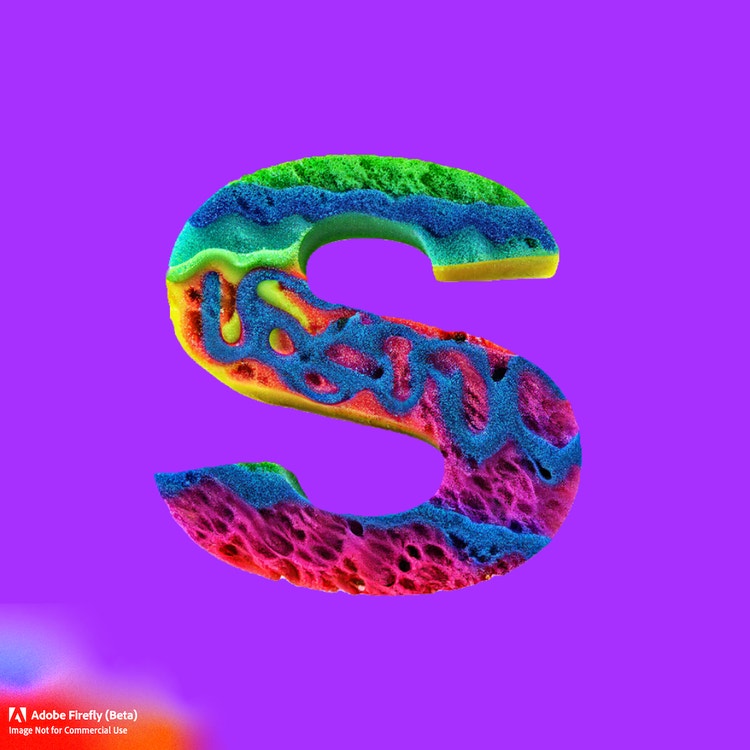
There’s a place for plain type, but a stylish font can grab attention. Type a simple description into the text effect generator and watch it create stunning textures and styles for your text.
Make letters out of bundled electrical wires, pizza, sequins, and nearly anything else you can imagine.
Create text effects using AI and go straight from prompt to template.
1
Get started for free.
Go to Adobe Express and sign into your Adobe account. If you don’t have one, you can quickly create a free account.
2
Add text.
Click on Text at the left of the online editor to add your messaging, then select Generate text effects at the bottom of the menu.
3
Generate text effects.
Type in a simple description of what you’re looking for, like “chunky neon colored building blocks.” Hit Generate and watch as your text turns into a stylized font.
4
Continue editing.
Add animation or a new background to your newly generated text effect. Download your project to save, share, or keep editing in Adobe Express.
The world's leading businesses use Adobe Express.
Save time and create content even faster.
Go from idea to finished design faster than ever by quickly generating text effects. From font styles that glitter in gold to monogram letters made of flower petals, our generative AI lets you create anything you can think of. Save your creation as a JPEG with a colored or transparent background to use anywhere.
Make every word count.
With the options limited only by what you can type into the prompt field, you can create scroll-stopping headlines, CTAs, social media posts, and so much more. Stop your audience in their tracks and encourage them to like, comment, share, or subscribe to your content in no time with standout text effects made in Adobe Express.
Generate text effects for fun or work.
Getting the perfect text effect you like is quick and easy in Adobe Express. Create engaging visuals for marketing materials, social media posts, presentations, and more. Use it to level up personal projects like invitations and custom stickers, too.
Explore all the text effects options.
Grab attention and make your text pop instantly. Each text effects generation produces four results, so you have different versions to experiment with on your designs. Whatever mood, occasion, or message you want to convey, the Generate text effects tool lets you bring it to life with extraordinary styles and custom text textures.
Easily create text effects with the AI text effect generator in Adobe Express.
Frequently asked questions.
Is Adobe Express beginner-friendly?
The Adobe Express all-in-one content creation app is beginner-friendly and easy to use. All skill levels can create something amazing with tons of templates to jumpstart your creative process. It’s easy to get started and even easier to make something that’s 100% you in no time.
Is there a limit to how many designs I can make in Adobe Express?
Adobe Express is here to help you express your creative self in as many ways possible, whether it be through social posts, videos, posters, and flyers. You can create as many designs as you’d like, so feel free to play around with all the customization options you have right at your fingertips.
How do I add animation to my text effect?
To add animation to your text effect or any element in your project, select it, then click on Animation. Make your text effects or graphics pan in, loop, or transition out in just a few taps.
Does the size or quality change after adding animation text to the designs?
The size or quality won’t change, but the type of file will. If you start with an image and add text animation to it, you will need to download your final design as an MP4 video file in order to preserve the animation. If you want to then share your animation as a GIF, you can use our free MP4 to GIF converter to switch file types in seconds.
Can I use Adobe Express for free? If so, what’s included?
Yes, we have a free plan available for anyone. Enjoy everything you need to stand out, including dozens of quick action tools, thousands of templates, photo editing and effects, and much more. Explore our plans and pricing for details.
You can control how Adobe websites use cookies and similar technologies by making choices below. But note that if you disable cookies and similar technologies entirely, Adobe websites may not function properly.
Cookies are small text files stored by your web browser when you use websites. There are also other technologies that can be used for similar purposes like HTML5 Local Storage and local shared objects, web beacons, and embedded scripts. These technologies help us do things like remembering you and your preferences when you return to our sites, measure how you use the website, conduct market research, and gather information about the ads you see and interact with.
You can make choices in the menu below about what cookies and other technologies you want us to use on Adobe sites when you visit them from this browser. You can always change those choices later by clicking on the Cookie Preferences link at the bottom of the page.
If enabled:
We can improve your experience by tailoring the site and the content to things we think might be of interest
We can better keep track of your preferences — like what language you prefer to use
We will better understand your likely interests so we can provide you more relevant Adobe ads and content on non-Adobe websites and in non-Adobe apps
It will help us improve the performance of our website and those of our partners who use the Adobe Experience Cloud
If disabled:
We won’t be able to remember you from session to session so the experience may not be tailored to your interests
You’ll still have access to the content of the site but certain features that depend on cookies may not function
You’ll still see ads, they just may not be as relevant to you
General information
You can control how Adobe websites use cookies and similar technologies by making choices below. But note that if you disable cookies and similar technologies entirely, Adobe websites may not function properly.
Cookies are small text files stored by your web browser when you use websites. There are also other technologies that can be used for similar purposes like HTML5 Local Storage, web beacons, and embedded scripts. These technologies help us do things like remembering you and your preferences when you return to our sites, measure how you use the website, conduct market research, and gather information about the ads you see and interact with.
You can make choices in the menu below about what cookies and other technologies you want us to use on Adobe sites when you visit them from this browser. You can always change those choices later by clicking on the Cookie Preferences link at the bottom of the page.
If enabled:
We can improve your experience by tailoring the site and the content to things we think might be of interest
We can better keep track of your preferences — like what language you prefer to use
We will better understand your likely interests so we can provide you more relevant Adobe ads and content on non-Adobe websites and in non-Adobe apps
It will help us improve the performance of our website and those of our partners who use the Adobe Experience Cloud
If disabled:
We won’t be able to remember you from session to session so the experience may not be tailored to your interests
We’ll still count your use of our site and services
You’ll still have access to the content of the site but certain features that depend on cookies may not function
You’ll still see ads, they just may not be as relevant to you
Operate the site and core servicesOperate site and measure engagement
Always active
These cookies are required, and they are used to enable the site and related services core functionality. Without them the site could not operate, so they cannot be disabled.
These cookies enable the site and related services’ core functionality and collect statistics about user engagement, such as counting active use to help us understand trends. These cookies cannot be disabled.
Measure performance
These cookies are used to analyze site usage to measure and improve performance. Without them Adobe cannot know what content is most valued and how often unique visitors return to the site, making it hard to improve information we offer to you.
These cookies are used to analyze site usage to measure and improve performance. Without them Adobe cannot know what content is most valued, making it hard to improve information we offer to you.
Extend functionality
These cookies are used to enhance the functionality of Adobe sites such as remembering your settings and preferences to deliver a personalized experience; for example, your username, your repeated visits, preferred language, your country, or any other saved preference.
Personalize advertising
These cookies are used to enable Adobe and our partners to serve ads more relevant to your interests. Without them you will still see ads, but they might not be as relevant to you.