
Powerful tool for everything eLearning
#ffffff
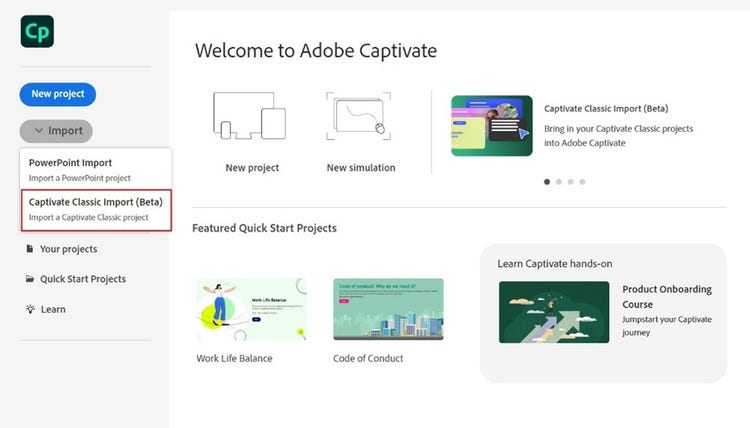
Import Adobe Captivate Classic projects effortlessly (BETA)
Migrate Adobe Captivate Classic courses into the new Adobe Captivate without rebuilding from scratch, while retaining key simulation elements such as click boxes, input fields, and highlight boxes.
Engage effectively with video demos
Effortlessly create video demos by simultaneously recording webcam and all on-screen actions like mouse movements, system audio, and keyboard activity.


Discover the all-new Adobe Captivate
The new generation eLearning tool to create beautiful eLearning courses in minutes.
Adobe Captivate Version Comparison Chart

Adobe Captivate 13.0 (released in 2025)
Adobe Captivate 12.x (Originally released in 2023. 6 updates released from 2023-2025)

Adobe Captivate Classic (originally released in 2019)
All users who want to quickly create:
- Powerpoint to eLearning
- Software simulations
- Responsive courses
- Interactive videos
- Slide-based interactive content.
- Long scroll interactive content
All users who want to quickly create:
- Software simulations
- Responsive courses
- Interactive videos
- Slide-based interactive content.
- Long scroll interactive content
Existing Adobe Captivate users who want to:
- Maintain older course*
- Create video demo*
- Create virtual reality course*
*These use cases will be added to the new Adobe Captivate, in frequent upcoming updates.
Advanced:
- Generate Image (Adobe Firefly integration)
- Long scroll + slide-based content
- Real content Quick Start Projects
- Rich media asset library
- Enhanced image editing
- Beautiful readymade layout slides
- Elegant design options
- Stylish Text presets
Advanced:
- Long scroll + slide-based content
- Real content Quick Start Projects
- Rich media asset library
- Enhanced image editing
- Beautiful readymade layout slides
- Elegant design options
- Stylish Text presets
Limited:
- Slide-based content
- Quick Start Projects
- Rich media asset library
- Limited image editing
No credit card information required for 30-day free trial
All plans include access to all new Adobe Captivate and Adobe Captivate Classic