Descobrir diferentes estilos com modelos generativos de terceiros
Descubra diversos estilos de ilustração no Illustrator em tempo recorde para incentivar novas ideias e agilizar o processo criativo.
Introdução e apresentação da autora Sydney Michuda
[Sydney Michuda]: Sabia que há vários modelos de parceiros de IA no Illustrator para criar arte vetorial?
Sou Sydney Michuda, diretora criativa da Super Creative.
Neste vídeo, vou mostrar modelos de parceiros de IA enquanto experimento estilos de ilustração.
Vamos começar.
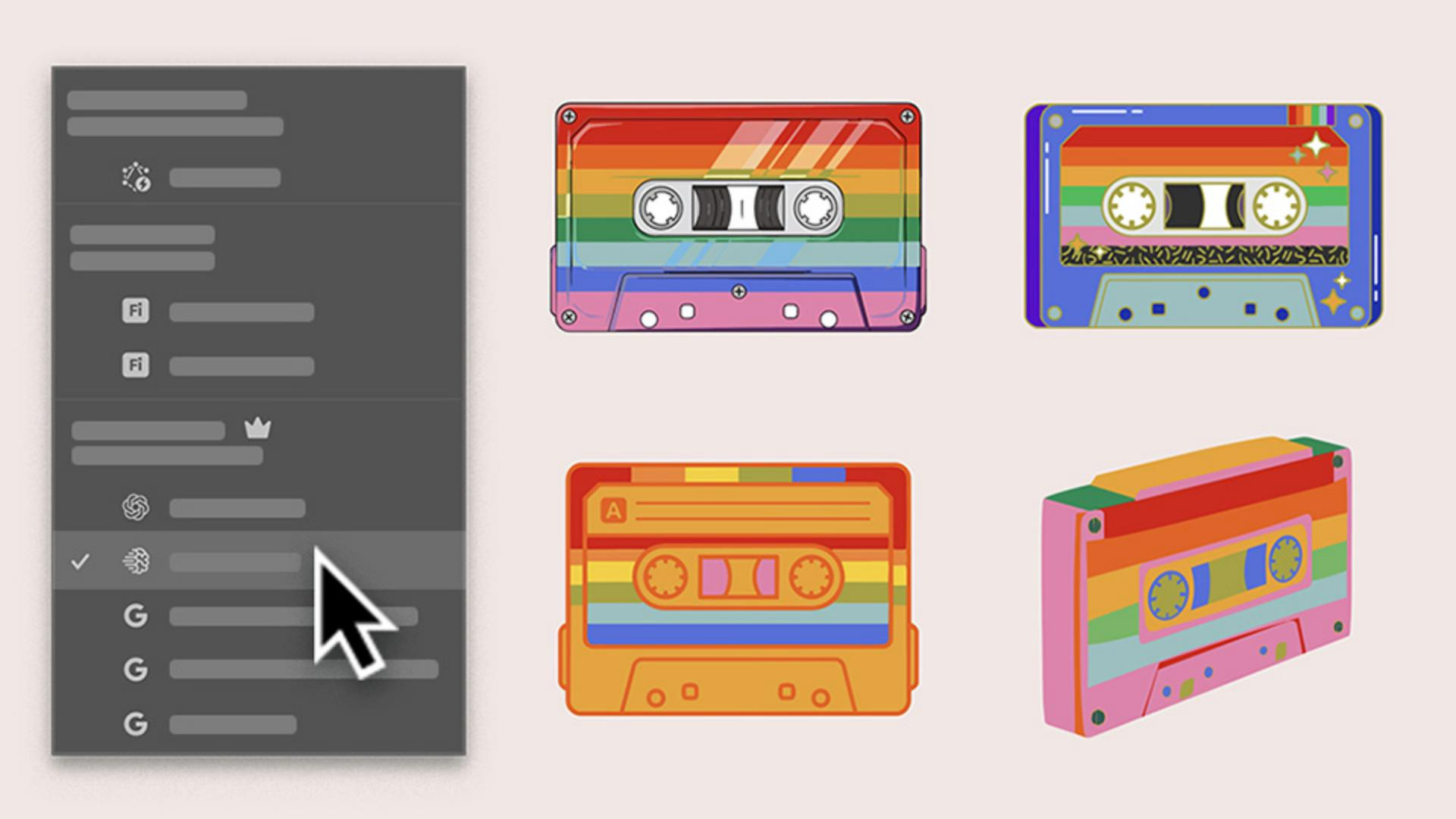
Estou criando ilustrações para um evento musical do Pride, e quero fazer uma fita K7 colorida divertida.
Mas gostaria de testar alguns estilos para apresentar ao cliente.
Para começar, vou em Janela, clico na barra de tarefas contextual e em Gerar vetores.
Gerar vários estilos de ilustração usando um único prompt
Com os novos modelos de parceiros de IA, há várias opções, cada uma com suas especificidades.
Vou começar com a Seleção automática para o Illustrator escolher para mim.
Vou digitar meu prompt, selecionar Assunto, manter o Detalhe no meio, adicionar a paleta de cores do projeto e clicar em Continuar.
O Illustrator selecionou Imagen 4, vamos ver.
Ficou incrível e é uma ótima opção.
É altamente estilizado e quase realista.
Vou iterar mais um pouco e ver o que acontece.
Comparar os estilos para identificar a direção mais promissora
Vou usar o mesmo prompt nas configurações mas com o Gemini 3.
Também ficou muito legal, mas bem diferente da primeira ilustração.
Mais simples e divertido.
Vou tentar outra geração com o GPT Image 4o.
Também é interessante.
Há mais detalhes únicos e elementos estilosos.
Usar um esboço para orientar novos conceitos com o Preenchimento de forma generativo
Gostaria de ver o K7 de um ângulo mais inclinado.
Vou usar o Preenchimento de forma generativo, que também tem acesso a modelos de terceiros.
Vou selecionar meu esboço agrupado, clicar em Preenchimento de forma generativo, clicar em Configurações, adicionar o mesmo prompt, diminuir a Intensidade da forma e clicar em Gerar.
Muito legal.
Esse também tem estilo, especialmente sem os contornos.
Agora tenho quatro ilustrações de K7 em estilos diferentes para propor ao cliente antes de criar e refinar um conjunto, tudo com a ajuda dos modelos de parceiros de IA no Illustrator.
Gerar vários estilos de ilustração usando um único prompt
Inicie com Gerar vetores e um prompt simples para produzir diversas variações de estilo em segundos. Use a Seleção automática para que o Illustrator escolha o modelo mais adequado e gere a primeira direção de ilustração.
Comparar os estilos para identificar a direção mais promissora
Execute o mesmo prompt em modelos diferentes para observar como cada um interpreta o conceito. Analise os resultados lado a lado e identifique quais direções valem a pena desenvolver.
Ampliar conceitos usando um esboço com o Preenchimento de forma generativo
Aplique o mesmo prompt ao esboço usando o Preenchimento de forma generativo para descobrir novos estilos em diferentes modelos. Compartilhe um conjunto de conceitos com clientes e refine o conceito aprovado no próprio estilo vetorial.
You can control how Adobe websites use cookies and similar technologies by making choices below. But note that if you disable cookies and similar technologies entirely, Adobe websites may not function properly.
Cookies are small text files stored by your web browser when you use websites. There are also other technologies that can be used for similar purposes like HTML5 Local Storage and local shared objects, web beacons, and embedded scripts. These technologies help us do things like remembering you and your preferences when you return to our sites, measure how you use the website, conduct market research, and gather information about the ads you see and interact with.
You can make choices in the menu below about what cookies and other technologies you want us to use on Adobe sites when you visit them from this browser. You can always change those choices later by clicking on the Cookie Preferences link at the bottom of the page.
If enabled:
We can improve your experience by tailoring the site and the content to things we think might be of interest
We can better keep track of your preferences — like what language you prefer to use
We will better understand your likely interests so we can provide you more relevant Adobe ads and content on non-Adobe websites and in non-Adobe apps
It will help us improve the performance of our website and those of our partners who use the Adobe Experience Cloud
If disabled:
We won’t be able to remember you from session to session so the experience may not be tailored to your interests
You’ll still have access to the content of the site but certain features that depend on cookies may not function
You’ll still see ads, they just may not be as relevant to you
General information
You can control how Adobe websites use cookies and similar technologies by making choices below. But note that if you disable cookies and similar technologies entirely, Adobe websites may not function properly.
Cookies are small text files stored by your web browser when you use websites. There are also other technologies that can be used for similar purposes like HTML5 Local Storage, web beacons, and embedded scripts. These technologies help us do things like remembering you and your preferences when you return to our sites, measure how you use the website, conduct market research, and gather information about the ads you see and interact with.
You can make choices in the menu below about what cookies and other technologies you want us to use on Adobe sites when you visit them from this browser. You can always change those choices later by clicking on the Cookie Preferences link at the bottom of the page.
If enabled:
We can improve your experience by tailoring the site and the content to things we think might be of interest
We can better keep track of your preferences — like what language you prefer to use
We will better understand your likely interests so we can provide you more relevant Adobe ads and content on non-Adobe websites and in non-Adobe apps
It will help us improve the performance of our website and those of our partners who use the Adobe Experience Cloud
If disabled:
We won’t be able to remember you from session to session so the experience may not be tailored to your interests
We’ll still count your use of our site and services
You’ll still have access to the content of the site but certain features that depend on cookies may not function
You’ll still see ads, they just may not be as relevant to you
Operate the site and core servicesOperate site and measure engagement
Always active
These cookies are required, and they are used to enable the site and related services core functionality. Without them the site could not operate, so they cannot be disabled.
These cookies enable the site and related services’ core functionality and collect statistics about user engagement, such as counting active use to help us understand trends. These cookies cannot be disabled.
Measure performance
These cookies are used to analyze site usage to measure and improve performance. Without them Adobe cannot know what content is most valued and how often unique visitors return to the site, making it hard to improve information we offer to you.
These cookies are used to analyze site usage to measure and improve performance. Without them Adobe cannot know what content is most valued, making it hard to improve information we offer to you.
Extend functionality
These cookies are used to enhance the functionality of Adobe sites such as remembering your settings and preferences to deliver a personalized experience; for example, your username, your repeated visits, preferred language, your country, or any other saved preference.
Personalize advertising
These cookies are used to enable Adobe and our partners to serve ads more relevant to your interests. Without them you will still see ads, but they might not be as relevant to you.
Personalize advertising
These cookies are used to enable Adobe and our partners to serve ads more relevant to your interests. Without them you will still see ads, but they might not be as relevant to you.