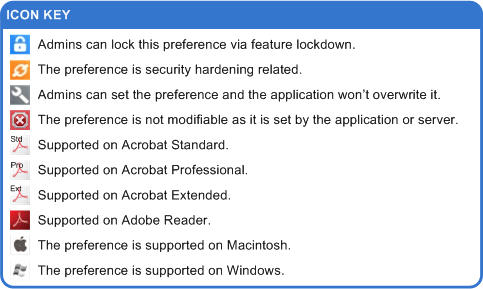
| Admin modifiable |
The field indicates whether the preference can be
modified through the user interface or only
at the registry level. There are a number of preference that exist
visibly in
the registry, but which are application generated. For example,
tSASL_Mechanism is a server-generated
ID which is sent to the client. Values marked with a red X should not be
modified as this will either
break the feature or the application will overwrite value. |
| Data types |
The preference data type; for example, boolean
or string. While Windows and Macintosh use the same data types, they are
represented differently. For an overview, see the following:
For more detail, refer to the Enterprise Administration Guide. |
| Default value |
The value that ships with the product. |
| Deprecated |
Whether or not the preference is deprecated and no longer in use. |
| Details |
Details include allowable values,
interaction with other preferences, and a description of the
preference's effects. Since this document is merely a reference, it is
often necessary to refer to related technical guides. |
| Key name |
The name of the application preference in the registry or plist |
| Lock Path |
These are paths to system level preferences that require administrator permissions to change. Paths vary by platform:
- Windows 32-bit: HKEY_LOCAL_MACHINE\SOFTWARE\Policies\Adobe\(product name)\(version)\FeatureLockDown\
- Windows 64-bit: HKEY_LOCAL_MACHINE\SOFTWARE\Wow6432Node\Policies\Adobe\(product name)\(version)\FeatureLockDown\
- Macintosh: For 11.0 and later, preferences that are lockable on Windows may also be locked
on Macintosh. Use the same path described in the Windows FeatureLockDown section.
The lock file is located at /Library/Preferences/com.adobe.(product name).plist
|
| Maps to GUI |
This section is deprecated since 10.x and is no longer maintained. In many cases, the user interface mapping has not changed, but accuracy is not guaranteed. |
| Path |
The user preference path in the registry or plist for this particular preference.
These paths are for per user settings. For information about machine (system) preferences that
require administrator permissions to change, see Lock Path.
- Windows: Most
user preferences reside in HKEY_CURRENT_USER\Software\Adobe\(product
name)\(version)\. Many of these registry settings can also be set via
the user interface. The
path varies based on the product name and product version. Lockable
preferences and a few others (such as installer preferences) reside in
HKLM and can only be modified by someone with administrator rights.
- Mac: The plist path varies by version. The filename includes the application
name and version. For 9.x versions and earlier, the filename also
includes the processor type. For example:
- 10.x and later: /Users/(username)/Library/Preferences/com.adobe.[Acrobat.Pro or Reader].plist
- 9.x: /Users/(username)/Preferences/com.adobe.[Acrobat.Pro or Reader]_[ppc or x86]_[version].plist
|
| Product name |
The product name must be one of the following:
- Windows: Adobe Acrobat (for all versions of Acrobat) or Acrobat Reader
- Macintosh: Acrobat.Pro or Reader
|
| Product version |
The product version in which the preference was first introduced. Note the DC product's Continuous track introduces the concept of "version-less" preferences. For this track, settings don't reside under a base version hive (10.0, 11.0, etc.), but rather under "DC". "DC" never changes over time even when the product is updated. |
| Security hardening |
Indicates whether or not values for this
preference make the application environment more or less secure. For
example, enabling enhanced security and disabling JavaScript increases
application security by reducing potential surface attack areas. Of
course, such security precautions also restrict or turn off features and
managing for security is often a balancing act between mitigating risks
and allowing desirable functionality. For additional detail, see the
Application Security Guide. |
| Since version |
The product version in which the preference was introduced. |
| Summary |
A one sentence summary describing what the key does. |