ACROBAT | 9-MINUTE READ
Daily schedule: How to create one with 3 different types.
Learn how to make a daily schedule and keep easy track of your tasks.


ACROBAT | 9-MINUTE READ
Learn how to make a daily schedule and keep easy track of your tasks.

How many tasks do you need to accomplish each day? Between your work and personal lives, the to-do list can really stack up. One of the best ways to de-clutter your mind, stay on track, and still make sure you get everything done is to make a daily schedule. Here’s how to do it.
A daily schedule is a plan that outlines how you will spend your time throughout the day. It helps organize tasks, appointments, and activities in a structured way, making it easier to manage time effectively.
Having a daily schedule provides a clear framework for managing time, responsibilities, and goals. Whether you’re an individual balancing work and personal life, or a family trying to coordinate school, meals, and activities, a daily schedule offers structure and peace of mind. It helps create predictable routines and ensures that essential tasks don’t fall through the cracks. By following a daily schedule, you can stay focused, reduce stress, and ensure that important responsibilities are completed on time. It’s a useful tool for building healthy routines and increasing productivity.
Here are a few of the benefits of learning how to make a schedule and sticking to it:
A well-thought-out daily schedule is more than just a list of tasks—it’s a valuable tool for leading a more organized and fulfilling life.
Whether you prefer to use a printable daily schedule or a digital one, all schedules start with a few basic steps. Here’s how you stay organized as you build your schedule.
The first step toward organizational mastery is simply listing everything you have to do for the day. It doesn’t matter in what order or how significant. If you have to do it, put it on the to-do list.
The only goal for step one is not to forget anything.
Armed with your list of tasks, step two is to assign deadlines. Every task on your daily schedule should have a deadline to complete.
It can sometimes feel daunting to assign deadlines, like you’re setting yourself up for failure if you don’t accomplish the task. But remember, this is your personal daily schedule. Set a deadline that makes sense for now, knowing you can always move it if necessary.
Don’t forget to assign deadlines to your personal tasks, too; they’re not just for work.
Step three is all about prioritizing. And it should go in tandem with your deadlines since they will often influence a task’s urgency. One of the most effective ways to prioritize your tasks is with color coding.
Come up with at least three colors to signify low, medium, and high priorities. Many people like to stick with green for low priority, yellow for medium priority, and red for high priority, but you’re welcome to pick any color you like best. You can always add more colors or priority levels, but starting with just three is easiest. You don’t want to overcomplicate your daily schedule.
If you want one daily schedule that works across the board, you might also want to color code tasks based on whether they’re work-related or personal. Alternatively, assign each family member a specific color if the daily schedule is for the entire family.
Some tasks you have to complete repeatedly. Mark any recurring events on your daily schedule. If you decide to add your schedule to a digital platform, you can make the tasks pop up every week or month without needing to re-add them every time.
If you decide to make your daily schedule printable, you can leave recurring tasks on your template so they’re always there when you go to print.
So far, all your tasks are displayed in a big, colorful list. Now is the time to add them to your daily schedule.
Set up your daily schedule into time increments, typically 30 minutes. Then, start adding your tasks, filling as many time blocks as you think they’ll take.
You can add tasks in any order you want. Start the day with your hardest tasks to get them out of the way, set yourself up for a slower start, or accomplish them based on priority. However you decide to fill your day is completely up to you — just don’t forget anything.
When your daily schedule starts to resemble a productive yet attainable day, it’s time to save your progress. Even if you decide to upload your schedule to a digital platform, it’s still a good idea to make a printable daily schedule to sit on your desk and remind you of what’s to come.
You can also save your schedule directly to your device for easy recall or so that you always have it on you to reference as you go about your day. Better yet, upload it to your favorite cloud storage solution, so you can check your daily schedule from any device.
Just be sure to save your daily schedule as a PDF so you can access it no matter which device you use to view it. You can easily convert either Word to PDF or Excel to PDF online right from your web browser. And if you need to make changes or additions, you can also edit PDFs online to add comments or notes about your schedule right in the document.
There’s no one-size-fits-all approach to creating a daily schedule. The right format depends on your needs, goals, and lifestyle. Three of the most common ways to organize a daily schedule are hourly, by priority, or by deadline. Each method offers unique benefits and can be adapted for individuals, teams, or families.
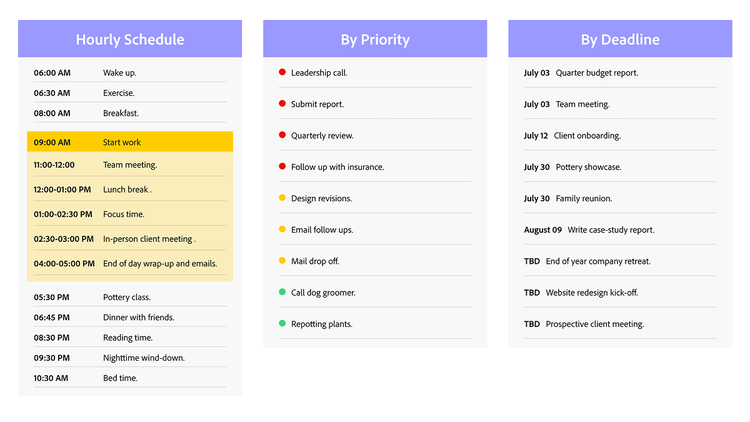
Hourly Schedule.
This format breaks the day into specific time slots, assigning tasks to each hour. It’s ideal for those who thrive on structure or have many time-sensitive activities. It helps ensure that every hour is used efficiently and is especially useful for managing back-to-back commitments.
By Priority.
Instead of being time-based, this schedule focuses on what needs to get done first. Tasks are ordered by importance or urgency, allowing for more flexibility in timing. It works well for people who prefer to work at their own pace or need to adapt their schedule on the fly.
By Deadline.
In this format, tasks are listed according to their due dates. This helps you stay focused on what’s time-critical while still leaving room for longer-term planning. It’s a great option for juggling multiple deadlines or project-based work.
Choosing the right type of schedule can make your day more manageable and productive. In fact, many people benefit from combining these formats to fit their unique needs.
Your daily schedule doesn’t have to be ridiculously in-depth. But the more details you add, the easier it is to structure your day and achieve all the goals you’ve set for yourself. Just remember to include time for breaks and a little extra time to make up for anything you didn’t quite accomplish. Even with an incredible daily schedule, things don’t always go to plan.
Here’s a quick example of what a good daily schedule might look like:
Morning Routine
6:00 AM — Wake up and stretch.
6:15 AM — Morning meditation.
6:30 AM — Exercise or workout.
7:30 AM — Shower and get ready.
8:00 AM — Breakfast.
Work/Productive Hours
9:00 AM — Start work
9:00 – 10:30 AM – Work on client proposal for presentation Tuesday.
10:30 – 10:45 AM — Short break.
10:45 – 11:00 – Respond to emails.
11:00 – 12:00 PM — Team meeting.
12:00 – 1:00 PM — Lunch break.
1:00 – 2:30 PM — Update sales spreadsheet and compile monthly insights report.
2:30 – 3:00 PM — Meeting with client at the café.
3:00 – 3:15 PM — Short break.
3:15 – 4:00 — Put together client profile based on earlier meeting.
4:00 – 5:00 – Open time to complete unfinished projects from the day and respond to emails.
Personal Development/Leisure
5:30 PM — Pursue hobbies or personal development
6:30 PM — Free time for relaxation or socializing
7:30 PM — Dinner
8:30 PM — Quality time with family or friends or personal leisure activities
10:00 PM — Winding down activities
10:30 PM — Bedtime routine
Note: You don’t always have to prioritize tasks with color coding. In this example, the writer chose to only prioritize work tasks and left personal items more generic and uncolored. It’s your schedule; build it in a way that works for you.
It takes time to create a daily schedule from scratch, so give yourself a head start by creating a template.
To make your template, simply create your schedule, add recurring tasks, and save the document. Then, whenever you’re ready to create your next schedule, open the template and fill in the day’s events. Just remember to save your schedule as a new file so you don’t overwrite your template.
You can also use the same tactic to create your ideal weekly schedule template — because there’s no such thing as too much organization.
Once you have your template ready, it’s time to choose a format. Do you prefer to use a digital daily schedule, or is paper a better option?
Most people today choose to use a digital daily schedule template. Working on a computer makes it easy to add, edit, and move line items with the click of a mouse or tap of the keyboard. Here are just a few of the benefits of using a digital daily schedule template:
Of course, there are also a few downsides to using a digital daily schedule:
The choice between a digital or paper daily schedule template is very personal. What works for you might not work for someone else. So, weigh the pros and cons of each to decide which is right for you. You could always make a digital daily schedule and print it out each morning to get the best of both worlds.


