

Key findings:
- The average U.S. employee surveyed clocks nearly 21 full business days working from their mobile phone annually.
- Nearly nine in 10 Americans surveyed say they feel pressured to be "on call" for work, even long after the workday ends.
- The top mobile work task for Americans surveyed is sending emails (75 percent), and over half have used an automated "sent from my..." signature.
- The "sent from my..." signature divides the office: 38% of Gen Z surveyed see it as rushed or informal, versus 35% of older generations who consider it normal work culture.
- Gen Z leads the way in mobile work anxiety (26 percent), a concern shared by roughly one in eight surveyed U.S. employees who worry about being fired for working from mobile.
- Nearly one in three respondents is uncomfortable editing professional documents for work on their mobile devices.
The rise of mobile work - and mobile devices as a core work tool
Phones have become an extension of the workplace, enabling employees to handle tasks anywhere, whether at home, on the move, or between meetings.
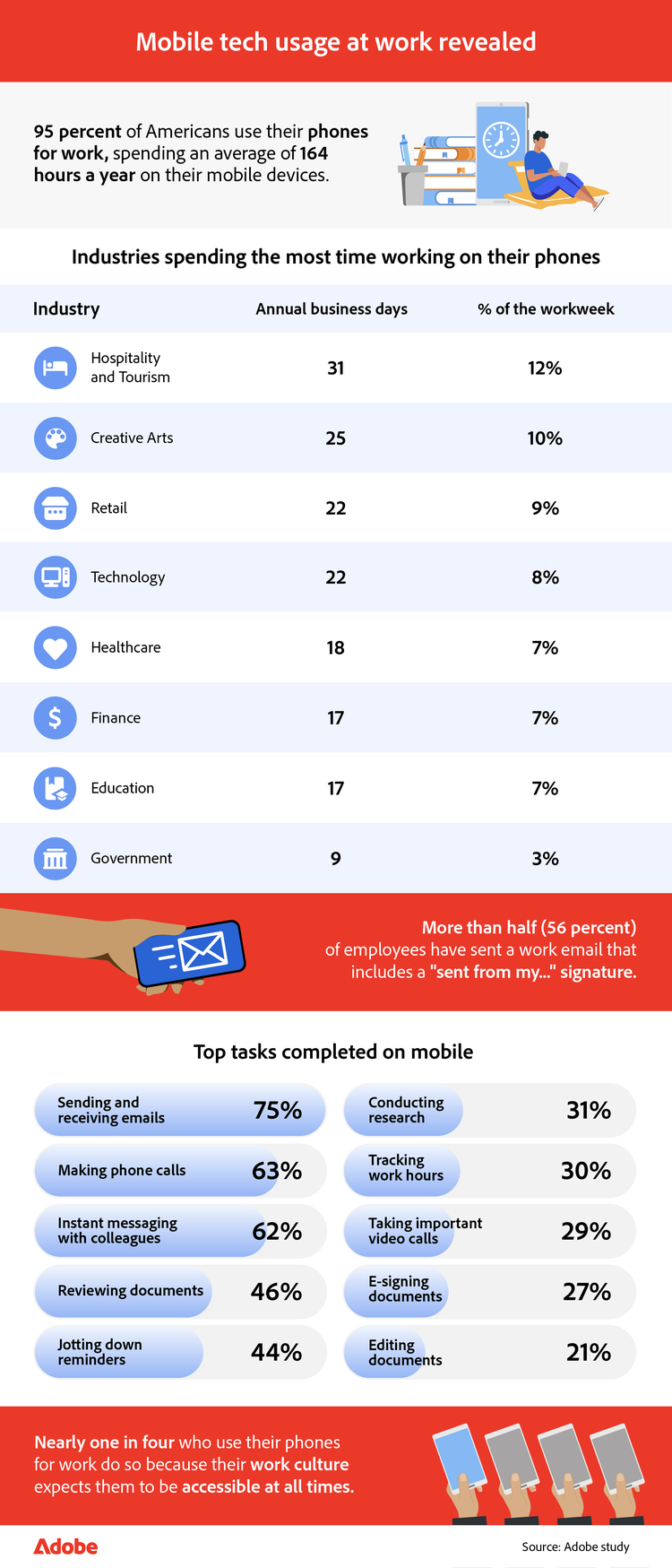
Cellphones play a big role in how employees manage their workdays. On average, surveyed employees spend eight percent of their workweek on their mobile devices, using nearly 21 full business days of work per year. Just over half (51 percent) of respondents agree that it improves their work-life balance.
Generational differences in mobile use
While you might expect the most digitally native employees to spend the most time using their phones for work, Gen Z respondents actually report spending 23 percent less time on their phones for work than older workers. Gen Z spends an average of 158 minutes per week (nearly 20 business days), compared to 194 minutes (about 24 business days) for older generations. This may reflect the pressure younger employees feel to prove themselves professionally by relying on more traditional methods of working.
Seniority and the “Sent from my…” signature
Seniority also influences how employees utilize mobile devices for work. More than half of surveyed employees (56 percent) have sent an email from their phone that included a "sent from my…" signature, but directors are 66 percent more likely than entry-level employees to do so. For higher-level employees, this signature can signal accessibility and authority, showing they're always on and responsive. Junior employees may hesitate, however, as they are concerned that the same signature could be perceived as rushed or unprofessional.
Beyond email: Mobile devices for document work
Employees are also using their phones for document-heavy tasks: 27 percent of surveyed employees report e-signing contracts on their phones, and 46 percent indicate reviewing documents on mobile devices. Having the option to sign PDFs online or quickly edit PDF files helps keep work moving on the go.
Where employees work from mobile
For many, mobile work extends beyond the traditional office and into everyday life. Of those surveyed, the most common places to work from mobile include:
- At home (69 percent)
- At the office (61 percent)
- During lunch (49 percent)
- While traveling for work (36 percent)
- While running personal errands (31 percent)
- During the commute (30 percent)
- At personal appointments (29 percent)
- While on vacation (24 percent)
- While picking up their kids (10 percent)
Gen Z leads in working during commutes, with 38 percent reporting they stay connected on the move—making them 15 percent more likely than Millennials. Remote employees also stand out, being twice as likely as on-site employees to work from their phones while running personal errands.
Why employees turn to mobile
Respondents cite a variety of reasons for working from mobile, ranging from practical to cultural:
- Convenience (64 percent)
- Necessity (64 percent)
- Flexibility (46 percent)
- Productivity (41 percent)
- Work culture (24 percent)
What tasks employees avoid on mobile
Not every task feels suited to a small screen, and many workers draw the line when the work is sensitive, complex, or too important to risk mistakes.
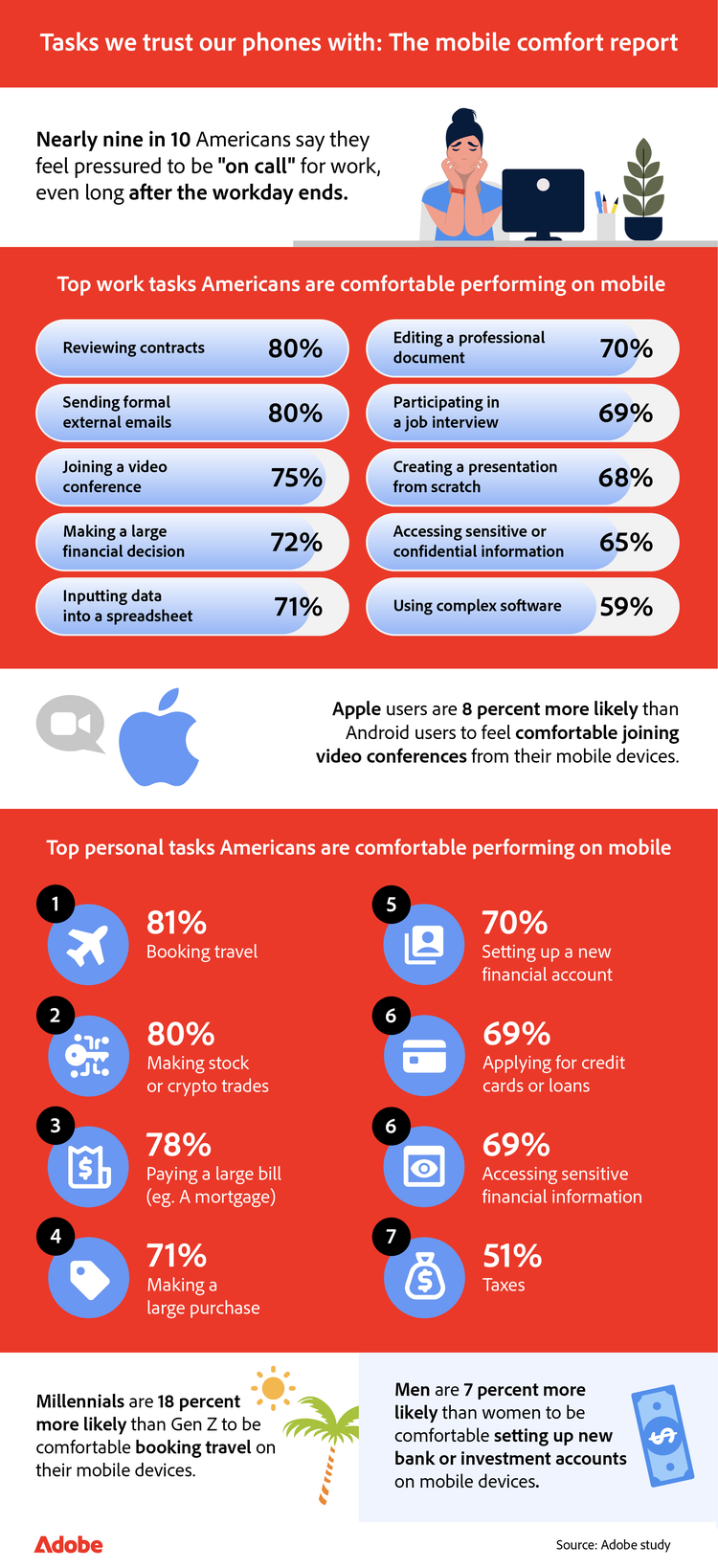
Phones may be central to daily work, but many employees draw the line at using their phones for complex or high-stakes tasks. Of those surveyed, over four in five say they are comfortable e-signing contracts from a mobile device, and 70 percent feel the same about editing a professional document. While mobile work is here to stay, the right tools, such as Adobe Acrobat's PDF filler and sign PDF online capabilities, make all the difference in bridging the gap between what employees need to do and what they feel comfortable doing.
Managing personal finances
Personal tasks also carry their own challenges. Over half of respondents (51 percent) say they are comfortable completing their taxes on a mobile device. At the same time, around two in three feel at ease applying for a loan or credit card, or accessing sensitive financial information. Women are also 8 percent more likely than men to feel comfortable making cryptocurrency or stock trades from their phones.
The challenges of working from mobile devices
Constant notifications and smaller screens make mobile work convenient but can also increase stress, leaving many employees worried about productivity, professionalism, and maintaining a balance.
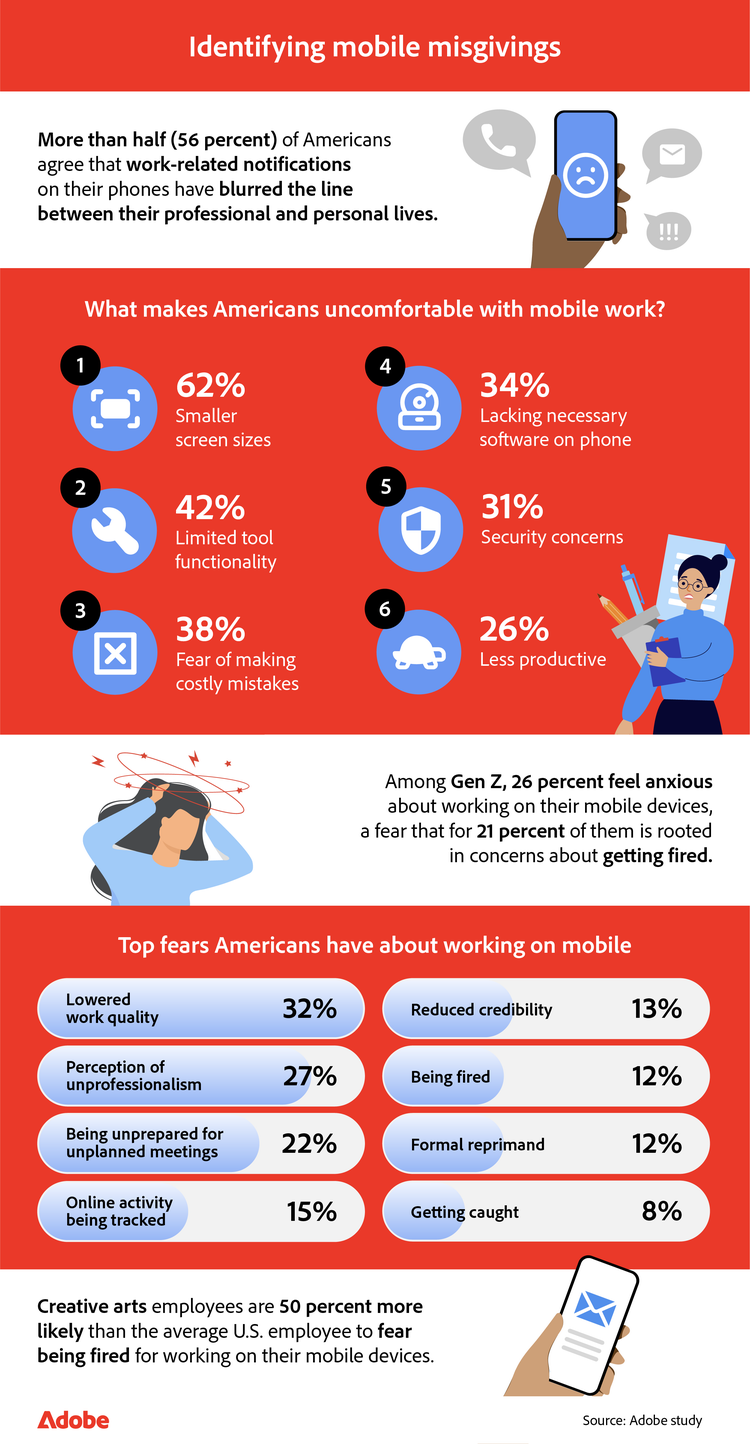
For many surveyed employees, the convenience of mobile devices comes with a downside: more than half of respondents (56 percent) say that work-related notifications have blurred the line between their personal and professional lives. On top of that, the smaller screen itself poses challenges, with 62 percent reporting it makes work more difficult. Other top concerns include limited software functionality (42 percent), fear of making a costly mistake (38 percent), and lacking the necessary apps to get work done (34 percent).
Fears and perceptions of mobile communication
Concerns about lowered work quality span all generations of respondents, making it the top fear of working on mobile devices. When asked about emails sent from mobile that include a "sent from my…" signature, employees report a mix of views:
- Normal and expected part of work culture (35 percent)
- They are always accessible (32 percent)
- Seems rushed or less formal (27 percent)
- They are efficient and responsive (24 percent)
- Dedicated to work even away from the desk (21 percent)
- They should be more mindful of how they present themselves (16 percent)
- They have poor work-life balance (14 percent)
Of those surveyed, Gen Z is the most likely to see a "sent from my…" signature as rushed or informal (38 percent), while older generations tend to view it as a regular part of work culture (35 percent). These differences demonstrate how mobile habits influence perceptions of professionalism, and why many employees seek tools that help them maintain clear and polished work.
The importance of clear mobile work guidelines
Twenty-six percent of surveyed Gen Z employees, many of whom are new to the workforce, report experiencing anxiety around using their phones for work, with 21 percent worried that it could lead to them being fired. This is partly because not every employer has clear communication guidelines in place. Establishing these expectations can help reduce uncertainty and make mobile work feel less overwhelming. Among surveyed employees, many say their employers set guidelines, such as:
- Professional tone and etiquette in digital communication (31 percent)
- Use of different channels for different types of information (27 percent)
- Out-of-office messages (25 percent)
- Expected response times for internal communication (24 percent)
- How to escalate urgent requests (23 percent)
- Expectations for responding outside of working hours (19 percent)
Work on the go confidently with Adobe Acrobat
Employees embrace mobile for its convenience, but smaller screens, limited functionality, and concerns about accuracy often hold them back. At the same time, many of the most common mobile tasks respondents reported, such as editing documents, filling out forms, and signing contracts, are precisely where the right tools can make a difference.
With the free Adobe Acrobat app, employees can edit PDF files, securely sign PDFs online and fill out forms with a PDF filler, all from their mobile device. Acrobat helps reduce the frustrations respondents mentioned by offering the same level of confidence and polish they expect from desktop tools. Whether it's making quick updates to a contract, sending back an approval, or reviewing a file while away from the desk, Acrobat helps employees stay productive without sacrificing quality.
With Adobe Acrobat, employees can handle tasks on mobile with the same confidence and polish they expect at their desks.
Methodology
To explore how American employees use their mobile we surveyed 1,000 full-time employees across a variety of industries in the U.S. The data has a 95 percent confidence level and a low three percent margin of error. Because this exploratory research relied on self-reported data, respondents may have biases, and discrepancies may exist between their answers and their actual experiences.
Keep exploring
title
Mobile Devices are reshaping the modern workday
cardImageAltText
cardImage