ACROBAT
Make work easier with automated workflows in Adobe Acrobat
Automate repetitive tasks to build efficiencies that save time and money.

Automated workflows help teams eliminate repetitive tasks, reduce errors, and move work forward faster. With Adobe Acrobat, you can automate document‑heavy processes, from form creation to approvals to signatures, and build efficient, scalable workflows that save time and money.
Whether you’re managing contracts, onboarding employees, processing requests, or collaborating across departments, Acrobat gives you the tools to streamline work and keep everything moving.
What is workflow automation?
Workflow automation, sometimes called robotic process automation, uses software tools to execute manual tasks automatically. Instead of relying on people to remember every step, automation follows your rules and completes tasks in real time.
With Acrobat, automated workflows can:
- Route documents to the right people
- Trigger notifications and reminders
- Collect signatures automatically
- Convert files into standardized formats
- Track progress across every step
- Reduce manual data entry and errors
Automation helps teams stay organized, consistent, and efficient, whether you’re managing business processes or personal tasks.
The benefits of automated workflow processes.
Automated workflows offer advantages that traditional manual processes simply can’t match.
- Greater accuracy and fewer errors
Automation reduces the risk of skipped steps, missing information, or inconsistent processes. - Higher productivity
Teams spend less time on repetitive tasks and more time on work that requires expertise. - Better visibility and transparency
Stakeholders can see where documents are in the process, who needs to take action, and what’s been completed. - Lower operational costs
Automation reduces time spent on manual tasks and eliminates unnecessary printing, scanning, and mailing. - Scalability
As your team grows, automated workflows grow with you, no extra overhead required.
Why workflow automation matters
As work becomes more digital and teams rely on shared documents, approvals, and cross‑department collaboration, the amount of manual coordination required can quickly overwhelm even the most organized workflows. Every handoff, every follow‑up email, every missing signature, and every forgotten step adds friction, slowing down projects and increasing the risk of errors. Workflow automation removes that friction by turning repeatable processes into reliable, self‑running systems.
If you need more time to focus on meaningful work, automation gives it back to you. Acrobat makes it easy to:
- Create fillable online forms
- Convert Word, PowerPoint, and Excel files into editable PDFs
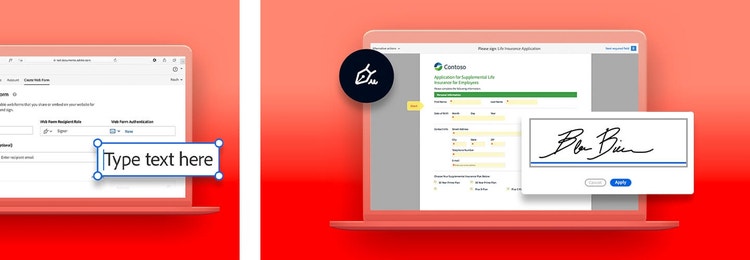
- Send documents for signature with automated routing
- Track approvals and responses in real time
- Reduce delays caused by manual handoffs
With Acrobat’s signature automation and document tools, you can complete tasks in minutes instead of hours.
5 signs you need workflow automation software.
For some, manual tasks present no problem. But if you or your organization experience any of the following issues, an automated workflow can help put you on the right track.
1. Specific steps in the workflow process continuously get skipped.
If you find yourself unable to remember the particular sequence of steps of a task, your work can be stopped in its tracks. Workflow automation software can prevent that from happening and ensure that your manual processes never miss a beat.
2. Communication breaks down between teams.
Regardless of industry, open and honest communication between all parties you do business with is essential. Without automated workflow management tools, the opportunities for miscommunication due to human error increase.
3. There’s no accountability.
Without proper systems in place, disorganization happens easily, and it becomes hard to know who is responsible for what. Robotic process automation lets you and your team members know who has a hand in the business workflow and, if any problem arises, where the slack needs to be picked up.
4. You can’t track tasks easily.
You’re likely required to multitask every day, but you can only remember so much. One of the benefits of workflow automation is a visual breakdown of the status of the tasks that still need to be completed along with the progress made so far.
5. No performance metrics.
Effective systems need constant evaluation to yield satisfactory results. Workflow automation software makes it easy to review best practices and follow up on problem areas.
Keep exploring