Dieses kurze Tutorial zeigt, wie sich Formen in unterschiedlichen Größen erstellen lassen.
Veröffentlicht am
Mit Adobe Illustrator kannst du Formen ganz einfach erstellen und bearbeiten. Einer der großen Vorteile dabei ist, dass die Formen interaktiv bleiben, sich also jederzeit mit einem der Zeichenwerkzeuge bearbeiten lassen.
1 Rechtecke, Quadrate und Rauten erstellen.
Aktiviere das Rechteck-Werkzeug. Bevor du mit dem Zeichnen beginnst, lege im Bedienfeld „Eigenschaften“ die Farben für Fläche und Kontur fest.
Ziehe mit gedrückter Maustaste über die Zeichenfläche, um ein Rechteck zu zeichnen. Ziehe zum Erstellen eines Quadrats so lange, bis eine diagonale, magentafarbene Hilfslinie erscheint. Neben dem Cursor werden beim Ziehen in einer QuickInfo die Maße angezeigt.
Bewege den Cursor etwas vom Begrenzungsrahmen weg. Er verwandelt sich in einen gebogenen Doppelpfeil. Durch Ziehen lässt sich das Quadrat nun beliebig drehen und in eine Raute verwandeln. Beim Ziehen mit gedrückter Umschalttaste erfolgt die Drehung in 45-Grad-Schritten.
Zum Skalieren der Form ziehst du an einem der acht Griffe am Begrenzungsrahmen. Im Bedienfeld „Eigenschaften“ im Abschnitt „Transformieren“ („Fenster > Eigenschaften“) kannst du Drehwinkel, Abmessungen und andere Merkmale der Form ändern.
2 Dreiecke und andere Polygone erstellen.
Klicke auf der Werkzeugleiste auf das Rechteck-Werkzeug, und halte die Maustaste dabei gedrückt. Wähle aus der angezeigten Liste das Polygon-Werkzeug aus.
Eine Grundform lässt sich auch ganz einfach per Klick auf die Zeichenfläche und Angabe der Seitenanzahl erstellen, z. B. 3 für ein Dreieck oder 5 für ein Fünfeck.
Ziehe zum Ändern der Abmessungen an den Griffen des Begrenzungsrahmens. Beim Ziehen mit gedrückter Umschalttaste bleibt das Seitenverhältnis erhalten.
Aus diesen Formen lassen sich problemlos unregelmäßige Vielecke erstellen. Klicke auf einen leeren Bereich, um die Auswahl aufzuheben. Klicke dann mit dem Direktauswahl-Werkzeug auf einen Steuerungspunkt, und verändere die Form durch Ziehen.
3 Kreise, Ovale und organische Formen erstellen.
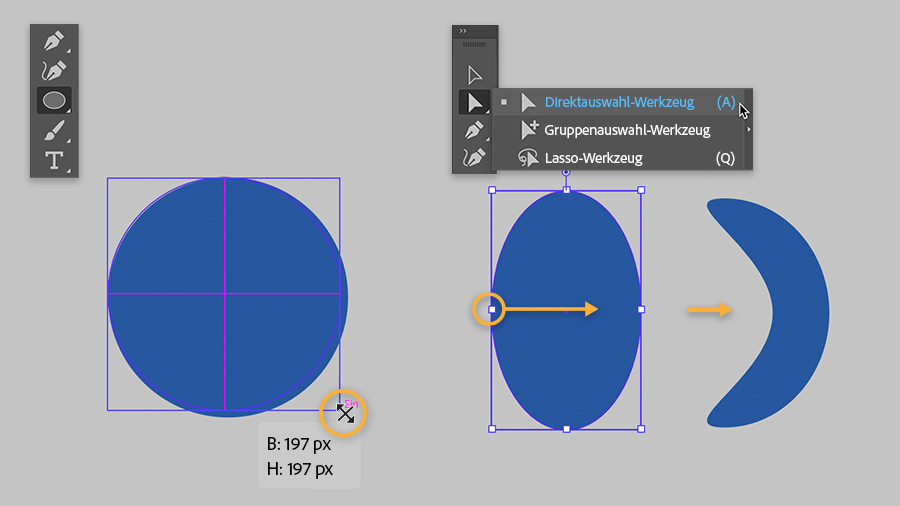
Wechsle zum Ellipse-Werkzeug (gehört ebenfalls zur Gruppe des Rechteck-Werkzeugs). Ziehe auf der Zeichenfläche ein Oval beliebiger Größe auf. Ziehe zum Erstellen eines Kreises solange, bis ein magentafarbenes Fadenkreuz angezeigt wird, oder ziehe mit gedrückter Umschalttaste.
Klicke auf einen leeren Bereich, um die Auswahl aufzuheben. Mit dem Direktauswahl-Werkzeug kannst du nun organische Varianten des Ovals erstellen.
Du kennst nun einige geometrische Grundformen, aus denen sich mit etwas Übung komplexere Grafiken erstellen lassen.
You can control how Adobe websites use cookies and similar technologies by making choices below. But note that if you disable cookies and similar technologies entirely, Adobe websites may not function properly.
Cookies are small text files stored by your web browser when you use websites. There are also other technologies that can be used for similar purposes like HTML5 Local Storage and local shared objects, web beacons, and embedded scripts. These technologies help us do things like remembering you and your preferences when you return to our sites, measure how you use the website, conduct market research, and gather information about the ads you see and interact with.
You can make choices in the menu below about what cookies and other technologies you want us to use on Adobe sites when you visit them from this browser. You can always change those choices later by clicking on the Cookie Preferences link at the bottom of the page.
If enabled:
We can improve your experience by tailoring the site and the content to things we think might be of interest
We can better keep track of your preferences — like what language you prefer to use
We will better understand your likely interests so we can provide you more relevant Adobe ads and content on non-Adobe websites and in non-Adobe apps
It will help us improve the performance of our website and those of our partners who use the Adobe Experience Cloud
If disabled:
We won’t be able to remember you from session to session so the experience may not be tailored to your interests
You’ll still have access to the content of the site but certain features that depend on cookies may not function
You’ll still see ads, they just may not be as relevant to you
General information
You can control how Adobe websites use cookies and similar technologies by making choices below. But note that if you disable cookies and similar technologies entirely, Adobe websites may not function properly.
Cookies are small text files stored by your web browser when you use websites. There are also other technologies that can be used for similar purposes like HTML5 Local Storage, web beacons, and embedded scripts. These technologies help us do things like remembering you and your preferences when you return to our sites, measure how you use the website, conduct market research, and gather information about the ads you see and interact with.
You can make choices in the menu below about what cookies and other technologies you want us to use on Adobe sites when you visit them from this browser. You can always change those choices later by clicking on the Cookie Preferences link at the bottom of the page.
If enabled:
We can improve your experience by tailoring the site and the content to things we think might be of interest
We can better keep track of your preferences — like what language you prefer to use
We will better understand your likely interests so we can provide you more relevant Adobe ads and content on non-Adobe websites and in non-Adobe apps
It will help us improve the performance of our website and those of our partners who use the Adobe Experience Cloud
If disabled:
We won’t be able to remember you from session to session so the experience may not be tailored to your interests
We’ll still count your use of our site and services
You’ll still have access to the content of the site but certain features that depend on cookies may not function
You’ll still see ads, they just may not be as relevant to you
Operate the site and core servicesOperate site and measure engagement
Always active
These cookies are required, and they are used to enable the site and related services core functionality. Without them the site could not operate, so they cannot be disabled.
These cookies enable the site and related services’ core functionality and collect statistics about user engagement, such as counting active use to help us understand trends. These cookies cannot be disabled.
Measure performance
These cookies are used to analyze site usage to measure and improve performance. Without them Adobe cannot know what content is most valued and how often unique visitors return to the site, making it hard to improve information we offer to you.
These cookies are used to analyze site usage to measure and improve performance. Without them Adobe cannot know what content is most valued, making it hard to improve information we offer to you.
Extend functionality
These cookies are used to enhance the functionality of Adobe sites such as remembering your settings and preferences to deliver a personalized experience; for example, your username, your repeated visits, preferred language, your country, or any other saved preference.
Personalize advertising
These cookies are used to enable Adobe and our partners to serve ads more relevant to your interests. Without them you will still see ads, but they might not be as relevant to you.
Personalize advertising
These cookies are used to enable Adobe and our partners to serve ads more relevant to your interests. Without them you will still see ads, but they might not be as relevant to you.