So organisierst du deine Projekte wie ein Profi – mit @aryalee und @jaysamuelz.
Die Organisation deiner Projekte ist einfach, aber wichtig. Denn sie hilft dir, effizienter zu arbeiten. Der Musikkünstler Jay (@jaysamuelz), die rechte Hand von Arya (@aryalee), gibt in diesem Adobe Premiere Pro-Tutorial hilfreiche Tipps zu diesem Thema. Er zeigt dir, wie du den Überblick über deine Projekte behältst.
Bevor du in Premiere Pro mit der Arbeit beginnst, musst du deine Projektordner einrichten. Erstelle einen übergeordneten Ordner für das Projekt und unter diesem Ordner zwei Unterordner – einen für das Video und den anderen für den Ton.
2 Projektordner erstellen.
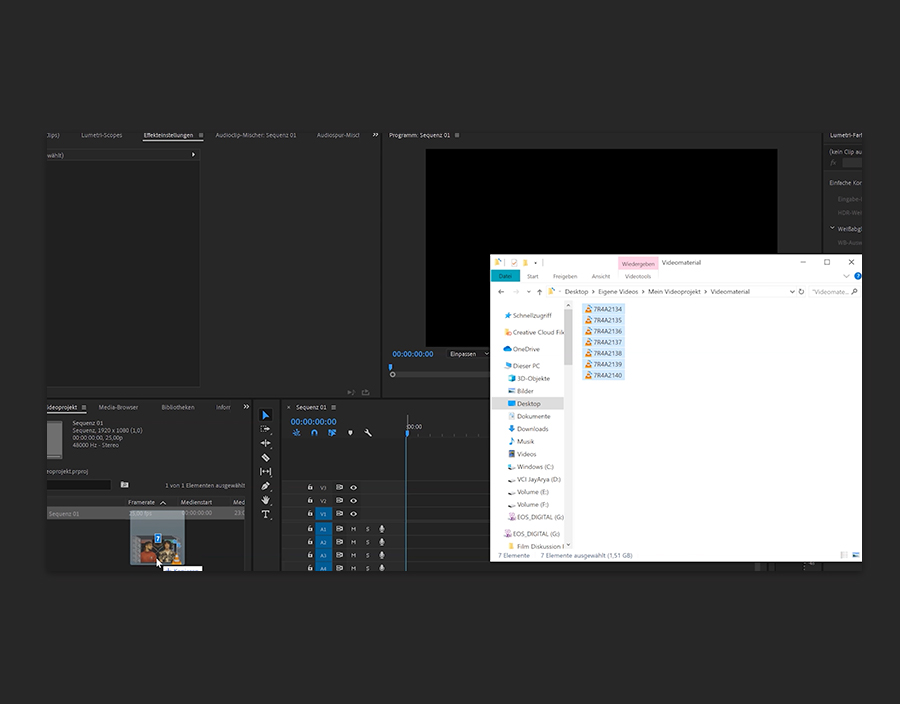
Öffne Premiere Pro, klicke auf Neues Projekt, benenne die Datei, suche nach deinem Projektordner und klicke auf Auswählen. Wechsle nun zu Datei > Neu > Sequenz und wähle eine der Standardeinstellungen aus oder lege hier deine eigenen Einstellungen fest. Nun kannst du dein Material per Drag-and-Drop entweder in das Projekt-Fenster oder direkt auf deine Zeitleiste ziehen.
3
Projekte umfassender strukturieren.
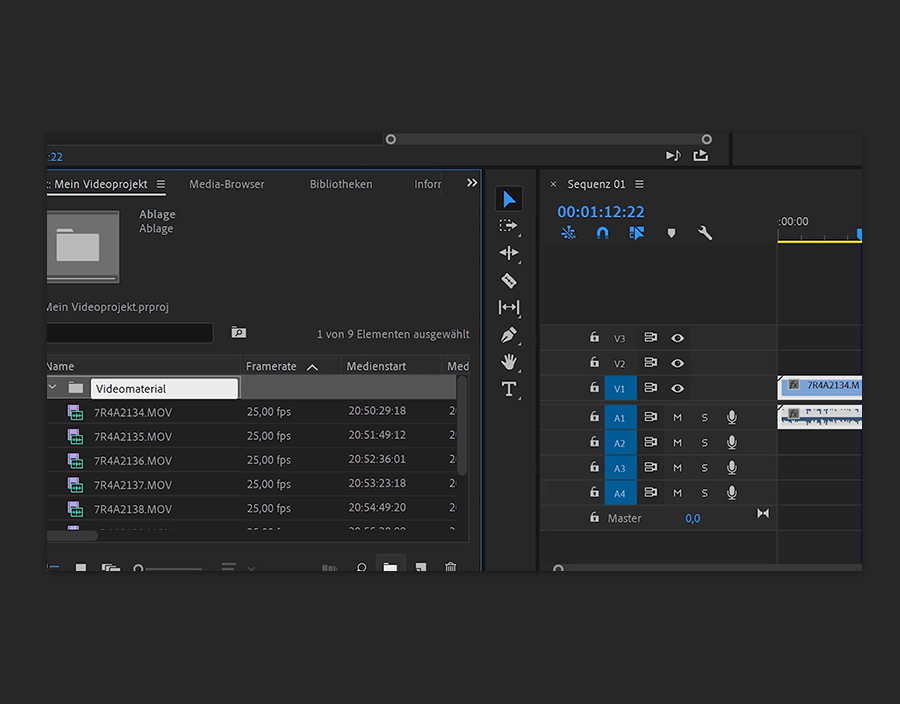
Im Projekt-Fenster kannst du auch auf das Ordnersymbol klicken und die Datei benennen. Auch Unterordner kannst du hier erstellen. Dieser grundlegende Schritt ist besonders bei großen Projekten wichtig, an denen viele beteiligt sind. Doch auch bei sehr kleinen Projekten hilft dies, die Arbeit zu beschleunigen.
4
Eigene optimale Organisation herausfinden.
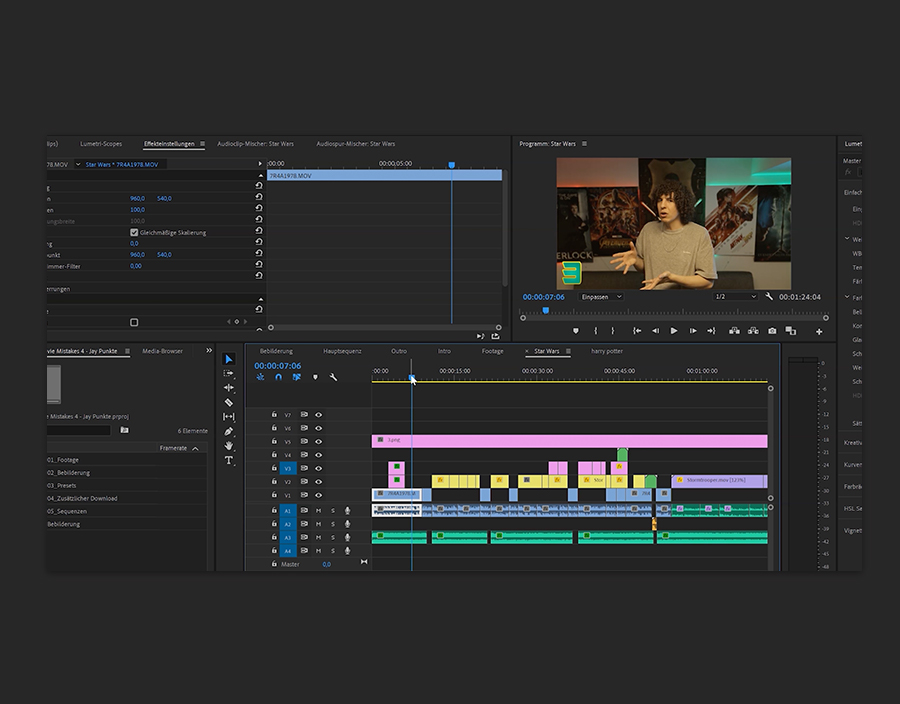
Es gibt hier kein richtig oder falsch, finde also heraus, was für dich gut funktioniert. Das Wichtigste dabei ist jedoch, immer darauf zu achten, dass alles eindeutig bezeichnet und klar geordnet ist. Wenn ein Projekt gut organisiert ist, kann dies wirklich hilfreich sein.
Behance: https://www.behance.net/live/de/ Lasse dich in unseren regelmäßigen Livestreams von echten Profis mit echten Projekten in Echtzeit inspirieren.
Cookie Settings
General information
You can control how Adobe websites use cookies and similar technologies by making choices below. But note that if you disable cookies and similar technologies entirely, Adobe websites may not function properly.
Cookies are small text files stored by your web browser when you use websites. There are also other technologies that can be used for similar purposes like HTML5 Local Storage and local shared objects, web beacons, and embedded scripts. These technologies help us do things like remembering you and your preferences when you return to our sites, measure how you use the website, conduct market research, and gather information about the ads you see and interact with.
You can make choices in the menu below about what cookies and other technologies you want us to use on Adobe sites when you visit them from this browser. You can always change those choices later by clicking on the Cookie Preferences link at the bottom of the page.
If enabled:
We can improve your experience by tailoring the site and the content to things we think might be of interest
We can better keep track of your preferences — like what language you prefer to use
We will better understand your likely interests so we can provide you more relevant Adobe ads and content on non-Adobe websites and in non-Adobe apps
It will help us improve the performance of our website and those of our partners who use the Adobe Experience Cloud
If disabled:
We won’t be able to remember you from session to session so the experience may not be tailored to your interests
You’ll still have access to the content of the site but certain features that depend on cookies may not function
You’ll still see ads, they just may not be as relevant to you
General information
You can control how Adobe websites use cookies and similar technologies by making choices below. But note that if you disable cookies and similar technologies entirely, Adobe websites may not function properly.
Cookies are small text files stored by your web browser when you use websites. There are also other technologies that can be used for similar purposes like HTML5 Local Storage, web beacons, and embedded scripts. These technologies help us do things like remembering you and your preferences when you return to our sites, measure how you use the website, conduct market research, and gather information about the ads you see and interact with.
You can make choices in the menu below about what cookies and other technologies you want us to use on Adobe sites when you visit them from this browser. You can always change those choices later by clicking on the Cookie Preferences link at the bottom of the page.
If enabled:
We can improve your experience by tailoring the site and the content to things we think might be of interest
We can better keep track of your preferences — like what language you prefer to use
We will better understand your likely interests so we can provide you more relevant Adobe ads and content on non-Adobe websites and in non-Adobe apps
It will help us improve the performance of our website and those of our partners who use the Adobe Experience Cloud
If disabled:
We won’t be able to remember you from session to session so the experience may not be tailored to your interests
We’ll still count your use of our site and services
You’ll still have access to the content of the site but certain features that depend on cookies may not function
You’ll still see ads, they just may not be as relevant to you
Operate the site and core servicesOperate site and measure engagement
Always active
These cookies are required, and they are used to enable the site and related services core functionality. Without them the site could not operate, so they cannot be disabled.
These cookies enable the site and related services’ core functionality and collect statistics about user engagement, such as counting active use to help us understand trends. These cookies cannot be disabled.
Measure performance
These cookies are used to analyze site usage to measure and improve performance. Without them Adobe cannot know what content is most valued and how often unique visitors return to the site, making it hard to improve information we offer to you.
These cookies are used to analyze site usage to measure and improve performance. Without them Adobe cannot know what content is most valued, making it hard to improve information we offer to you.
Extend functionality
These cookies are used to enhance the functionality of Adobe sites such as remembering your settings and preferences to deliver a personalized experience; for example, your username, your repeated visits, preferred language, your country, or any other saved preference.
Personalize advertising
These cookies are used to enable Adobe and our partners to serve ads more relevant to your interests. Without them you will still see ads, but they might not be as relevant to you.
Personalize advertising
These cookies are used to enable Adobe and our partners to serve ads more relevant to your interests. Without them you will still see ads, but they might not be as relevant to you.