
Creativity for all
Photography, video, graphic design, illustration and so much more. Everything you need, wherever your imagination takes you.


DESIGN
Build clear, consistent brand guidelines using Adobe Creative Cloud. From logos to layouts, discover how AI features in these apps help streamline every step of your brand style guide.

TABLE OF CONTENTS
Building blocks of a professional brand style guide
Creating your brand style guide with Adobe AI
Turn your brand guide into a shared, interactive resource
Designing your brand style guide with Adobe Creative Cloud products
A well-defined brand style guide brings clarity and consistency to every visual and written touchpoint. Whether you are designing digital campaigns, packaging, or social content, and whether you are a startup, a D2C brand, an agency, or a freelancer, clear branding guidelines ensure fonts, colours, tone, and imagery stay true to your identity across teams, platforms, and time.
This consistency is especially important in India’s multilingual, multi-platform market, where audiences engage with brands in different languages and on a wide range of channels, from print and social media to OTT platforms. A strong brand style guide helps maintain visual and tonal coherence so your message resonates equally well in every language and format while preserving your core identity.
With Adobe’s AI-powered design apps in Creative Cloud, creating a complete, professional brand guide becomes faster and more intuitive. From generating layout templates to auto-extracting colour palettes, AI can help teams of any size create flexible, polished branding style guides with confidence.
This guide explores how business owners can build create a professional brand using Adobe Creative Cloud.
An effective brand guide goes beyond logos and colour codes. Adobe Illustrator, InDesign, and Adobe Express (with Firefly-powered AI features) help you build each section with clarity and structure:
With these elements, your branding style guide becomes a central source of truth for anyone creating branded materials.
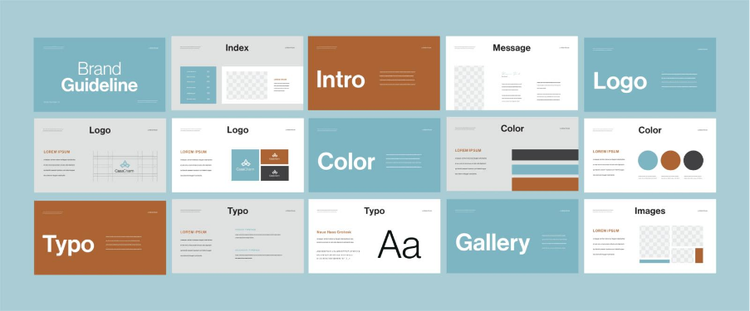
Designing a professional brand style guide is faster and more efficient with Adobe Creative Cloud’s AI-powered features. Follow these steps to move from concept to a polished, shareable guide:
Gather your logos, colour palette, fonts, and sample imagery. Upload these into Creative Cloud Libraries so they are ready to use across apps.
Use Generative Fill and Content-Aware Fill to clean up visuals, remove distractions, or create backgrounds that match your brand’s look and feel.
Try Generate Template to build ready-to-use layouts, then use Apply Brand Recolour to instantly apply your colour palette to all graphics, posts, and designs.
Use Text to Vector Graphic to turn text prompts into scalable icons and Generative Recolour to test colour variations quickly.
Apply AI Masking, Lens Blur, and Adaptive Presets for consistent lighting and colour tones across all brand images.
Speed up edits with Auto Reframe, Auto Colour, and Text-Based Editing for consistent video content across social media and campaigns.
By following these steps, you can reduce repetitive tasks, keep visual style consistent across platforms, and produce a brand style guide that is both professional and ready to scale.

Once your brand style guide is complete, Creative Cloud makes it easy to share it across teams and platforms.
Interactive guides not only keep internal teams aligned but also reduce onboarding time and simplify creative approvals.
AI is transforming how brands are built. With Adobe Creative Cloud’s AI-powered features, teams can move from concept to cohesive brand identity faster than ever. Whether you're starting from scratch or refining existing assets, AI features across Creative Cloud apps help design every part of your brand style guide with clarity, speed, and creative control:
Firefly brings generative creativity to brand development.
Express uses AI to simplify content creation and brand rollout.
While AI supports ideation, Illustrator and InDesign help formalise your style guide.
Together, these AI-powered apps support every stage of brand development from first ideas to final documentation helping you build a professional, consistent brand style guide that’s ready to share and scale.
In India’s diverse and competitive market, a brand style guide should not only maintain consistency but also reflect the cultural and linguistic richness of its audience. Here are some tips to make your style guide more distinctive and relevant:
Include instructions for adapting tone, typography, and imagery when your brand communicates in multiple Indian languages.
Define how your visual identity should adjust for different platforms such as print, social media, OTT, and e-commerce without losing brand integrity.
Use photography, illustrations, and iconography that resonate with local audiences while staying true to your core brand identity.
Ensure colour palettes and typography choices meet accessibility standards, and represent diverse audiences in imagery and messaging.
Build ready-to-use design templates for seasonal festivals or location-specific promotions.
By tailoring your brand style guide for India’s multilingual, multi-platform market, you can ensure your brand remains consistent, culturally relevant, and memorable across every audience touchpoint.
Photography, video, graphic design, illustration and so much more. Everything you need, wherever your imagination takes you.

caas:business-unit/creative-cloud, caas:products/illustrator, caas:products/photoshop, caas:content-type/article, caas:product-categories/graphic-design,
caas:product-categories/photo,
caas:features/tools-and-functions,
caas:features/paint-and-draw,
caas:features/ai-photo-editing

Based on your location, we think you may prefer the United States website, where you'll get regional content, offerings, and pricing.


