#000

Adobe Photoshop

What is image inpainting and how does it work?

Image inpainting is a photo editing technique that removes, replaces, or restores parts of an image. Discover how AI-powered inpainting can seamlessly restore missing details and refine photos without disrupting their natural look.

Start free trial|Start free trial - Photoshop

https://main--cc--adobecom.aem.live/cc-shared/fragments/merch/products/photoshop/sticky-banner/default

#F8F8F8

What is image inpainting.

Inpainting refers to reconstructing or filling in missing or damaged portions of an image using AI. By analysing the surrounding content and existing details of an image, like textures and patterns, it’s possible to recreate areas that blend seamlessly with the original.

In modern photo editing workflows, inpainting is commonly used to restore images, remove unwanted elements, and repair missing visual details while preserving natural image continuity.

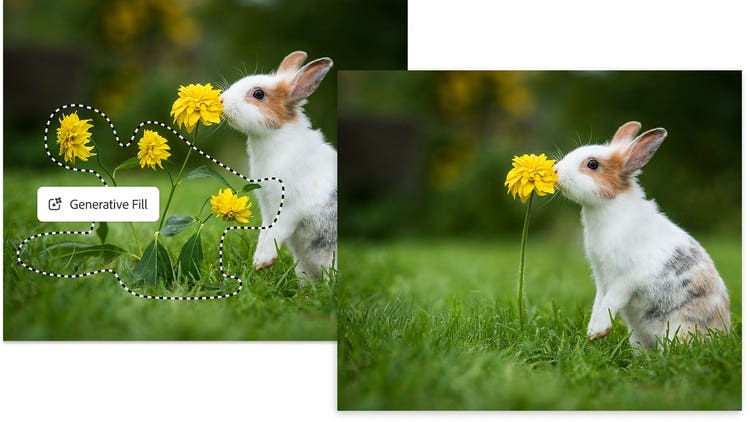
Split image showing rabbit with many flowers simplified to one using Generative Fill in Photoshop.

Explore AI-powered inpainting with Generative Fill.

AI tools like Generative Fill empower users across skill levels to achieve professional-quality edits and make high-level image manipulation more accessible than ever.

Generative Fill makes reconstructing images faster and easier and achieves more realistic results. Unlike traditional methods, Generative Fill uses advanced AI to understand image context and perform AI fill in image tasks such as removing distractions, restoring backgrounds or filling missing sections.

Because AI can analyse the context more accurately than humans, the results look more consistent without as much manual work. This makes it easier to achieve professional-quality results, whether fixing small details or filling in large gaps, regardless of skill level.

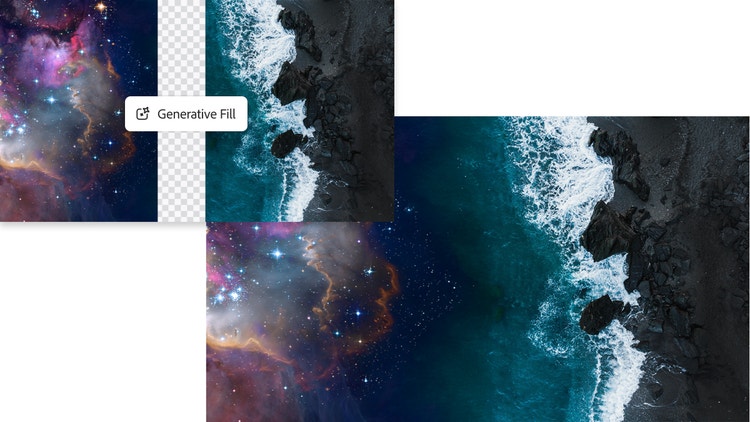
Galaxy blended with aerial seashore scene using Generative Fill in Adobe Photoshop.

How does AI-powered Generative Fill work in Photoshop.

Generative Fill uses AI to reconstruct missing or unwanted parts of an image by analysing surrounding visual information and blending new content naturally with the original.

Here’s a simple look at how Generative Fill works in practice:

  • Select the area of the image that needs to be edited or restored.
  • Generative Fill analyses surrounding pixels, textures, lighting, and patterns.
  • AI predicts how the missing or unwanted area should appear.
  • The generated content blends naturally with the original image.
  • Users can refine results by regenerating variations if needed.

For example, if part of a background is missing in a travel photo, Generative Fill can reconstruct the scene by extending the sky, landscape, or textures so the image looks complete and natural.

Frequently asked questions about image inpainting.

Why is image inpainting important?
Image inpainting restores and repairs images by seamlessly filling in missing or damaged areas, preserving the image’s integrity and aesthetic. It helps photographers, designers, and everyday users recover valuable visuals, improve image quality, and maintain visual consistency without complex manual editing.
What is the difference between inpainting and outpainting?
Inpainting involves filling in missing parts within the boundaries of an image, while outpainting extends the borders of an image by generating new content beyond its original edges.
When should you use inpainting?

You should use image inpainting when parts of an image are missing, damaged, distracting, or need refinement while preserving a natural look.

Common situations include:

  • Restoring old or scanned photographs
  • Removing background distractions from images
  • Cleaning up product photos for online listings
  • Filling gaps or extending image backgrounds
  • Creating composites for creative projects
What are different inpainting techniques?
Photoshop uses AI-powered tools like Content-Aware Fill, Patch Tool and Spot Healing Brush for precise inpainting, each tailored for different types of repairs. These techniques range from pixel-replacement methods and texture synthesis to AI-based image reconstruction that analyses surrounding visual information to fill missing areas accurately.
How does AI understand missing parts of an image?
AI understands missing parts of an image by analysing the surrounding pixels, textures, lighting, and patterns to predict what should appear in the incomplete area. Using machine learning models trained on large image datasets, AI can reconstruct image regions in a way that blends naturally with the original content while maintaining visual consistency.
What are the benefits of AI inpainting for beginners and professionals?
AI inpainting makes image restoration and editing faster and more accessible for users at all skill levels. Beginners can repair photos or remove distractions without advanced editing knowledge, while professionals can save time on complex retouching tasks and maintain consistent results across projects. This improves workflow efficiency while preserving image quality.

https://main--cc--adobecom.aem.live/cc-shared/fragments/products/photoshop/do-more-with-adobe-photoshop

https://main--cc--adobecom.aem.live/cc-shared/fragments/products/photoshop/caas/default

https://main--cc--adobecom.aem.live/in/cc-shared/fragments/merch/products/photoshop/merch-card/segment-blade