Streamline your creative work with the Properties panel
Work faster in Adobe Illustrator with easy access to your most used features and controls in the handy new Properties panel in the redesigned Essentials workspace.
View tutorial in Illustrator
Follow along in the app
Note: You’ll need the latest version of Illustrator to use this feature.
Get to know the Essentials workspace
Start by selecting the Essentials workspace at the top. This trim, uncluttered workspace makes it easy to find and use the right controls when you need them.
Find your tools in the Tools panel on the left, create artwork on the artboard in the middle, and access three docked panels on the right — Properties, Layers, and Libraries. These three panels put the controls and features you’re most likely to need in one convenient place.
Meet the smart Properties panel
Use the context-aware settings in the Properties panel to change the appearance of artwork and text objects. The panel is divided into sections such as Transform, Appearance, and other dynamic controls. The options in the panel change depending on what — if anything — is selected.
When no object is selected and the Selection tool is active, you can set up your document and apply any global settings. Change units, edit artboards, add a grid, and set up commonly used tool preferences. You also have easy access to Document Setup and Preferences in the Quick Actions section.
With selected text, you can easily change the font, style, and other type attributes, and then transform the text object completely by altering its size, aspect ratio, rotation angle, and more. Color the text, change its opacity (make it more transparent), and apply other effects. Click Create Outlines to instantly convert the text to a shape to use in other creative ways.
When an object, such as a rectangular shape, is selected, you’ll see relevant options to transform it (scale, rotate, and so on), change the appearance (apply a different fill or stroke), add a drop shadow effect, and more. Notice that you can see what type of content is selected at the top of the Properties panel.
You can access more options within these sections. For example, click Stroke to add a dashed line, change the corner appearance of the stroke, add arrowheads, and much more.
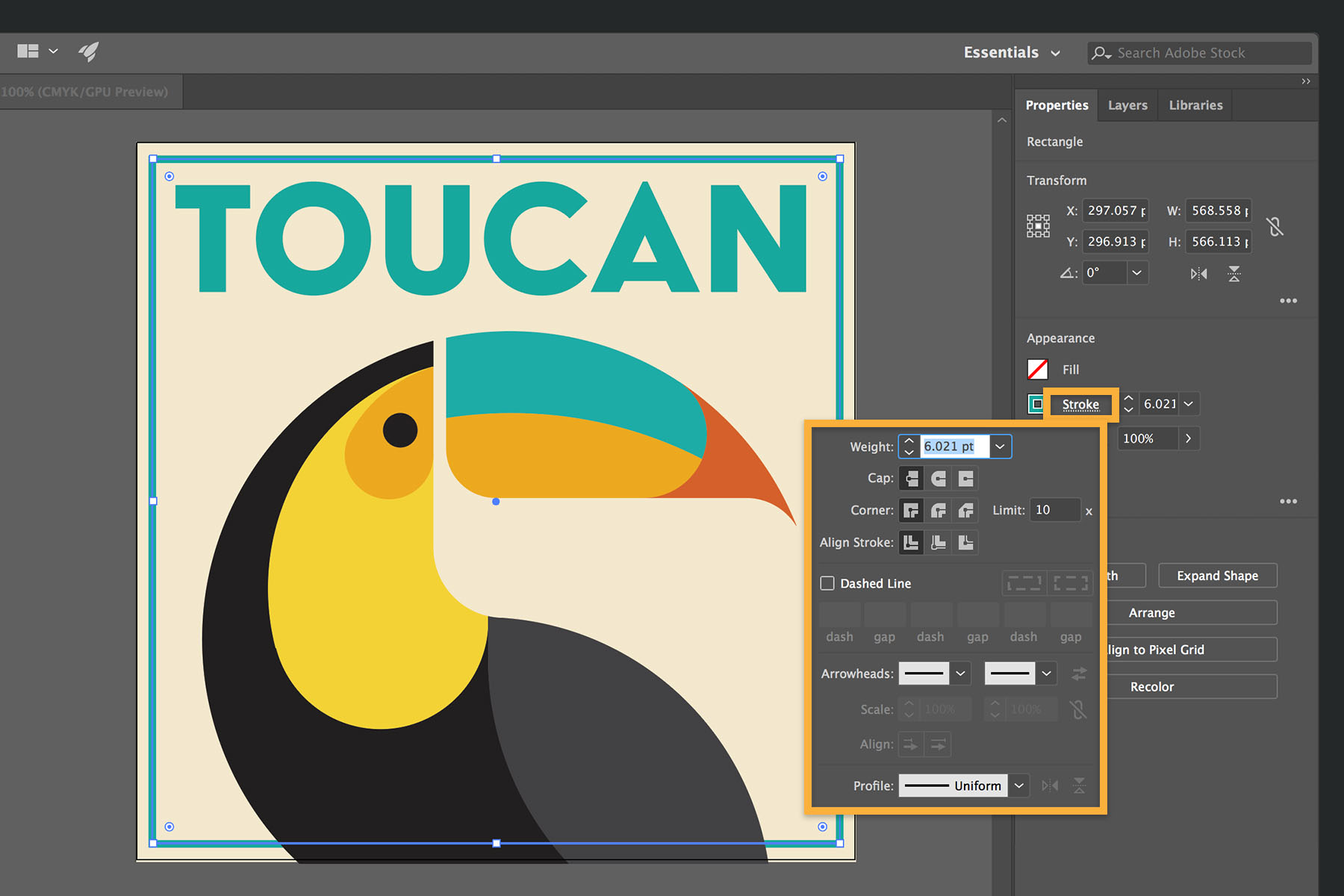
Try clicking More Options (…) to quickly access advanced features or panels with additional settings.
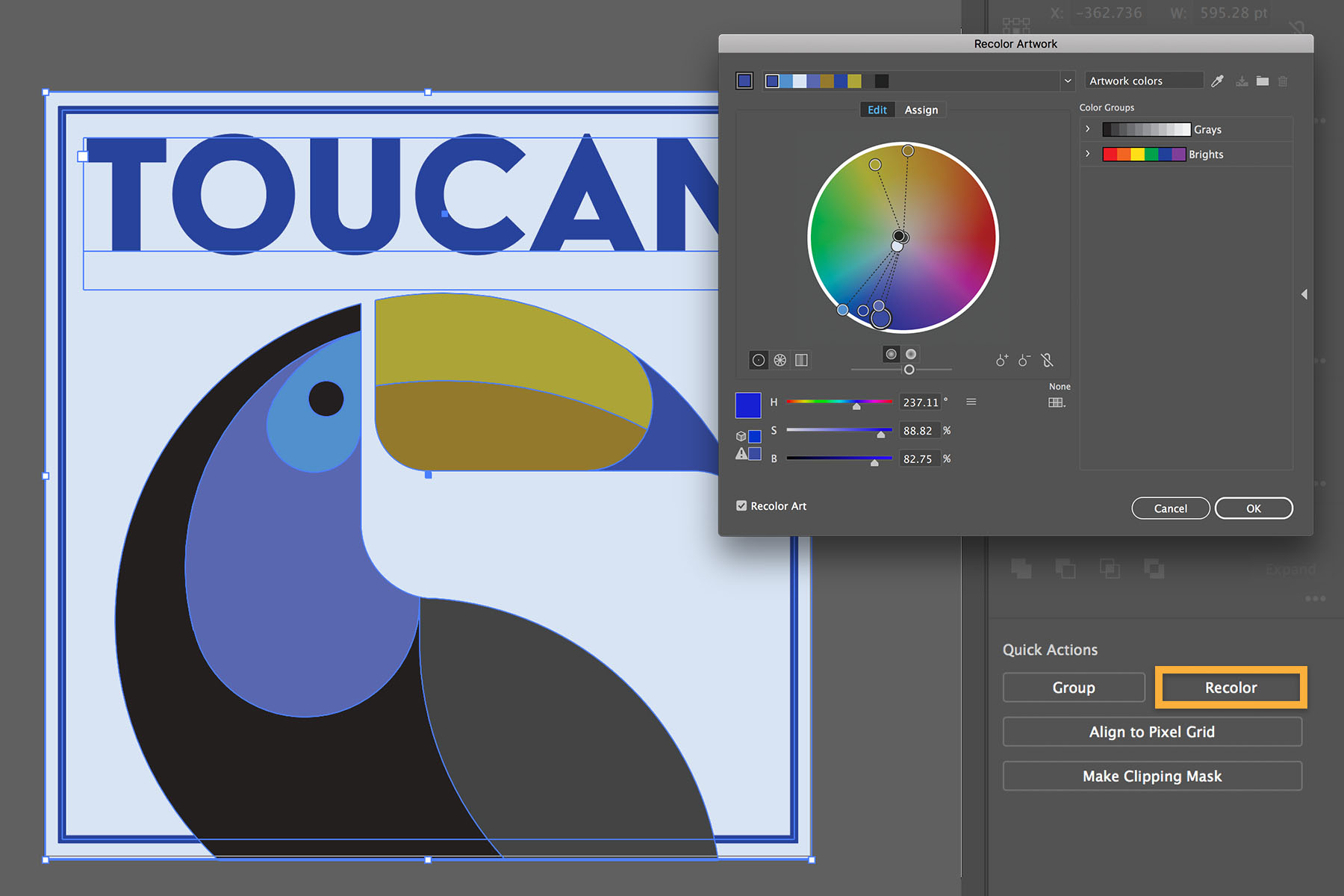
You’ll find many commonly used actions within easy reach in the Quick Actions section. For example, when multiple objects are selected, you can click Group, or click Recolor to explore ways to quickly change their colors while maintaining color harmony. Use Pathfinder functions to create a unique compound shape from overlapping objects or align the selected objects in various ways.
When you place an image, you can crop it, change its colors, and transform it in other ways. Alternatively, click Image Trace to easily convert it to vector art.
Go ahead and try the Properties panel in Illustrator. You’ll enjoy creating with your most used features, options, and tasks at your fingertips.Learn more about the Properties panel .

28 de diciembre de 2022
Try these tutorials with Illustrator
Create illustrations and other graphics with vectors.
You can control how Adobe websites use cookies and similar technologies by making choices below. But note that if you disable cookies and similar technologies entirely, Adobe websites may not function properly.
Cookies are small text files stored by your web browser when you use websites. There are also other technologies that can be used for similar purposes like HTML5 Local Storage and local shared objects, web beacons, and embedded scripts. These technologies help us do things like remembering you and your preferences when you return to our sites, measure how you use the website, conduct market research, and gather information about the ads you see and interact with.
You can make choices in the menu below about what cookies and other technologies you want us to use on Adobe sites when you visit them from this browser. You can always change those choices later by clicking on the Cookie Preferences link at the bottom of the page.
If enabled:
We can improve your experience by tailoring the site and the content to things we think might be of interest
We can better keep track of your preferences — like what language you prefer to use
We will better understand your likely interests so we can provide you more relevant Adobe ads and content on non-Adobe websites and in non-Adobe apps
It will help us improve the performance of our website and those of our partners who use the Adobe Experience Cloud
If disabled:
We won’t be able to remember you from session to session so the experience may not be tailored to your interests
You’ll still have access to the content of the site but certain features that depend on cookies may not function
You’ll still see ads, they just may not be as relevant to you
General information
You can control how Adobe websites use cookies and similar technologies by making choices below. But note that if you disable cookies and similar technologies entirely, Adobe websites may not function properly.
Cookies are small text files stored by your web browser when you use websites. There are also other technologies that can be used for similar purposes like HTML5 Local Storage, web beacons, and embedded scripts. These technologies help us do things like remembering you and your preferences when you return to our sites, measure how you use the website, conduct market research, and gather information about the ads you see and interact with.
You can make choices in the menu below about what cookies and other technologies you want us to use on Adobe sites when you visit them from this browser. You can always change those choices later by clicking on the Cookie Preferences link at the bottom of the page.
If enabled:
We can improve your experience by tailoring the site and the content to things we think might be of interest
We can better keep track of your preferences — like what language you prefer to use
We will better understand your likely interests so we can provide you more relevant Adobe ads and content on non-Adobe websites and in non-Adobe apps
It will help us improve the performance of our website and those of our partners who use the Adobe Experience Cloud
If disabled:
We won’t be able to remember you from session to session so the experience may not be tailored to your interests
We’ll still count your use of our site and services
You’ll still have access to the content of the site but certain features that depend on cookies may not function
You’ll still see ads, they just may not be as relevant to you
Operate the site and core servicesOperate site and measure engagement
Always active
These cookies are required, and they are used to enable the site and related services core functionality. Without them the site could not operate, so they cannot be disabled.
These cookies enable the site and related services’ core functionality and collect statistics about user engagement, such as counting active use to help us understand trends. These cookies cannot be disabled.
Measure performance
These cookies are used to analyze site usage to measure and improve performance. Without them Adobe cannot know what content is most valued and how often unique visitors return to the site, making it hard to improve information we offer to you.
These cookies are used to analyze site usage to measure and improve performance. Without them Adobe cannot know what content is most valued, making it hard to improve information we offer to you.
Extend functionality
These cookies are used to enhance the functionality of Adobe sites such as remembering your settings and preferences to deliver a personalized experience; for example, your username, your repeated visits, preferred language, your country, or any other saved preference.
Personalize advertising
These cookies are used to enable Adobe and our partners to serve ads more relevant to your interests. Without them you will still see ads, but they might not be as relevant to you.
Personalize advertising
These cookies are used to enable Adobe and our partners to serve ads more relevant to your interests. Without them you will still see ads, but they might not be as relevant to you.