https://main--cc--adobecom.aem.live/cc-shared/fragments/merch/products/premiere/sticky-banner/default-app-page

https://main--cc--adobecom.aem.live/cc-shared/fragments/products/premiere/app/vertical-cards

Create content made to share.

Premiere on mobile is built for social with one-tap background removal, free unlimited captions, and more. Edit for Instagram Reels, TikTok, YouTube Shorts, and everywhere you love to post.

#f8f8f8

Seamless editing. From start to finish.

Stay in your creative flow without distracting watermarks or pop-up ads. Trim, reorder, and layer clips on a timeline that shows everything in one view. Exports and features are free — only pay when you want to use tools powered by Generative AI.
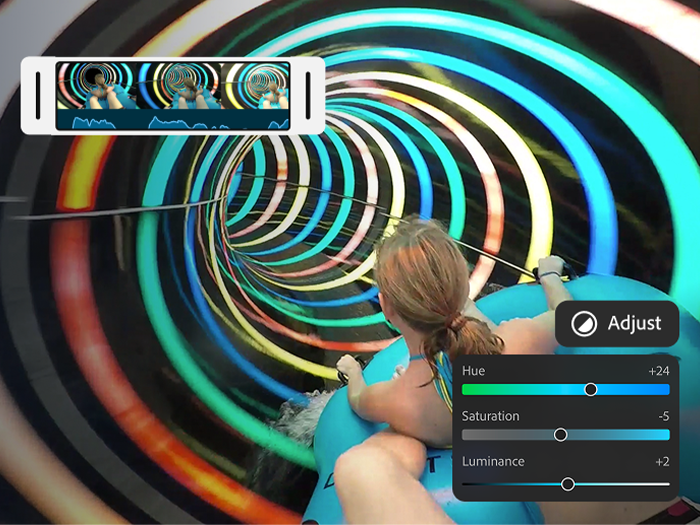
https://main--cc--adobecom.aem.live/cc-shared/assets/video/product/premiere/app/media_168c5443bea93c4a38526161979690e1e52520ef7.mp4#_autoplay| A girl riding an inner tube down a colorful tunnel with an overlay of the Premiere on iPhone color adjustment sliders and the final sequence playing in the timeline.
#f8f8f8
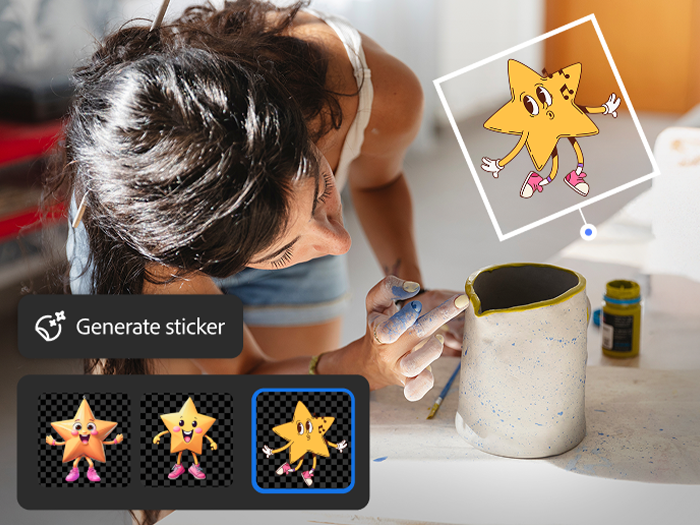
https://main--cc--adobecom.aem.live/cc-shared/assets/video/product/premiere/app/media_1162e8db844b26afa2a58fd4d2e6f46f04816db4c.mp4#_autoplay | A woman admiring a white mug with an overlay of the Generate sticker tool, the prompt "A cute star character," and AI-generated character options.

Endless ways to create your way.

Share videos that pack a punch. Choose from hundreds of thousands of images, videos, stickers, fonts, and more to make your videos pop — or explore new ideas with generative AI right at your fingertips.

#f8f8f8

Sound so good in seconds.

No sound studio? No problem. Easily smooth out dialogue and clean up background noise with Enhance Audio. Find trending tracks right inside the app, and use your own voice to create perfectly-timed sound effects.
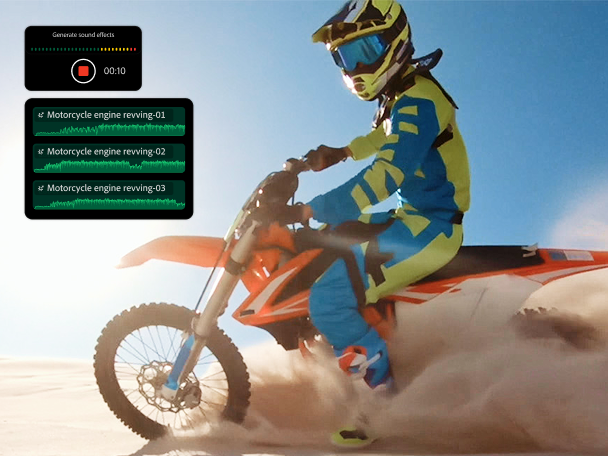
https://main--cc--adobecom.aem.live/cc-shared/assets/video/product/premiere/app/media_113f00543ad5eda76e18e10bf24fc0aba991fe56c.mp4#_autoplay | The app UI showing footage of a motorcycle with overlays of the Generate sound effect feature, the prompt "Motorcycle revving engine," and the effect being added to the timeline.

https://main--cc--adobecom.aem.live/cc-shared/fragments/products/premiere/app/pr-top-features

https://main--cc--adobecom.aem.live/cc-shared/fragments/products/premiere/app/youtube/adobe-partner-youtube-shorts

https://main--cc--adobecom.aem.live/cc-shared/fragments/products/premiere/app/premiere-seamless-movement

https://main--da-cc--adobecom.aem.page/cc-shared/fragments/products/premiere/app/prm-app-gallery

Frequently asked questions

Is Adobe Premiere on mobile a free app?

Yes, Adobe Premiere on mobile is a free, standalone video editing mobile app. You can use all core editing functions and export an unlimited number of videos in 4K resolution with no watermarks in the free version. Generative AI features powered by Firefly use generative credits which can be purchased with a subscription or are included as part of most Creative Cloud plans. Generative AI features are currently only available on iOS.

How do I download Adobe Premiere on mobile?

To download and install Adobe Premiere on mobile, scan the QR code above or visit the Apple App Store or Google Play Store on your device.

What creative assets are included?

Adobe Premiere on mobile includes images, effects, music tracks, fonts and video assets. You can also generate custom sound effects, stickers, images and more using Adobe Firefly. Generative AI features powered by Firefly use generative credit, which can be purchased with a subscription or are included as part of existing Creative Cloud plans. Generative AI features are currently only available on iOS.

Does Adobe Premiere on mobile have AI features?

Adobe Premiere on mobile helps you create one-of-a-kind content with AI features like generative video, images, stickers, sound effects, and more. It also includes assistive AI tools like speech enhancement, background removal, and automatic caption creation to help you work faster. Generative AI features are currently only available on iOS.

Will you be able to send projects from {{adobe-premiere}} on mobile to Premiere on desktop?

Yes, if you have a paid subscription to {{adobe-premiere}} on desktop, you can import projects and media from Adobe Premiere on mobile.

What is {{adobe-premiere}} on mobile best for?

{{adobe-premiere}} on mobile is best for creators who want professional-grade editing on mobile — frame-accurate timeline control, watermark-free exports, and commercially safe AI-generated content, all in a free app. It’s ideal for content creators who also use Adobe’s desktop tools and want a seamless mobile-to-desktop workflow.

How does {{adobe-premiere}} on mobile compare to other mobile video editing apps?

Compared to other mobile editors, Adobe Premiere on mobile offers a more professional editing experience with a multi-track, resizable timeline, unlimited free auto-captions, and watermark-free exports at no cost. Adobe Firefly AI features are commercially safe because Adobe only trains Firefly on licensed content. Generative AI features are currently only available on iOS.

Where is Adobe Premiere on mobile available?

Adobe Premiere on mobile is available for both iOS and Android. Some features may vary between platforms. Visit the Adobe Help Center to learn more.

https://main--cc--adobecom.aem.live/cc-shared/fragments/products/premiere/app/trial-mobile-app