https://main--cc--adobecom.aem.live/creativecloud/img/icons/designer.svg | Designer
Nov. 10, 2020, by David Larsson
Automate your E-Commerce 3D Optimization Pipeline
David Larsson details the practicalities of a 3D pipeline within the e-commerce field.

Designing automated pipeline for producing 3D models for product visualization
If you’ve ever tried to upload a 3D model exported from a CAD program to a WebGL or AR service, it’s likely you’ve run into issues around maximum file sizes, never-ending progress bars and bad frame rate.
In order to author good online interactive experiences, optimizing your 3D data for size and performance is critical. It is also good for your bottom line, as smaller files require less cloud storage and push less data through your CDN.
This article describes how to design an automated pipeline for producing good 3D models for visualization. This allows you to author your models with full detail and have web- and AR-friendly models available at any time, and with minimal manual effort.
When 3D models are authored for manufacturing or visualization in offline renderers, they are often unsuitable for display in handheld devices, web browsers, AR applications and other devices with lower specs. This means content production teams often end up spending lots of time optimizing or converting source assets to lower-end devices to ensure smooth renders and quick downloads.
Optimization of 3D assets & how process interacts with Substance
In this article, we will look at the optimization of 3D assets in general, and specifically how this process interacts with Substance materials and libraries.
Hand-optimizing 3D models is not only boring and time-consuming, but can easily become a bottleneck in a production pipeline. The problem is that optimization is inherently downstream from the source assets, which means any change to the source asset (3D model, materials, etc.) needs to be reflected in the optimized asset. Therefore, there is a conflict between being able to preview the optimized content early and the time spent of optimizing it.
If there is an expectation that the source model is going to change a few times during production, it’s more efficient to only optimize it after it is final.
This makes optimization a prime target for automation. It’s not a place where you need artistic expression. An automation pipeline would detect when there are changes to any aspect of an asset library and re-optimize the affected assets.
Overview of a 3D optimization pipeline
Let’s look at an e-commerce-like setup.

The source 3D models can come from many different places such as CAD packages, DCC packages, and so on. In addition to the vertices and polygons, we will assume they have texture UVs and normal information.
The material library is the set of source materials to be used on the 3D models. The image below is from Substance Source, which is a great starting point for materials – but any such materials can also be built in-house, perhaps being created from real-world material samples.

Substance materials are procedural, allowing users to set parameters and define presets. A material, together with the settings for a specific application, is called a material instance. As an example, the same leather material can be instanced for both a red and a blue leather material.

Three instances based on ..sbsar preset for a single material
Once the material is selected, we assign it to specific parts of an object. For a couch, you might assign a fabric material on the cushions, and metal to the legs:

Model without materials (left) and model with materials assigned (right)
The same model can also have multiple assignment configurations: in this example, the same couch can have different fabrics and leathers for the cushions.

Two material permutations for the same model
Output targets
Different devices have different capabilities, and what works well in-browser in a last-generation phone might be very different from a high-end PC, so we want to be able to produce different models for different targets.

Three different quality levels for the same model
In its simplest form, the pipeline looks something like this:

Note that this process shows one model being processed, but the idea is that multiple objects with multiple material configurations for multiple outputs go through this process.
There are two stages in the conceptual pipeline, Optimize Model and then Apply Materials. Note that Optimize Model is the first of these steps, and Apply Materials occurs downstream. This means that any change to the 3D model will trigger both an optimization and reapplication of materials – but a change to materials can be carried out without re-optimizing.
This pipeline is simplified and in a real-life pipeline there are likely to be more stages and dependencies.
Things to keep in mind to automate efficiently
With a structured pipeline like the one above, we can automate the process of producing optimized models – meaning we can have up-to-date visualization models available during the entire life cycle of a product.
In order to efficiently run an asset pipeline, we need to understand the relationship between operations, as well as which data affects which output. This means we can quickly figure out what needs to be built when the source data changes.
Some examples:
— When a material in the material library is changed, any output using that material needs to be rebuilt;
— When a new output target is added, all models need to be processed for that target;
— When a 3D model is changed all configurations for all targets for that model need to be rebuilt.
Exactly when and how to trigger the automated process is a balance between how fast results are needed and how much compute power to use. Triggering a run every time anything is changed will give fast results, but it might also mean you spend lots of time processing models that will soon change again.
Another approach is running the process nightly when processing power is more available or cheaper, meaning up-to-date models should be ready every morning.
It’s also possible to let users decide when to run the process for the model so that they can get hold of an up-to-date model when they need one.
A common concern with automating parts of the 3D workflow is losing artistic control. This should not be the case, since all artistic decisions are made before automation happens. The optimization stage should be seen in the same way that an image stored as a .tiff file might be compressed to .jpeg format before being placed on a website. Automating the optimization stage should free up more time to work creatively since you don’t need to spend time optimizing models for deployment.
The main thing to take into account with automated solutions is how and when manual fixes happen. If the output of the process is not good enough for a certain model, the instinct is often to fix the generated output asset. The problem with this approach is that the fix needs to be reapplied every single time the asset is changed (since the change is downstream from the automation pipeline). In general, all tweaking of outputs should be done as settings in the automation pipeline so they can be applied next time the pipeline is run. Manual fixing is discouraged unless you are certain the model is its final state.
A good approach to tweaking is hierarchical settings overrides. The default value for the pipeline can be overridden on a per-asset level, so you can set a higher quality value for an asset that doesn’t come out well – without affecting any of the other assets.
Why would I want to optimize?
Optimization of the input data is the key to making good 3D models for the web and handheld devices. CAD models or models made for high-end renderings are too detailed, too large, and so are typically not suitable for the purpose.
The main things you want to improve with optimization are:
— Rendering performance
— Battery life
— Download size
— Memory usage
These different goals are generally aligned: smaller models are typically faster to render and use less battery power on devices.
Evaluating optimized models
Before digging into what things we optimize for, it’s important to make sure we know how to evaluate the visual quality of the results. The key is always to evaluate based on how the model is meant to be used. If you produce a model that is meant to look good in a 400×400 pixel-size web viewer or on a handheld device, spending time tweaking settings to preserve details or remove artifacts you can’t see without zooming in close will mean you’ll ship a model that’s too detailed and too heavy to download.
When it comes to rendering performance, without benchmarking it’s not always easy to anticipate what’s going to have the best effect, but there are many heuristics which together tend to produce good results outlined below. Also remember that even if you hit your target frame rate and download size, smaller and faster is still relevant on handheld devices since a less busy GPU consumes less battery. The article GPU Performance for Game Artists covers the topic in more detail and is a good resource for learning about what constitutes a 3D model that’s fast to render.
Polygon Count
Polygon count and polygon density are important parts of making the model render fast and download quickly. More polygons and vertices will mean the GPU will have to do more computations in order to produce an image.
GPUs are generally happier rendering polygons that are larger and more uniform in size. GPUs are highly parallel and are optimized for larger polygons. The smaller and thinner the polygons are, the more that this parallelism will be wasted on areas that are masked out. This problem is referred to as ‘overshading’, and is covered in the linked article above.
In general, it’s good to look at the wireframe of a produced model, and make sure it’s not very dense when visualizing the model at the size it’s expected to be viewed.
An effective way of reducing the polygon count without sacrificing details is by using normal maps. The idea is that we are more sensitive to how lighting interacts with the object than with the silhouette of the object. This means we can move details from the triangle data to the normal map (i.e. from the model to the texture) and use larger polygons, and still get details from the original data in the lighting.
Here is the same model optimized without (left) and with (right) normal maps containing details from the original model:
|
With normal
|
Without normal
|
Optimizing models to a level where most of the small details are in the normal map also allows the mesh to have better UV maps. Small details and sharp edges are often a problem when creating UV maps. Simpler models tend to have fewer bigger charts, less space wasted on padding, and fewer visible seams – which can be a problem for automatically UV-mapped models.
GPU Draw Calls
Draw Calls represent how many times the renderer needs to talk to the GPU in order to render an object. In general, the GPU needs to be notified whenever you switch from one object to another, or want to use a different texture. This means that objects that are segmented into multiple parts or use many different materials will be costlier to render than the same model if it had consisted of only one mesh with a single set of textures.
Texture Resolution
GPUs are good at selecting textures with the appropriate resolution for the size the model is viewed at, and avoid performance and quality problems related to using a texture resolution that is too high. Given your viewing constraints for the model you ship, it’s easy to include unnecessarily high resolution textures. They won’t actually be seen at full resolution, which leads to unnecessary download time for the user.
Overdraw
Overdraw is what happens when rendering polygons that ends up behind other polygons. Some overdraw is unavoidable for most objects. However, for simple viewing scenarios, there are also likely to be polygons that will never be seen regardless how the user interacts with the model. Imagine, for instance, a couch that was modeled with the seat cushions as individual objects laid out on top of the couch frame. In a scenario where the user can’t remove the cushions, the bottom of the cushion and the part of the frame where the cushion is placed will never ever be seen.

Model before (left) and after (right) optimization cleaning out internal geometry
A good optimization solution can identify these unnecessary areas and get rid of them so the polygons in the invisible areas don’t have to be downloaded or rendered. Even more important, in many texturing scenarios, texture image space is assigned to these invisible polygons, which means you will waste texture data, affecting the download size negatively and reducing texture resolution in areas that are actually visible.
The role of optimization to protect your IP
Finally, when working with data originating from CAD programs, the 3D model often contains details related to how the product is manufactured. An optimization solution can remove internal objects and convert small details into normal map and texture information. This makes it difficult to reverse engineer products from models meant for visualization only.
With normal

Without normal

With normal
Without normal
Foundations of a good pipeline
Implementing an automatic pipeline that incorporates all aspects of what is mentioned above can be a challenging task. But getting the basics right can save a lot of headaches later.
Data layout
A prerequisite for any successful automation endeavor is having a structured approach to your data. It is crucial to have clear notions about the material library used, and which materials are assigned to which object. You also want to make this material visible to the pipeline, which allows the pipeline to track changes, so that time isn’t wasted reprocessing things that haven’t changed.
All data should be stored in some central repository, and no data outside this repository should be allowed to be referenced to make sure the entire source asset can be found without mounting additional shared network drives (or other potential places data can live). When picking data formats, they should either be self-contained, or any references to other files should be easy to access, to help with tracking.
Dependency tracking
Tracking the relationships between assets allows you to only rebuild what has changed. The more finely grained your dependency tracking and job execution is, the smaller your incremental asset builds can be.
As an example, imagine your dependency tracking sees the material library as a single opaque entity. If you make a change to one material, it will force every model to be rebuilt to guarantee all material data is up-to-date. If you instead track changes to individual materials, it would allow the rebuilding of only those objects that use the modified material.
Execution
When the dependencies have been resolved you will end up with several build tasks to produce the desired outputs. These tasks are often largely independent and can run in parallel. This means the build processes can be scaled to multiple CPUs or machines. The execution part involves scheduling these tasks, and making sure that the appropriate tool is called to produce the required outputs.
Examples of tasks carried out in an optimization pipeline include:
— Mesh optimization
— Texture rendering
— Texture compression
— Scene assembly
Caching
Intermediate results in the build process can be cached to speed up incremental builds. An example is the low polygon output of the optimization. This might not be directly usable as an asset as it requires textures to be applied before it’s ready to deploy. However, this low-polygon asset can be cached as an intermediate step. This way, it doesn’t have to be rebuilt in the event that you update the materials used in the asset, and you can shortcut the processing to avoid redoing the optimization.
A cache is a convenient way of solving this since it can be cleaned without losing any data that can’t be recreated. This ensures that the size can be constantly pruned to get a good balance between incremental build performance and temporary data storage.
A Sample Pipeline
To provide something tangible for this somewhat abstract article, I decided to build a simple implementation of an asset optimization pipeline.
My intention here is to show the different aspects of a pipeline, with particular emphasis on showing how Substance materials can be involved in an asset optimization workflow.
The goal of the pipeline is to take high resolution 3D furniture models, and automatically produce models that are small and fast to render. This pipeline is mainly implemented in Python, and is meant to run locally on a single Windows machine.
The original pipeline described looked like this:
Adding details to the processing box we get to something like this:
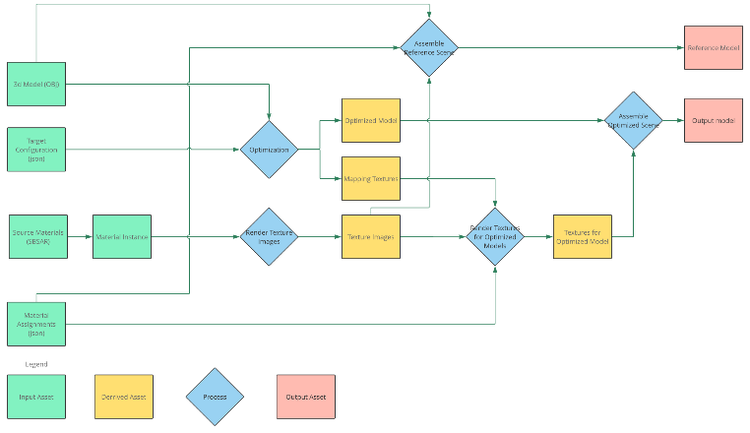
This is the overview of a single optimized model going through the sample pipeline. This pipeline can be applied to multiple models and multiple qualities for the same model. The derived assets represent intermediate outputs that can be cached by the build system to speed up incremental builds.
Data
The data in this pipeline is a set of files on disk to keep things as simple as possible. They are separated into:
- Meshes: .obj files
- Source materials: Substance .sbsar files
- Material library: .json documents referencing .sbsar files with additional settings for selecting presets, parameters and material scaling.
- Material assignment: .json documents associating parts of models with material instances and per-model scaling.
- Pipelines: .json documents describing an optimization target profile such as mobile, VR etc.
- Jobs: .json documents describing what models to optimize, what material permutations to use and what pipelines to produce outputs through.
OBJ as mesh file format
The reason I use .obj files for geometry is simplicity. They are easy to create and share. Since they are text-based, they can also be edited easily if group names are missing or wrong for some reason.
The main constraint on the meshes in the pipeline is that UV charts must fit inside a UV page. They can’t be used to tile a material over a shape, though they can overlap or be on separate pages if preferred. Ideally, all UV charts should have a size that is relative to its size in world space on the model, so that textures are applied with the same scale on all parts.
Below you can see two different UV layouts for the same model. The layout on the left will cause problems, as it has charts crossing UV tile boundaries; conversely, the layout on the right will behave correctly.

|

|
Material libraries
The material library format used is a custom .json file instead of the .obj MTL format. The MTL format doesn’t support binding Substance materials or set procedural parameters, so I decided to introduce a simple custom format with these features.
This is an example of a material instance in the material library:
{
   // ...
   // Leather is the name of the instance
   "Leather": {
        // sbsar file referenced
        "sbsar": "${assets}/material_library/sbsar/Sofa_Leather.sbsar",
        "parameters": {
            // These are parameters on the sbsar
            "normal_format": 1,
            "Albedo_Color": [
                0.160,
                0.160,
                0.160,
                1
            ],
            "Roughness_Base": 0.353
        },
        "scale": [
            // A material relative scale for the UV
            20.0,
            20.0
        ]
    }
    // Additional material instances
    // ...
}
In the sample pipeline all material instances are stored in a single material library file.
The materials are PBR metallic roughness-based using the following maps:
- Base color
- Normal
- Roughness
- Metallic
Material assignments
The material assignment is a separate file associating parts in a model with a specific material instance. The material assignment also includes a scale factor for the specific model, to allow compensation for differences between the scale of the texture charts between different models.
Separating the material assignments from the geometry allows users to specify different material configurations for the same model, or to share material configurations between models that share the same group names.
This is an example of a material assignment configuration:
{
    // Legs is the name of the part in OBJ file
    // If similar scenes share part names the same
    // material assignment file can be used for all of them
    "Legs": {
        // Material refers to a material instance
        // in the library
        "material": "Metal",
        // Scale is the scale of the material associated with this
        // part. It will be multiplied by the scale from the
        // material instance
        "scale": [
            1.0,
            1.0
        ]
    },
    // Additional assignments to other parts
    "Cushions": {
        "material": "Leather",
        "scale": [
            1.0,
            1.0
        ]
    },
    "Frame": {
        "material": "Wood",
        "scale": [
            1.0,
            1.0
        ]
    }
}
GLB as output format
A .glb file is a version of .gltf where mesh data, scene data and textures are packed into a single file. I’m using .glb as the output format for the process because it’s a compact file representation of the mesh, materials, and all textures produced, with wide industry support for web and mobile 3D viewers.
Pipelines
The pipeline describes different aspects of the optimization to be carried out for a specific target hardware.
An example pipeline can look like this:
{
    "import": {
        // Resolution for reference source textures
        // Insufficient resolution in the source textures
        // will come out as blurry areas in the model
        // Must be an integer power of 2
        "material_resolution": 2048
    },
    "reference": {
        // Enable or disable reference model
        // creation
        "enable": true
    },
    "optimize": {
        // Target size in pixels for which the model
        // quality should be optimized. Anything above
        // 2000 will be very time consuming to produce
        "screen_size": 600,
        // Resolution for the utility maps for the model
        "texture_resolution": 1024,
        // Bake tangent space using Substance Automation
        // Toolkit if true, use Simplygon if false
        "bake_tangent_space_SAT": true,
        "remeshing_settings": {
            // Angle in degrees between surfaces in
            // a vertex to split it with discrete
            // normals
            "hard_edge_angle": 75
        },
        "parameterizer_settings": {
            // How much stretching is allowed inside
            // a chart in the generated UV layout for
            // the model
            "max_stretch": 0.33,
            // How prioritized large charts are for the
            // UV layout
            "large_charts_importance": 0.2
        }
    },
    "render": {
        // Texture resolution for the atlas
        // for the optimized model. Should typically
        // be the same as the texture_resolution in
        // optimize
        "texture_resolution": 1024,
        // Offset for mip map selection. 0 is default,
        // Negative values gives sharper and noisier results
        // Positive values give blurrier results
        "mip_bias": 0,
        // Enable FXAA post processing on the map to give
        // smoother edges between different materials
        // (doesn't apply to normal maps)
        "enable_fxaa": true,
        // Blurring of the material id mask before compositing
        // to give smoother borders between materials
        // (doesn't apply to the normal map)
        "mask_blur": 0.25,
        // Enable FXAA post processing on the normal map to
        // give smoother edges between different materials
        "enable_fxaa_normal": true,
        // Blurring of the material id mask before compositing
        // the normal map to give smoother borders between
        // materials
        "mask_blur_normal": 0.25,
        // Clean up edges around charts on normal maps
        "edge_clean_normal_maps": false,
        // Normal map output format and filtering
        // For most cases 8 bpp is enough but
        // for low roughness and 16bpp is needed to avoid
        // artifacts
        "output_normal_map_bpp": 8,
        // Enable dithering for the normal map. Typically only
        // relevant for 8 bpp maps
        "enable_normal_map_dithering": true,
        // Dithering intensity. Represents 1/x. Use 256 to
        // get one bit of noise for an 8bpp map
        "normal_map_dithering_range": 256,
        // Paths to tools for compositing materials and
        // transforming normal maps
        "tools": {
            "transfer_texture": "${tools}/MultiMapBlend.sbsar",
            "transform_normals": "${tools}/transform_tangents.sbsar"
        }
    }
}
Jobs
A job is the entry point for the process where all models, material permutations and pipelines are specified. This is an example of a job:
{
    // Scenes to optimize
    "scenes": {
        "sofa-a1": {
            // OBJ file with geometry in
            "mesh": "${assets}/meshes/sofa-a1.obj",
            // Different material variations to produce for this model
            "material_variations": {
                // These are references to material assignment files
                "sofa-a1-leather": "${assets}/material_bindings/leather.json",
                "sofa-a1-fabric": "${assets}/material_bindings/fabric.json"
            }
        },
        // Additional scenes goes here
        // ...
    },
    // The material library with material instances in to use
    "material_library": "${assets}/material_library/material_library.json",
    "pipelines": {
        // A pipeline to run for the scenes
        "lq": {
            // Reference to the definition file
            "definition": "${assets}/pipelines/lq.json",
            // Paths for reference models and optimized models for
            // this pipeline
            "output_reference": "${outputs}/lq/reference",
            "output_optimized": "${outputs}/lq/optimized"
        },
        // Additional pipelines to run
        // ...
    }
}
Python as core language for the pipeline
Python is used for implementing the pipeline. It’s a language with wide support and comes with features for many of the problems we tackle out of the box. There are bindings for several tools I wanted to use in the process, making it easy to focus on building the pipeline, rather than creating bridges to other applications.
SCons dependency tracking and execution
The dependency tracking and execution system used for the pipeline is the SCons build system. It’s a Python-based build system that keeps track of dependencies and tries to minimize the cost of incremental builds by only rebuilding data that has changed since the last build. This means it works as an executor, and also carries out the caching for intermediate results for us.
It’s convenient to use a Python-based build system as this makes interaction with the build operations trivial. It’s also available in the pip module system, allowing anyone with a Python environment to install it easily.
The pipeline also supports running directly as a Python script, making it easier to debug. When running the pipeline directly from the script, it will be rebuilt from scratch every time it is run, and no parallel processing of independent tasks will be carried out.
Optimization
For optimization I’m using Simplygon’s Remesher 2.0. Simplygon is considered the gold standard for polygon optimization in the gaming industry, and can produce very compact meshes with lots of control. It has several different optimization strategies that can be applied to different scenarios, but to keep things simple I selected one for the pipeline.
The remesher has many desirable properties for optimized meshes:
1. It aggressively optimizes the model and can often produce good results using fewer polygons by orders of magnitude, if used correctly.
2. It clears out all internal geometry of the model reducing overdraw, and texture allocation to surfaces not seen, as well as removing irrelevant or proprietary information from the model.
3. It creates a new texture atlas for the entire model, meaning it can be rendered as a single draw call with the same amount of texture data, regardless of how the model was initially set up.
4. It produces mappings from the source mesh to the destination mesh, so that textures, normals etc. on the source mesh can be correctly transferred to the optimized model at high quality.
5. It can optimize to a specific viewing size. If you want to show a model at a predictable quality in a viewer with a specific size or resolution, you can feed in this information as a target resolution; your result with be a model suitable for this size. The remesher can also suggest a texture size for this specific quality, though this function wasn’t used in this pipeline.
6. In the past I worked for Simplygon; one of my own reasons for using the Remesher 2.0 in this case was therefore simply because I’m very familiar with it – with the type of results it produces, as well as how to configure the tool to use it well.
Simplygon also has the following features making it suitable for this pipeline:
1. It has a Python API from which all optimization and scene creation can be driven, making it easy to integrate this tool with the rest of the pipeline, which is also created in Python.
2. It can read and write .obj and .glb files. This provides a lot of control concerning how materials and textures are managed; the tool can therefore be used to read the source data with the custom materials, and to write out .glb files with textures generated using Substance.
The remesher is an aggressive optimization technique, and it works great for models seen at a distance. However, it’s not suitable for models that needs to be inspected too closely, as it can affect the object silhouette and mesh topology quite dramatically. It therefore might not be the right solution for every visualization scenario. Specifically, transparency is not handled well by the implementation used here, and should be avoided in this pipeline. By breaking the mesh topology of objects, parts that are meant to be separate for animation purposes or similar might merge together, so this process requires special attention in such cases.
There are many other solutions for 3D optimization out there, but Simplygon was the natural choice for me because of its vast number of features and my previous experience with it.
Substance for texturing the optimized model
I’m using the Substance Automation Toolkit for applying textures from the source mesh to the optimized mesh.
The Substance Automation Toolkit allows me to build all the operations used in the texture transferring process using Substance Designer, and invoke them from Python scripts in the pipeline. It also allows me to separate optimization from texture generation as two individual stages, meaning SCons can track intermediate files independently; in this way, a change to material data won’t trigger a geometry optimization, since the optimization itself is independent of the materials — as long as the model remains unchanged.
The pipeline
The pipeline consists of the following stages:
Texture rendering
In this stage we look at the material bindings for all the models processed, and render out Substance PBR images for all materials used.

Reference model creation
The reference stage combines the original model with the rendered texture to produce a reference .glb file.
This reference .glb file is not used downstream, but it is a good asset to have in order to get ‘before’ and ‘after’ shots. It also helps debugging in terms of whether a problem in the output was introduced during optimization or is in the source data.
Because of the limitations of input UV coordinates described in the .obj section above the UV charts are scaled based on the material scale and the assignment scale. This ensures textures will have the same scale as the optimized model.
Optimization
The optimization stage loads the source model and runs the re-meshing process using Simplygon. The model will get a new UV set that is unrelated to the original one as part of this process.
In addition to doing the remeshing, it also produces a set of textures using the Simplygon Geometry Casters to transfer texture data from the source model to the optimized model. These maps are all expressed in the new UV space of the optimized model:
1. Material IDs. This map encodes the index of a material per texel. With this map we can determine which material is assigned to which point on the source model.

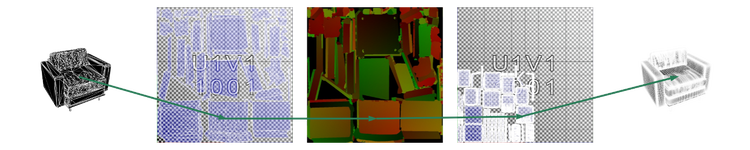
2. UVs. This map encodes the UV coordinate of the source model in the texture space of the optimized model. Using this map, we can determine where to look in a texture on the source model to transfer data to the optimized model.
Note that this map is a 16bpp map between 0-1, which is why we cannot use UVs for tiling materials. The material tiling from the assignment is applied in the texture rendering stage.
The UV remap texture allows us to find the UV coordinate on the high polygon model so that we can texture the optimized model using the original UVs:
3. Ambient occlusion for the source model, expressed in the UV space of the optimized model. Since the ambient occlusion is created using the details from the source model, it will provide occlusion for areas that might have been lost in the optimization, providing visual cues for lost geometry.
4. World space normals and tangents for the source model, in the UV space of the optimized model. Using these two maps we can capture the lost normals of the original model and transfer tangent space normal maps applied on the source model to world space for further processing.
5. World space normals and tangents for the optimized model. Using these maps we can transfer normals from the source model to a tangent space normal map for the optimized model, capturing both the source mesh normals and tangent space normal maps applied to it.
Texture rendering for the optimized model

This stage is a multi-stage process for transferring all the source material maps from the source model using the Substance Automation Toolkit. Since Substance graphs can’t involve geometry in processing, it uses the maps from the optimization stage to carry out the material transfer. The basic process uses the UV transfer map to select a position to sample, and picks the texture based on the material ID map.
In addition to the utility maps and the material maps, this stage takes the per-material scale and parameters related to mipmapping as inputs in order to control tiling and filtering.
For normal maps, the process is more intricate as it needs to not only sample the source texture space normal map, but involve the normals and tangents of the source and destination mesh to produce a tangent space normal map for the optimized model.
Note that this entire process can be delayed until after deployment. If the model is intended to be used in a material configuration scenario this process can be run using the Substance engine or Substance Automation Toolkit on the server to produce images on demand based on user input; this is significantly faster than running the full optimization pipeline.
This process is described in more detail in the section Substance Texture Processing in Depth.
Final scene assembly
The scene assembly uses Simplygon to load the optimized geometry and assign the new rendered maps to it, in order to save out a .glb file with materials.
Implementation of the job processing
The job processing is implemented as a Python script that understands and tracks all dependencies from the job, pipeline, material library, and so on.
The different build stages are separate Python files, and the pipeline applies the relevant parameters and input files to each stage. The content of the files and the parameters acts as a cache key, meaning that if they are all unchanged since the last run, it can reuse the old result rather than rebuilding it.
This means we are trying to apply a minimal set of parameters to each operation to avoid unnecessary reprocessing. As an example of how the data is pruned, only material instances referenced in the used material assignment files for an object are applied as parameters, to make sure only changes to material instances referenced by the model being processed will trigger a new build.
The processing script can be run in two ways:
- Build mode. In this mode it will identify all build operations and execute directly from Python. Note that this is not taking any caching into consideration, and will re-evaluate the entire pipeline every time it’s run.
- Dry run mode. In this mode, all the dependency resolution will be carried out, but instead of running the pipeline a list of build operations with the corresponding parameters and all input and output files specified will be generated.
The output of the dry run mode can be consumed by any build system that can then build the result in parallel in dependency order.
SCons script
The SCons script will execute the pipeline in dry run mode and use the output to specify all build tasks.
It uses the same build operations that the python script uses in build mode to execute the tasks. SCons will then identify what tasks are independent and try to run as many of them as possible in parallel, to ensure that the build runs quickly. It will also identify which targets are already up to date and leave them intact, so that only targets that have changed are built.
The code package
The code for the pipeline can be found on Community Assets | Substance 3D Assets. The package contains installation and running instructions, just in case you are interested in exploring the pipeline yourself.
Results
Output models
The comparison here is carried out comparing the reference models created with the optimized models.
- Sofa-a1-fabric
- Sofa-a2-fabric
- Sofa-a2-leather
- Sofa-b1-fabric
- Sofa-b1-leather
- Sofa-b2-fabirc
- sofa-b2-leather
This is not necessarily an apples-to-apples comparison since the texture density is significantly higher on the reference models, but it should give an estimation of the differences between the models. Also, note that the numbers might not be identical between your own runs and our runs since neither the optimization nor the texturing process are deterministic.
The sample pipelines
There are two pipelines in the process, LQ and HQ, for low quality and high quality respectively. LQ is aggressively optimized, and intended for something along the lines of a thumbnail-sized model. HQ is meant for a 600×600 pixel viewer.
Inspecting the models
|
Reference
|
Optimized
|
Polygon count
| Model | Polygon Count | HQ Polygon Count | LQ Polygon Count |
| Sofa A1 | 96 948 | 2 226 | 256 |
| Sofa A2 | 133 998 | 1 496 | 168 |
| Sofa B1 | 740 748 | 2 628 | 238 |
| Sofa B2 | 1 009 690 | 1 556 | 118 |
As you can see, the polygon count is orders of magnitude lower in the optimized models. Also note that the resulting polygon count for the denser source models is not significantly higher than the lower ones. This is a feature of optimizing towards a target screen size, rather than a percentage of the original polygon count. This is desirable, since different CAD packages, workflows, and designers might produce very different source data — but when it comes to visualizing the data we want a consistent package size for a specific viewing scenario.
File size
The file size is determined by the combination of polygons and textures, producing images.
| Model | Reference Size HQ | Optimized Size HQ | Optimized Size LQ |
| Sofa A1 Leather | 80 MB | 3.4 MB | 0.24 MB |
| Sofa A1 Fabric | 78 MB | 4.4 MB | 0.29 MB |
| Sofa A2 Leather | 80 MB | 3.3 MB | 0.22 MB |
| Sofa A2 Fabric | 82 MB | 4.1 MB | 0.26 MB |
| Sofa B1 Leather | 102 MB | 3.3 MB | 0.26 MB |
| Sofa B1 Fabric | 104 MB | 3.8 MB | 0.29 MB |
| Sofa B2 Leather | 112 MB | 3.4 MB | 0.23 MB |
| Sofa B2 Fabric | 113 MB | 4.0 MB | 0.27 MB |
As you can see there is a dramatic difference in download size between the original and the optimized models. This comes at a cost, and these models are really not intended to be inspected closely, but they represent meaningful viewing scenarios where the additional cost of the higher quality models is excessive. In all fairness, the reference models are not optimized for size and there is a lot that can be done to make them smaller if a higher quality level is needed.
GPU draw calls
The optimized models have the textures for all materials merged into a single atlas meaning they can be rendered as a single draw call.
The source models used 3 different material groups; most renderers would therefore submit 3 draw calls for every model.
Overdraw
The optimized models have their internal geometry cleaned out, meaning there is almost no unnecessary overdraw.
Testing models in Adobe Aero

As an example of a real-life situation where optimizing content makes a difference I created Adobe Aero projects with all 8 models. One project used the reference models, and one used the optimized models.
The projects were created with Adobe Aero beta desktop, and was then opened on an iPhone on a fast LTE connection to compare the difference in in time to sync the the models to the device, so that they were available to use.
The first issue was that the two Sofa B1 and Sofa B2 were considered too heavy to be loaded in the project using reference models, so they didn’t show up in the Aero iPhone application at all. The source data for them has significantly higher polygon count and they hit a cap for how heavy models can be in order to ensure that the application runs well.
The time to open and sync the projects:
| Model Type | Opening Time |
| Reference | 4 min 50 sec |
| Optimized | 32 sec |
Execution time
The optimization pipeline was run on a 6 Core 2.6GHz Intel Core-7 CPU. This produces reference and optimized models for 2 material configurations for 4 different models.
| Execution Mode | Execution Time |
| Python native | 14 min 25 sec |
| SCons parallel 6 cores | 5 min 50 sec |
As you can see, the process is about twice as fast when running through SCons. This might be a bit surprising given that it can use 6 cores, but the reality is that many processes run are multithreaded themselves — meaning you don’t get a linear scaling by adding cores.
The real benefit of SCons is seen when making a minimal change to the assets and doing incremental builds, which has a turnaround time counted in seconds, so long as the operation carried out is not time-consuming, and that it doesn’t trigger a lot of changes downstream.
Execution time in context
The first point to consider when looking at these numbers is to compare them to having a human manually carry out this work. Producing a low-resolution model can be a time-consuming task on its own, taking perhaps hours of work. It’s also a task that needs to be redone to some extent every time a source model changes. From a time consumption point of view, automating this process is a major win.
The other thing to keep in mind is that this process can be hidden from the user and run on a separate machine. This means it can be run in the background on a build machine, ensuring that this process doesn’t slow down users, or occupy workstations unnecessarily.
Reference

Optimized

Reference
Optimized
Substance Texture Processing in Depth
The texture processing was built in Substance Designer and contains a few core components:
1. Sampling from a texture based on the UV remap texture
2. Selecting texels in an image based on the input material ID
3. Transforming a normal from one tangent space to another

Materials are selected using the MaterialID map; the UV from which a sample will be drawn is selected from the UV remap texture. Note that the 3D model is not needed in this process; this happens completely in texture space. This process is carried out for all PBR maps, and the normal maps receive an additional tangent space transformation afterwards.
Doing these three things means we pick materials from the source model and transfer them to a shared atlas on the optimized model.
In the pipeline, the first and second of the points listed above are implemented in one process and run individually for each PBR map (basecolor, roughness, metallic and normal). Point 3 is a separate stage which is only run only on the normal map in order to make sure the normal map is compatible with the tangent space of the optimized model.
The graphs are hardwired for up to 22 input textures at this point; running the process on an object with more than 22 materials will fail.
UV sampling
In this stage all the maps for a single PBR channel are fed in together, along with the UV remap texture. For each texel the UV from the UV remap texture is used to select which point in the map is sampled. Note that before sampling, the UV is scaled by the provided scale for the texture ID in order to ensure the texture tiles correctly on the output texture.
Also note that the UV remap texture is rendered with 16 bits per pixel to encode enough precision to avoid artifacts.
Mipmapping
An issue that shows up in this process is that the initial texture, from which the rendering is carried out, is of higher resolution than the outputted render. This can lead to aliasing artifacts such as noise and moiré.
In order to mitigate this we use mipmapping, which is the process of pre-filtering the source texture to lower resolutions, and sampling from a texture where the scale of the source texture and the destination texture is roughly the same.
To determine what scale to sample at, we use neighboring pixels in the UV remap texture to estimate the area covered for the specific texture sample. Then we blend between the two closest textures to get smooth transitions in areas where the mipmap level is not constant.
We also cull outlier values in UV seams to avoid artifacts; the output looks significantly better after this step.
The other benefit of using mipmapping is that the output is less noisy; images therefore compress significantly better, reducing download size. Note that traditional mipmapping is not the best filter for normal maps: a better way would be to use something like LEAN mapping where lost normal detail is moved to the roughness map. This was not implemented in this pipeline, however.
Compare textures with and without mipmapping:
|
Without mipmapping
|
With mipmapping
|
Material masking
When the source textures for a material channel have been remapped through the UV set of the high polygon mesh, the next step is to mask them so that they only apply to the areas where this material is assigned. This process uses the material ID map to create a mask for each material, and only retains pixels that are not masked out. These masks are optionally lightly blurred and normalized globally in order to get softer edges between materials. It also supports applying FXAA on the output textures, making the seams between different materials less visible. This process is carried out for each input texture with the corresponding map, and merges the results into a single map.
In the .sbs file the graphs called MultiMapBlend/MultiMapBlend_Grayscale do the masking. The graphs called MultiMapBlend_uv/MultiMapBlend_uv_Grayscale implement the operation, also incorporating the mipmapped UV remap from the UV Sampling stage. MultiMapBlend_uv/MultiMapBlend_uv_Grayscale are the entry points for the for sbsrender at the texture rendering stage.
Transforming normal maps
The normal map stage does two main things.
1. It transforms the normals from the high resolution model to the tangent space of the optimized model;
2. It applies tangent space normals from the .sbsar material to the model.
This transformation is carried out using the world space tangent and normal maps for the source and destination model generated in the optimization stage. The tangent space normal is transformed to world space using the tangent frame created by the maps from the high-resolution model’s normal and tangent map.
This new normal is then transformed into the tangent space of the low-resolution model using the normal and tangent maps of the low-resolution model.
This graph operates at 16bpp to make sure there is enough precision to avoid artifacts in the generated normal map. The user can control whether to output a 16bpp or 8bpp normal map. For objects with surfaces that have very low roughness, a 16bpp normal map might be needed to avoid banding artifacts. This increases the download size significantly, however, and is not recommended unless there are visible issues.
The process also allows the application of dithering on the output, which will reduce these artifacts when going to 8bpp; thish makes the artifacts harder to see but also introduces visible noise in these glossy areas.
Compare low roughness with 8bpp, dithered 8bpp, and 16bpp normal maps:

|

|

|
The implementation for tangent space transformations are in the file normal_space_converter.sbs.
Without mipmapping

With mipmapping

Without mipmapping
With mipmapping
Future Work
The sample pipeline is quite limited but it should give an overview of how a pipeline can make you work more efficiently with content optimization and deployment. Here are a number of improvements that could be added to make it scale and work better.
Texture compression
The textures in the models are .png files. There are ways of getting smaller files:
– Implement pngquant in the pipeline. The pngquant tool is a lossy .png compressor that can cut the sizes of .png quite dramatically with little quality loss, without requiring any special extensions in the viewer.
– Work is currently being carried out on GPU hardware texture compression as an extension to .gltf/.glb. Implementing this should allow for smaller files and faster load times.
Better Substance parameter support
The current material instancing format is limited and works for scalars, vectors, booleans, and so on. But if trying to use enum strings or more advanced parameter types it might misbehave.
More optimization options/strategies
The optimization exposes only a single algorithm with a minimal set of parameters. There might be good reasons to introduce more options and algorithms to target a wider range of target types.
Mesh compression
There is support for draco mesh compression in .gltf. It was evaluated for the process here but since most of the data consists of textures it didn’t have a significant impact on the file sizes.
Mesh sharing
The meshes for different material variations are identical in this pipeline A setup where the result is written as .gltf files (as opposed to .glb) could share the mesh data between different files to use less space on disk.
Decompose operations
Both the optimization and the texture rendering are operations implemented with calls to multiple processes. If they were broken down into smaller operations SCons would be able to find more parallelism in them and allow more fine-grained dependency tracking.
Normal map minification
The normal maps are filtered using mipmaps. This is not the right filter for normal maps and to improve quality, it’s possible to move normal detail that is too fine to show into the roughness of the object. This is described in the paper on LEAN mapping.
Asset references
The current asset references (.sbsar files, meshes, etc.) are local file paths. This setup works well on a single machine, but if you want to scale your pipeline to multiple machines you would want to reference files with some kind of URI scheme to make sure they can be referenced in a structured way across machines.
Settings overrides
In real-world optimization pipelines, there will be assets that don’t come out right or that require special settings. A convenient way to do repeatable fixes per asset such as texture resolution, optimization quality etc. is using settings overrides. This would allow the user to do per-pipeline, per-asset overrides to properties; these would override the default values from the pipeline.
Scaling bigger
For large-scale deployments, a build process like this can be distributed across multiple machines. This is not possible with SCons, however, and would require a using a different build system.
Closing words
I hope this article provided a starting point for how to think about automated workflows with 3D graphics and some helpful information on how to produce 3D models that are fast to render.
Acknowledgements
Thanks to the following people, who provided invaluable help during the work on this article:
Luc Chamerlat, for producing meshes and materials to demonstrate the pipeline on.
Justin Patton, for producing materials, testing the pipeline on various meshes and providing feedback on how to improve it.
Nicolas Wirrmann, for providing utility Substance graphs for features such as dithering and normal transformation.
The Simplygon team, for adding features needed for the pipeline and quickly responding to any bug reports and questions when I ran into problems.
