Meet Manuel Arroyo Arrebola
Manuel Arroyo Arrebola is a freelance character artist and 3D generalist currently based in Alicante, Spain. His professional credits to date include work on projects such as Apex Legends, Sky, and Call of Duty.
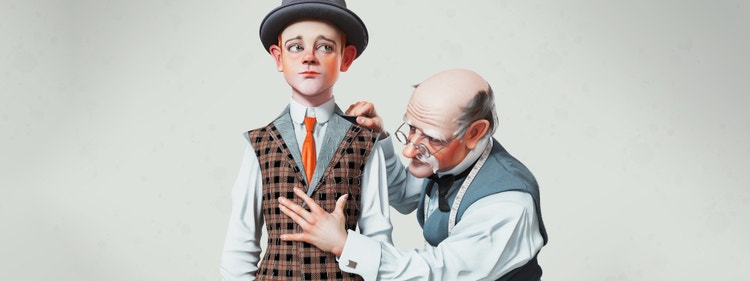
Character Artist Manuel Arroyo Arrebola first blew away the Substance 3D team with works such as "Doctor and Doll", which showed remarkable skill with both the Substance toolset and Marvelous Designer, as well as a knack for capturing the spirit of Rockwell-esque early twenty-first century art. When we began searching for an artist who could test out and showcase the abilities of the Substance in Marvelous Designer plugin, Manuel was a natural choice.
My beginnings in the world of 3D go back to a very specific moment in my childhood. When I was 3 years old, living in Torredelcampo in the south of Spain, my parents gave me a VHS tape of the film Toy Story. It was the first time that I’d seen a 3D animation film and I instantly fell in love with it. I watched it over and over again, rewinding it back to my favorite scenes and wondering how such a movie could be made.
This persistent sense of wonder was one element that caused me, many years later, to sign up for a ZBrush summer course. I enjoyed it so much that I knew that I wanted to dedicate my life to 3D, and to spend as much time as possible learning to improve my skills.
With any illustration or concept art, I first notice its ability to transmit something, and evoke feelings with just one look. I search for characters that convey their own emotions. And I look for overall composition, as well.
The first time I saw a Joseph Christian Leyendecker illustration I knew that I had to represent his work in 3D. I began exploring the work of both Leyendecker and Norman Rockwell, whose work was massively influenced by Leyendecker, and I fell in love with both artists. I loved the way they represent everyday life in their painting, as well as their use of art as a protest against the social injustices of that time. I even loved their own personal stories.
For this particular project, I ultimately settled on a 3D representation of one of Leyendecker’s works, one of his iconic covers of The Saturday Evening Post. I was conscious that I’d need to use Marvelous Designer, so I set about learning how this software could help me to create a piece of artwork that was a suitable homage to Leyendecker’s image. And I was also already considering how the tailor in the image might provide a little link to the world of sewing, both in real life and in 3D.
JC Leyendecker’s original magazine cover, published in April 1916.
The piece consists of two main characters, connected by the tailor’s arm. The challenging part when it comes to translating the illustration into 3D it is to provide the continuity to the scene between the connection of the two characters, and also to credibly represent in 3D some of the characteristic elements of Leyendecker’s work, such as the wrinkles in the clothing or his characters’ expressiveness.
The perspective in this scene presents some difficulty as well. Here, Leyendecker fakes some elements of the perspective in order to get that final look, such as the perspective of the tailor’s right arm, behind the boy, or some of the anatomical proportions. When you’re viewing a scene in 3D, potentially from a range of different angles, you can’t really get away with this sort of visual sleight of hand; any visual trickery is immediately much more obvious. And so it’s here that you need to find a balance between a completely faithful adaptation of the original work, and recognizing the parts you have to sacrifice to remain as true as possible to its overall concept.
When I start the modeling phase, first I carry out a general analysis of the illustration, to identify which element of the picture presents the easiest starting point. In this case I choose to start with the boy; his pose is more static, and there’s less of a time investment in adapting and modifying this.
I always start characters the same way: in ZBrush, I start from a sphere and then I continue creating a general form. When I have a simple blocking of the proportions and the anatomy, I keep adding details to the face, and then to the body. I constantly check the upper left window in the ZBrush UI, which shows the negative version of the model, the alpha. That’s a quick way of keeping an eye on the silhouette of the sculpt, allowing me to compare it with the original illustration. When the sculpt is done, and detailed, I start placing subtools, to give me an idea of the project’s final aspect.
|
|
Once I’ve finished this stage in ZBrush, I transfer all the models into Maya, where I start working on the topology and UVs, making sure the model is correctly laid out across multiple UV tiles (UDIMs). During this step I also model the rest of the props that give form to the scene, like the boy’s hat or the tailor’s glasses.
Then, with these changes made in Maya, I bring everything back to ZBrush and project this onto the previous ZBrush version of the model; this has the effect of adding in all the necessary details.
Now it’s time to start clothing our characters. Before I start creating clothes in Marvelous Designer, I carry out an exhaustive search for the patterns in various image search engines. Finding exact patterns is quite complicated, because they’re really scarce, and because they tend to vary a lot depending on the age or physiognomy of the character. For instance, children typically have shorter arms and legs than adults, so the patterns on their clothes tend to be correspondingly smaller. It’s tricky to find the exact pattern you need.
Once I’ve chosen the most neutral and most appropriate pattern for the characters, I upload it into Marvelous Designer as an avatar, and then draw on top of these patterns over the avatar in the 2D windows. It’s frequently necessary to have to adapt these patterns to the avatar shape of the body, and it almost always happens when the character has cartoon proportions.
I modify the post-processing and texture configuration to adapt it to my workflow with the ACES color profile. ACES allows me to present a visual aspect that’s closer to the range of perception of color of the human eye. I highly recommend the ACES color profile, because it can greatly improve your projects.
First of all I open the Display Settings menu and modify the color profile, by adding this specific file, ACES LUT for Substance Painter.
Then, in the Post-Effects tab, I activate Tone Mapping and change the Function to Log. As a last step I modify the Channels of the textures in Texture Set Settings with this configuration:
After this, I can visualize the Substance Painter file in the ACES color profile, export the textures, and test each character’s shader.
The characters’ hair was challenging for me because it was a new area for me; I learned how to create hair on this project, which I really enjoyed. I found that it’s easier to recreate uniform and relatively compact hair, or this kind of hairstyle, than it is to recreate messy or curly hair, or a complex hairstyle such as a braid.
Creating the characters’ hair involves a process of adding guides to create hair strands of different lengths, and to provide the direction of each character’s hairline or hairstyle. Doing this again and again, I’m able to gradually fill in each character’s entire head, readjusting parts if necessary. Of the two characters, the tailor’s hairstyle is more complicated, due to the very characteristic shapes of his locks of hair. I have to reproduce these perfectly in order to stay true to the original concept.
Rendering
With the lighting setup ready, it’s time to render the whole project. I carry out the rendering process with Arnold; this is the engine I’ve used from the moment I started learning and working in the 3D field. Arnold provides versatility and an excellent finish; that’s why it’s always been my main choice. I usually work a lot with Arnold Render View, which allows you to rapidly preview the final result of the render. When configuring the sampling, I always adapt it depending on the project I am working with. I use this configuration:
And finally, once we have all the shots, it is time to add the final post-processing touches in Photoshop. Here, I play with the following different elements of Photoshop:
At last, the render has gone through the final process and is ready to be exported. I export it in PNG at highest quality.
I encountered various problems in interpreting the illustration. The, first and most complicated, has been the perspective of the tailor’s right arm. This arm goes from the lapel of the vest to his own hand, and it is completely distorted. It’s been really difficult to adapt this arm to make it believable in the 3D model.
Another problem was the expressions of the characters. In the original image, the child has a neutral pose, and his frame of mind is difficult to identify; trying, therefore, to imbue him with a particular feeling or emotion was a complicated task. At the same time, the hands of the tailor that are posing and holding the vest, have their own rather complex form. Making that form credible and faithful to the concept has been quite difficult.
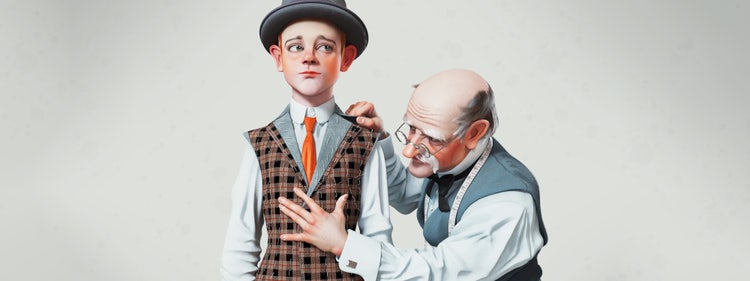
A side-by-side comparison, Leyendecker’s original image (left) and Manuel’s 3D adaptation (right).
As I mentioned above, one of the great challenges of this project was the wrinkles, specifically the types of wrinkles that Leyendecker has illustrated on the tailor’s left arm. And so the complication here was not only creating the wrinkles, but when generating lighting also taking into account that the projection of the wrinkles has to be the same as or similar to the original work.
Finally, getting the same camera shot as the original concept was really tricky. The shot with the boy is more low-angle, while the perspective of the tailor is much straighter – and so this is only really possible if the tailor’s torso were much more angled. I had to play around with the field of view quite a bit to get that look of an illustration that’s present in the original.
These points have made this illustration a real challenge, as well as a beautiful exercise in self-improvement and adaptation.
Trying to capture that style, and that quality that Leyendecker had as an artist, has been complex; I think that my overall representation of this wonderful artist’s work has proven a worthy homage. I couldn’t be happier or more satisfied with the final result.
Manuel Arroyo Arrebola is a freelance character artist and 3D generalist currently based in Alicante, Spain. His professional credits to date include work on projects such as Apex Legends, Sky, and Call of Duty.