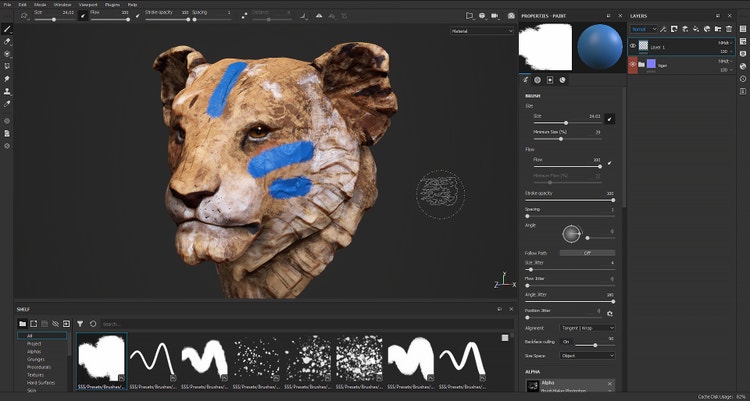
Improved Painting and Automatic UVs: We Love the Painter in You!
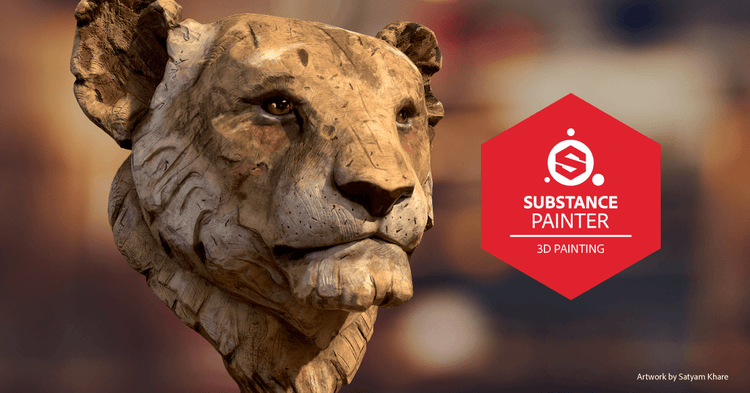
Artwork by Satyam Khare
(Artwork inspired by the original work of Jürgen Lingl-Rebetez)
This holiday season, Substance Painter is getting game-changing updates on many fronts. From enhanced hand-painting to Automatic UV Unwrapping, a lot of our long-term projects are finally coming to fruition right before the holidays.
We also have great news concerning UDIMs: a beta is on the way! But first, let’s begin with what’s in Substance Painter today.
style
grid width 8, L spacing
background
#e8e8e8
Your painting experience – improved!
It’s been a long time coming! We’re excited to give you a revamped Painter brush engine – with a little help from the Photoshop team.
Photoshop brushes are now natively supported in Substance Painter
Time to dust off your ABR brush libraries and load them up in the shelf!
If you don’t have any, don’t worry: Adobe has thousands of pre-made brushes available for Photoshop subscribers. Give them a try!
You don’t have a subscription but you’re still itching to get your hands on the brushes? This new version of Substance Painter ships around 100 ABR brush presets.
ABR support is in its infancy in Substance Painter. We’re aiming for quality, as always: please help us make it better by giving us feedback.
New possibilities with expanded brush settings
To allow you to make the most of the ABR brush, we’ve developed our brush engine further. These expanded settings will increase with time; this first iteration has a large batch of settings such as Minimum Size, Minimum Flow, Roundness, and more.
Even though we don’t support every single ABR format setting today, we will keep adding the missing pieces over time, making the brush engine more versatile with each new release.
Introducing a new opacity blending mode
You’ve been hoping for better opacity accumulation when you’re hand-painting an asset. Today, we deliver!
With the new opacity blending setting, choose between the legacy opacity blending and a new Max blending mode. This means you can easily mimic what you would expect from painting in Photoshop.
A leap forward for tablet users
Your painting experience is, in general, much better. One of the improvements concerns smoother strokes: when working with a pen or stylus, the pressure sensitivity has a smoother curve.
Improved brush preview
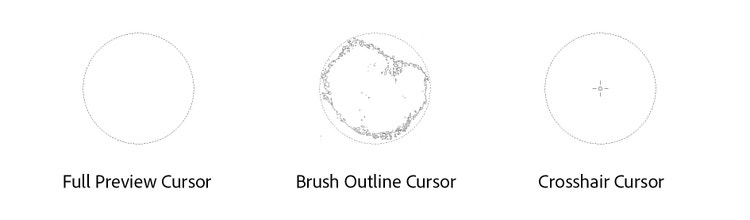
Sometimes the alpha of a brush was in the way when trying to paint intricate details or precise strokes. You can now opt for a light brush preview, clearing the view at the center of the stamp. Here are your cursor preview options:
What If You Didn’t Need to Worry About UVs?
We’ve been wanting to simplify UV unwrapping for a while now. It’s tedious, it adds no artistic value to the asset, and it can take what seems like forever.
Our efforts began as a small – but intense – project in 2016. Little by little, the tool started to take shape, until we were finally ready to unveil it for the very first time at SIGGRAPH in 2019. Today, with no small amount of pride, we can present our UV unwrapping tool inside Substance Painter!
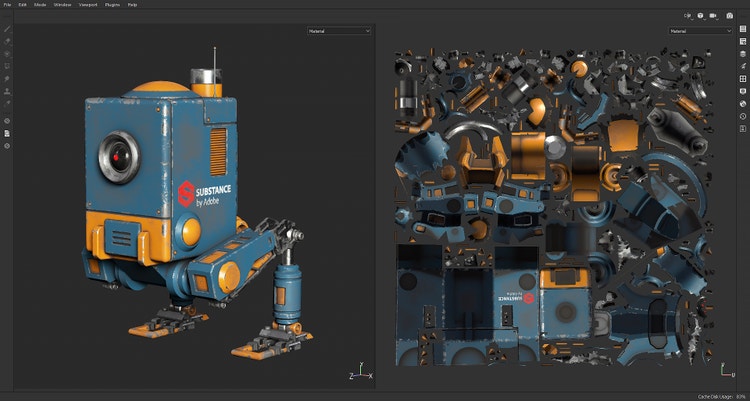
Enter Automatic UV Unwrapping, available in beta in this new update. This tool automatically seams, unwraps and packs UVs for you if you import a 3D model that has no UV coordinates. See it in action:
We’re honestly super-excited to get it into your hands! Try it out with every model you have, and don’t forget to share your feedback. With your help, the feature is sure to get even better!
A long-requested feature was the ability to have an alpha, pattern or material follow smoothly along curves and strokes. The Paint Roller is here to answer your needs for stitches, trims, folds, pipes and all other sorts of curvy apparatus.
Thank you Zinan Liu, who graciously allowed us to tweak and ship his ‘Roll Brush’!
New filters and dynamic brushes
Our team of artists has also been hard at work on new fun toys to play with. Here’s what you can find in your shelf with this new release.
Transform any photo into an oil painting
The MatFx Oil Painting filter allows you to apply various classic painting styles to your textures. From paint buildup to brush strokes, with cracks in the dried oil paint.
This filter is inspired by a creation by Substance Insanity Award winner Emrecan Cubukcu. Thank you!
And more content!
Explore the new Watercolor filter, Comic Effect filter, Charcoal dynamic brush, and more!
UX improvements: slider consistency
Sliders in Substance Painter now support the full range of features you’ve come to enjoy in Substance Designer, such as custom stepping, improved precision and soft range.
Need more details? Read the full Substance Painter release changelog here.
style
grid width 8, L spacing
Paint across UV tiles: it’s coming!
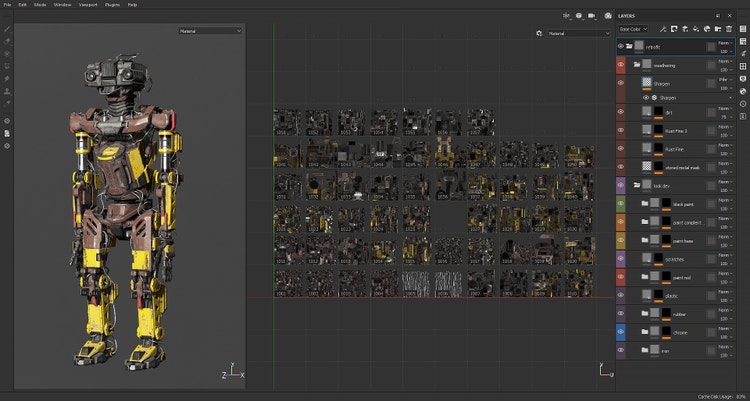
We’ve been saying it was coming “soon” for a while now, but our work on UDIM – or UV Tiles as we call them – has seriously advanced! You can now bake, paint, apply Smart Materials or Effects and even throw particles across multiple UVs.
A new Tile Mask has been introduced to keep performance to a maximum at all times and facilitate working on very large assets. Several UI components related to these UV Tiles are still in progress, but we were eager to share it with you (here with a cool robot made by Jason Huang)
As the feature is still in its infancy, we’ve decided to offer it in a separate beta build to the 500 first applicants. Simply fill out this form and you will see a new ‘Substance Painter Beta’ product appear on your account’s licenses page, ready to download. Spots will initially be limited so hurry up if you want to give UDIMs a spin!
This release’s artwork is a creation by Satyam Khare. Find the rest of his art here.
Share this page
style
grid width 8, M spacing
ContentType
Article
CardImage
CardImageAltText
Improved Painting and Automatic UVs - Adobe Substance 3D
Details
Dec. 17 2019
Title
Improved Painting and Automatic UVs - Adobe Substance 3D
Description
Substance Painter is getting game-changing updates on many fronts. From enhanced hand-painting to Automatic UV Unwrapping.
Cookie Settings
General information
You can control how Adobe websites use cookies and similar technologies by making choices below. But note that if you disable cookies and similar technologies entirely, Adobe websites may not function properly.
Cookies are small text files stored by your web browser when you use websites. There are also other technologies that can be used for similar purposes like HTML5 Local Storage and local shared objects, web beacons, and embedded scripts. These technologies help us do things like remembering you and your preferences when you return to our sites, measure how you use the website, conduct market research, and gather information about the ads you see and interact with.
You can make choices in the menu below about what cookies and other technologies you want us to use on Adobe sites when you visit them from this browser. You can always change those choices later by clicking on the Cookie Preferences link at the bottom of the page.
If enabled:
We can improve your experience by tailoring the site and the content to things we think might be of interest
We can better keep track of your preferences — like what language you prefer to use
We will better understand your likely interests so we can provide you more relevant Adobe ads and content on non-Adobe websites and in non-Adobe apps
It will help us improve the performance of our website and those of our partners who use the Adobe Experience Cloud
If disabled:
We won’t be able to remember you from session to session so the experience may not be tailored to your interests
You’ll still have access to the content of the site but certain features that depend on cookies may not function
You’ll still see ads, they just may not be as relevant to you
General information
You can control how Adobe websites use cookies and similar technologies by making choices below. But note that if you disable cookies and similar technologies entirely, Adobe websites may not function properly.
Cookies are small text files stored by your web browser when you use websites. There are also other technologies that can be used for similar purposes like HTML5 Local Storage, web beacons, and embedded scripts. These technologies help us do things like remembering you and your preferences when you return to our sites, measure how you use the website, conduct market research, and gather information about the ads you see and interact with.
You can make choices in the menu below about what cookies and other technologies you want us to use on Adobe sites when you visit them from this browser. You can always change those choices later by clicking on the Cookie Preferences link at the bottom of the page.
If enabled:
We can improve your experience by tailoring the site and the content to things we think might be of interest
We can better keep track of your preferences — like what language you prefer to use
We will better understand your likely interests so we can provide you more relevant Adobe ads and content on non-Adobe websites and in non-Adobe apps
It will help us improve the performance of our website and those of our partners who use the Adobe Experience Cloud
If disabled:
We won’t be able to remember you from session to session so the experience may not be tailored to your interests
We’ll still count your use of our site and services
You’ll still have access to the content of the site but certain features that depend on cookies may not function
You’ll still see ads, they just may not be as relevant to you
Operate the site and core servicesOperate site and measure engagement
Always active
These cookies are required, and they are used to enable the site and related services core functionality. Without them the site could not operate, so they cannot be disabled.
These cookies enable the site and related services’ core functionality and collect statistics about user engagement, such as counting active use to help us understand trends. These cookies cannot be disabled.
Measure performance
These cookies are used to analyze site usage to measure and improve performance. Without them Adobe cannot know what content is most valued and how often unique visitors return to the site, making it hard to improve information we offer to you.
These cookies are used to analyze site usage to measure and improve performance. Without them Adobe cannot know what content is most valued, making it hard to improve information we offer to you.
Extend functionality
These cookies are used to enhance the functionality of Adobe sites such as remembering your settings and preferences to deliver a personalized experience; for example, your username, your repeated visits, preferred language, your country, or any other saved preference.
Personalize advertising
These cookies are used to enable Adobe and our partners to serve ads more relevant to your interests. Without them you will still see ads, but they might not be as relevant to you.