|
Selecting the connection type
Note: This information is intended for UltraDev 1 users.
Open the Define Connection dialog box by choosing Connections from the Modify menu, then clicking New in the Connections dialog box. Clicking the Type pop-up menu presents you with the following four choices:
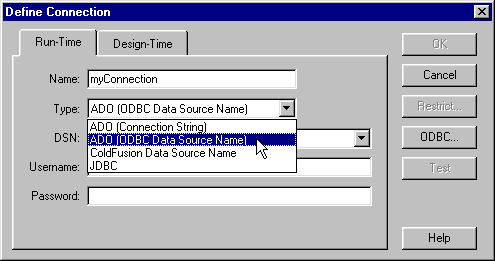
Here are guidelines for selecting a connection type. For a run-time connection, your choice depends on the application you're developing and on whether or not you're using a DSN.
Run-time connection types
| Application |
DSN? |
Run-time connection type |
| ASP |
Yes |
ADO (ODBC Data Source Name) |
| ASP |
No |
ADO (Connection String) |
| JSP |
n/a |
JDBC |
| ColdFusion |
Yes |
ColdFusion Data Source Name |
For a design-time (UltraDev) connection, your choice depends on the driver you want to use with the database and on whether or not you're using a DSN.
Design-time connection types
| Driver |
DSN |
Design-time connection type |
| ODBC |
Yes |
ADO (ODBC Data Source Name) |
| ODBC |
No |
ADO (Connection String) |
| OLE-DB |
n/a |
ADO (Connection String) |
| JSP |
n/a |
JDBC |
| 




