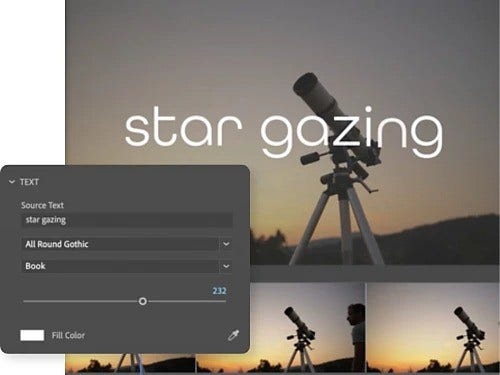
Animated titles and graphics are moving text or images that appear on top of video footage. They provide the audience with key information about what they’re watching and include elements like title sequences, opening credits, end credits or subtitles. Sometimes, they’re essential to the content, like headlines scrolling beneath a news anchor, while other times, they highlight key information for the viewer or simply help set the mood.
style
grid width 8
Intuitively add titles to your videos.
Just click, type and drag. Then, easily change the appearance of text and shapes using fills, strokes, backgrounds, shadows and masks. Save your favourite styles as presets to use them again and again.
Create compelling motion graphics.
Bring titles and text to life with dynamic motion graphics and precise keyframing. Use per-character text gradients and a variety of styling tools, allowing for intricate customisations for visual impact.
Arrange graphics with precision.
Precisely align and evenly distribute titles, graphics and shapes across your video frame. Design your graphics to adapt responsively to changes in the video frame aspect ratio or to the position or scale properties of another graphic layer.
Generate, style and export captions.
Automatically generate transcripts and add captions to your videos, both available in 18 languages with caption translation. You can edit, stylise and export captions and subtitles with ease, all while saving style presets for consistency across all your projects.
Use powerful Motion Graphics Templates.
Get the power of After Effects title and motion graphic design packaged up as templates with easy-to-use controls designed to be customised in Premiere. Leverage the power of data-driven Motion Graphics Templates to quickly and accurately customise bar charts, line graphs and more.
Import imagery from other Creative Cloud apps.
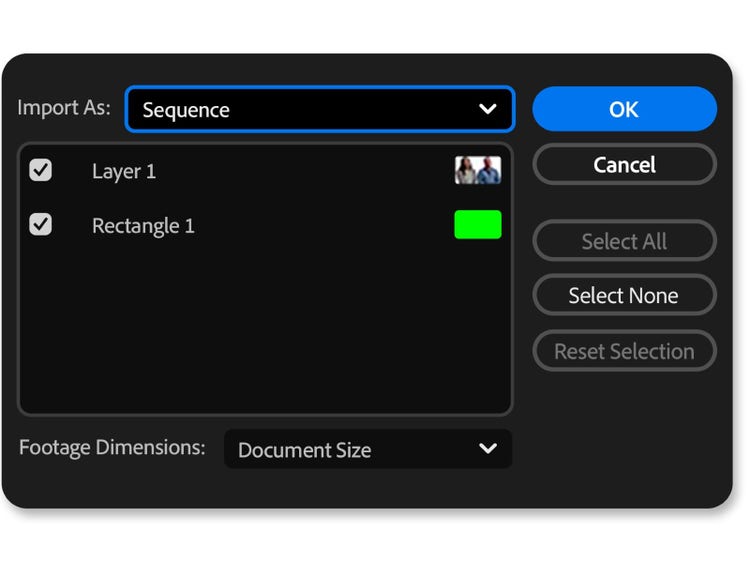
Easily incorporate complex graphics, enhanced illustrations and detailed image sequences into your video projects from Photoshop, Illustrator, Firefly or other Creative Cloud apps.
style
Container, L spacing, Static links
How to customise a motion graphics template (MOGRT).
Follow these steps in Premiere to make any MOGRT your own.
Open a new project in Premiere.
Open the Essential Graphics panel and pick a MOGRT template.
Drag and drop your selected template onto your video timeline.
Click the graphic to open adjustment icons or click the Edit button in the Essential Graphics panel.
Replace each placeholder image or graphic in the MOGRT with your own content from Creative Cloud Libraries.
style
grid width 8, s spacing, light, Static Links
background
#f5f5f5
Questions? We have answers.
Motion graphics is the process of creating a series of images, text or other elements that form a coherent whole, while motion design is the creation of three-dimensional objects used in motion graphics.
Yes, you can use .mogrt files without After Effects. You can create graphics in Premiere using the Essential Graphics panel and then export them as .mogrt files for sharing or reuse.
To open a Motion Graphics template in After Effects, select a composition from your project and add it to the Essential Graphics panel. To open the current composition, select Composition > Open in Essential Graphics.
Regularly at £66.49/moAlternatively at £32.66/moincl. VAT. Annual, billed monthly
Join a global community of over 7 million Creative Cloud Pro subscribers. Save 50% for the first 3 months on the full version of Adobe Premiere and 20+ apps plus Adobe Firefly creative AI. Pay £32.66/moincl. VAT for the first 3 months and £66.49/moincl. VAT after that. New subscribers only. See terms | See what’s included
Speed up your video workflows with Adobe Firefly generative AI.
Visualise shots and effects ahead of the shoot, generate assets missed in production to complement your edit and eliminate tedious tasks to stay focused on your creative ideas.
You can control how Adobe websites use cookies and similar technologies by making choices below. But note that if you disable cookies and similar technologies entirely, Adobe websites may not function properly.
Cookies are small text files stored by your web browser when you use websites. There are also other technologies that can be used for similar purposes like HTML5 Local Storage and local shared objects, web beacons, and embedded scripts. These technologies help us do things like remembering you and your preferences when you return to our sites, measure how you use the website, conduct market research, and gather information about the ads you see and interact with.
You can make choices in the menu below about what cookies and other technologies you want us to use on Adobe sites when you visit them from this browser. You can always change those choices later by clicking on the Cookie Preferences link at the bottom of the page.
If enabled:
We can improve your experience by tailoring the site and the content to things we think might be of interest
We can better keep track of your preferences — like what language you prefer to use
We will better understand your likely interests so we can provide you more relevant Adobe ads and content on non-Adobe websites and in non-Adobe apps
It will help us improve the performance of our website and those of our partners who use the Adobe Experience Cloud
If disabled:
We won’t be able to remember you from session to session so the experience may not be tailored to your interests
You’ll still have access to the content of the site but certain features that depend on cookies may not function
You’ll still see ads, they just may not be as relevant to you
General information
You can control how Adobe websites use cookies and similar technologies by making choices below. But note that if you disable cookies and similar technologies entirely, Adobe websites may not function properly.
Cookies are small text files stored by your web browser when you use websites. There are also other technologies that can be used for similar purposes like HTML5 Local Storage, web beacons, and embedded scripts. These technologies help us do things like remembering you and your preferences when you return to our sites, measure how you use the website, conduct market research, and gather information about the ads you see and interact with.
You can make choices in the menu below about what cookies and other technologies you want us to use on Adobe sites when you visit them from this browser. You can always change those choices later by clicking on the Cookie Preferences link at the bottom of the page.
If enabled:
We can improve your experience by tailoring the site and the content to things we think might be of interest
We can better keep track of your preferences — like what language you prefer to use
We will better understand your likely interests so we can provide you more relevant Adobe ads and content on non-Adobe websites and in non-Adobe apps
It will help us improve the performance of our website and those of our partners who use the Adobe Experience Cloud
If disabled:
We won’t be able to remember you from session to session so the experience may not be tailored to your interests
We’ll still count your use of our site and services
You’ll still have access to the content of the site but certain features that depend on cookies may not function
You’ll still see ads, they just may not be as relevant to you
Operate the site and core servicesOperate site and measure engagement
Always active
These cookies are required, and they are used to enable the site and related services core functionality. Without them the site could not operate, so they cannot be disabled.
These cookies enable the site and related services’ core functionality and collect statistics about user engagement, such as counting active use to help us understand trends. These cookies cannot be disabled.
Measure performance
These cookies are used to analyze site usage to measure and improve performance. Without them Adobe cannot know what content is most valued and how often unique visitors return to the site, making it hard to improve information we offer to you.
These cookies are used to analyze site usage to measure and improve performance. Without them Adobe cannot know what content is most valued, making it hard to improve information we offer to you.
Extend functionality
These cookies are used to enhance the functionality of Adobe sites such as remembering your settings and preferences to deliver a personalized experience; for example, your username, your repeated visits, preferred language, your country, or any other saved preference.
Personalize advertising
These cookies are used to enable Adobe and our partners to serve ads more relevant to your interests. Without them you will still see ads, but they might not be as relevant to you.