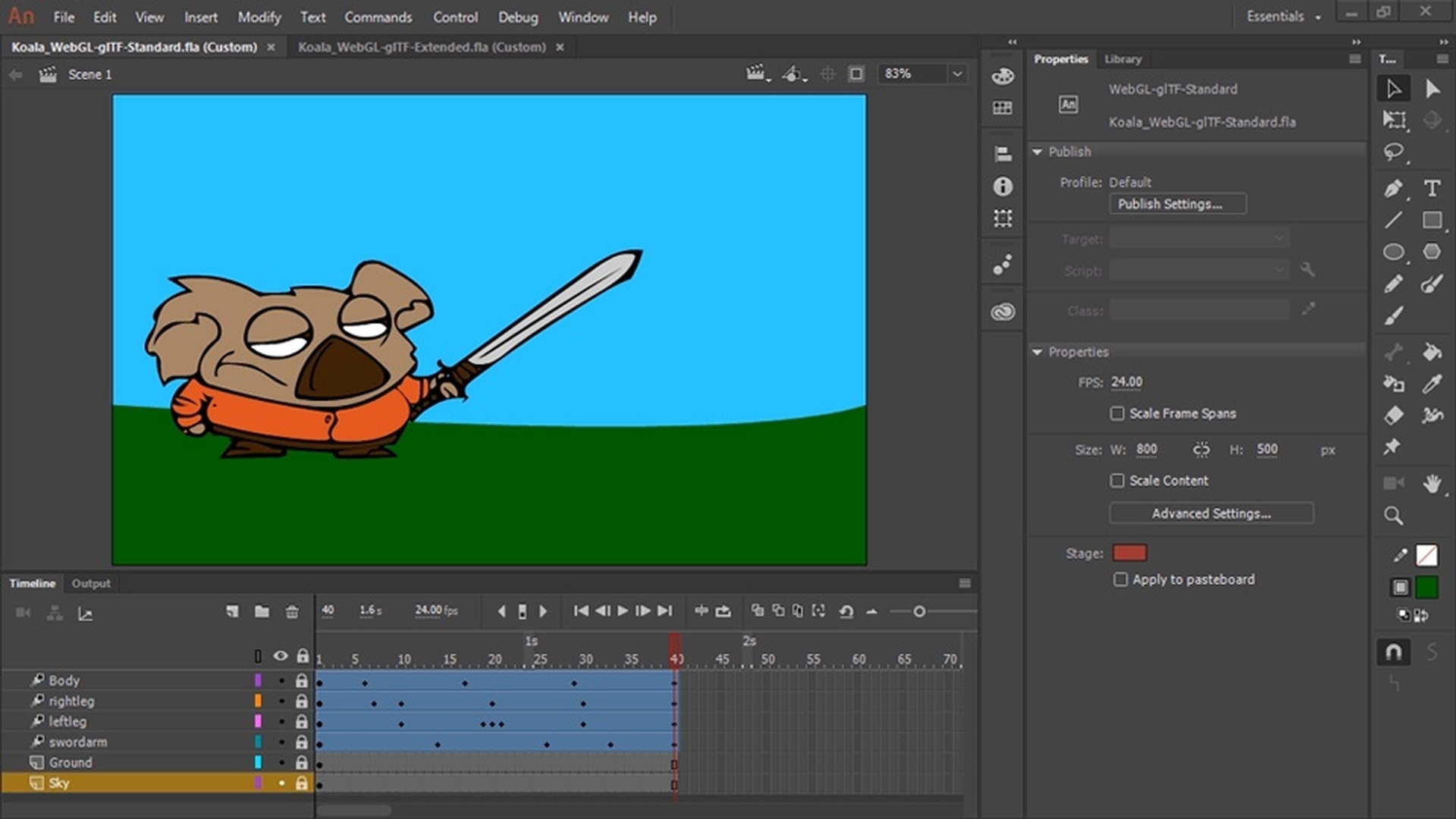
Adobe Animate has two WebGL-glTF options available. Choosing the standard option allows integration with standard glTF playback packages and is focused on basic interactivity and standards. The extended version is more specific to Animate and is focused on advanced animation.
Choosing a standard option allows integration with Three.js, Babylon.js or any of the standard glTF playback packages and is completely standard’s compliant.
Here we have a basic animation of a koala moving with a sword.
We can create content for this new platform in very much the same way we do when targeting Flash Player or HTML5 Canvas.
Let's have a look at the Publish Settings.
Publishing animations as glTF or GLB files
This is a WebGL-glTF standard file.
In our Publish Settings we can provide an output name and location and we can choose what format to output, either a glB file or glTF.
Here we can specify image resolution and whether to remove white spaces in JSON file.
The standard choices apply here of looping timeline or not and including hidden layers.
I'm going to put the output name as koala and hit Publish.
There we go it's been published for us.
So here I've gone to sandbox.babylon.JS.com.
Viewing published content in Babylon.js
This allows us to drop any glTF or glB files onto the standards compliant playback.
Looking within where I published this stuff if we go into assets, and then koala, Scene_1 I can find the GLB file that was created.
Let's go ahead and drop this directly on to the playback and there's our koala.
Now whereas the WebGL-glTF standard does play back
Recognizing limitations of the standard glTF workflow
in standards compliant playbacks it does have its limitations.
For example, we have this particular animation here in which we play, and we see the little man and he's dancing.
Now let's go ahead and publish a GLB file for this animation as well.
Here we're not going to include hidden layers and Publish.
OK.
Popping back over to the babylon.JS playback there we have our old man except you'll notice here that his foot isn't exactly attached to his ankle anymore and there are some additional layering issues.
It's important to know that you'll see these type of issues as support is evolving.
You can however circumvent this by using many of the existing functionalities in Animate by doing something like a break apart or converting to bitmap instead of using a transformal skew which is what's causing this particular problem.
Using the extended glTF format for advanced animations
Now, here is the same animation using WebGL-glTF extended.
As the name implies, we've extended the functionality of glTF in the glTF extended document type.
The extended version is more specific to Animate focused on advanced animation, with interactivity, filter support, and includes transformations like skew that caused such a problem with this foot. in the standard version.
Let's go ahead and test this out Control, Test.
And there he is.
When published with Animate, you'll see the result being smooth animation.
What you learned:
Export to WebGL GLTF platforms
Explore the difference between the standards-based WebGL GLTF (Standard) and advanced interactive animations with the WebGL GLTF (Extended) document type
Publish a GLB or GLTF file and run it on Babylon.js runtime
You can control how Adobe websites use cookies and similar technologies by making choices below. But note that if you disable cookies and similar technologies entirely, Adobe websites may not function properly.
Cookies are small text files stored by your web browser when you use websites. There are also other technologies that can be used for similar purposes like HTML5 Local Storage and local shared objects, web beacons, and embedded scripts. These technologies help us do things like remembering you and your preferences when you return to our sites, measure how you use the website, conduct market research, and gather information about the ads you see and interact with.
You can make choices in the menu below about what cookies and other technologies you want us to use on Adobe sites when you visit them from this browser. You can always change those choices later by clicking on the Cookie Preferences link at the bottom of the page.
If enabled:
We can improve your experience by tailoring the site and the content to things we think might be of interest
We can better keep track of your preferences — like what language you prefer to use
We will better understand your likely interests so we can provide you more relevant Adobe ads and content on non-Adobe websites and in non-Adobe apps
It will help us improve the performance of our website and those of our partners who use the Adobe Experience Cloud
If disabled:
We won’t be able to remember you from session to session so the experience may not be tailored to your interests
You’ll still have access to the content of the site but certain features that depend on cookies may not function
You’ll still see ads, they just may not be as relevant to you
General information
You can control how Adobe websites use cookies and similar technologies by making choices below. But note that if you disable cookies and similar technologies entirely, Adobe websites may not function properly.
Cookies are small text files stored by your web browser when you use websites. There are also other technologies that can be used for similar purposes like HTML5 Local Storage, web beacons, and embedded scripts. These technologies help us do things like remembering you and your preferences when you return to our sites, measure how you use the website, conduct market research, and gather information about the ads you see and interact with.
You can make choices in the menu below about what cookies and other technologies you want us to use on Adobe sites when you visit them from this browser. You can always change those choices later by clicking on the Cookie Preferences link at the bottom of the page.
If enabled:
We can improve your experience by tailoring the site and the content to things we think might be of interest
We can better keep track of your preferences — like what language you prefer to use
We will better understand your likely interests so we can provide you more relevant Adobe ads and content on non-Adobe websites and in non-Adobe apps
It will help us improve the performance of our website and those of our partners who use the Adobe Experience Cloud
If disabled:
We won’t be able to remember you from session to session so the experience may not be tailored to your interests
We’ll still count your use of our site and services
You’ll still have access to the content of the site but certain features that depend on cookies may not function
You’ll still see ads, they just may not be as relevant to you
Operate the site and core servicesOperate site and measure engagement
Always active
These cookies are required, and they are used to enable the site and related services core functionality. Without them the site could not operate, so they cannot be disabled.
These cookies enable the site and related services’ core functionality and collect statistics about user engagement, such as counting active use to help us understand trends. These cookies cannot be disabled.
Measure performance
These cookies are used to analyze site usage to measure and improve performance. Without them Adobe cannot know what content is most valued and how often unique visitors return to the site, making it hard to improve information we offer to you.
These cookies are used to analyze site usage to measure and improve performance. Without them Adobe cannot know what content is most valued, making it hard to improve information we offer to you.
Extend functionality
These cookies are used to enhance the functionality of Adobe sites such as remembering your settings and preferences to deliver a personalized experience; for example, your username, your repeated visits, preferred language, your country, or any other saved preference.
Personalize advertising
These cookies are used to enable Adobe and our partners to serve ads more relevant to your interests. Without them you will still see ads, but they might not be as relevant to you.
Personalize advertising
These cookies are used to enable Adobe and our partners to serve ads more relevant to your interests. Without them you will still see ads, but they might not be as relevant to you.