Was nicht passt, wird passend gemacht – dank „Generatives Erweitern“. Grafikdesignerin Franzi Scheele verwendet die KI-gestützte Funktion, um Bilder direkt in ihren Designs zu erweitern. So stellt sie sicher, dass jeder Bildausschnitt perfekt zum Layout passt.
Branding.
Starke Grafiken für starke Marken.
Vom Markenlogo bis hin zum Verpackungsdesign: Mit InDesign lässt du deine Marke im einheitlichen Look erstrahlen. Das weiß auch Produktdesignerin Isabell Herzog: Sie nutzt InDesign, um stimmige Designs für Marken mit Wiedererkennungswert zu gestalten.
Layout.
Professionelle Layouts – Seite für Seite.
Gedrucktes Buch oder digitales Magazin, Cover oder Impressum, Fußzeile oder Headline: Mit InDesign lässt sich jede kreative Layout-Idee umsetzen. Kommunikationsdesignerin Maria Wiese nutzt die InDesign-Tools, um alte Klassiker im modernen Look erstrahlen zu lassen.
style
m spacing
Die Funktionen von InDesign kennenlernen.
Wir stellen vor: der neue KI-Assistent (Beta).
Stelle Fragen und hole dir Tipps zum Ausbauen deiner Fähigkeiten, ohne InDesign verlassen zu müssen. Lass den KI-Assistenten Routineaufgaben übernehmen, damit du dich auf das Designen konzentrieren kannst.
carousel
Carousel container
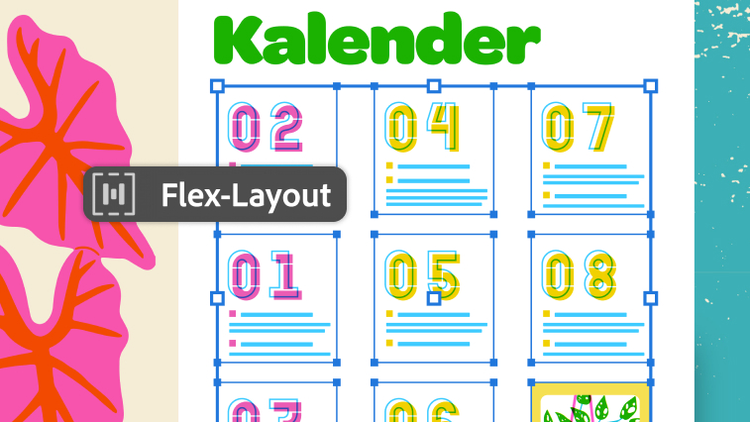
Flexible Layouts erstellen.
Richte Layouts schnell und konsistent neu aus. Flex-Layout passt sich inhaltlichen Änderungen dynamisch an – für maximale Präzision und Kontrolle.
carousel
Carousel container
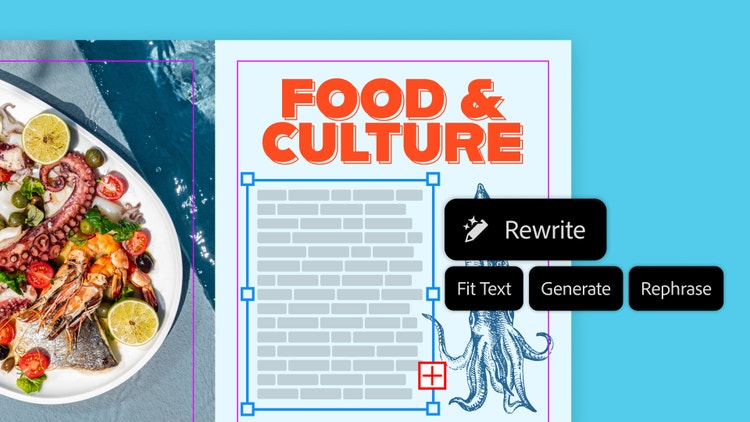
Text beim Designen verfeinern.
Lasse Text so umschreiben, dass er perfekt ins Layout passt. Füge realistischen Platzhaltertext hinzu oder justiere die Länge und den Ton von Text passend zu deinem Design – ohne deinen Flow zu unterbrechen.
carousel
Carousel container
InDesign-Dokumente aus PDF-Dateien erstellen.
Mit der Funktion „PDF in InDesign-Dokument umwandeln“ lassen sich Marketing-Materialien, Bücher und Berichte aktualisieren und erneut veröffentlichen.
carousel
Carousel container
Mühelos Alt-Text hinzufügen.
Zeit sparen und schneller barrierefreie Dokumente erstellen: Du kannst jetzt Alt-Text generieren, während du Bilder in deine InDesign-Dokumente einfügst.
carousel
Carousel container
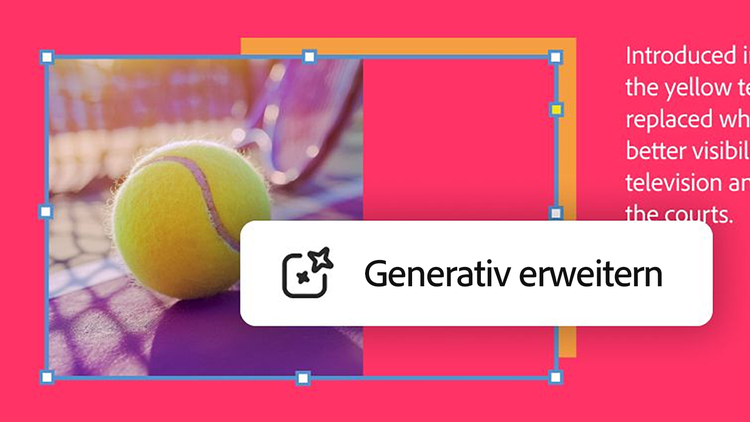
Bilder in beliebige Richtungen vergrößern.
Das mühsame Justieren von Rändern und Anschnitt hat ein Ende. Mit der KI-gestützten Funktion „Generatives Erweitern“, die jetzt in InDesign verfügbar ist, bringst du Bilder schnell und einfach in die gewünschte Form.
Adobe InDesign ist ein professionelles Programm zum Designen von Layouts für Print- und Digital-Publishing. Mit InDesign kannst du viele Arten von Content für Print, Web und Apps gestalten und veröffentlichen. Das Programm bietet präzise Kontrolle über Typografie, integrierte Kreativ-Tools, eine intuitive Design-Umgebung sowie eine nahtlose Anbindung an Adobe Photoshop, Illustrator und Acrobat.
InDesign wurde für Layout-, Prepress-, Druck- und Produktionsprofis konzipiert, die für Verlage, Design- und Werbeagenturen oder Herausgeber von Produktkatalogen arbeiten oder im Corporate Design, kommerziellen Druckwesen oder anderweitig mit der Veröffentlichung von Druck- und Online-Materialien befasst sind. Weitere Infos zu InDesign
InDesign ist Teil von Creative Cloud. Daher erhältst du mit einem Abo alle Updates und neuen Features sofort nach Verfügbarkeit.
InDesign arbeitet eng mit Photoshop, Illustrator, Acrobat Pro und InCopy zusammen. Die Benutzeroberflächen, Befehle, Bedienfelder und Tools von InDesign, Photoshop, Illustrator und InCopy sind vergleichbar. Wenn du mit einem dieser Programme bereits vertraut bist, lassen sich deine Kenntnisse auf ein anderes übertragen. So bist du schnell eingearbeitet. Du kannst native Dateien aus Photoshop und Illustrator importieren. Das erleichtert das Layouten, Optimieren und Aktualisieren von Grafiken. Die native Unterstützung von PDF-Dateien gewährleistet zuverlässige und konsistente Ergebnisse für Print- und Web-Publishing ebenso wie für die Veröffentlichung auf Smartphones und Tablets. InDesign und InCopy bieten eine leistungsstarke Kombination für redaktionelle Workflows in kleinen Kreativ-Teams.
InDesign ist auch für 25,99€/Monatinkl. MwSt. einzeln erhältlich (Jahres-Abo mit monatlicher Abrechnung). Doch viele nutzen After Effects gemeinsam mit anderen Creative Cloud-Anwendungen wie Premiere und Photoshop. All diese Anwendungen und mehr bekommst du im Jahres-Abo von Creative Cloud Pro mit monatlicher Zahlung, das für Einzelpersonen für die ersten 3 Monate Normalerweise 77,99€/MonatAlternativ: 38,98€/Monatinkl. MwSt. kostet und danach 77,99€/Monatinkl. MwSt.. Nur für Neukundinnen und Neukunden. Bedingungen ansehen.19,34€/Monatinkl. MwSt. im ersten Jahr für Schülerinnen, Schüler, Studierende und Azubis und 86,55€/Monatpro Lizenzexkl. MwSt. für Teams. Nur im ersten Jahr. Nur Neukundinnen und Neukunden. Bedingungen ansehen.
Du kannst InDesign 7 Tage lang kostenlos testen. Die Testversion entspricht der offiziellen Vollversion des Programms und beinhaltet alle Funktionen und Updates der aktuellsten Version von InDesign. Deine Testversion wird nach 7 Tagen automatisch in ein kostenpflichtiges Creative Cloud-Abo umgewandelt, es sei denn, du kündigst vorher. Du kannst auch unseren Online-Vorlagen-Editor Adobe Express nutzen.
Schülerinnen und Schüler, Studierende, Azubis und Lehrende erhalten mehr als 75% Rabatt auf das Adobe Creative Cloud Pro-Abo. Weitere Infos zu den Angeboten für Schule und Studium findest du hier.
style
xxl-spacing-bottom
Abo-Optionen
Mit InDesign durchstarten.
Starte nur mit InDesign oder hole dir mit der Creative Cloud Pro Abo-Variante InDesign und über 20 weitere Apps.
InDesign
25,99€/Monatinkl. MwSt.Innerhalb von 14 Tagen kostenlos kündbar. Jahres-Abo mit monatlicher Abrechnung
Produktübersicht:
InDesign zur Erstellung und Veröffentlichung von Broschüren, digitalen Magazinen, E-Books, Postern und Präsentationen
All-in-one-Editor Adobe Express für die einfache und schnelle Erstellung von Social-Media-Posts, Flyern und Vorlagen
Schriften, Bilder, Tutorials und weitere Ressourcen
Normalerweise 77,99€/MonatAlternativ: 38,98€/Monatinkl. MwSt.Innerhalb von 14 Tagen kostenlos kündbar. Jahres-Abo mit monatlicher Abrechnung
Produktübersicht:
Mit InDesign kannst du Broschüren, digitale Magazine, E-Books, Poster und Präsentationen erstellen und veröffentlichen.
Über 20 Apps für Foto, Design und Video
Uneingeschränkter Zugriff auf kreative Standard-KI-Funktionen für Bilder und Vektorgrafiken wie „Text zu Bild“ und „Generatives Füllen“
4000 Generative Credits pro Monat für Premium-KI-Funktionen bei Video und Audio – zum Beispiel „Text zu Video“.
Uneingeschränkter Zugriff auf Firefly Boards zur Entwicklung von Ideen und Erstellung von Storyboards
Nutzung von KI-Modellen anderer Anbieter in Firefly
Adobe Express Premium, Frame.io für Creative Cloud, Tutorials, Schriften, Vorlagen und 100 GB Cloud-Speicherplatz
Über 7 Millionen Kreative weltweit nutzen Creative Cloud bereits. Spare 50% in den ersten 3 Monate auf die Vollversion von InDesign, inklusive der kreativen KI Adobe Firefly. Zahle 38,98€/Monatinkl. MwSt. in den ersten 3 Monate und danach 77,99€/Monatinkl. MwSt.. Nur für Neukunden und Neukundinnen.
Normalerweise 77,99€/MonatAlternativ: 19,34€/Monatinkl. MwSt.Innerhalb von 14 Tagen kostenlos kündbar. Jahres-Abo mit monatlicher Abrechnung
Produktübersicht:
Mit InDesign kannst du Broschüren, digitale Magazine, E-Books, Poster und Präsentationen erstellen und veröffentlichen.
Mehr als 20 Programme für Fotografie, Design und Video, darunter InDesign
Uneingeschränkter Zugriff auf kreative Standard-KI-Funktionen für Bilder und Vektorgrafiken wie „Text zu Bild“ und „Generatives Füllen“
4.000 Generative Credits pro Monat für Premium-KI-Funktionen für Video und Audio wie „Text zu Video“
Zugriff auf branchenführende KI-Modelle von Adobe, Google, OpenAI und weiteren Anbietern
Uneingeschränkter Zugriff auf Firefly Boards zur Entwicklung von Ideen und Erstellung von Storyboards
Zugriff auf Modelle anderer Anbieter für generative KI in Firefly
Adobe Express Premium, Frame.io für Creative Cloud, Tutorials, Schriften, Vorlagen und 100 GB Cloud-Speicherplatz
Spare 75% auf mehr als 20 Programme, darunter InDesign sowie die kreative KI Adobe Firefly für Bilder, Videos und Audio. Du zahlst 19,34€/Monatinkl. MwSt. im ersten Jahr und danach 34,99€/Monatinkl. MwSt..
You can control how Adobe websites use cookies and similar technologies by making choices below. But note that if you disable cookies and similar technologies entirely, Adobe websites may not function properly.
Cookies are small text files stored by your web browser when you use websites. There are also other technologies that can be used for similar purposes like HTML5 Local Storage and local shared objects, web beacons, and embedded scripts. These technologies help us do things like remembering you and your preferences when you return to our sites, measure how you use the website, conduct market research, and gather information about the ads you see and interact with.
You can make choices in the menu below about what cookies and other technologies you want us to use on Adobe sites when you visit them from this browser. You can always change those choices later by clicking on the Cookie Preferences link at the bottom of the page.
If enabled:
We can improve your experience by tailoring the site and the content to things we think might be of interest
We can better keep track of your preferences — like what language you prefer to use
We will better understand your likely interests so we can provide you more relevant Adobe ads and content on non-Adobe websites and in non-Adobe apps
It will help us improve the performance of our website and those of our partners who use the Adobe Experience Cloud
If disabled:
We won’t be able to remember you from session to session so the experience may not be tailored to your interests
You’ll still have access to the content of the site but certain features that depend on cookies may not function
You’ll still see ads, they just may not be as relevant to you
General information
You can control how Adobe websites use cookies and similar technologies by making choices below. But note that if you disable cookies and similar technologies entirely, Adobe websites may not function properly.
Cookies are small text files stored by your web browser when you use websites. There are also other technologies that can be used for similar purposes like HTML5 Local Storage, web beacons, and embedded scripts. These technologies help us do things like remembering you and your preferences when you return to our sites, measure how you use the website, conduct market research, and gather information about the ads you see and interact with.
You can make choices in the menu below about what cookies and other technologies you want us to use on Adobe sites when you visit them from this browser. You can always change those choices later by clicking on the Cookie Preferences link at the bottom of the page.
If enabled:
We can improve your experience by tailoring the site and the content to things we think might be of interest
We can better keep track of your preferences — like what language you prefer to use
We will better understand your likely interests so we can provide you more relevant Adobe ads and content on non-Adobe websites and in non-Adobe apps
It will help us improve the performance of our website and those of our partners who use the Adobe Experience Cloud
If disabled:
We won’t be able to remember you from session to session so the experience may not be tailored to your interests
We’ll still count your use of our site and services
You’ll still have access to the content of the site but certain features that depend on cookies may not function
You’ll still see ads, they just may not be as relevant to you
Operate the site and core servicesOperate site and measure engagement
Always active
These cookies are required, and they are used to enable the site and related services core functionality. Without them the site could not operate, so they cannot be disabled.
These cookies enable the site and related services’ core functionality and collect statistics about user engagement, such as counting active use to help us understand trends. These cookies cannot be disabled.
Measure performance
These cookies are used to analyze site usage to measure and improve performance. Without them Adobe cannot know what content is most valued and how often unique visitors return to the site, making it hard to improve information we offer to you.
These cookies are used to analyze site usage to measure and improve performance. Without them Adobe cannot know what content is most valued, making it hard to improve information we offer to you.
Extend functionality
These cookies are used to enhance the functionality of Adobe sites such as remembering your settings and preferences to deliver a personalized experience; for example, your username, your repeated visits, preferred language, your country, or any other saved preference.
Personalize advertising
These cookies are used to enable Adobe and our partners to serve ads more relevant to your interests. Without them you will still see ads, but they might not be as relevant to you.