

Key findings:
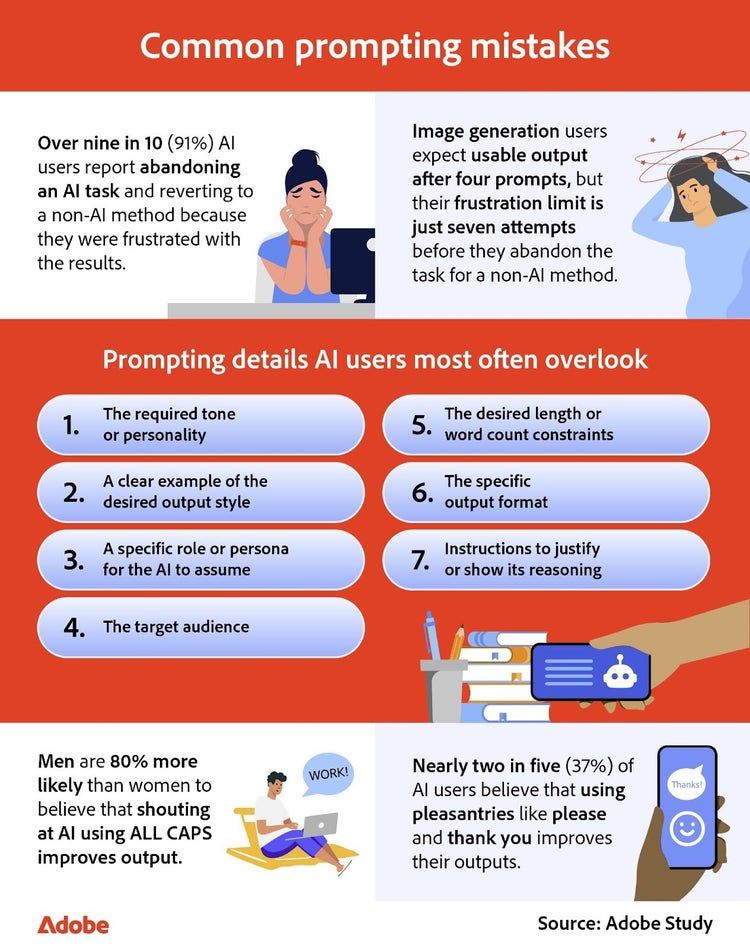
- 91 percent of AI users report abandoning a generative AI task and reverting to a non-AI method due to frustration with the results.
- We scored 1,000 text-to-image prompts: The average AI user earned a 'C' grade (57/100) in creative AI proficiency.
- Despite Gen Z reporting the highest confidence in AI prompting, Millennials currently show the greatest skill.
- AI prompting proficiency is leveling the playing field, as entry-level employees score just as high (55 percent 'C') as directors in our assessment.
- The top AI prompting mistakes include failing to define the soft elements of the output, such as forgetting the required tone or personality, neglecting to provide a clear example of the desired output style, and omitting a specific role or persona for the AI to assume.
- Men are 80 percent more likely than women to believe that shouting at AI using ALL CAPS improves output.
- Over half (55 percent) of AI users have adopted an advanced workflow by asking the AI tool itself to review and improve their prompts.
The rise of generative AI as a core workplace skill
In 2025, there is no ignoring Generative AI. From its integration into tools we already use to entirely new programs, AI has become a part of our everyday workflows and is quickly becoming a core workplace skill. The quality of the AI image generator's output, however, depends heavily on the quality of the prompt.
Most people are AI users. They enter a request, hope for the result they wanted, and adjust only when the AI’s output misses the mark. A prompt engineer, however, approaches AI differently. Engineers understand that successful prompting requires defining tone, style, intent, and even the AI's role. They treat prompting as a learned skill rather than a one-off instruction.
How Adobe Acrobat and Firefly studied AI prompting behaviors
To better understand how Americans prompt AI, Adobe Acrobat and Firefly surveyed over 1,000 AI users to uncover how they write text-to-image prompts, what works, and what doesn’t. As part of the survey, respondents were shown a target image and asked to write a text-to-image prompt to recreate it, allowing us to score prompt quality by comparing their submissions to the original prompt.
Where most AI prompts go wrong
Most prompting issues weren’t about what people included, but what they left out. Leaving out an important detail will cause the AI to fill in the gap itself, producing something that doesn’t quite match the user’s vision.
Why users give up before reaching a strong prompt
Generative AI is meant to make work easier, yet 91 percent of respondents say they’ve walked away from an AI task because they didn’t have the time to craft a prompt that truly fit their needs. Writing a strong prompt can take longer up front, even if it saves time in the long run, which leads many users to give up before they’ve cracked the code. Much of that frustration stems from how people phrase their requests.
With AI image generation tools, for example, respondents expect something usable after roughly four attempts, but by the seventh try, most have had enough. The window is even smaller for text tasks like emails or social media posts — respondents hope for a solid result after two prompts and give up around the fourth. It’s a short fuse, made shorter by the fact that many tools operate on limited credits. If users burn through a free trial refining an output, they often walk away assuming the tool is broken rather than their instructions. Because AI output is directly affected by the input it receives, learning to craft a strong prompt is a skill that takes time to develop.
Generational confidence vs. actual skill
Generationally, Gen Z has the most confidence in their AI-generated prompt writing, with 54 percent of respondents self-rating their skills as four or five (on a five-point scale). They are also 26 percent more likely than Millennial respondents to claim high proficiency in text-to-image prompt writing for tools like Adobe Firefly’s AI image generator.
Politeness in AI prompting
When communicating with AI, many users treat the experience like a conversation with a human coworker, but the reality is that prompting techniques like capitalizing words matter more than conversational style. About one in seven respondents believe that using all caps in their prompts leads to better output, and surveyed men are 80 percent more likely than surveyed women to agree that "shouting" at AI results in better output. While typing in all caps won’t influence an AI the way it might affect a coworker, capitalizing certain words can serve as a technique for emphasis. Some AI users rely on it to signal importance, for example, highlighting constraints like “DO NOT include personal information" as a way to help the model prioritize specific instructions. This technique is helpful whether you're using a free AI video or image generator like Adobe Firefly.
On an industry level, specific fields are more polite to AI, with respondents in finance and banking saying 'please' 43 percent of the time. Respondents who work in education, transportation, and logistics say please 42 percent of the time—followed by those in the creative arts and healthcare at 38 percent and 36 percent, respectively.
As lovely as it is to be kind, politeness to AI rarely translates to better output. So instead of the pleasantries, Adobe Firefly recommends focusing on tone, style, and a specific persona assignment when writing a prompt for your next image or video creation using an AI image or video generator.
Breaking down the image prompt results
To gauge the quality of prompts respondents provided and to understand where perceived confidence meets actual skill, we asked them to study a target image and write a text-to-image prompt to recreate it. We then compared their results against the original prompt using a scoring system across 10 categories.
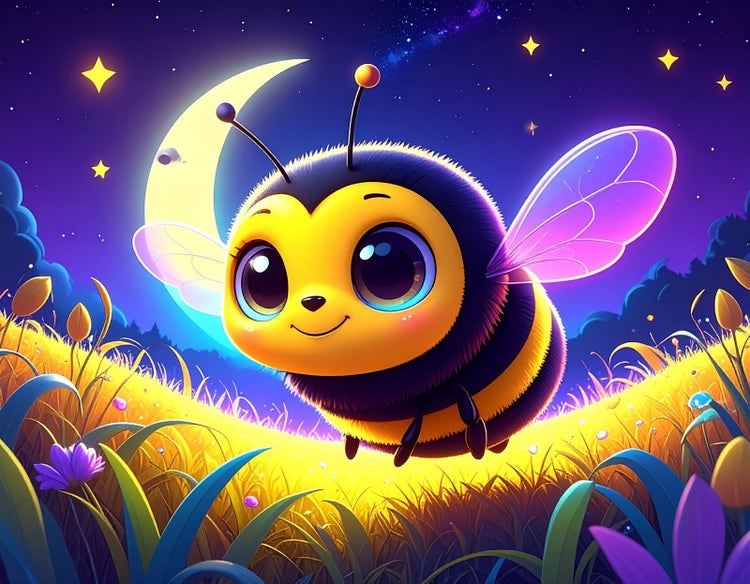
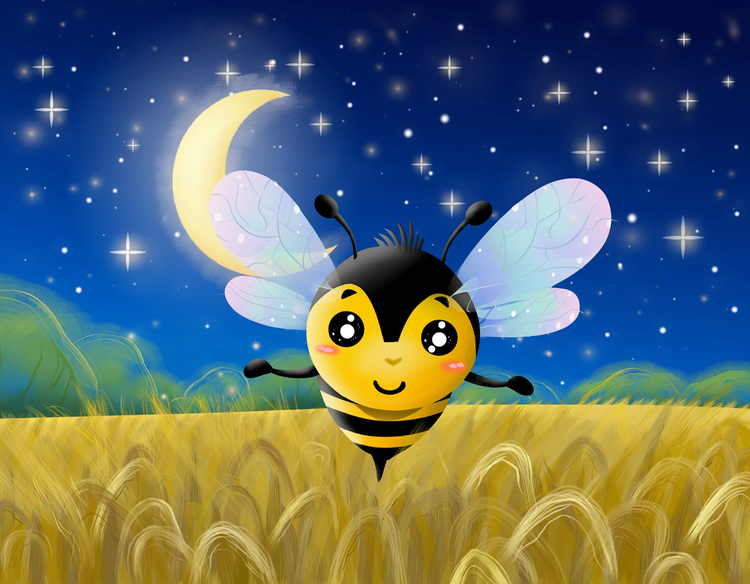
Our original prompt was used to generate the image below in Adobe Firefly’s AI image generator. “You are a commercial artist. Please generate a charming, stylized cartoon bumblebee with large, expressive eyes and a friendly smile as it zips through a whimsical field with oversized, dew-kissed blades of grass under a crescent moon and twinkling stars, all rendered in the vibrant, neon-lit, somewhat psychedelic color.”
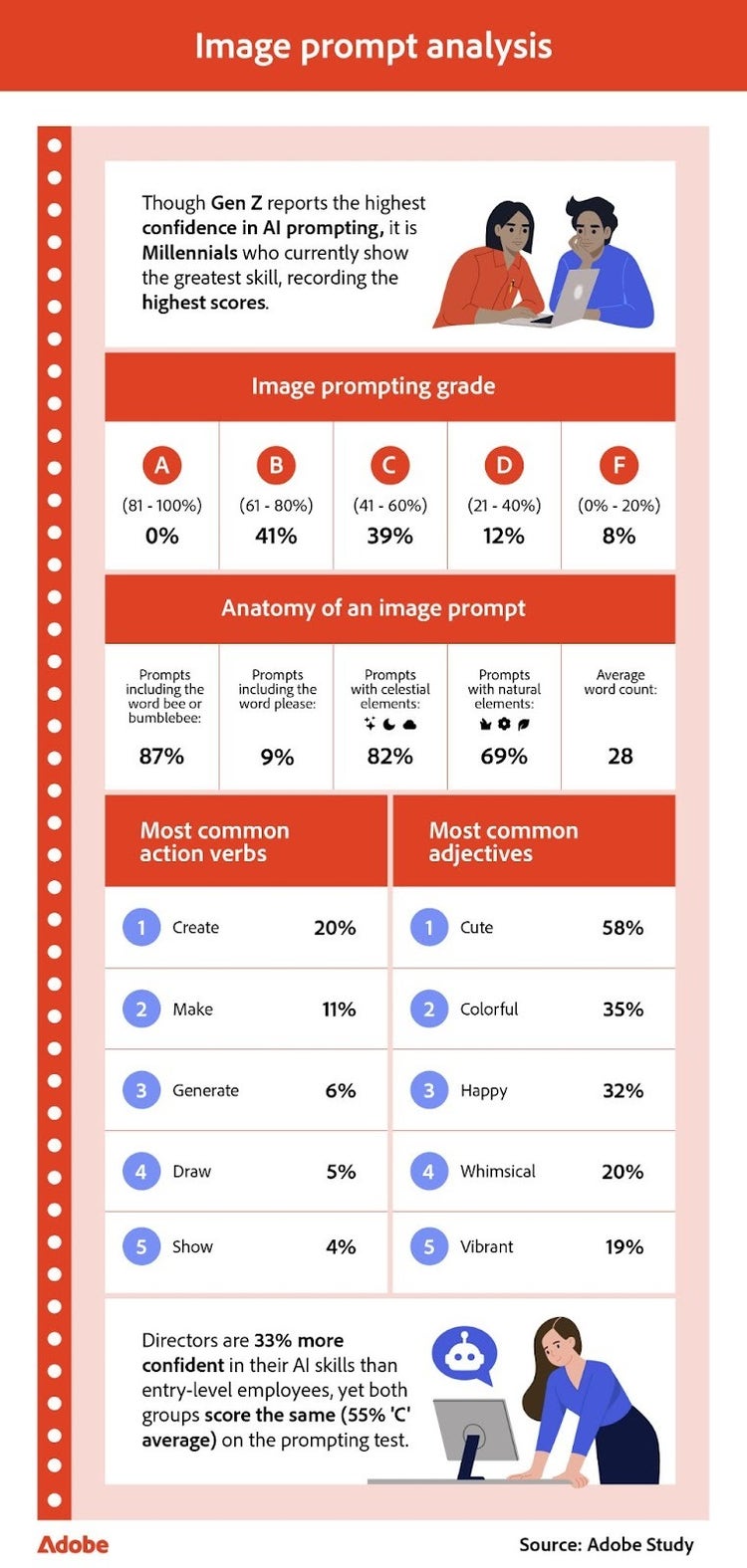
Across one thousand prompts, respondents earned an average score of 57 out of 100, most commonly receiving a C. And although an A was defined as 81-100 points, no respondents met that bar.
Breakdown by generation
Although Gen Z respondents had the most confidence in their prompts, their average score was 56 out of 100. On the other hand, surveyed Millennials had the best score at 58. These results show that confidence doesn’t always line up with skill, and Millennial respondents are underselling their skills, while Gen Z respondents overestimate how good their prompts really are.
Looking at individual submissions made the areas for improvement easy to spot. The B-level prompt captured much of the image’s tone and detail, but it missed two key elements: a persona assignment and a word count close to the original prompt. Those omissions kept it from getting an A.
B prompt example: “A cute, glowing cartoon bumblebee with big sparkling eyes flying over colorful flowers in a magical meadow at night, with a bright moon and twinkling stars in the sky, soft lighting, vibrant colors, and a whimsical fantasy art style.”
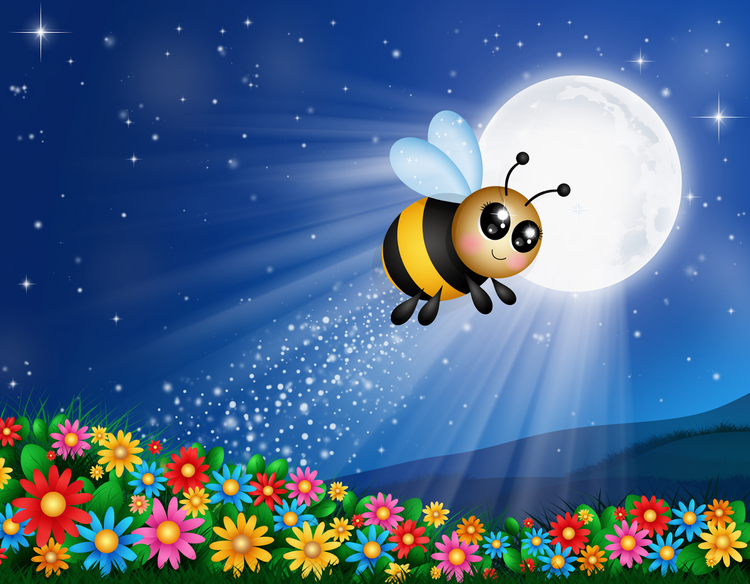
The C-level prompt identified the main subject but omitted several vital details, such as movement, emotion, color, and a defined role for the AI. It also fell short on the word count. Without those elements, the prompt didn’t give the AI image generator enough to work from, and the differences show: the images lose the neon lighting and the expressive stylized look of the original because those details never made it into the text prompt.
C prompt example: “Create a cartoonish bumblebee with big human-like baby eyes in a field of flowers—nighttime sky with twinkling stars and an overly large crescent moon.”
Confidence vs. performance across demographics and job types
Across all prompts, the same issues occurred repeatedly, and the gaps between perceived and actual skill were apparent when comparing gender and worker types. Surveyed men were 15 percent more confident in their prompting abilities than women, but their actual prompts scored only five percent better on average. Remote employee respondents performed seven percent better than on-site workers, and entry-level respondents scored the same as directors, with both groups scoring 55 percent.
Small choices, like changing an adjective or skipping a color, made a noticeable impact on the text-to-image output, highlighting how confidence often outpaced actual skill. Even simple prompts can benefit from being written with intention, whether you are using a free AI image generator for social media content or a powerful AI video generator for short-form clips.
How to become a prompting engineer
A few simple changes in how someone structures their prompts can dramatically improve the quality of the results they get back.
Engineers use step-by-step prompting
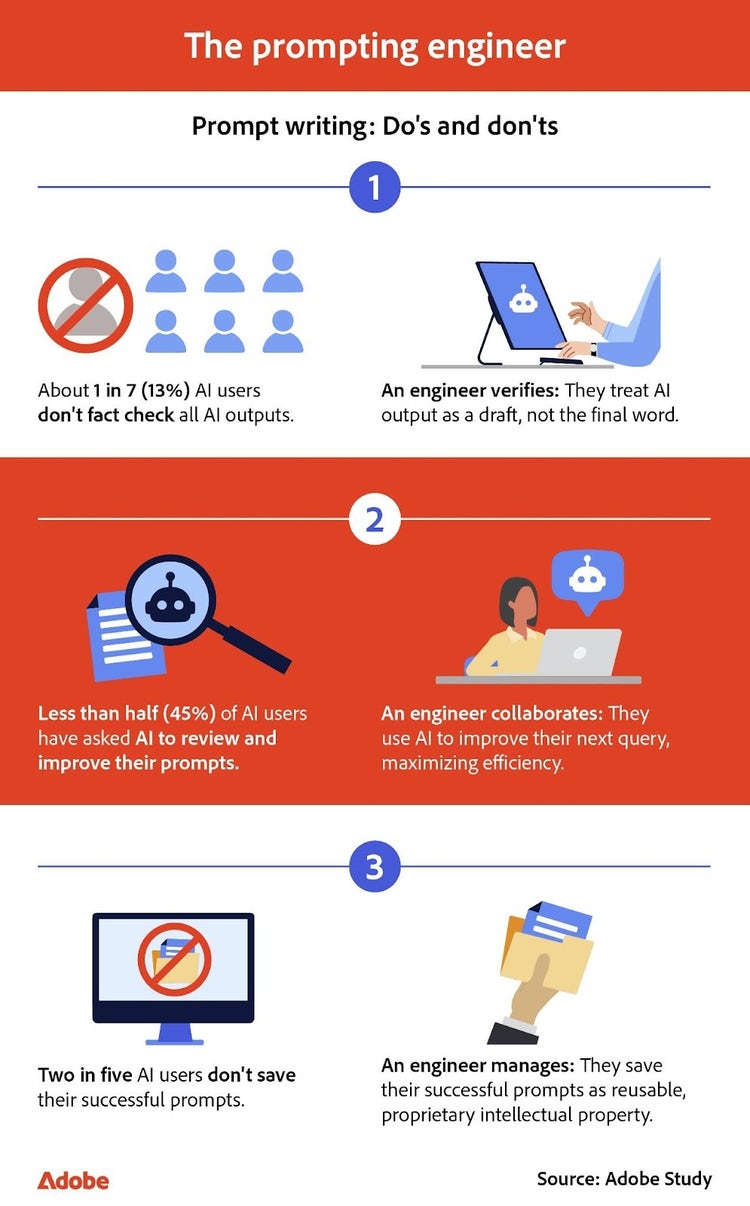
There is a noticeable gap between how respondents prompt an AI image generator and how AI engineers would approach the same tasks. Many respondents relied on single, catch-all prompts. Still, the highest performers took a different approach. These prompt engineers broke their prompts into smaller, sequential steps, giving the AI focused guidance at each stage instead of asking it to do everything at once.
Relying on reuse and templates
Engineers also build habits around refinement and reuse. Without saving the prompts that do work, many users end up repeating the same trial-and-error process, wasting time that prompt engineers preserve by building on their previously successful instructions. Manager-level employees, for example, were 39 percent more likely than entry-level respondents to save their successful prompts, treating them as templates to boost operations.
Prompt engineers can also use Adobe Acrobat to transform these individual templates into cohesive team resources. By using the PDF merge tool, they can combine best-performing text prompts with their resulting output into a unified style guide. When a prompt needs a slight tweak, engineers can use an online PDF editor to edit PDF text directly, keeping the playbook up to date without re-exporting files.
Engineers fact-check their content
Engineers take the same mindset with accuracy. They treat fact-checking as part of the workflow, whether they’re reviewing text or scanning an AI-generated image created by a free AI image generator for minor mistakes.
When a team needs to provide feedback on AI-generated imagery, engineers can use a tool like Adobe Acrobat to streamline the review loop. They might use the edit PDF function within the PDF editor to circle and annotate specific notes directly on the proof.
Not every AI user follows this approach; however, one in seven respondents does not fact-check their AI outputs. The survey also showed noticeable differences across industries.
Industries most likely to skip fact-checking
- Business: 24 percent
- Healthcare: 17 percent
- Retail and e-commerce: 16 percent
These differences make it clear that AI prompting skill doesn’t depend on job title or industry; it’s determined by the habits people bring to the tools they use.
Tips to become an AI prompt engineer
- Set the voice: Add tone, style, or emotion so the AI knows how the output should feel.
- Give the AI a role: Start with a simple cue, such as “You are a concept artist…” to guide the approach.
- Show an example: Provide a sample structure or style when you want a specific format.
- Fact-check: Ask the AI to cite sources or stay within the information you provide.
- Review images carefully: Look for common issues such as strange lighting, distorted body parts, incorrect reflections, unreadable text, or inaccurate branding.
- Save strong prompts: Keep a record of successful prompts to reuse later.
- Use an efficiency loop: Ask the AI to critique your first draft and suggest improvements before you try writing another prompt.
- Break tasks into steps: Use a few smaller prompts instead of trying to handle everything in one.
A clear path to stronger AI prompts
Most people are already using generative AI in some part of their work, but the quality of the results still depends on the time and energy they put into their prompts. Many respondents had the right ideas, but the most successful outputs came from those who took time to explain in more detail what they wanted. Simple choices often made the most significant difference.
As Americans continue to use tools like Adobe Firefly, a powerful image and video generator, to create everything from social content and business visuals to custom cards and other personal projects, improving prompting habits will offer a practical way to work faster, think more intentionally, and create more reliable results. This efficiency also extends to post-generation workflow with Adobe Acrobat. Once your visuals are generated, the ability to convert PDF assets for any platform or use an online PDF editor for last-minute tweaks ensures your final creative output is as polished as it is prompt.
Methodology
To explore how Americans prompt AI, we surveyed 1,008 AI users across different skill levels. The data has a 95 percent confidence level and a low three percent margin of error. Because this exploratory research relied on self-reported data, respondents may have biases, and discrepancies may exist between their answers and their actual experiences.
To measure prompt quality, respondents were provided with a target image and asked to write a prompt they would use to re-create it. A detailed scoring system was then created to compare each submission against the original prompt used to generate the image. Prompts were scored across 10 categories, with 10 points awarded to each, for a total possible score of 100. The ten key criteria awarded points include:
- Explicitly mentions a bumblebee
- Includes movement words (lies, zips, zooms, etc.)
- Includes celestial elements (moon, stars, night, etc.)
- Includes natural elements (grass, field, flower, etc.)
- Includes emotional adjectives (happy, cute, charming, etc.)
- Contains persona assignment (you are a…, as a concept artist…)
- Word count within ± five of 49
- No extraneous detail
- Includes ≥ two style-specific terms (cartoon, photorealistic, etc.)
- Includes a color
Keep exploring
title
From casual user to prompt engineer: How to master AI image generation
cardImageAltText
Illustration showing data and images transforming from a disorganized mass into organized blocks and visuals, symbolizing the transition from AI prompt to finished product generation.
cardImage

