ACROBAT
Digital notes for students: Benefits, examples, and how to create interactive notebooks
Learn how educators engage students digitally — in the classroom and online.

What students use digital notes for today
Digital notes aren’t just a replacement for paper, they’re a smarter, more flexible way for students to learn, study, and stay organized. Digital notebooks are ideal for students to use for everything from daily classwork to exam prep. Because students can keep updating their digital student notebook throughout the school year, these tools have become essential for turning messy information into clean study guides, quick summaries, flashcards, mind maps, and personalized study plans.
Students increasingly rely on digital notes not just to store information, but to transform it. Modern digital notebooks support:
- Turning messy notes into clean, structured study guides
- Summarizing chapters, articles, or lecture transcripts into bullet points
- Creating flashcards automatically from text
- Generating mind maps to visualize concepts
- Explaining complex topics in simple, age‑appropriate language
- Preparing for exams with personalized study plans
- Annotating readings, diagrams, and PDFs
- Embedding videos, links, and interactive elements
- Collaborating with classmates in real time
How digital notebooks help students.
Digital notebooks can aid studying in any subject, from elementary science to high school social studies and beyond. As more school systems supply students with affordable laptops, such as Chromebooks, digital notebooks for students have become a key tool for blended learning activities.
Here are some of the benefits of a digital notebook for students:
1. Enhance student participation.
Interactive notebooks can use variety to engage students with different learning styles and help them participate more meaningfully.
2. Keep students’ attention.
PowerPoint-style apps like Google Slides or the free, education-focused Google Classroom keep students’ attention with high-tech functionalities.
3. Allow students to take an active role in their education.
Digital notebooks for students can help them create their own learning strategies. Students can conduct their own research online, and teachers can encourage students to dive deeper according to their interests using hyperlinks in the notebooks or by merging multiple resources together.
4. Allow easy reviewing and studying of material.
Students can keep updating their digital student notebook throughout the school year, so it’s easy to go back and review information and previous lessons ahead of the next exam.
5. Enhance educational outcomes.
Teachers can use these tools to support learning objectives and engage students with various needs and interests so that class outcomes are improved.
For example, a biology lesson plan using digital notebooks could have students watch an embedded video about photosynthesis, then test their knowledge by having them label different stages of the process on a full-color diagram in the same slide. Students could apply what they learned with further research online and then, create a new slide with images, graphs, and information about the various proteins and enzymes involved in photosynthesis.
What should you include in a digital notebook for students?
A traditional interactive notebook contains a variety of media and information prepared by both the teacher and the student. That can include full-color photographs, screenshots of charts and diagrams, adding hyperlinks to videos or embedding them, animations, scanned notes, or any other materials to help students grasp the concepts being taught.
How to turn any notes into digital notes
When creating a digital notebook for your class, start by determining what you want it to look like and what purpose it’s going to serve.
Students and teachers can follow this simple workflow to keep digital notes organized.
1. Scan handwritten notes using Adobe Scan to convert them into clean PDFs.
2. Organize pages by merging, reordering, or deleting files in Acrobat.
3. Add structure with headings, dividers, and a table of contents.
4. Make it interactive using Prepare Form to add text boxes, checkboxes, or fillable worksheets.
5. Embed learning resources like videos, links, diagrams, or practice questions.
6. Compress the final notebook so it’s easy to share or upload.
Examples of digital notes for different subjects
Biology notebook
- Embedded video on photosynthesis
- Label‑the‑diagram activity
- Research links to enzymes and proteins
- Flashcards for key terms
History notebook
- Timeline templates
- Primary source annotations
- Map labeling
- Chapter summaries
Math notebook
- Step‑by‑step problem walkthroughs
- Graphs and charts
- Practice problems with fillable answers
- Formula reference sheet
How Adobe can help you create a stellar digital notebook.
As you gather materials to add to your digital interactive notebook, you may find you have physical documents you’d like to include. Using the Adobe Scan app you can quickly digitize paper documents and insert them into your notebook as a high-quality JPG or PDF.
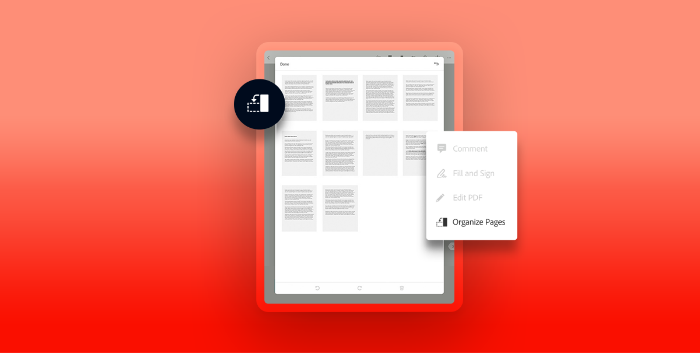
Once you’ve prepared your pages, merge PDFs or JPGs to combine all these individual files into a single document for your digital notebook. After they’re merged, you can delete or rearrange individual pages until they’re in the order you want.
If you want to add fillable worksheets or blank pages where students can take notes, use the Prepare Form function in Acrobat to create pages with interactive text boxes. Acrobat will scan your document and automatically place text boxes in the appropriate places, but you can also add your own manually.
Depending on how long your digital notebook is, it may take up more space on your device than expected. Fortunately, you can learn how to make a PDF smaller using a tool to compress file size small enough to send as an email attachment without sacrificing any quality.
Whatever the subject, digital interactive notebooks are an engaging and cost-effective way to help students take an active role in the learning process.
Frequently asked questions.
How do I turn messy notes into a clean study guide?
How do I summarize a chapter into bullet points?
How do I create digital notes from a lecture transcript?
How do I make flashcards from my notes?
How do I explain a concept like I’m 12?
How do I turn notes into a mind map?
How do I prepare for an exam using digital notes?
Keep exploring