
Content as a Service v2 - b2b - Wednesday, September 25, 2024 at 15:13

A sales presentation is a structured communication designed to persuade potential customers to purchase a product or service. It combines visual elements, data, and storytelling to guide prospects through a journey—from understanding their challenges to seeing your solution as the answer.
Effective sales presentations do more than showcase features. They build trust, address concerns, and create emotional connections that move buyers toward action. Whether delivered in person, over video calls, or shared asynchronously, these presentations serve as critical touchpoints in the sales process.
Sales presentations come in several forms, each serving a distinct purpose in the buyer’s journey. Understanding these four types of sales presentation helps you choose the right approach for each situation:
Understanding which type fits your situation helps you craft content that resonates with where your prospect stands in their decision-making process. Each type serves different stages of the sales funnel and requires distinct approaches to content, design, and delivery.
The evolution of sales presentations has accelerated dramatically with digital tools. What once required days of manual design work can now be accomplished in hours with AI assistance. This shift allows sales professionals to focus more energy on strategy and personalization—the elements that truly differentiate winning presentations from forgettable ones.
Every effective sales presentation follows a logical structure that guides prospects from awareness to action. Understanding these core elements helps you build presentations that engage, inform, and persuade. When considering what a sales presentation should include, focus on these essential components that create a complete narrative.
The foundation of any strong sales presentation includes these essential slides:
This sets the visual tone and establishes your brand identity. Include your company logo, presentation title, and any relevant prospect information to personalize the experience immediately. First impressions matter significantly—a polished cover slide signals professionalism and attention to detail.
Here you demonstrate that you understand your prospect’s challenges. This builds rapport and positions you as someone who genuinely comprehends their situation. Use specific language that mirrors how your prospect describes their own challenges, drawing from discovery conversations and research.
Present your offering as the answer to the problems you’ve just outlined. Keep this focused on outcomes rather than features alone. Connect each capability directly to a pain point you’ve identified, making the relevance immediately clear.
Quantify the value you deliver. Use specific numbers, percentages, or timeframes to make your claims concrete and believable. Abstract benefits like “improved efficiency” carry far less weight than “reduces processing time by 40%.”
Show that others have succeeded with your solution. Include testimonials, logos of recognizable clients, or brief success metrics. This element addresses the natural skepticism prospects feel when evaluating new vendors.
Be transparent about investment and outline a clear path forward. Ambiguity at this stage can stall momentum. Present pricing in context of value delivered, and make the decision process feel manageable rather than overwhelming.
End with a specific, actionable request. Whether scheduling a follow-up call or starting a trial, make the next step obvious. Vague endings waste the momentum you’ve built throughout the presentation.
The problem slide deserves particular attention. Research shows that prospects engage more deeply when they feel understood. Spend time articulating their challenges using language they actually use—not industry jargon or generic pain points. This requires genuine research and active listening during discovery conversations.
Your value proposition slide should connect directly to sales acceleration strategies that demonstrate measurable impact. Include specific metrics like time saved, revenue increased, or costs reduced. When possible, present ranges based on customer segment or implementation scope.
The social proof slide works best when it features customers similar to your prospect. Industry-specific examples carry more weight than generic testimonials. If your prospect is a mid-sized healthcare company, showcase results from similar healthcare organizations rather than impressive but irrelevant enterprise tech clients.
Visual consistency throughout these elements reinforces professionalism. Color schemes, fonts, and design elements should remain cohesive from first slide to last. This attention to detail may seem minor, but it subconsciously signals the care you’ll bring to the business relationship.
Creating a sales presentation that converts requires more than assembling slides. It demands strategic thinking about your audience, message, and delivery. Following these five steps of a sales presentation creation process ensures you build something that truly resonates with prospects.
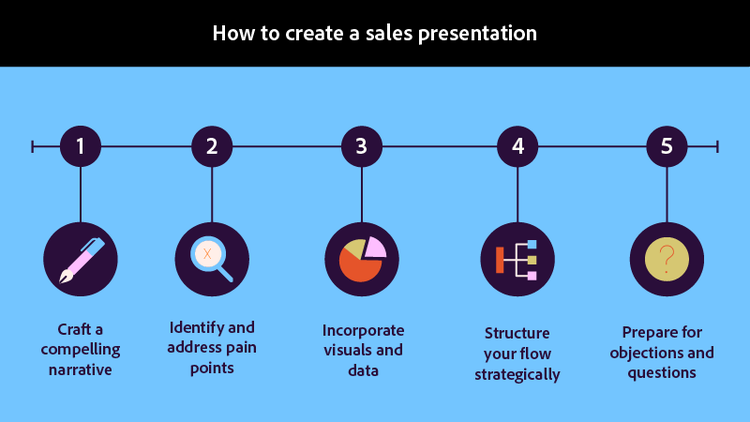
Stories stick. Rather than presenting disconnected facts, weave your content into a narrative arc that takes prospects on a journey. Start with the world as they know it—full of challenges and frustrations. Introduce your solution as the turning point. End with a vision of success that feels achievable.
This narrative approach creates emotional engagement that pure data cannot. Prospects remember how you made them feel long after they forget specific statistics. The best sales presentations feel less like information dumps and more like collaborative conversations about possibilities.
Structure your narrative with clear tension and resolution. The problem slides create tension—highlighting gaps between current reality and desired outcomes. The solution slides offer resolution—showing a path from frustration to success. This arc mirrors storytelling patterns humans have responded to for millennia.
Before creating a single slide, research your prospect thoroughly. What challenges keep them awake at night? What goals are they struggling to achieve? What obstacles stand in their way?
When you streamline your sales workflow, you create more time for this crucial research phase. Use LinkedIn, company websites, industry reports, and previous conversation notes to build a comprehensive picture of their situation.
Document specific pain points with supporting evidence. Instead of assuming what matters to your prospect, validate your understanding through discovery questions. The most effective presentations address problems the prospect has explicitly acknowledged rather than issues you assume they face.
Visual elements transform abstract concepts into tangible understanding. Charts, graphs, and images communicate complex ideas faster than text alone. However, choose visuals purposefully—every image should reinforce your message, not distract from it.
Data visualization deserves special attention. A well-designed chart can make your value proposition immediately clear, while a wall of numbers overwhelms and confuses. Select the right visualization type for your data—bar charts for comparisons, line graphs for trends, pie charts for proportions.
Balance is essential. Slides overloaded with visuals feel chaotic, while text-heavy slides lose attention quickly. Aim for visual anchors that draw the eye while leaving space for your verbal explanation to fill in details.
Pacing matters as much as content. Front-load your presentation with engagement—hook attention early, then build momentum toward your call to action. Vary the rhythm between information-dense slides and visual breathers.
Consider your audience’s attention span. Most prospects start losing focus after ten to fifteen minutes, so place your most critical points early and keep the overall presentation concise. If you must cover extensive material, build in interaction points that re-engage attention.
Transitions between sections should feel natural, not jarring. Each slide should logically flow from the previous one, creating a sense of inevitable progression toward your conclusion. Signpost major transitions verbally to help prospects track where you are in the overall arc.
Anticipate the concerns your prospects will raise. Prepare supplementary slides or talking points that address common objections without appearing defensive. Having data, case studies, or testimonials ready demonstrates confidence and thoroughness.
Create an appendix of additional slides covering frequently raised objections. These hidden slides can be navigated to when specific concerns arise, showing preparedness without cluttering your main presentation flow.
Practice responding to tough questions until your answers feel natural rather than rehearsed. The best presenters welcome objections as opportunities to demonstrate expertise and build trust.
When creating your sales presentation PowerPoint or other format, keep these guidelines in mind:
A pitch deck for a software company might open with industry disruption statistics before introducing their innovative solution. The narrative builds from market chaos to product clarity, positioning the company as a guide through uncertainty.
A proposal presentation for a consulting firm could walk through a detailed project plan with milestone deliverables. Each phase connects to specific client outcomes, making the investment feel tangible and trackable.
A product demo for a manufacturing tool would show the interface in action, highlighting time savings through real-world scenarios. Rather than abstract feature lists, prospects see exactly how their daily work would change.
A case study presentation might feature before-and-after metrics from a client in the same industry as the prospect. The specificity creates relevance and believability that generic claims cannot match.
Artificial intelligence has transformed how sales professionals create presentations. From research and content generation to design and refinement, AI tools accelerate every phase of the process while maintaining quality. Understanding how to make a sales presentation with AI assistance gives you competitive advantages in speed and personalization.

Before generating any content, use AI to analyze your prospect thoroughly. Upload relevant documents—annual reports, press releases, previous correspondence—and let AI extract key insights about their priorities, challenges, and language patterns.
Tools that let you chat with your documents make this research phase remarkably efficient. Ask specific questions about prospect pain points, competitive positioning, or strategic initiatives. The AI synthesizes information from multiple sources, giving you a comprehensive understanding in minutes rather than hours.
Define clear objectives for your presentation. Are you introducing your company, proposing a specific solution, or closing a deal? AI can help refine these goals based on where your prospect sits in the buying journey.
Try prompting: “Based on this company’s annual report, what are their top three strategic priorities for this year, and what challenges might they face achieving them?” The AI provides focused insights you can directly address in your presentation.
Once you understand your audience, AI excels at generating initial content. Upload research materials and use an AI summary generator to extract the most relevant points for your presentation.
For example, you might prompt: “Summarize the top three challenges facing retail companies based on this industry report, and suggest how our inventory management solution addresses each one.”
The AI returns focused, actionable content you can refine and incorporate directly into your slides. This approach ensures your messaging stays grounded in real data rather than generic claims.
Content generation extends beyond summaries. AI can draft entire slide narratives, suggest compelling statistics, and create talking points that complement your visual content. The key is providing sufficient context about your prospect, solution, and objectives.
AI can recommend presentation structures based on your goals and audience. By analyzing successful presentations in your industry, generative AI for documents suggests optimal flow, slide order, and content distribution.
Ask AI to evaluate your draft structure against best practices. It can identify missing elements, suggest reordering for better impact, or recommend additional slides that strengthen your argument.
Try prompting: “Review this presentation outline for a B2B software pitch. What elements are missing? What should be reordered for better persuasive flow?” The AI provides specific, actionable recommendations based on presentation best practices.
Template selection matters significantly. Different industries and contexts call for different approaches. AI can analyze your specific situation and recommend structures that have proven effective for similar presentations.
Visual design often consumes significant time in presentation creation. AI tools now generate charts, graphics, and imagery that elevate your slides without requiring design expertise.
An AI presentation maker can transform your content into professionally designed slides. Try prompting: “Create a comparison chart showing our solution’s three main advantages over traditional approaches, using a clean professional style with blue accent colors.”
The AI generates visual options you can customize to match your brand guidelines, dramatically reducing design time while improving visual quality. This capability democratizes design—even team members without visual training can create polished, professional slides.
Consider generating multiple visual options for key slides. AI can produce several alternatives quickly, allowing you to select the most impactful option for each message.
After assembling your presentation, AI helps polish the final product. Use AI to review your language for consistency, clarity, and persuasive impact. It can identify jargon that might confuse prospects, suggest stronger action verbs, or adjust tone for different audience types.
When you need to share your presentation in different formats, you can convert documents to presentation format seamlessly. This flexibility ensures your content works across various delivery contexts—from live presentations to email attachments.
Additionally, when prospects send you documents for review, you can quickly compress files to make them easier to manage and analyze alongside your presentation materials.
Final refinement should include reading your presentation aloud. AI can help identify awkward phrasing or overly complex sentences that will trip up verbal delivery. The goal is content that sounds natural when spoken, not just reads well on screen.
The integration of multiple AI capabilities creates a powerful workflow. Document analysis tools enable you to upload and analyze multiple prospect documents simultaneously, building comprehensive audience profiles that inform your messaging. Design AI generates visual content that matches your brand while saving hours of design work. Summary tools distill lengthy research into concise bullet points perfect for slide content.
Combining these tools creates a workflow where AI handles time-consuming tasks—research synthesis, content generation, visual design—while you focus on strategy, personalization, and relationship building. The result is higher-quality presentations produced in less time, giving you competitive advantages in responsiveness and customization.

