


Discover how Adobe Acrobat can help you convert, edit, merge, and protect your PDFs seamlessly.
#1E1E1E
Acrobat
How to insert a PDF into Word.
Save time by easily inserting PDFs into Word using Adobe Acrobat. Find out how to insert a PDF into Word in this quick, easy guide.
Published by Adobe Acrobat Australia on 17 June 2025
Having trouble integrating PDF content into your Word documents? Instead of the hassle of manually copying, pasting, or rewriting your content, you can simplify the process by importing PDFs directly into Word. This method not only saves you time but also preserves the integrity of your documents. Depending on your needs, you can either embed PDFs or add them as clickable objects.
In this guide, we'll walk you through several methods for inserting a PDF into Word. Discover how to attach a PDF, add it as an image, insert multiple pages, or convert your PDF into a Word file for easy editing.
Why insert a PDF into Word?
PDFs often contain important content like forms, reports, and designs. Adding these directly into a Word document helps keep all essential information together without losing the quality or formatting. Here’s why you might want to add a PDF to your Word document:
- Seamlessly integrate detailed forms, reports, or designs into your text
- Incorporating forms and designs while keeping their original look
- Enriching your documents with both visual and textual elements
- Ensuring your documents are versatile and easy to share
Combining PDFs with Word documents merges the strengths of both formats, creating more dynamic and comprehensive files.
How to add a PDF to a Word document.
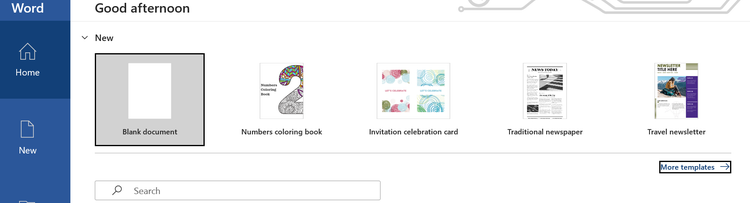
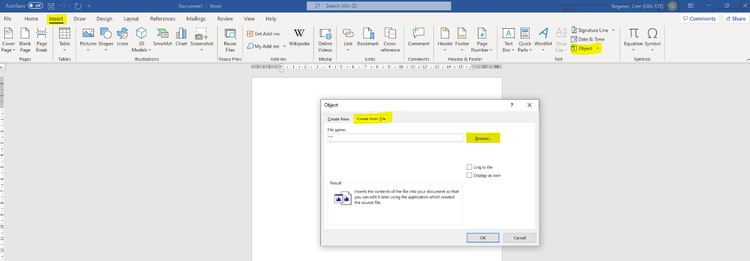
Adding a PDF to your Word document is quick and easy. Just follow these simple steps:
How to insert a PDF into Word as an image.
Inserting a PDF as an image to your Word document can help reduce the file size while preserving the visual elements. Here’s how:
The PDF pages will now appear as images within your Word document.
How to insert a PDF into Word for multiple pages.
You may want to insert multiple pages of a PDF into Word if you have a large document which requires many changes across various pages. To do this, follow these steps:
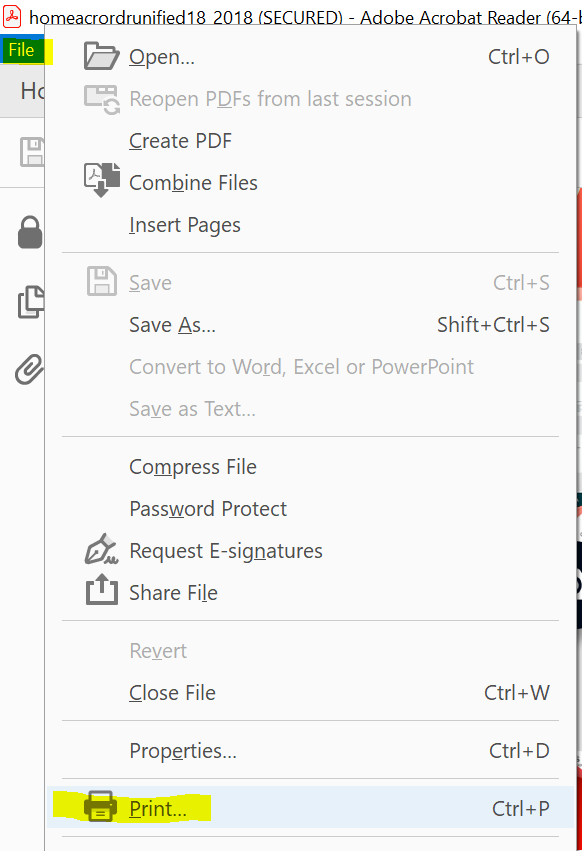
- Open Adobe Acrobat Reader and go to File > Print.
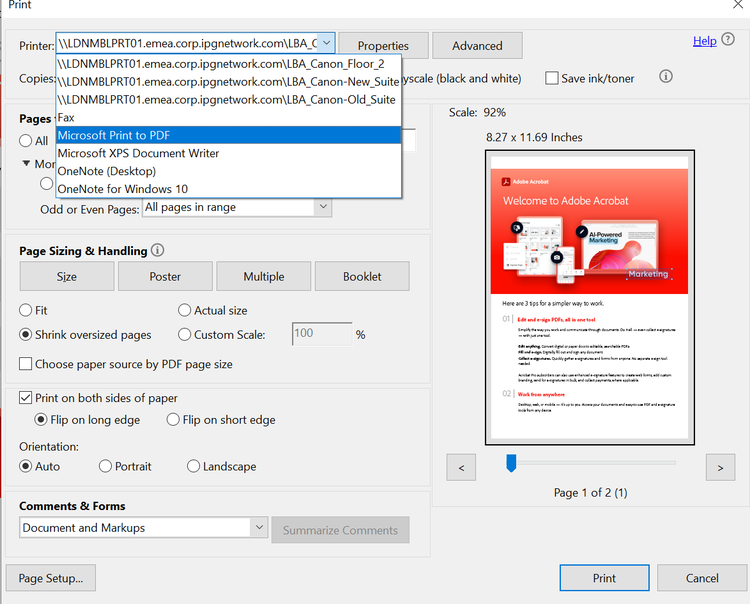
- From the dropdown menu, select Microsoft Print to PDF.
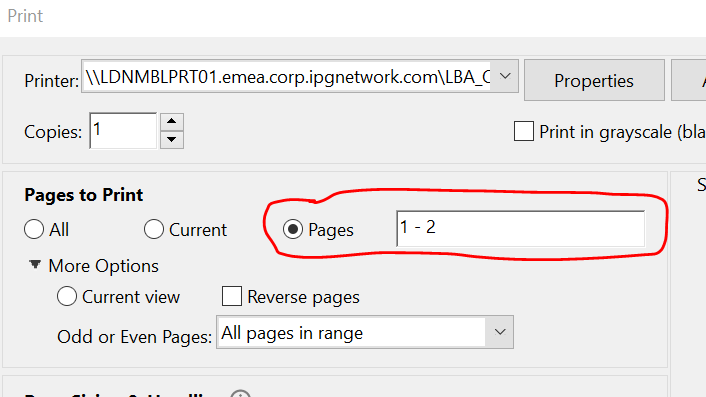
- Choose the specific pages you want to include. You don't have to select all pages—just the ones you need.
- Click Print. This saves each selected page as an individual PDF file. Note that this doesn't print the pages but creates separate PDFs for each page.
- Convert the new PDF into images by following the steps in the “How to Insert a PDF into Word as an Image” section.
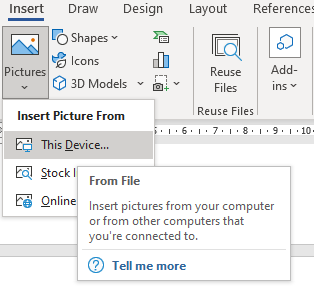
- Open your Word document, go to Insert > Pictures >This Device and select the images from the folder where you saved them.
You can now insert each image into your word document as needed.
Other options: Convert PDF to Word.
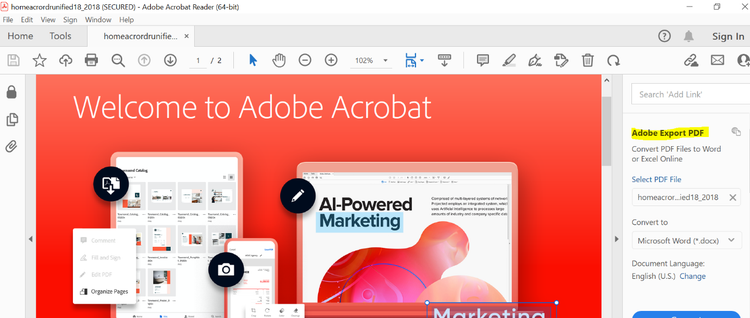
If you need to edit text directly, converting a PDF to Word can be a great option. Adobe’s PDF to Word tool simplifies this process:
- Open our PDF to Word online tool, simply select a file, and it will automatically convert your PDF file into a Word document.
- To insert this Word document into another Word file, click where you want the content to go.
- Go to ‘Insert’ and select the arrow next to ‘Object’.
- Choose ‘Text from File’.
- Find the file you need and double-click on it.
- To add in the contents of any additional Word documents, repeat the steps above.
Expand your PDF toolkit with Adobe Acrobat.
Now that you know how to insert a PDF into Word, there are even more ways Adobe Acrobat can help streamline your workflow. Whether you need to convert files, edit PDFs, or manage documents across different formats, Adobe has you covered. Convert Word documents back into PDFs, combine multiple files, or even use Adobe’s PDF editing tools for more precise adjustments. Explore the full suite of tools to make working with PDFs easier, no matter the task.
Try it online.
You can try some of our PDF tools right now — online, on the spot. Discover how easy and powerful working with PDFs can be with Adobe Acrobat.
#fff

Convert your PDF into a Microsoft Word document
--- #b6b6b6
#fff

Convert your Microsoft Word to a PDF file
--- #b6b6b6
Frequently asked questions.
Can I convert a PDF to Word for free?
Yes, converting a PDF to Word is free and straightforward. Just upload your PDF to Adobe’s PDF to Word converter tool, and with a few clicks, your document will be transformed into an editable Word file. It’s fast, convenient, and doesn’t require any downloads.
Can I convert a Word document into a PDF file?
Absolutely. Adobe Acrobat online has a range of converters that are free to use. Among these is the Convert Word to PDF tool. Simply drag and drop your Microsoft Word file into the tool, or click ‘Select a file’ and double-click on the file you wish to convert. A few seconds later, the file will be converted to a PDF.
Why does the PDF I insert into Word appear so large?
Sometimes when you insert a PDF image into Word, it can appear too big. If so, you may need to resize the image to fit better to the page. You can do this by clicking on the image and adjusting the resize handles. Make sure you keep an eye on the shape and definition – if you condense it too much it might start to distort.
Can I open a PDF directly in Word for editing?
Yes, you can open a PDF directly in Word for editing. Go to “File,” click “Open,” and select your PDF. Word will convert the PDF into an editable document. Keep in mind, though, that complex formatting or graphics might not convert perfectly, so this works best for simpler PDFs.
Can I insert a PDF into a specific location in my Word document?
Yes, you can insert a PDF into a specific location by placing your cursor where you want the PDF to appear before following the insertion steps. This allows you to control exactly where the PDF will be positioned within the document.
Will the quality of my PDF be preserved when I insert it into Word?
Generally, inserting a PDF into Word as an object preserves its quality. However, if you convert it into an editable Word document, some elements like images or intricate formatting might not retain their original quality. For the best results, consider embedding the PDF or inserting it as an image if you don’t need to make edits.
title
How to insert a PDF into Word.
cardImageAltText
Graphic illustration of laptop with 3D PDF file popping out of screen.
description
Find out how to insert a PDF into Word easily and quickly.
cardImage
primaryTag
caas:content-type/article
Tags
caas:content-type/article,caas:business-unit/document-cloud,caas:products/acrobat, caas:topic/convert-pdf, caas:topic/integration, caas:topic/document-management