Acrobat
Unlocking efficiency: Adobe Acrobat Studio’s AI-powered solutions for enterprises.
With Adobe Acrobat Studio combining intelligent automation, collaboration tools, and AI Assistants to simplify document creation, review, and approvals at scale, Australian enterprises are able to work smarter, faster, and more efficiently.

Published by Adobe Acrobat Australia on 24 February 2026
AI-powered workspaces are reshaping how Australian enterprises manage documents, as organisations face growing pressure to streamline increasingly complex workflows. With rising document volumes and distributed teams, businesses are seeking smarter ways to achieve measurable time savings, improve accuracy, and enable seamless collaboration across departments.
What Adobe Acrobat Studio brings to the table is a comprehensive solution for automating creation, review, and approval processes. By reducing reliance on manual, repetitive tasks, it allows teams to focus on work that matters more.
In this article, we explore how AI-driven document workflows are transforming enterprise operations. Let's get into it.
The rise of AI in document workflows.
Across Australia, enterprises are adopting AI-powered workspaces to handle growing document volumes more efficiently. These systems can analyse document content, identify inconsistencies, help flag potential compliance risks, and suggest improvements in real time. AI can also automate workflow steps, such as routing documents for review or approval, to reduce delays and minimise human error. As the system learns from previous documents and user actions, it becomes more accurate and consistent over time.
For enterprises operating in regulated industries, AI plays a critical role in improving quality assurance and compliance while accelerating turnaround times. By embedding intelligence directly into document workflows, solutions like Adobe Acrobat Studio help organisations move faster, work smarter, and achieve greater operational efficiency at scale.
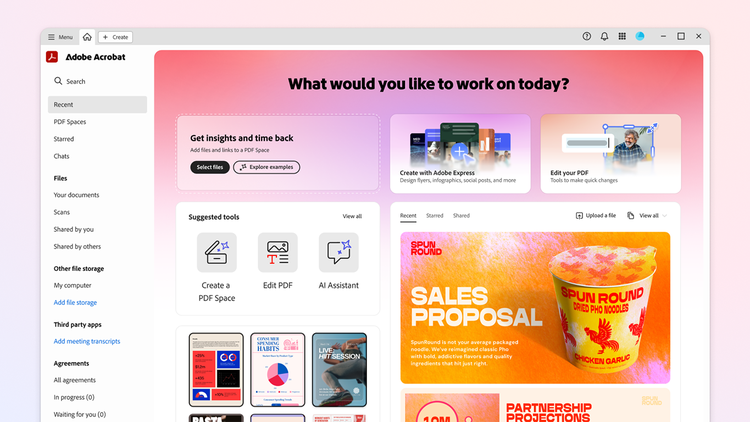
What is Adobe Acrobat Studio?
Adobe Acrobat Studio is a next-generation, all-in-one platform for document creation, collaboration, and workflow automation. It combines Adobe’s trusted PDF capabilities with AI-powered workspaces and personalised AI Assistants to help teams create, review, and manage documents more efficiently.
Key features of Adobe Acrobat Studio’s AI-powered workspaces.
Adobe Acrobat Studio brings together a set of AI-powered capabilities designed to simplify how enterprises create, review, collaborate on, and approve documents. These features work together within a single workspace to reduce manual effort, improve accuracy, and keep teams moving efficiently whether they’re in the office, working remotely, or on the go.
Intelligent document creation.
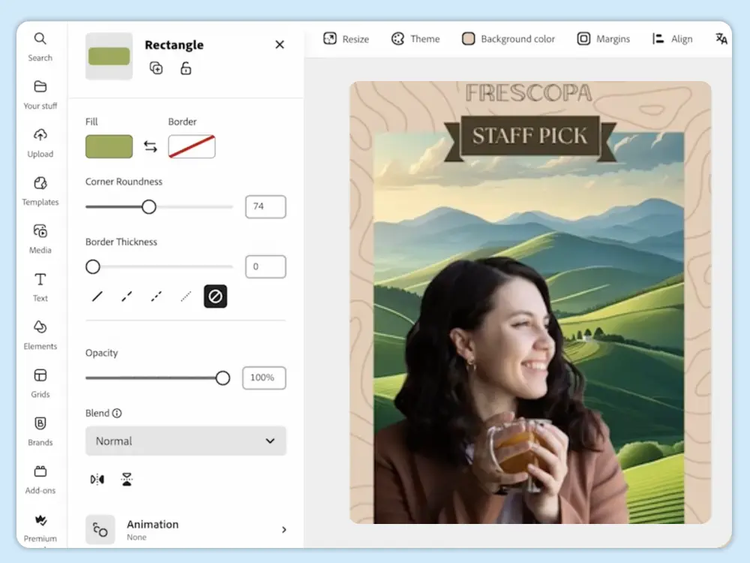
Integrated into Adobe Acrobat Studio is Adobe Express, which provides users with access to limitless templates for reports, flyers, social media posts, and various other document types. It also offers a deep collection of different visual elements, such as fonts, effects, graphics, photos, and videos. Instead of starting from scratch, teams can use pre-built assets to ensure consistency and accuracy across all documents. This reduces repetitive tasks, allowing teams to focus on strategic priorities rather than formatting or manual data entry.
AI-assisted review and editing.
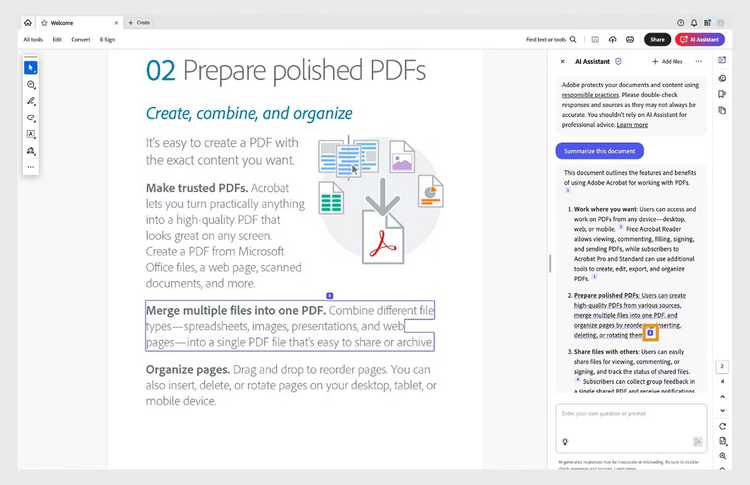
Adobe Acrobat Studio includes AI Assistants that help teams review and refine documents more quickly and accurately. Employees can converse directly with these AI Assistants and provide prompts: analyse content to identify inconsistencies, highlight potential issues, surface insights, generate summaries, and suggest improvements in real time. By supporting quality assurance at scale, they help businesses maintain consistency and confidence across high volumes of documents, all while enabling employees to spend less time reviewing and more time making informed decisions.
Dynamic, collaborative environment.
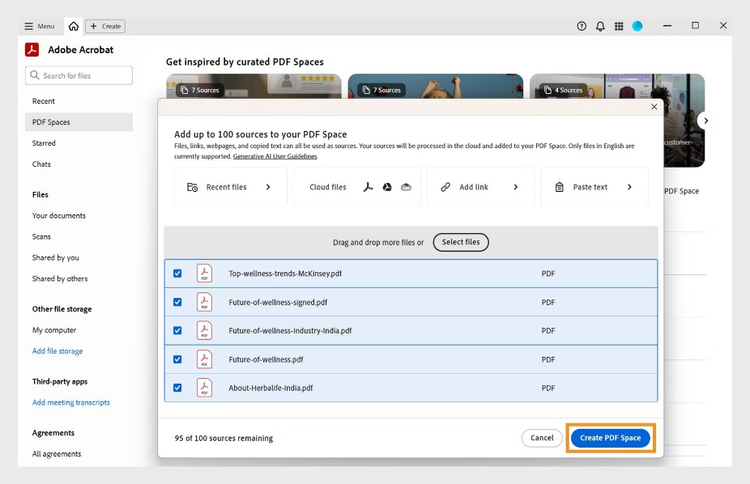
Adobe Acrobat Studio provides a dynamic, collaborative environment through PDF Spaces, where teams can work together in a shared workspace. Multiple stakeholders can review documents, leave comments, and track changes in one central location, eliminating version confusion and lengthy email threads. PDF Spaces enable real-time visibility into document status and feedback, helping teams stay aligned regardless of location. For enterprises with distributed or hybrid workforces, this collaborative approach improves transparency, accelerates reviews, and supports smoother decision-making across departments.
Hands-free voice commands.
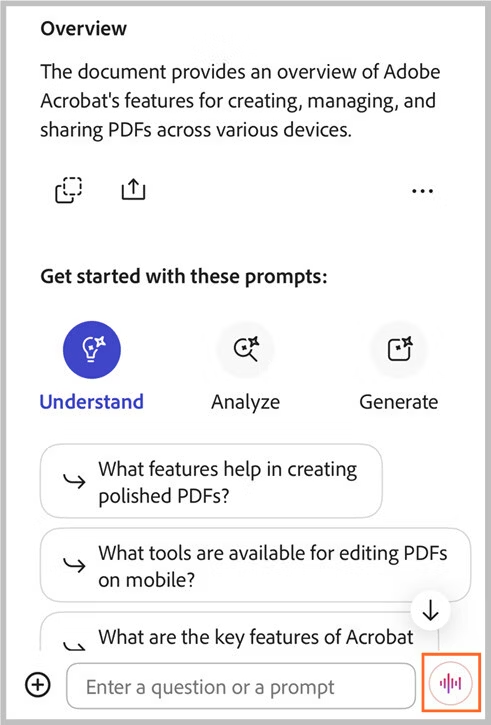
For mobile and on-the-go teams, Adobe Acrobat Studio supports hands-free voice commands that make document tasks easier to manage from anywhere. Teams can review content, add comments, or navigate documents using voice controls, which reduces reliance on manual input when working on smartphones or tablets. This feature is particularly valuable for field teams, managers, or executives who need to stay productive while travelling.
Easy signature collection, approval, and sharing.
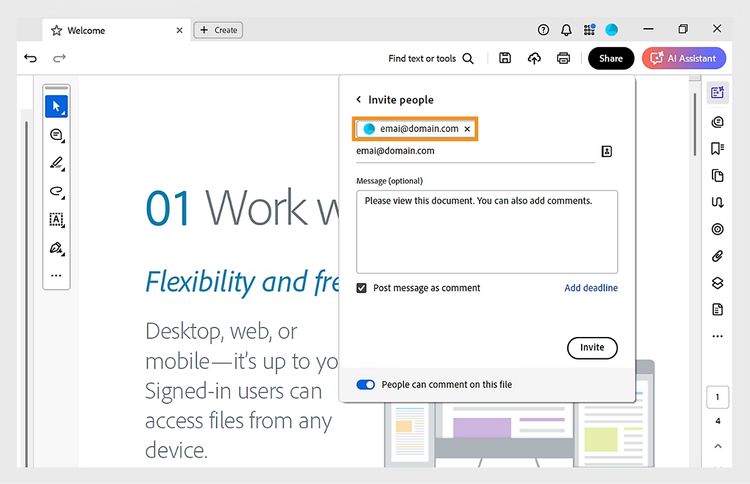
Adobe Acrobat Studio simplifies signature collection, approvals, and document sharing. Documents can be routed automatically to the right stakeholders, with clear visibility into who has signed, approved, or reviewed each file. This reduces delays, shortens approval cycles, and ensures accountability throughout the process. Once finalised, documents can be securely shared with internal teams or external partners. By streamlining these critical steps, enterprises can move things along more swiftly while maintaining control and compliance across document workflows.
Benefits of AI-powered workspaces for enterprises.
AI-powered workspaces deliver measurable advantages by embedding intelligence directly into everyday document workflows. Rather than relying on manual processes and disconnected tools, organisations can use AI to work faster, smarter, and with greater confidence at scale. Key benefits include:
-
Significant time savings through automation.
AI automates repetitive document tasks such as creation, review, routing, and approvals, reducing cycle times and freeing teams to focus on higher-value, strategic work.
-
Improved accuracy and quality assurance.
Intelligent analysis helps identify errors, inconsistencies, and compliance risks early in the process, which results to more consistent, reliable outcomes across high document volumes.
-
Stronger compliance and risk management.
AI-powered workflows support adherence to internal policies and regulatory requirements, which is especially critical for highly regulated industries such as finance, healthcare, and government.
-
Seamless collaboration across teams and locations.
Shared workspaces enable teams across cities or time zones to review, comment on, and approve documents in real time, improving visibility and reducing delays.
-
Scalable workflows that grow with the business.
AI-powered solutions adapt easily to increasing document volumes and evolving business needs without sacrificing speed or quality.
How does AI-powered solutions look like in the real world?
- Financial services and banking: Banks and lenders can use AI-powered workflows to automate loan applications, compliance checks, and reporting. AI-assisted review can also help identify missing information or inconsistencies early to reduce processing times and lower the risk of costly errors.
- Government and public sector: Public sector teams use AI-powered workspaces to accelerate approvals for permits, grants, and official correspondence. Automated routing and approvals improve transparency, reduce delays, and help agencies deliver services more efficiently.
- Legal and professional services: Firms can manage contracts, agreements, and client documentation more effectively with AI-assisted review, collaborative editing, and secure approval workflows.
- Large enterprises with distributed teams: Organisations with hybrid or remote workforces use AI-powered collaboration tools to keep teams aligned, eliminate version confusion, and maintain visibility across complex document workflows.
Use Acrobat tools for free
- Sign in to try 25+ tools, like convert or compress
- Add comments, fill in forms and sign PDFs for free
- Store your files online to access from any device
Create a free account | Create free account Adobe Acrobat Sign in
Frequently asked questions.