.

Acrobat

Building collaborative workspaces: How PDF Spaces unifies teams across Australia.

Adobe Acrobat Studio brings AI-powered PDF Spaces and secure collaboration into a single workspace, helping Australian teams centralise knowledge, progress approvals, and work confidently across hybrid and cloud-based environments

Explore Acrobat Studio

Collaborative, AI powered workspaces are changing how Australian organisations share knowledge and manage documents across hybrid and remote teams. As projects span offices, home locations, and cloud platforms, businesses are looking for practical ways to improve approval speed, maintain accuracy, and keep collaboration connected across departments.

Adobe Acrobat Studio provides a structured approach to building secure and centralised document workspaces. By combining trusted PDF tools, AI powered PDF Spaces, and collaborative editing, teams can reduce manual handling and focus more on decision making and delivery.

In this article, we explore how PDF Spaces supports practical, secure collaboration for Australian teams working across offices, home locations, and cloud platforms. Let’s take a closer look.

The role of collaborative knowledge hubs in document workflows.

As Australian teams operate across offices, home locations, and cloud platforms, organisations are placing greater emphasis on keeping documents, feedback, and decisions connected within a single workspace. The focus is on maintaining accuracy, improving approval speed, and ensuring teams can collaborate without losing visibility or control.

PDF Spaces supports this approach by providing a shared, AI powered environment where documents and insights live together. Through secure collaboration and built-in assistance, Adobe Acrobat Studio helps teams coordinate work, support compliance efforts, and move projects forward with greater consistency across departments and locations.

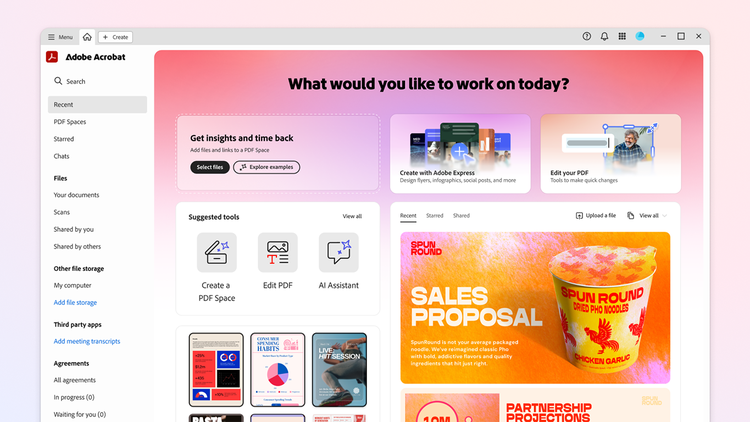
Acrobat Studio Home is a landing page that introduces the user experience through three cards: Add files and links to a PDF Space, Create with Adobe Express, and Edit your PDF.

What is Adobe Acrobat Studio?

Adobe Acrobat Studio is an all-in-one platform for building secure, collaborative document environments. As a collaboration tool, it brings together trusted PDF tools, AI-powered PDF Spaces, and personalised AI Assistants to help teams centralise knowledge, collaborate in real time, and manage document workflows with greater consistency.

Key features of Adobe Acrobat Studio for unified, AI-powered team workspaces.

Adobe Acrobat Studio brings together AI-powered PDF Spaces, personalised AI Assistants, and secure document tools to help Australian teams turn documents into shared knowledge. These capabilities work inside a single workspace, enabling teams to centralise information, uncover insights, and move approvals forward across hybrid and cloud-based environments.

PDF Spaces as conversational knowledge hubs.

PDF Spaces as conversational knowledge hubs.

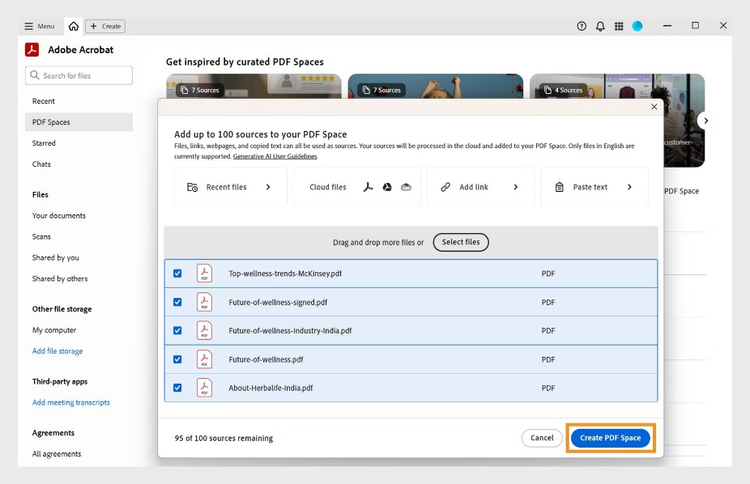
PDF Spaces enables teams to create an AI-powered workspace by bringing together PDFs, Microsoft 365 files, web links, and text into a single, structured knowledge hub. Instead of reading through each file manually, teams can use the built-in AI Assistant to generate summaries, ask questions, and surface key insights across all added sources.

Teams can use PDF Spaces to:

  • Upload and organise multiple file types and reference links in one workspace
  • View auto generated insights and summaries as soon as content is added
  • Ask natural language questions and receive document-based answers with citations
  • Add notes and contextual guidance for other team members
  • Rename and describe spaces to reflect project scope or team purpose

Because AI Assistant only uses the files and links added to the space, teams collaborate within a focused and secure context. This creates a shared reference point where insights, actions, and decisions remain visible and easy to revisit over time.

See how teams collaborate, edit, and share documents in real time—right from your mobile device. Experience a PDF Space in action.

Personalised AI Assistants for role-based insights and guided actions.

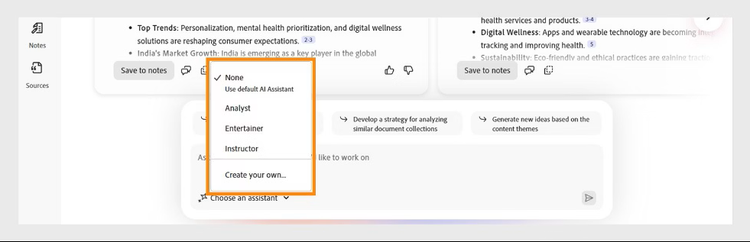
PDF Space chat panel showing options to select a specialist AI Assistant, such as Analyst or Entertainer for personalized insights.

Tailored insights with prebuilt AI Assistants.

PDF Spaces includes prebuilt AI Assistants designed for specific roles and document types, such as an Analyst or Instructor. Teams can select the Assistant that best fits their task to generate focused, context-aware insights from the files and links added to the workspace.

With prebuilt AI Assistants, teams can:

  • Generate executive summaries across multiple documents in a space
  • Identify action items, responsibilities, and next steps
  • Compare information and create structured outputs, such as tables or overviews
  • Ask follow-up questions to refine insights and uncover gaps

Responses are generated using only the verified sources within the PDF Space, helping teams work with information that stays relevant and traceable.

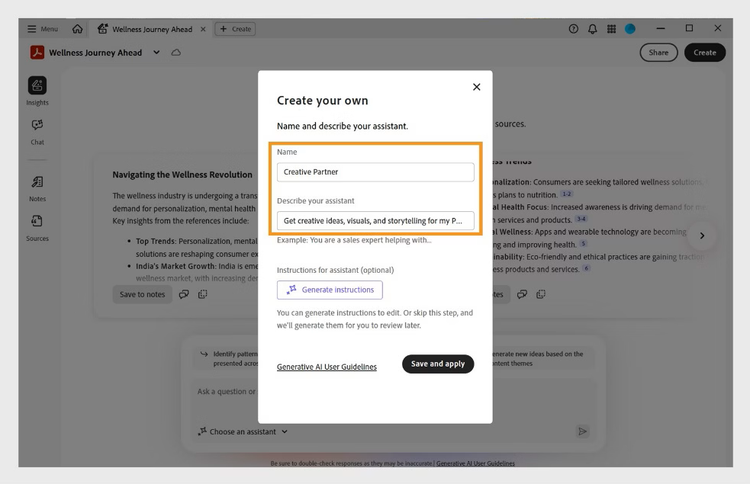
PDF Spaces dialog box for creating a custom assistant with fields to assign name, define goal, and instructions.

Creating personalised AI Assistants for team specific goals.

Acrobat Studio allows teams to create their own AI Assistant inside a PDF Space by defining a name, purpose, and set of instructions. This enables the Assistant to align more closely with specific project goals, business needs, or review standards.

Teams can use personalised AI Assistants to:

  • Guide document reviews based on internal policies or criteria
  • Draft communications, study guides, or briefing notes from workspace content
  • Generate consistent outputs for reporting and approvals
  • Support onboarding by explaining concepts and context within a space

By setting clear goals and instructions, teams can shape how the Assistant responds to create a more consistent and purpose-driven way to work with shared knowledge.

Sharing knowledge, not just files.

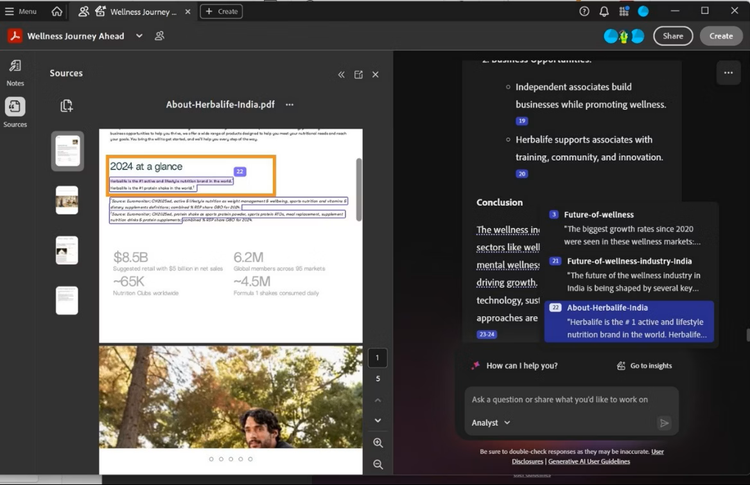
AI-generated content in PDF Spaces show clickable citations to reveal source details for verification and deeper understanding.

Teams can invite colleagues, partners, and stakeholders into a shared workspace that includes both the full set of documents and an AI Assistant configured for the task at hand. This allows new participants to move beyond reading files and quickly understand key decisions, priorities, and project context.

When teams collaborate this way, they can:

  • Access AI-generated summaries with clickable citations that link directly back to source documents
  • Jump to specific sections, pages, and references without searching across multiple files
  • Validate key points using clear document metadata, including titles and page locations
  • Share insights and decisions with traceable references rather than static attachments

This approach supports clearer collaboration, stronger accountability, and a more reliable flow of information across internal teams and external partners, even as projects span regions and time zones.

Secure collaboration with controlled access and traceable context.

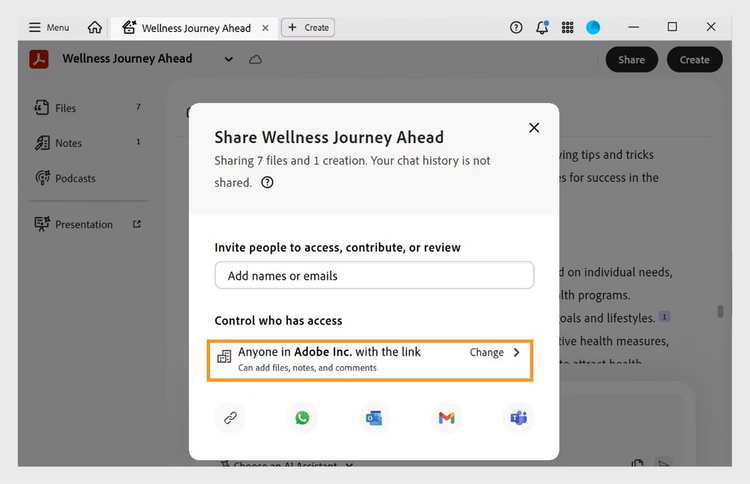
The Share dialog for a PDF Space displays fields to invite people, set link access levels, and choose recipient permissions such as adding files, notes, and comments..

Teams can share a workspace with clearly defined access settings, ensuring the right people can view documents, insights, and notes without exposing sensitive content. Access can be limited to invited users, restricted to internal teams, or shared via secure links, giving organisations flexibility without losing governance.

Within a shared workspace, collaborators can:

  • View all files, notes, and AI generated insights in one central location
  • Interact with a prebuilt or personalised AI Assistant selected by the workspace owner
  • Navigate summaries and responses with clickable citations that link directly to source documents
  • Trace references using document metadata, including file names, sections, and page locations

These controls help teams collaborate openly while maintaining oversight, supporting consistent records, and preserving the integrity of shared knowledge as projects move across departments and locations.

Connected content, approvals, and decisions in one workspace.

Acrobat Studio enables teams to bring research, drafts, and final documents into a single shared environment where collaboration and approvals can happen without losing context. Files, links, and supporting materials sit alongside review notes and AI-generated insights, creating a consistent source of truth as work progresses.

Teams can build workspaces using a wide range of content, including PDFs, Microsoft Word, Excel, and PowerPoint files, text documents, cloud-stored files from Google Drive and OneDrive, and public web links. This allows reference material, working files, and approval-ready documents to remain connected rather than scattered across separate systems.

Within this environment, teams can:

  • Route documents for review and approval with clear visibility into ownership and progress
  • Collect binding e-signatures and monitor completion status in real time
  • Maintain a complete record of files, notes, and AI generated insights in one location
  • Use traceable references and citations to support quality checks and governance
  • Share workspaces securely with internal teams or external partners using controlled access settings

By keeping content, collaboration, and sign off processes in one place, teams can reduce handover delays and preserve a clear and reliable record of decisions as work moves across departments, platforms, and locations.

Benefits of collaborative PDF workspaces for Aussie teams.

Collaborative workspaces deliver practical advantages by bringing documents, insights, and team interaction into a single, secure environment. Instead of managing files across disconnected systems, organisations can centralise knowledge and coordinate work more effectively across offices, home locations, and cloud platforms. Highlights include:

  • Faster alignment across distributed teams.

    Shared workspaces ensure everyone is working from the same set of documents, notes, and AI generated insights. This reduces misunderstandings, limits rework, and helps teams reach decisions more quickly, even when working across cities or time zones.

  • Clearer visibility into progress and ownership.

    Teams can track where documents sit in the review and approval process, who is responsible for next steps, and what feedback has already been addressed. This improves accountability and reduces delays caused by unclear handovers.

  • Stronger knowledge retention and continuity.

    By keeping files, notes, citations, and AI generated summaries in one place, organisations preserve context over time. This makes it easier for new team members or stakeholders to step into projects without losing critical background or decision history.

  • Confident collaboration with built in governance.

    Controlled access settings, traceable references, and secure sharing options help teams collaborate openly while maintaining oversight. This supports compliance, internal policies, and consistent record keeping across departments and regions.

  • Scalable collaboration as teams grow.

    As projects expand and document volumes increase, shared workspaces can adapt without adding complexity. Teams can continue working efficiently while maintaining the same standards of quality, visibility, and security.

How collaborative workspaces support teams in practice.

  • Project and operations teams in national organisations.
    Project teams managing work across multiple offices use shared workspaces to bring plans, reports, and reference material into one place. AI-generated summaries with traceable citations help team leads quickly align stakeholders on progress and next steps, while controlled access settings keep sensitive internal information visible only to the right groups.
  • Legal, compliance, and risk teams.
    These teams rely on workspaces to organise contracts, policy documents, and supporting evidence side by side. Structured summaries and linked citations allow reviewers to validate key clauses and references without searching across separate files. This supports consistent reviews and preserves a clear trail of decisions and approvals.
  • Government and public service delivery teams.
    Service teams coordinating permits, grants, and public communications use shared spaces to connect source documents, internal guidance, and official correspondence. Secure sharing options make it easier to collaborate across departments and regional offices while maintaining transparency and record keeping standards.
  • Financial services and commercial teams.
    Teams handling applications, proposals, and customer documentation use collaborative workspaces to track supporting material, approvals, and sign off steps in one environment. AI Assistants help surface action items and summaries, which improves handovers between frontline staff, managers, and central teams.
  • Education and training organisations.
    Institutions and corporate learning teams use shared spaces to organise course materials, policy updates, and briefing notes. Personalised AI Assistants can help explain content, generate study guides, and maintain consistent messaging across campuses and remote learners.
a text bubble, pencil icon and a stacked PDF icon representing free online Acrobat tools

Use Acrobat tools for free

  • Sign in to try 25+ tools, like convert or compress
  • Add comments, fill in forms and sign PDFs for free
  • Store your files online to access from any device

Frequently asked questions.

More resources

Acrobat Trefoil Mnemonic

Adobe Acrobat

Browse all Acrobat plans.

Buy now Start free trial