Acrobat
How to hear PDF files read aloud.
Enjoy the convenience of having PDF files read aloud to you. Find out how to customize narration and pacing options for your best experience.
Acrobat
Enjoy the convenience of having PDF files read aloud to you. Find out how to customize narration and pacing options for your best experience.

Having a PDF file read aloud offers numerous advantages. It’s also an easy feature to master.
Sometimes you need to have a PDF read aloud. Perhaps your eyesight is poor, and you forgot your glasses, or you want to multitask and save time by having a PDF read out loud while you press on with some other work, drive to the office or take the train back home.
People working from home might use the time to have a PDF read aloud while they do some housework or put the kettle on. So how do you turn PDF text to speech?
Read our dedicated guide to listening to a PDF.
Follow these simple steps to transform your PDF into a spoken document.
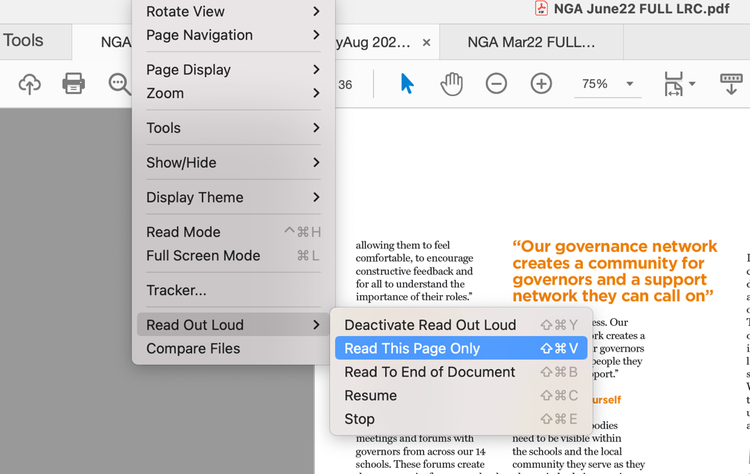
During the process, you can also choose from several options to customize the experience of having your PDFs read out loud:
You can also choose other options by returning to the View > Read Out Loud menu. There, you can have Reader read the current page, read from the current location to the end of the document, or pause, stop, and play the reading. You can also deactivate the Read Out Loud feature if you’re done with it.
Converting your PDF to a read-aloud file can have many benefits. Firstly, it’s very helpful for those who are perhaps partially sighted and require assistance when reading print text. This can make your document more accessible.
Creating a spoken-word document can also help some listeners understand the language that is included in a PDF better. Again, this makes your documents more inclusive to those who would benefit more from an audio piece of literature.
Whatever your reason, Adobe Reader enables you to have your files read aloud. You can also personalize your documents even further, by changing the narrator’s voice and selecting the speed that text will be read out at.
Now you can have your PDF read aloud with your unique preference selections. See what else you can do with PDFs online. From converting files like Word to PDF to splitting files, merging PDFs, we have a roster of helpful tools to help you create fantastic documents today.