#1E1E1E

Acrobat

What is document management? Meet the ATO’s record-keeping requirements.

In Australia, the ATO sets the benchmark for how business records must be created, stored, and produced because its requirements define what counts as a valid, auditable record for tax and compliance purposes. Adobe Acrobat Studio can help teams manage everyday documents in a way that naturally aligns with those standards, without turning record keeping into a separate, manual task.

Explore Adobe Acrobat

https://main--da-dc--adobecom.aem.page/dc-shared/fragments/promo-banners/acrobat-studio

For Australian businesses, the Australian Taxation Office (ATO) plays a central role in shaping how records are managed. Its guidelines outline what must be kept, how long records should be retained, and how quickly they need to be produced if requested. These expectations influence everything from how invoices and contracts are stored to how approvals, changes, and supporting documentation are tracked over time.

The result is that document management is no longer just an administrative function. It becomes part of a broader compliance framework for businesses operating in Australia. Under this, businesses need systems that make records easy to locate, consistent in format, protected from unauthorised changes, and accessible to the right people when needed.

This is where collaborative, secure document environments, like Adobe Acrobat Studio, become practical tools for compliance, not just productivity.

What is document management?

Document management is the structured way a business creates, organises, stores, protects, and retrieves its documents throughout their lifecycle. This includes everyday working files and official records that must be retained for legal, tax, and compliance purposes.

In practice, document management goes beyond simply saving files in folders: it covers how documents are created in consistent formats, how changes and approvals are tracked, who can access or edit information, and how final records are preserved over time.

What does Adobe Acrobat Studio add to structured record management?

As a collaboration platform, Adobe Acrobat Studio brings document creation, review, and storage into a shared workspace built for teams that need clarity as much as speed. Instead of relying on scattered folders, long email trails, and competing file versions, teams work in a central environment that supports consistent handling from first draft through to approved and retained records.

For Australian businesses, this means everyday materials such as invoices, contracts, reports, and policy documents can move through defined review and approval paths while maintaining the qualities expected of formal business records, including accuracy, traceability, secure access, and clear retention.

By combining trusted PDF tools with shared PDF Spaces, AI-assisted insights, and controlled sharing, the platform helps teams keep information organised and accessible as they collaborate across offices, remote locations, and cloud-based systems.

Understanding ATO record-keeping expectations for Australian businesses.

The Australian Taxation Office (ATO) sets clear standards for how businesses must create, store, protect, and retrieve records. These requirements focus on accuracy, traceability, security, retention, and accessibility. Acrobat Studio aligns to these expectations by structuring how documents move, where they live, and how they are controlled across teams.

Rather than prescribing specific software, the ATO focuses on outcomes. Businesses are expected to maintain records that clearly explain transactions, remain protected from unauthorised changes, can be retrieved if requested, and are kept for the appropriate retention period.

For the most current and detailed guidance, businesses should always refer directly to the ATO’s official record-keeping requirements.

#000000

Already an existing Acrobat customer?

If you already have an Acrobat Reader, Standard or Pro plan, simply sign in on your Acrobat or Acrobat Reader app and try AI Assistant today.

Open Acrobat

How Adobe Acrobat Studio supports document management expectations in practice.

Acrobat Studio helps businesses align everyday document workflows with the outcomes the ATO expects, without adding complex systems or compliance overhead. By centralising how documents are created, reviewed, shared, and stored, teams can build stronger record management habits into their normal way of working.

Clear and complete records.

The ATO expects records to explain the purpose and details of each business transaction. Acrobat Studio supports this by standardising documents such as invoices, contracts, payroll records, and reports in a consistent PDF format. Structured layouts, form fields, and annotations help teams capture essential information in a clear and repeatable way, while shared workspaces keep related documents grouped together for context.

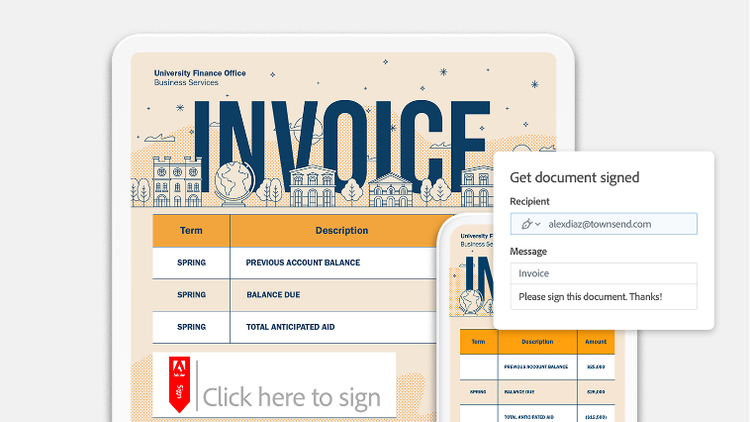
Request and track e-signatures by sending out PDFs with Acrobat.

Protected and controlled access.

Records must be safeguarded against unauthorised changes. With role-based access and secure sharing, Acrobat Studio allows businesses to control who can view, edit, comment on, or approve documents. Final versions can be locked to preserve accuracy, and document activity is visible across the workspace to support transparency.

Share documents on your teams and control who can access your PDFs or make it public.

Reliable digital storage.

The ATO expects digital records to be stored in a way that protects them from loss or tampering. Shared PDF Spaces provide a central location for storing official business records rather than relying on personal drives or email threads. This helps reduce duplication, improve visibility, and maintain continuity as teams grow or change.

Searchable and retrievable records.

Businesses must be able to produce records when requested. Acrobat Studio uses AI Assistant search and text recognition to make both digital and scanned documents searchable across shared workspaces. This allows teams to locate records quickly by keyword, document type, or context rather than relying on manual folder navigation.

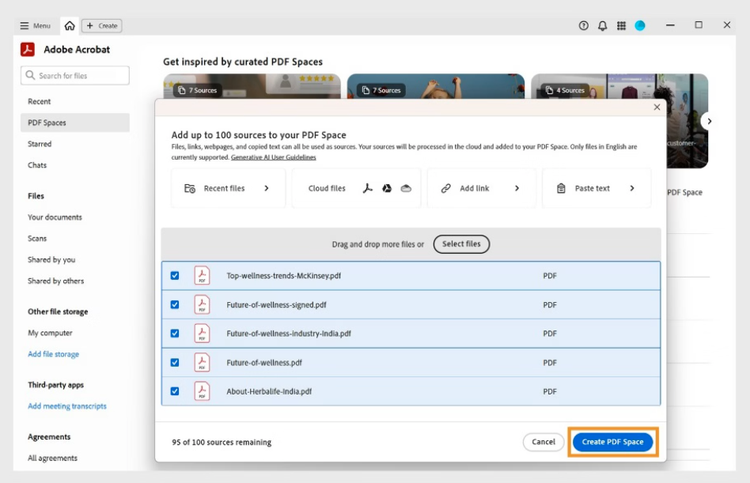
Create PDF spaces

Long-term retention support.

Most business records must be kept for at least five years, with some requiring longer retention. Centralised storage and version history help preserve documents across financial years, staff changes, and system updates, reducing the risk of records being lost or fragmented over time.

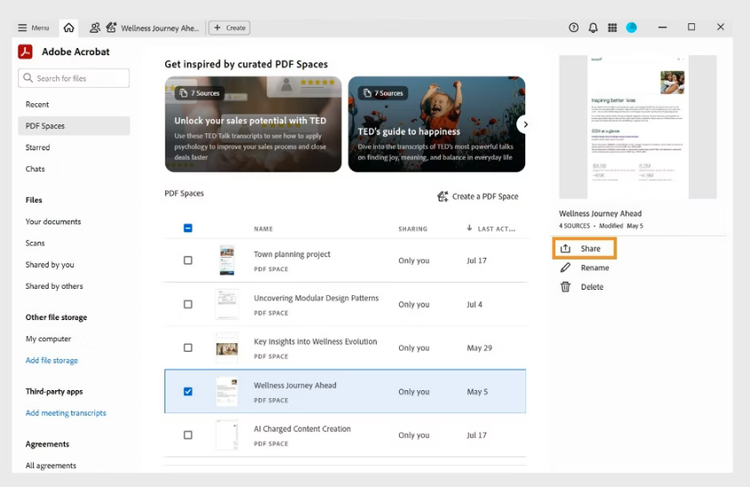
Share PDF spaces

Clear handling processes.

The ATO may ask how records are managed. Acrobat Studio supports defined workflows for drafting, reviewing, approving, and storing documents. This creates a visible process that businesses can explain and demonstrate, rather than relying on informal or undocumented handling practices.

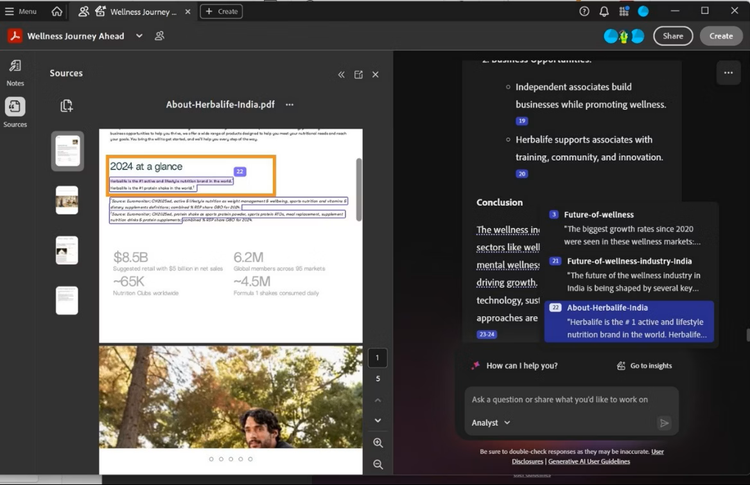
AI-generated content in PDF Spaces show clickable citations to reveal source details for verification and deeper understanding.

Usable and exportable formats.

Records must remain accessible and convertible if needed. Acrobat Studio allows businesses to export documents into common formats such as Word, Excel, or CSV, helping teams share information with accountants, auditors, or advisors without breaking document integrity.

Benefits of collaborative, ATO-aligned document management.

Building collaborative workspaces around secure, structured document handling delivers practical advantages beyond simple file sharing, including:

  • Faster access to required records.
    Documents stored in shared spaces with clear organisation are easier to locate when responding to internal reviews or external requests.
  • Stronger version control.
    Teams can work on the same files without creating conflicting copies, helping ensure the final record reflects approved and accurate information.
  • Improved security and access management.
    Sharing controls and permission settings help ensure only authorised users can view, edit, or approve sensitive business records.
  • Clearer audit trails.
    Notes, comments, and approval steps provide additional context around changes, making it easier to demonstrate how and why records were finalised.
  • Scalable processes as the business grows.
    As document volumes increase, structured workspaces and AI-assisted organisation help maintain consistency without adding administrative overhead.

Bringing compliance and collaboration together

Meeting ATO record-keeping requirements does not have to mean adding layers of manual checks or separate systems. By bringing documents, teams, and structured workflows into a shared environment, Adobe Acrobat Studio helps Australian businesses turn everyday collaboration into a reliable, compliant record-management process.

From initial drafts to final, stored records, teams can work together with confidence, knowing their documents are organised, protected, and ready when they are needed most.

Frequently asked questions.

How do organisations get started with Adobe Acrobat Studio?
Businesses can begin with a free trial to explore the full set of tools and collaborative features. Once the trial ends, teams can choose a plan that best fits their size, workflow needs, and document volume.
How does Acrobat Studio support teams working remotely or on the move?
Teams can review, comment on, and manage documents across desktop, web, and mobile, making it easier to keep records moving even when staff are not based in one location.
Can the AI Assistant be used across different industries and roles?
Yes. The AI Assistant can be tailored to focus on specific document types and workflows, which makes it useful for finance, legal, operations, compliance, and management teams.
Can teams extract insights from existing business records?
AI assisted tools can summarise content, highlight key sections, and help navigate large collections of documents, making it easier to find relevant information quickly.
Does Acrobat Studio work with existing business systems and platforms?
It integrates with common collaboration tools and cloud storage services, allowing teams to add structured document management without changing their core systems.
How does Acrobat Studio handle multilingual documents?
The platform can manage and organise documents in multiple languages, with generative AI features currently supported for a defined set of major languages.
Is it difficult for teams to adopt collaborative and AI-supported workflows?
Adobe provides in-product guidance and learning resources to help teams get comfortable and consistent with the tools over time.
How is business data protected when using AI features?
Documents remain private, and business content is not used to train Adobe’s generative AI models.

More resources

Content as a Service v3 - Thursday, 19 February 2026 at 09:44