Erfahre, wie du ein Produktfoto mit Lightroom und Photoshop Fix optimieren und anschließend mit Adobe Spark Post in eine Social-Media-Anzeige umwandeln kannst.
Adobe Photoshop Lightroom ist jetzt Adobe Photoshop Lightroom Classic – mit allen bekannten Funktionen und Werkzeugen.Lightroom ist der Cloud-basierte Foto-Service von Adobe.
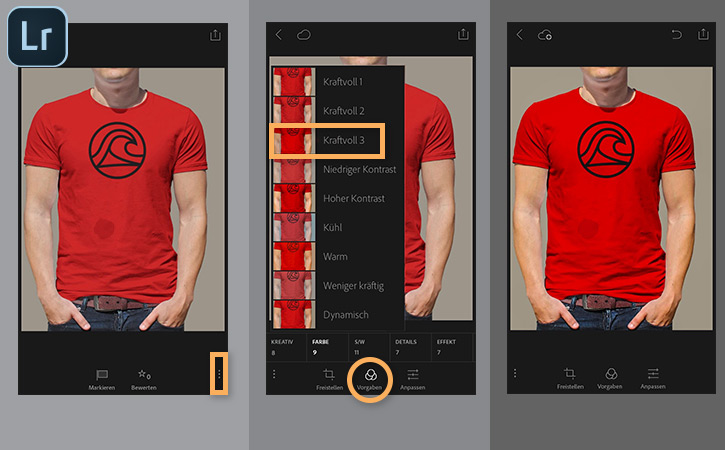
Starte Lightroom auf deinem Smartphone oder Tablet. Wähle aus einer deiner Lightroom-Sammlungen das Bild eines Produkts aus, für das du werben möchtest. Tippe unten auf das Symbol „Optionen“.
Tippe dann auf „Vorgaben“. Wähle „Farbe“. Wähle die Vorgabe „Kraftvoll 3“ aus, um die Farben intensiver wirken zu lassen.
Tipp: Du kannst auch ein Bild aus den Aufnahmen auf deinem Smartphone oder Tablet verwenden.
2
Das Foto an Photoshop Fix senden.
Sobald das Foto den passenden Look hat, kannst du mithilfe von Photoshop Fix unerwünschte Elemente entfernen.
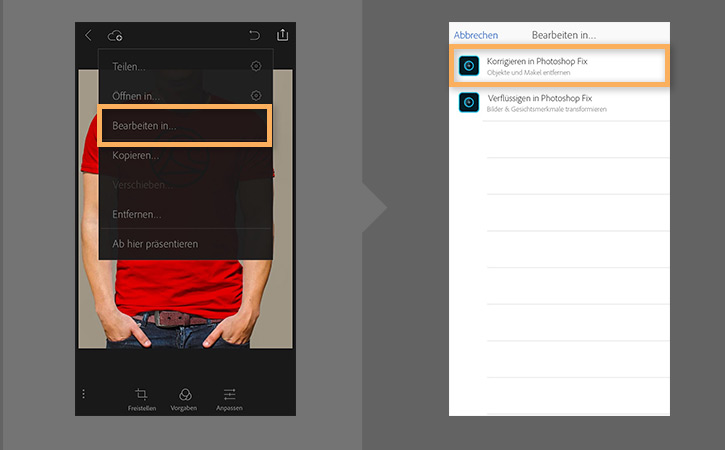
Tippe in Lightroom auf das Symbol zum
Freigeben. Wähle „Bearbeiten in > Korrigieren in Photoshop Fix“. Tippe auf „OK“.
3
Das Foto in Photoshop Fix bearbeiten.
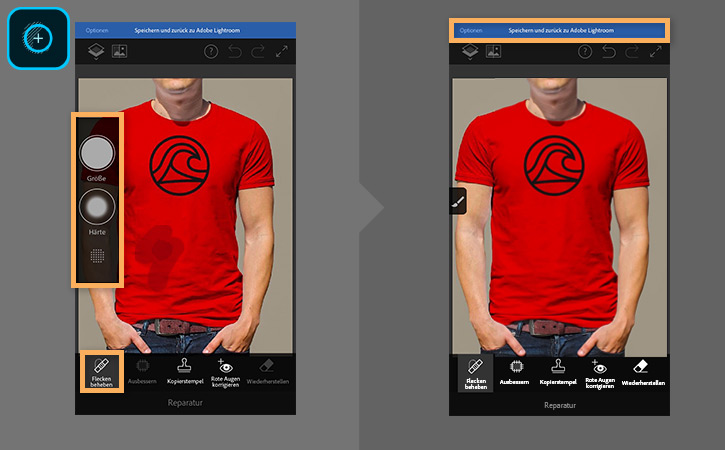
Tippe auf „Reparatur“ und dann auf „Flecken beheben“. Male mit dem Finger über die betroffene Stelle, um sie aus dem Produktfoto zu entfernen.
Tipp: Du kannst den ausgewählten Bereich mithilfe der Steuerungen für Größe und Härte genauer definieren.
Wenn du fertig bist, tippe oben auf „Speichern und zurück zu Adobe Lightroom“. Lightroom wird mit einer neuen Version deines Fotos geöffnet.
4
Das Bild in einer neuen Sammlung speichern.
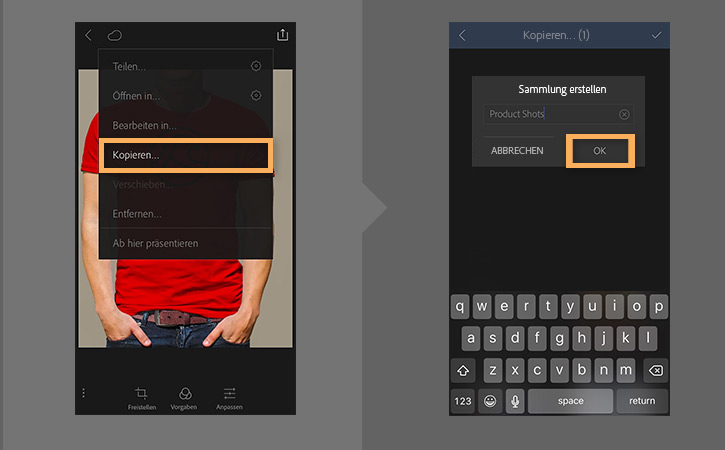
Tippe auf das Freigabesymbol. Wähle „Kopieren“. Tippe auf dem Bildschirm mit deinen Sammlungen auf das Pluszeichen, um eine neue Sammlung zu erstellen. Tippe anschließend auf das Häkchen.
Gib einen Namen für deine Sammlung ein. Tippe auf „OK“.
5
Das Foto in Adobe Spark Post öffnen.
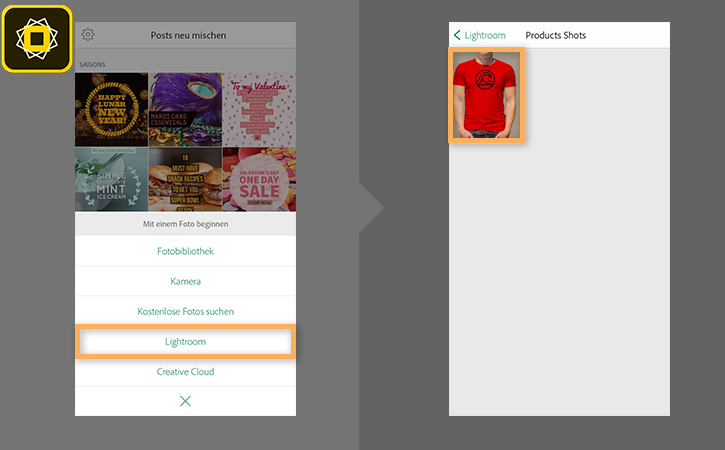
Öffne Adobe Spark Post. Tippe auf das Pluszeichen. Wähle „Lightroom“. Wähle die neue Sammlung, die du gerade erstellt hast. Tippe auf das Produktfoto.
Tipp: Du kannst auch ein Foto mit der Kamera deines Smartphones oder Tablets machen oder ein Bild aus deinen Aufnahmen importieren.
6
Das Foto in eine Anzeige umwandeln.
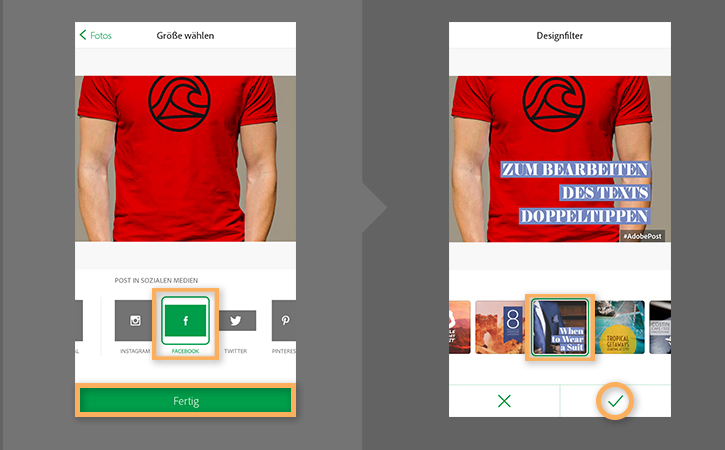
Lege fest, wo du deine Anzeige veröffentlichen möchtest. Spark Post passt die Größe des Bilds automatisch an die Zielplattform an. In diesem Beispiel wird Facebook verwendet. Tippe auf „Fertig“, sobald du fertig bist.
Tippe auf „Design“. Wähle eine Vorgabe aus. Tippe auf das Häkchen, um sie anzuwenden. Spark Post bietet verschiedene Vorgaben, mit denen du in Minuten professionelle Anzeigen erstellen kannst.
7
Text hinzufügen.
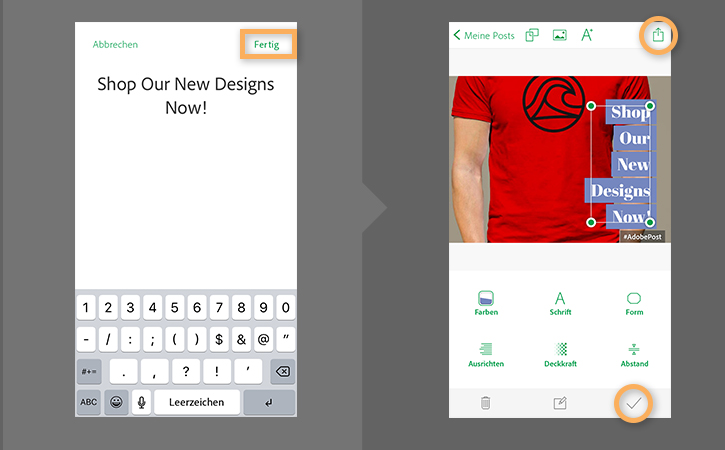
Tippe zweimal auf den Text. Gib den gewünschten Text für deine Anzeige ein. Tippe anschließend auf „Fertig“. Nun kannst du das Textfeld beliebig positionieren. Um die Größe des Textes anzupassen, ziehe an einem der Ankerpunkte.
Du kannst auch Schriftart, Farbe und andere Eigenschaften ändern. Tippe auf das Häkchen, sobald du fertig bist.
Jetzt kannst du deine Anzeige publizieren. Tippe auf das Symbol zum
Freigeben am oberen Bildschirmrand. Oder lade die Anzeige bei einem Service wieFacebook Ad Builder hoch.
Weitere Informationen zur Erstellung von Anzeigen für Facebook findest du unterFacebook Blueprint .

You can control how Adobe websites use cookies and similar technologies by making choices below. But note that if you disable cookies and similar technologies entirely, Adobe websites may not function properly.
Cookies are small text files stored by your web browser when you use websites. There are also other technologies that can be used for similar purposes like HTML5 Local Storage and local shared objects, web beacons, and embedded scripts. These technologies help us do things like remembering you and your preferences when you return to our sites, measure how you use the website, conduct market research, and gather information about the ads you see and interact with.
You can make choices in the menu below about what cookies and other technologies you want us to use on Adobe sites when you visit them from this browser. You can always change those choices later by clicking on the Cookie Preferences link at the bottom of the page.
If enabled:
We can improve your experience by tailoring the site and the content to things we think might be of interest
We can better keep track of your preferences — like what language you prefer to use
We will better understand your likely interests so we can provide you more relevant Adobe ads and content on non-Adobe websites and in non-Adobe apps
It will help us improve the performance of our website and those of our partners who use the Adobe Experience Cloud
If disabled:
We won’t be able to remember you from session to session so the experience may not be tailored to your interests
You’ll still have access to the content of the site but certain features that depend on cookies may not function
You’ll still see ads, they just may not be as relevant to you
General information
You can control how Adobe websites use cookies and similar technologies by making choices below. But note that if you disable cookies and similar technologies entirely, Adobe websites may not function properly.
Cookies are small text files stored by your web browser when you use websites. There are also other technologies that can be used for similar purposes like HTML5 Local Storage, web beacons, and embedded scripts. These technologies help us do things like remembering you and your preferences when you return to our sites, measure how you use the website, conduct market research, and gather information about the ads you see and interact with.
You can make choices in the menu below about what cookies and other technologies you want us to use on Adobe sites when you visit them from this browser. You can always change those choices later by clicking on the Cookie Preferences link at the bottom of the page.
If enabled:
We can improve your experience by tailoring the site and the content to things we think might be of interest
We can better keep track of your preferences — like what language you prefer to use
We will better understand your likely interests so we can provide you more relevant Adobe ads and content on non-Adobe websites and in non-Adobe apps
It will help us improve the performance of our website and those of our partners who use the Adobe Experience Cloud
If disabled:
We won’t be able to remember you from session to session so the experience may not be tailored to your interests
We’ll still count your use of our site and services
You’ll still have access to the content of the site but certain features that depend on cookies may not function
You’ll still see ads, they just may not be as relevant to you
Operate the site and core servicesOperate site and measure engagement
Always active
These cookies are required, and they are used to enable the site and related services core functionality. Without them the site could not operate, so they cannot be disabled.
These cookies enable the site and related services’ core functionality and collect statistics about user engagement, such as counting active use to help us understand trends. These cookies cannot be disabled.
Measure performance
These cookies are used to analyze site usage to measure and improve performance. Without them Adobe cannot know what content is most valued and how often unique visitors return to the site, making it hard to improve information we offer to you.
These cookies are used to analyze site usage to measure and improve performance. Without them Adobe cannot know what content is most valued, making it hard to improve information we offer to you.
Extend functionality
These cookies are used to enhance the functionality of Adobe sites such as remembering your settings and preferences to deliver a personalized experience; for example, your username, your repeated visits, preferred language, your country, or any other saved preference.
Personalize advertising
These cookies are used to enable Adobe and our partners to serve ads more relevant to your interests. Without them you will still see ads, but they might not be as relevant to you.
Personalize advertising
These cookies are used to enable Adobe and our partners to serve ads more relevant to your interests. Without them you will still see ads, but they might not be as relevant to you.