Aprende a utilizar la herramienta Organizar páginas de Adobe Acrobat para crear un PDF más pequeño y específico.
Introducción
[Sarah John]: Imagínate esto: Acabas de recibir un PDF enorme con muchos gráficos más de 100 páginas.
Muy interesante, claro que sí, pero dos de esas páginas están llenas de información especialmente vitales para tu puesto, la clase de material que tienes que consultar constantemente.
Por desgracia, debido a su tamaño, el archivo tarda una eternidad en abrirse y se ralentiza cuando te mueves por él.
Día tras día, te ves obligado a lidiar con este archivo gigantesco e inmanejable. que ralentiza tu trabajo y te dan ganas de tirar el ordenador por la ventana.
Céntrate en lo importante
Vale, pues tenemos buenas noticias: Con Organizar páginas de Adobe Acrobat podrás extraer esas páginas importantes en tu propio archivo y te facilitará mucho la vida.
En el menú Todas las herramientas de Acrobat, selecciona Organizar páginas y abre el archivo en cuestión.
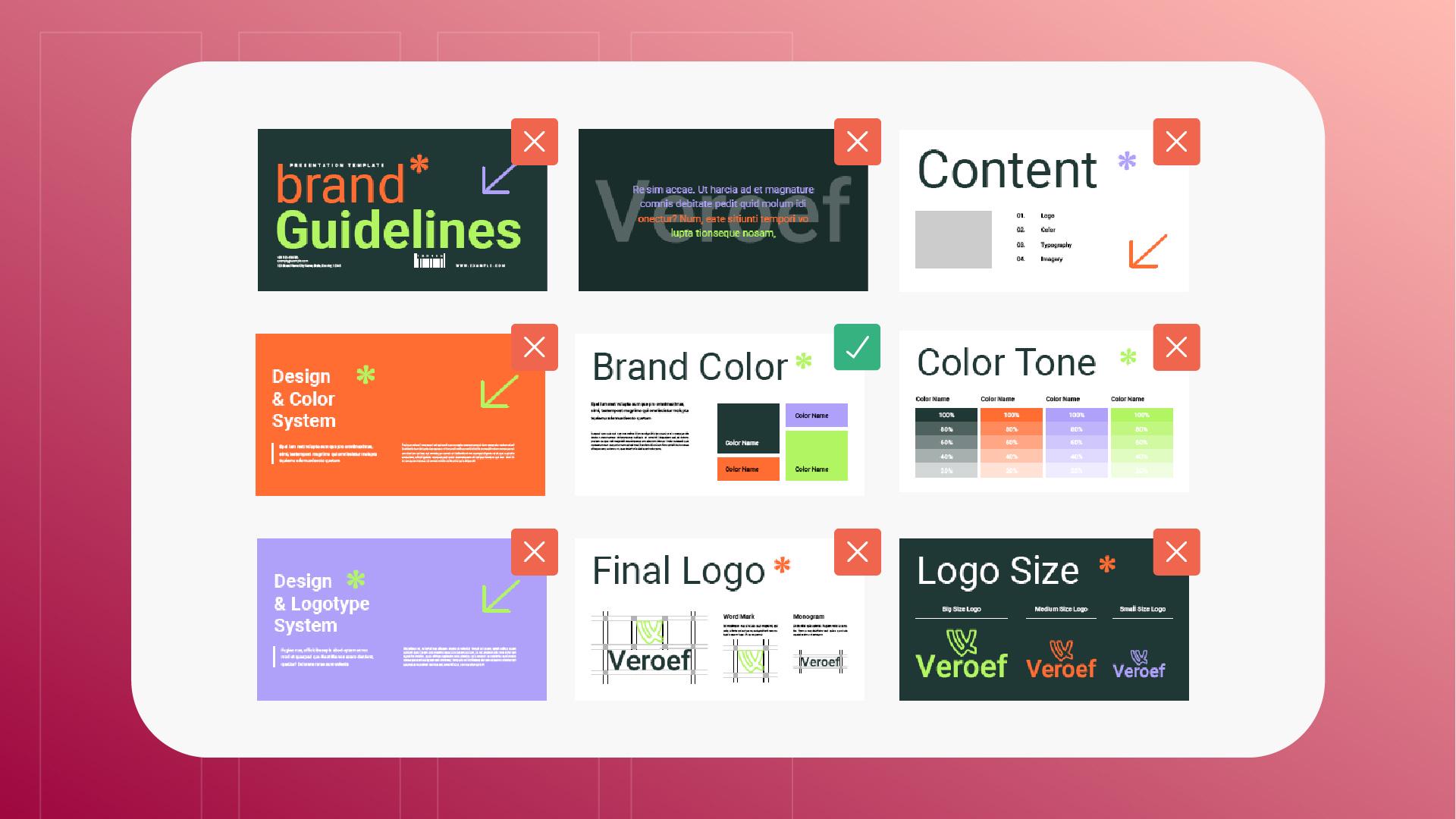
En este ejemplo, vamos a utilizar este documento de directrices de la marca.
Nos encanta la historia que cuenta este documento sobre tu marca y los detalles sobre todas las decisiones que tomamos, pero lo único que realmente necesitamos para nuestro trabajo diario
Selecciona y extrae páginas específicas
es esta página con la paleta de color actualizada.
Entonces, lo que vamos a hacer es seleccionar esa página y luego haz clic aquí en el botón Extraer páginas en la barra lateral.
En este menú, tenemos la opción de eliminar la página del original después de la extracción -no es necesario en este caso- y extraer la página seleccionada a un archivo independiente Vamos a marcar esa casilla y luego haremos clic en Extraer.
Acrobat nos preguntará dónde queremos guardar el nuevo archivo.
Y una vez que lo hayamos seleccionado y hayamos hecho clic en Aceptar, tendremos nuestro nuevo archivo.
Ahora, cada vez que queramos consultar los códigos actualizados de la marca, abriremos el nuevo PDF, mucho más pequeño y manejable. y nos ponernos directamente a trabajar.
Utiliza la herramienta Organizar páginas para separar las páginas más importantes de los documentos largos. Crea un archivo más pequeño que se abra rápidamente y sea fácil de consultar.
Selecciona y extrae páginas específicas
Selecciona las páginas que necesitas y elige Extraer páginas en la barra lateral. A continuación, guarda tu nuevo PDF más pequeño.
You can control how Adobe websites use cookies and similar technologies by making choices below. But note that if you disable cookies and similar technologies entirely, Adobe websites may not function properly.
Cookies are small text files stored by your web browser when you use websites. There are also other technologies that can be used for similar purposes like HTML5 Local Storage and local shared objects, web beacons, and embedded scripts. These technologies help us do things like remembering you and your preferences when you return to our sites, measure how you use the website, conduct market research, and gather information about the ads you see and interact with.
You can make choices in the menu below about what cookies and other technologies you want us to use on Adobe sites when you visit them from this browser. You can always change those choices later by clicking on the Cookie Preferences link at the bottom of the page.
If enabled:
We can improve your experience by tailoring the site and the content to things we think might be of interest
We can better keep track of your preferences — like what language you prefer to use
We will better understand your likely interests so we can provide you more relevant Adobe ads and content on non-Adobe websites and in non-Adobe apps
It will help us improve the performance of our website and those of our partners who use the Adobe Experience Cloud
If disabled:
We won’t be able to remember you from session to session so the experience may not be tailored to your interests
You’ll still have access to the content of the site but certain features that depend on cookies may not function
You’ll still see ads, they just may not be as relevant to you
General information
You can control how Adobe websites use cookies and similar technologies by making choices below. But note that if you disable cookies and similar technologies entirely, Adobe websites may not function properly.
Cookies are small text files stored by your web browser when you use websites. There are also other technologies that can be used for similar purposes like HTML5 Local Storage, web beacons, and embedded scripts. These technologies help us do things like remembering you and your preferences when you return to our sites, measure how you use the website, conduct market research, and gather information about the ads you see and interact with.
You can make choices in the menu below about what cookies and other technologies you want us to use on Adobe sites when you visit them from this browser. You can always change those choices later by clicking on the Cookie Preferences link at the bottom of the page.
If enabled:
We can improve your experience by tailoring the site and the content to things we think might be of interest
We can better keep track of your preferences — like what language you prefer to use
We will better understand your likely interests so we can provide you more relevant Adobe ads and content on non-Adobe websites and in non-Adobe apps
It will help us improve the performance of our website and those of our partners who use the Adobe Experience Cloud
If disabled:
We won’t be able to remember you from session to session so the experience may not be tailored to your interests
We’ll still count your use of our site and services
You’ll still have access to the content of the site but certain features that depend on cookies may not function
You’ll still see ads, they just may not be as relevant to you
Operate the site and core servicesOperate site and measure engagement
Always active
These cookies are required, and they are used to enable the site and related services core functionality. Without them the site could not operate, so they cannot be disabled.
These cookies enable the site and related services’ core functionality and collect statistics about user engagement, such as counting active use to help us understand trends. These cookies cannot be disabled.
Measure performance
These cookies are used to analyze site usage to measure and improve performance. Without them Adobe cannot know what content is most valued and how often unique visitors return to the site, making it hard to improve information we offer to you.
These cookies are used to analyze site usage to measure and improve performance. Without them Adobe cannot know what content is most valued, making it hard to improve information we offer to you.
Extend functionality
These cookies are used to enhance the functionality of Adobe sites such as remembering your settings and preferences to deliver a personalized experience; for example, your username, your repeated visits, preferred language, your country, or any other saved preference.
Personalize advertising
These cookies are used to enable Adobe and our partners to serve ads more relevant to your interests. Without them you will still see ads, but they might not be as relevant to you.
Personalize advertising
These cookies are used to enable Adobe and our partners to serve ads more relevant to your interests. Without them you will still see ads, but they might not be as relevant to you.