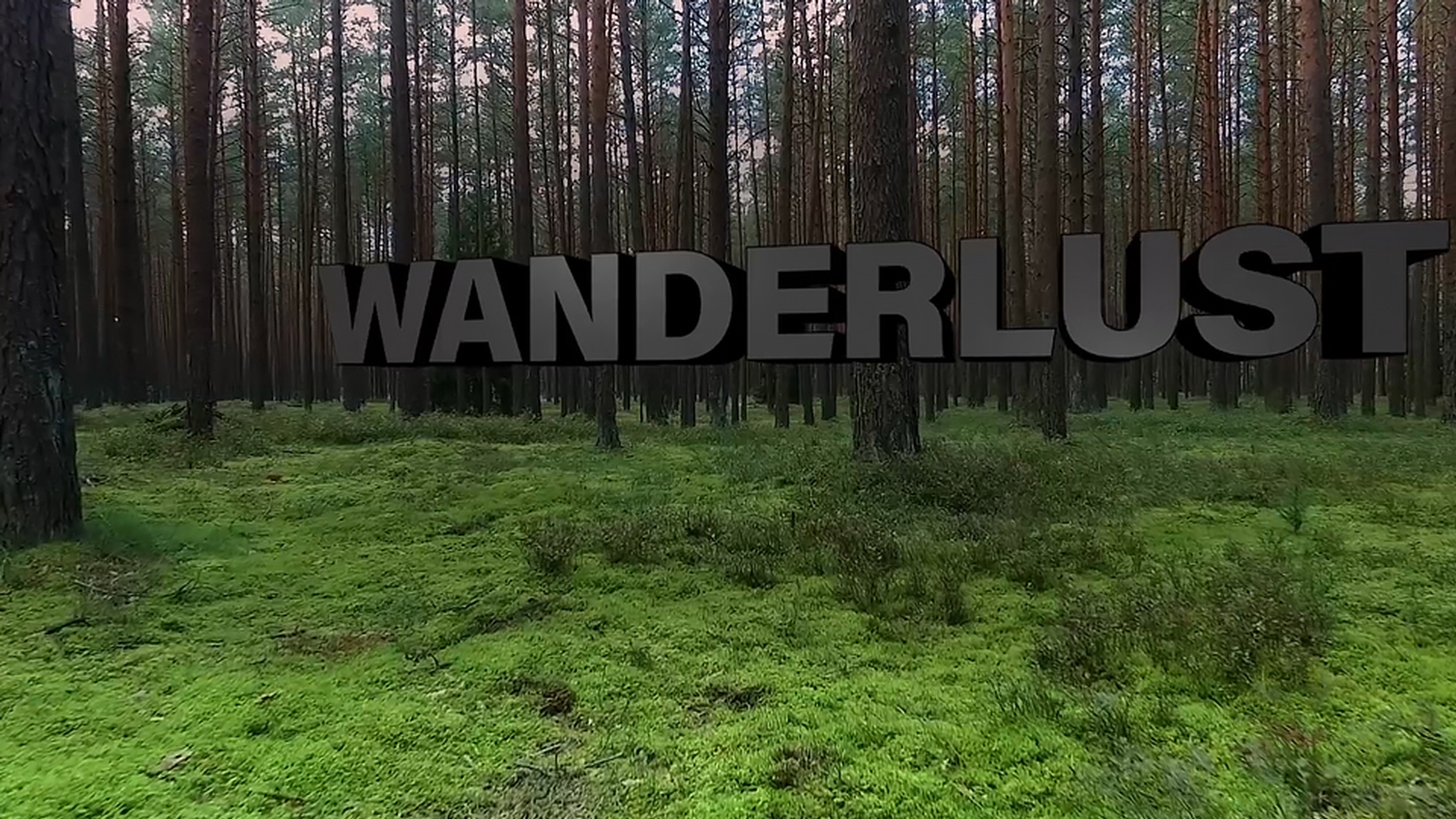
在本视频中,我们将从 Adobe Premier Pro CC 序列中的视频剪辑着手, 在 Adobe After Effects 中构建一个 包含 3D 标题的开放式图形, 确保利用动态链接, 以便能够在原始 Premier Pro CC 项目中编辑 3D 文本。
为了使标题图形具有视觉冲击力, 我们将使用 After Effects 中的摄像机 跟踪器将它添加到场景中。
所以像我说的,我们将从 Premier Pro CC 开始。
来看看我们的项目。
里有一个名为 Tree_Edit 的序列, 老实说,它算不上序列, 因为其中仅包含一个视频剪辑。
不过,让我们按下空格键开始播放, 观看一遍这个剪辑吧。
这是摄影师步行穿越森林时 拍摄的视频。
现在,我在接近剪辑结尾时 再次按下空格键停止播放, 停在大概 9.5 秒处。
观察当前帧, 我想要在这里添加标题, 就在这棵树前。
为了使文本看起来像是随着摄像机 移动而出现在场景中, 我们需要使用 After Effects 中的 摄像机跟踪器。
所以,请直接右键单击 时间轴中的剪辑, 选择 Replace With After Effects Composition (使用 After Effects 合成替换)。
现在,正确的做法是将 After Effects 项目 保存在 Premier Pro CC 项目文件旁。
我将其命名为 Title_Text.aep, 然后单击 Save(保存)。
既然想要使用摄像机跟踪器 放置文本:
我们可以更改一下工作区。
转到 Window(窗口), Workspace(工作区),选择 Motion Tracking(运动跟踪)。
现在,您可以在 Tracker (跟踪器)面板的左上角 看到 Track Camera (跟踪摄像机)功能。
放置 Track Camera (跟踪摄像机)之前, 最好将 Current Time Indicator (当前时间指示器)沿时间轴 向后移动,查看我们要将文本 加入场景的区域。
确保已在时间轴中选中 我们的视频图层后, 转到 Tracker(跟踪器)面板并单击 Track Camera(跟踪摄像机)。
此操作的用途是分析视频剪辑, 并且基于该分析在 After Effects 中 重现摄像机移过场景的软件版本。
这样做会使我们能够在 3D 场景中 置入任何内容, 使其看起来像是最初创建摄像机 移动时场景固有的部分。
现在,让我们进一步了解 Effect Controls(效果控件) 面板中的摄像机跟踪器。
请注意,此处显示的是 分析进度的状态更新, 而且分析正在后台进行。
所以,您可以继续处理其它合成, 执行工作流程的其它步骤。
如果您在分析期间出错, 您可能需要单击 Shot Type (拍摄类型)下拉菜单。
在这里,您可以指定拍摄素材 使用的镜头类型, 例如 Variable Zoom (可变缩放)镜头。
选择此选项表示您在拍摄期间 曾经缩放画面, 或者如果您知道拍摄素材使用的 具体镜头,还可选择 Specify Angle of View (指定视角)。
但是,Fixed Angle of View (固定视角) 非常适合此项目, 所以我们保留该设置不变。
分析完成后, 您会看到合成面板中心弹出 “Solving Camera” (正在解析摄像机)字样。
当这行文字消失后, 您会发现场景底部出现很多 X 图形。
如果没看到这些 X:请确认 是否在 Effect Controls(效果控件) 面板中选择了这个效果, 如果未选中,X 就不会出现。
现在,我们已经将当前时间指示器 移至想要在场景中加入文本的位置, 只需将鼠标直接悬停在场景上方, 您就会看到一个目标随着我们的光标在场景中来回移动。
现在,请确保目标 看起来位于地平面, 然后在想要添加文本的位置 单击一下。
这样做会自动选择场景中的三个点。
为了更清楚地观察这个过程: 请将合成放大率改为 100%。
然后,我们可以按住空格键, 暂时抓取手形工具,以便单击 并来回移动合成面板, 将目标重新移到视线内。
调整画面后,松开空格键, 然后将鼠标移至目标中心的上方, 单击右键并选择 Set Ground Plane And Origin(设置地平面和原点)。
这样做会重置场景的位置数据, 使您添加到场景中的所有对象 被置于 000, 即目标的正中心。
设置地平面和原点后, 重新回到目标,再次单击右键, 选择 Create Text and Camera(添加文本和摄像机)。
您会发现时间轴中出现两个新图层: 一个位于 3D 空间的文本图层 和一个摄像机。
您知道文本位于 3D 空间是因为 您能在开关面板中看到 3D 已被启用。
理解这一点非常重要, 因为这个 3D 文本图层只是对从场景中移过的摄像机做出响应, 而后者是对用于拍摄这段素材的 初始摄像机移动的重现。
如果划动 Current Time Indicator (当前时间指示器), 我们会发现文本在场景中是锁定的。
现在,由于文本平放在地面上, 我将选择 Text(文本)图层并按 R 打开 Rotation(旋转) 和 Orientation(方向)设置, 然后将方向坐标归零。
现在,文本应该垂直立起 并面对摄像机。
为了进一步编辑文本, 让我们继续操作, 将工作区更改为文本布局。
我会找到界面右上角的 双箭头,选择 Text(文本)工作区。
我当前使用的字体是 Acumin Pro Black, 但是,如果您是 After Effects 的 试用用户, 则需要使用 Acumin Pro Bold。
不管怎样,如果您尚未在系统中 激活这个字体, 请导航至 Creative Cloud 桌面应用程序, 依次选择 Assets(资产)下的 Fonts(字体), Manage Fonts(管理字体)启动 Typekit(文字工具包), 在其中为系统激活可用的 Acumin 字体。
如果文字看起来过大或过小, 可以选中文本图层后, 在此处的 Character(字符) 面板中调整字号。
另外,如果您需要更改文本颜色: 只需单击填充色卡 并选择新颜色即可。
我会保留灰色设置不变。
文本的字偶间距有些不适合。
所以,我转到 Character(字符) 面板中的字偶间距设置, 您会看到它设置为 Metrics (度量标准), 这表示它们是由字体创建者设计的 原始设置。
一种快速调整字偶间距的方法是将设置更改为 Optical(视觉), 即由软件查看每一个字母 并且根据字母的整体视觉效果 调整间距。
使用这个快速方法,您就不必 逐字母调整字偶间距了。
现在,我们来将文本从 “Text ”字样 更改为真正要使用的标题。
老实说,我不确定
最终获得批准的标题会是什么, 所以,我将从所有可能的标题中 选择最长的词语。
它就是 Wanderlust。
要更改文字,转到时间轴 并直接双击 Text(文本)图层的 T 图标, 自动选择合成面板中的所有文字。
然后键入 Wanderlust, 键入完毕后,请务必抓取选择工具 以设置文字。
由于这个词较长,让我们将 Paragraph(段落) 面板中的对齐从 Left(左对齐)更改为 Centered(居中对齐)。
现在,应该按 Shift 和斜杠键, 将合成窗口的放大率自动调整为 适合观看的大小。
要为文本添加更多视觉效果, 我们可以在 Y 轴略微添加一些旋转,像这样, 然后激活 Character(字符)面板 底部的 All Caps(全部大写)按钮, 将文字更改为全部大写。
您也可通过面板右上角的弹出菜单 启用这项设置。
现在看起来非常好,但是, 让我们在选中文本图层后 调整锚点, 将文字悬停在地面上方。
按 A 打开锚点并在 Y 轴上划动, 直到文字在场景中移动到 树干上端。
我将这个值大致设为 85。
由于我使用了锚点调整而非位置, 我还可以在场景中看到原始原点的 设置位置, 使用访问控制手柄作为参考。
现在,我们可以开始为文本 添加 3D 效果, 确保仍然选中时间轴中的文本图层, 然后按 AA,这样做会打开 Material Options(素材选项)和 Geometry Options(几何选项),具体视选项可用性而定。
而这次,只有 Material Options (素材选项)可用。
要启用文本图层的 Geometry Options(几何选项), 我们需要更改 Renderer(渲染器)。
转到合成面板的右上角, 单击显示 Classic 3D (经典 3D)的按钮。
这会打开渲染器设置, 我们可以单击其中的下拉菜单, 将设置更改为 CINEMA 4D 渲染器。
虽然这样做可以启用文本 和矢量图层的 3D 几何, 但是同样会禁用 After Effects 的一些 常用关键功能 例如 blending modes(混合模式) 和 track mattes(轨道遮罩) 不过无需担心,如果您需要使用 这些功能, 可以随时使用 Pre-Compose(预合成) 并在预合成窗口中将渲染器 改回 Classic 3D(经典 3D)。
现在,关闭此菜单之前, 单击 Options...(
选项...)
菜单 打开 Quality(质量)滑块。
如果我在构建动画, 通常会在工作期间将该滑块滑到 最左侧。
在开始渲染之前再将它滑动回来。
由于我想在构建期间查看标题的 一些细节之处, 所以我会将滑块拖动到 中心略靠右的位置, 直到看到 Anti-Aliasing(消除锯齿) 设置切换为 Best(最佳)。
单击 OK(确定)设置 Quality(质量)滑块。
再次单击 OK(确定) 更改 Render(渲染器)。
如果我们重新选择文本图层 并按 AA, 您会看到 Geometry Options (几何选项)。
要创建 3D 几何,我们需要添加一些 Extrusion Depth(凸出深度)。
我将单击并拖动滑块, 将凸出值大致设置为 25。
您可能会发现,现在很难看清 这些文字。
所以,为了提高清晰度,让我们转到 上方的 Layer(图层) 并依次选择 New(新建), Light...(
光照...),添加一个光照。
关于光照,我会创建一个 Point(点光), 它类似于没有灯罩的灯泡。
所以,它会从各个方位投射光照。
颜色为白色不变, Intensity(强度)为 100%。
Falloff(衰减)为 Smooth(平滑), Radius(半径)为 500, 并且从 500 像素到 1000 像素之间, 亮度从 100% 降至 0%。
我希望 Cast Shadows (投射阴影), 但是不需要阴影过暗, 所以,我将值大致降至 72%, Shadow Diffusion(阴影扩散) 可以略微软化阴影, 所以我们将该设置的值大致上调至 30 像素,然后单击 OK(确定)。
虽然光照已经添加到场景中, 我们仍然需要令它更靠近标题文本。
我将使用时间轴 Parent(父级)列中 隐藏的快捷方式。
如果该列未激活: 请右键单击时间轴顶部的 名称区域旁, 然后启用 Parent(父级)列。
让我们抓取光照图层的选取索, 按住 Shift 键并拖动选取索, 将其指向文本图层。
依次松开鼠标和 Shift 键, 您会发现,光照已经自动移至 文本访问控制手柄所在的位置。
很明显,我们需要将 场景中的光照上移。
按 P 打开光照图层的 Position(位置)值, 在 Y 轴上划动, 直到光照上移到文本内。
然后单击并拖动 Z 轴, 直到光开始照亮文字正面。
另外,单击并拖动 X 轴, 将光照移到文字的左侧。
为了创建更多维度,让我们 为文字边缘添加斜面。
返回文本图层的 Geometry Options(几何选项), 在 Bevel(斜面)下拉菜单中, 选择 Convex(凸面), 打造略显圆润的文本边缘。
我很喜欢文本边缘上的额外高光, 但是它看起来有点厚重, 让我们将 Bevel Depth(斜面深度)值更改为 0.8。
关于更改光照亮对象的方式, 另一种方法是调整 Material Options(素材选项)。
选中文本图层后,向下滚动到 Material Options(素材选项)。
为了使文本更亮一些, 我将调整 Specular Shininess (镜面反光度)。
这个值越大, 镜面高光就越细致或密集。
我将这个值大致设为 88。
要控制文本上的白色衰减效果, 我们可以调整 Diffuse(漫射)设置。
漫射设置越高, 光照的文字范围越大。
我将这个值大致设为 71%。
很明显,我们需要照亮文字的右侧。
所以,我选中 Light 1, 按 Command D 或 Control D (Windows) 复制光照。
然后,按 P 打开复制光照的 位置数据。
在 X 参数上划动, 将其向文字末尾移动并照亮右侧。
我还会在 Y 轴上划动, 将光照略微下移。
现在进行改进 3D 对象外观的 最后一步, 对几何图形的不同部分 应用自定义素材。
首先,我们将文字正面略微变暗。
折叠文本图层 并再次打开,这样能够看到 Text(文本)选项。
然后转到 Animate(动画)弹出菜 单,依次选择 Front(正面) Color(颜色), RGB。
让我们单击颜色井, 将亮红色更改为深灰色。
我会将亮度值大致设为 23。
单击 OK(确定)设置正面颜色, 然后看看我们的文字。
从整体来看,我希望文字的颜色 更深一些。
但是,我不会继续在 Add(添加)菜单中 添加更多自定义素材设置,请记住, 您随时可以返回更改文本的 原始颜色。
让我们将这个文字图层的颜色 重新设置为黑色, 转到上方的 Character(字符)面板, 将鼠标悬停在黑色色卡上方 直到吸管显示出来, 单击一次 将填充颜色设为黑色。
现在,我得到了想要的 精美黑色文本。
让我们保存项目并跳转回 Premier Pro CC。
返回 Premier Pro CC 后 请稍候片刻,等待其更新, 然后您会看到文本显示在场景中。
还记得我说过不确定 最终获得的标题效果会是什么样吗?
现在我们确实需要更改标题。
幸运的是,我们可以在 Premier Pro CC 中进行更改, 不必再返回 After Effects。
要更改文本,只需选择链接的合成 并按键盘上的 F 加载匹配帧。
然后,转到 Effect Controls (效果控件)面板更改标题。
我想将它更改为包含 & 符号的 “hide & seek”。
请注意,虽然我使用了大写 和小写字母,但是 因为我在 After Effects 的 Character (字符)面板中启用了全部大写, 所以这个新标题也会使用 相同的设置。
为了查看最终标题,我将选择时间轴 并选择 Render In to Out(渲染入点到出点),渲染队列。
渲染完成后,我将按 Ctrl 和重音标记 (~) 键进入全屏模式, 然后按空格键开始播放。
我知道您在想什么 我能否在不返回 After Effects 的 情况下, 在一个 Premier Pro CC 项目中 创建多个图形版本?
答案是可以。
只需在 Premier Pro CC 中复制 链接合成, 重复我们刚才完成的流程, 每个不同版本都会相应更新。
这样做,您既可将剪辑从 Premier Pro CC 发送到 After Effects 以在场景中添加 3D 文本, 又能返回到 Premier Pro CC 项目中 更新和更改文本。



