Du kannst unsere Beispieldatei (für das Tutorial Bauchbinde animieren) oder ein eigenes Bauchbinden-Design mit Ebenen verwenden.
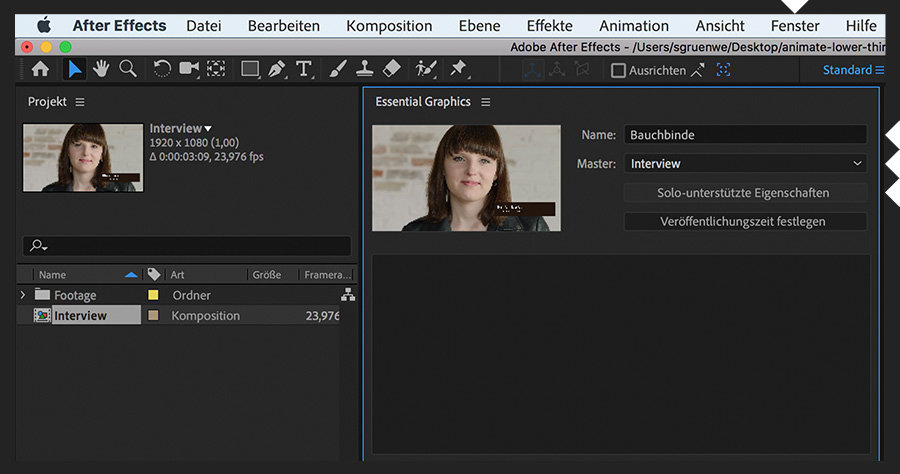
Starte mit einer fertigen Bauchbinde in After Effects. Öffne das Bedienfeld „Essential Graphics“ (Fenster > Essential Graphics). Benenne das Template. Wähle für „Master“ die Komposition, die die Ebenen für das Design enthält. Klicke auf „Solo-unterstützte Eigenschaften“.
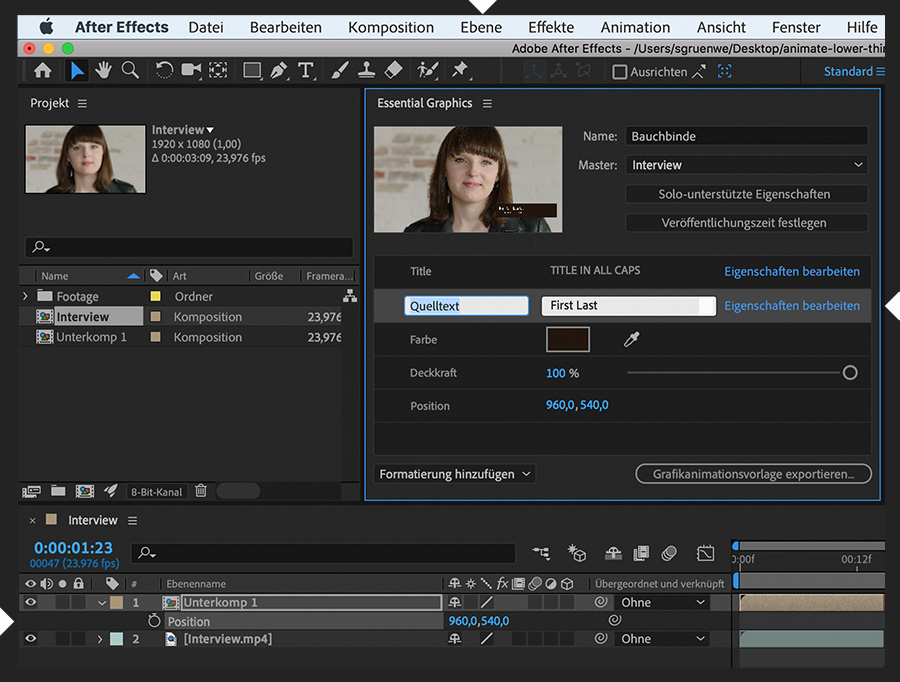
Ziehe eine unterstützte Eigenschaft, die dein Template enthalten soll, aus der Komposition auf das Bedienfeld „Essential Graphics“ – z. B. die Eigenschaft „Quelltext“ einer Textebene und die Eigenschaften „Farbe“ und „Deckkraft“ einer Formebene. Erstelle eine Unterkomposition der Ebenen (Ebene > Unterkomposition erstellen), sodass du die Positionseigenschaft der gesamtem Bauchbinde hinzufügen kannst. Klicke auf eine Eigenschaft, die du gerade auf das Bedienfeld gezogen hast, um sie umzubenennen. Wähle „Eigenschaften bearbeiten“, um zusätzliche Formatierungsoptionen im Template zu aktivieren.
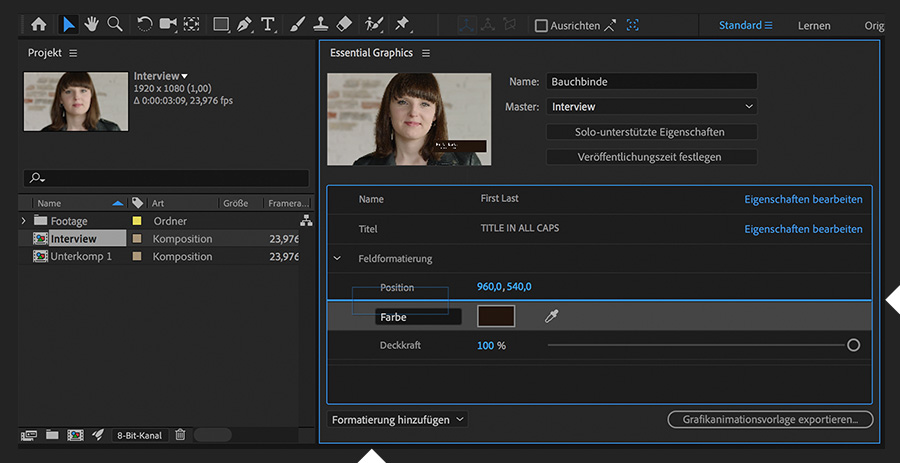
Ziehe die Eigenschaften nach oben und unten, um sie auf dem Bedienfeld „Essential Graphics“ neu zu positionieren. Über das Dropdown-Menü „Formatierung hinzufügen“ kannst du einen Kommentar hinzufügen oder eine Gruppe erstellen, in der du Eigenschaften zusammenfasst. Um eine Eigenschaft zu entfernen, wähle die gewünschte Eigenschaft aus, und drücke die Löschtaste.
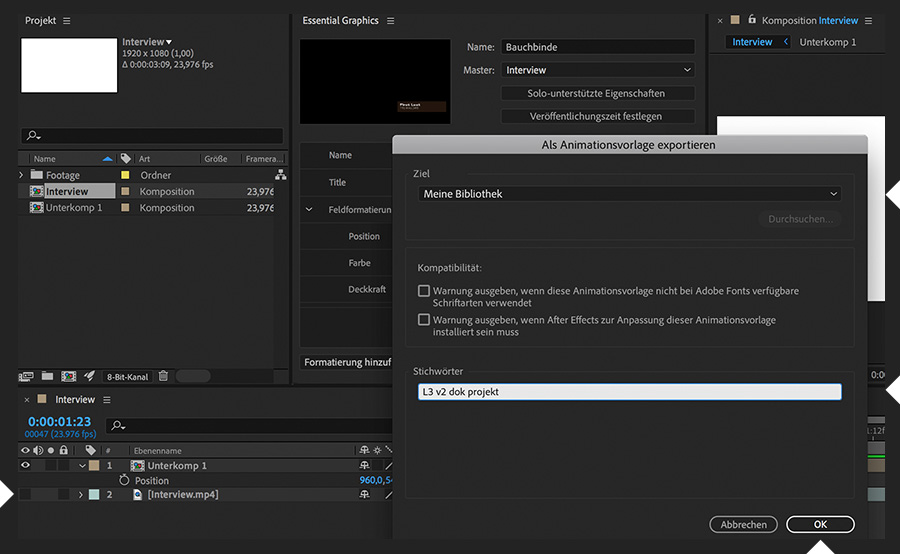
Blende die Videoebene aus, sodass sie nicht ins Template aufgenommen wird. Klicke im Bedienfeld „Essential Graphics“ auf „Grafikanimationsvorlage exportieren“. Lege den Speicherort fest (wähle eine Creative Cloud-Bibliothek). Füge eindeutige, beschreibende Stichwörter hinzu (falls gewünscht). Klicke auf „OK“.
Um das Template zu testen, rufe Premiere Pro auf. Öffne den Arbeitsbereich „Grafiken“. Klicke im Bedienfeld „Essential Graphics“ auf „Durchsuchen“. Suche in der entsprechenden Bibliothek nach dem Template (entweder nach Namen oder nach Stichwörtern). Nachdem du das Template auf eine Sequenz gezogen und ausgewählt hast, kannst du die Standardeinträge im Bedienfeld „Bearbeiten“ aktualisieren und andere Anpassungen vornehmen, die das Template unterstützt.
Du kannst das Bauchbinden-Design in After Effects jederzeit ändern. Veröffentliche das überarbeitete Design einfach erneut als Motion-Graphics-Template. Das vorherige Template wird dabei überschrieben. Ziehe das Template aus dem Bedienfeld „Essential Graphics“ wieder in Premiere Pro, um die Änderungen zu überprüfen.
You can control how Adobe websites use cookies and similar technologies by making choices below. But note that if you disable cookies and similar technologies entirely, Adobe websites may not function properly.
Cookies are small text files stored by your web browser when you use websites. There are also other technologies that can be used for similar purposes like HTML5 Local Storage and local shared objects, web beacons, and embedded scripts. These technologies help us do things like remembering you and your preferences when you return to our sites, measure how you use the website, conduct market research, and gather information about the ads you see and interact with.
You can make choices in the menu below about what cookies and other technologies you want us to use on Adobe sites when you visit them from this browser. You can always change those choices later by clicking on the Cookie Preferences link at the bottom of the page.
If enabled:
We can improve your experience by tailoring the site and the content to things we think might be of interest
We can better keep track of your preferences — like what language you prefer to use
We will better understand your likely interests so we can provide you more relevant Adobe ads and content on non-Adobe websites and in non-Adobe apps
It will help us improve the performance of our website and those of our partners who use the Adobe Experience Cloud
If disabled:
We won’t be able to remember you from session to session so the experience may not be tailored to your interests
You’ll still have access to the content of the site but certain features that depend on cookies may not function
You’ll still see ads, they just may not be as relevant to you
General information
You can control how Adobe websites use cookies and similar technologies by making choices below. But note that if you disable cookies and similar technologies entirely, Adobe websites may not function properly.
Cookies are small text files stored by your web browser when you use websites. There are also other technologies that can be used for similar purposes like HTML5 Local Storage, web beacons, and embedded scripts. These technologies help us do things like remembering you and your preferences when you return to our sites, measure how you use the website, conduct market research, and gather information about the ads you see and interact with.
You can make choices in the menu below about what cookies and other technologies you want us to use on Adobe sites when you visit them from this browser. You can always change those choices later by clicking on the Cookie Preferences link at the bottom of the page.
If enabled:
We can improve your experience by tailoring the site and the content to things we think might be of interest
We can better keep track of your preferences — like what language you prefer to use
We will better understand your likely interests so we can provide you more relevant Adobe ads and content on non-Adobe websites and in non-Adobe apps
It will help us improve the performance of our website and those of our partners who use the Adobe Experience Cloud
If disabled:
We won’t be able to remember you from session to session so the experience may not be tailored to your interests
We’ll still count your use of our site and services
You’ll still have access to the content of the site but certain features that depend on cookies may not function
You’ll still see ads, they just may not be as relevant to you
Operate the site and core servicesOperate site and measure engagement
Always active
These cookies are required, and they are used to enable the site and related services core functionality. Without them the site could not operate, so they cannot be disabled.
These cookies enable the site and related services’ core functionality and collect statistics about user engagement, such as counting active use to help us understand trends. These cookies cannot be disabled.
Measure performance
These cookies are used to analyze site usage to measure and improve performance. Without them Adobe cannot know what content is most valued and how often unique visitors return to the site, making it hard to improve information we offer to you.
These cookies are used to analyze site usage to measure and improve performance. Without them Adobe cannot know what content is most valued, making it hard to improve information we offer to you.
Extend functionality
These cookies are used to enhance the functionality of Adobe sites such as remembering your settings and preferences to deliver a personalized experience; for example, your username, your repeated visits, preferred language, your country, or any other saved preference.
Personalize advertising
These cookies are used to enable Adobe and our partners to serve ads more relevant to your interests. Without them you will still see ads, but they might not be as relevant to you.
Personalize advertising
These cookies are used to enable Adobe and our partners to serve ads more relevant to your interests. Without them you will still see ads, but they might not be as relevant to you.