Teste in Illustrator schnell unterschiedliche Illustrationsstile – als Inspiration für die kreative Ausrichtung und für schnellere Ideenfindung.
Einführung und Vorstellung der Vortragenden Sydney Michuda
[Sydney Michuda]: Wusstest du, dass du mit verschiedenen KI-Partnermodellen in Illustrator Vektorgrafiken erstellen kannst?
Ich bin Sydney Michuda, Creative Director von Super Creative.
In diesem Video teste ich KI-Partnermodelle und experimentiere mit Illustrationsstilen.
Legen wir los.
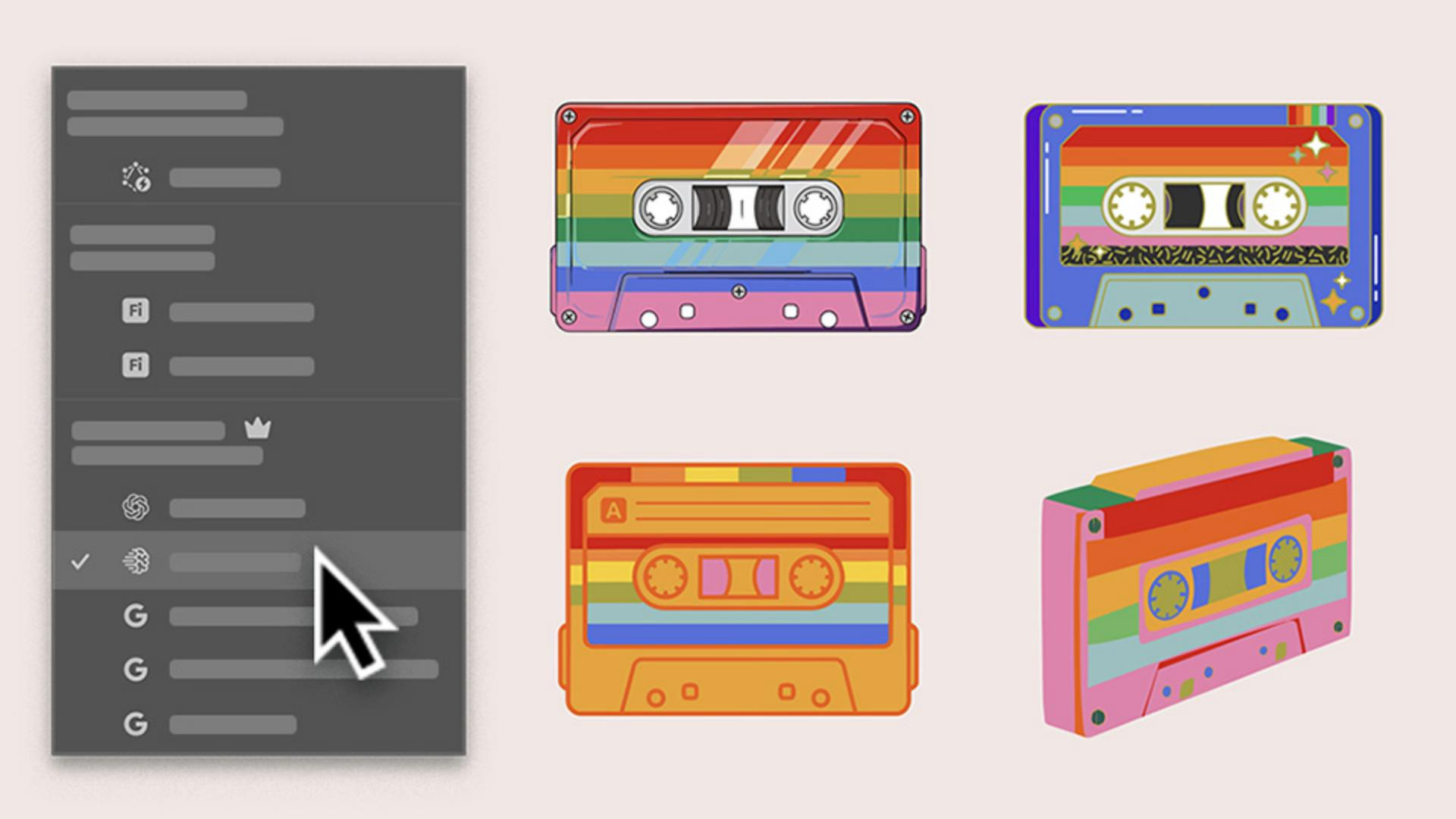
Ich erstelle einige Illustrationen für ein Pride-Musik-Event und möchte eine bunte Kassette in Regenbogenfarben gestalten.
Ich will schnell verschiedene Stilrichtungen ausprobieren, um sie meiner Kundschaft vorzuschlagen.
Zuerst gehe ich zu „Fenster“, klicke auf „Kontextbezogene Taskleiste“ und dann auf „Vektorgrafiken generieren“.
Verschiedene Illustrationsstile mit einem Prompt generieren
Mit den neuen KI-Partnermodellen gibt es verschiedene Optionen, jede mit ihren eigenen Vorteilen.
Ich fange mit „Automatische Auswahl“ an, um zu sehen, was Illustrator für die beste Wahl hält.
Ich gebe meinen Prompt ein, wähle „Motiv“, belasse den Regler „Detail“ in der Mitte, füge die Farbpalette für mein Projekt hinzu und klicke auf „Fortfahren“.
Illustrator hat „Imagen 4“ ausgewählt.
Schauen wir uns das mal an.
Okay, das sieht super aus und ist eine großartige Option.
Sehr stilisiert und fast realistisch.
Iterieren wir weiter und sehen uns die Ergebnisse an.
Stilrichtungen vergleichen, um die beste Variante zu finden
Ich teste denselben Prompt mit denselben Einstellungen, diesmal mit „Gemini 3“.
Das ist auch richtig cool – ganz anders als die erste Illustration, schlichter und verspielter.
Testen wir eine andere Variante, diesmal mit „GPT Image 4o“.
Diese Option ist richtig klasse.
Sie hat mehr Details und ausgefallene Elemente.
Konzepte ausgehend von einer Skizze mit „Generative Formfüllung“ weiterentwickeln
Ich würde die Kassette gerne aus einer schrägen Perspektive sehen.
Dafür verwende ich die Funktion „Generative Formfüllung“, die ebenfalls mit Partnermodellen arbeitet.
Ich wähle meine Skizze, klicke auf „Generative Formfüllung“, dann auf „Einstellungen“, gebe denselben Prompt ein, ziehe den Regler „Formtreue“ ganz nach links und klicke auf „Generieren“.
Sehr cool.
Das hat seinen ganz eigenen Look, besonders ohne die Konturen.
Ich habe vier Kassettenillustrationen in verschiedenen Stilrichtungen erstellt, die ich meiner Kundschaft vorschlagen kann, bevor ich ein ganzes Set erstelle und verfeinere – alles mithilfe der KI-Partnermodelle in Illustrator.
Ich bin Sydney Michuda von Super Creative.
Danke fürs Zuschauen.
Zusammenfassung.
Verschiedene Illustrationsstile mit einem Prompt generieren.
Erzeuge mit „Vektorgrafiken generieren“ und einem kurzen Prompt in Sekunden mehrere Stilalternativen. Wenn du auf „Automatische Auswahl“ klickst, wählt Illustrator das geeignetste Modell und generiert einen ersten Vorschlag zur kreativen Ausrichtung.
Stilrichtungen vergleichen, um die beste Variante zu finden.
Teste denselben Prompt mit unterschiedlichen Modellen, um zu sehen, wie sie das Konzept verstehen und umsetzen. Prüfe die Ergebnisse im direkten Vergleich, und entscheide dich für eine Version, die du verfeinern möchtest.
Konzepte ausgehend von einer Skizze mit „Generative Formfüllung“ weiterentwickeln.
Klicke auf „Generative Formfüllung“. Wende denselben Prompt auf deinen Entwurf an, um weitere Stilalternativen in verschiedenen Modellen auszuloten. Teile mehrere Konzeptvorschläge mit deiner Kundschaft, und verfeinere die gewählte Option in deinem eigenen Vektorstil.
You can control how Adobe websites use cookies and similar technologies by making choices below. But note that if you disable cookies and similar technologies entirely, Adobe websites may not function properly.
Cookies are small text files stored by your web browser when you use websites. There are also other technologies that can be used for similar purposes like HTML5 Local Storage and local shared objects, web beacons, and embedded scripts. These technologies help us do things like remembering you and your preferences when you return to our sites, measure how you use the website, conduct market research, and gather information about the ads you see and interact with.
You can make choices in the menu below about what cookies and other technologies you want us to use on Adobe sites when you visit them from this browser. You can always change those choices later by clicking on the Cookie Preferences link at the bottom of the page.
If enabled:
We can improve your experience by tailoring the site and the content to things we think might be of interest
We can better keep track of your preferences — like what language you prefer to use
We will better understand your likely interests so we can provide you more relevant Adobe ads and content on non-Adobe websites and in non-Adobe apps
It will help us improve the performance of our website and those of our partners who use the Adobe Experience Cloud
If disabled:
We won’t be able to remember you from session to session so the experience may not be tailored to your interests
You’ll still have access to the content of the site but certain features that depend on cookies may not function
You’ll still see ads, they just may not be as relevant to you
General information
You can control how Adobe websites use cookies and similar technologies by making choices below. But note that if you disable cookies and similar technologies entirely, Adobe websites may not function properly.
Cookies are small text files stored by your web browser when you use websites. There are also other technologies that can be used for similar purposes like HTML5 Local Storage, web beacons, and embedded scripts. These technologies help us do things like remembering you and your preferences when you return to our sites, measure how you use the website, conduct market research, and gather information about the ads you see and interact with.
You can make choices in the menu below about what cookies and other technologies you want us to use on Adobe sites when you visit them from this browser. You can always change those choices later by clicking on the Cookie Preferences link at the bottom of the page.
If enabled:
We can improve your experience by tailoring the site and the content to things we think might be of interest
We can better keep track of your preferences — like what language you prefer to use
We will better understand your likely interests so we can provide you more relevant Adobe ads and content on non-Adobe websites and in non-Adobe apps
It will help us improve the performance of our website and those of our partners who use the Adobe Experience Cloud
If disabled:
We won’t be able to remember you from session to session so the experience may not be tailored to your interests
We’ll still count your use of our site and services
You’ll still have access to the content of the site but certain features that depend on cookies may not function
You’ll still see ads, they just may not be as relevant to you
Operate the site and core servicesOperate site and measure engagement
Always active
These cookies are required, and they are used to enable the site and related services core functionality. Without them the site could not operate, so they cannot be disabled.
These cookies enable the site and related services’ core functionality and collect statistics about user engagement, such as counting active use to help us understand trends. These cookies cannot be disabled.
Measure performance
These cookies are used to analyze site usage to measure and improve performance. Without them Adobe cannot know what content is most valued and how often unique visitors return to the site, making it hard to improve information we offer to you.
These cookies are used to analyze site usage to measure and improve performance. Without them Adobe cannot know what content is most valued, making it hard to improve information we offer to you.
Extend functionality
These cookies are used to enhance the functionality of Adobe sites such as remembering your settings and preferences to deliver a personalized experience; for example, your username, your repeated visits, preferred language, your country, or any other saved preference.
Personalize advertising
These cookies are used to enable Adobe and our partners to serve ads more relevant to your interests. Without them you will still see ads, but they might not be as relevant to you.
Personalize advertising
These cookies are used to enable Adobe and our partners to serve ads more relevant to your interests. Without them you will still see ads, but they might not be as relevant to you.