Tools und Workflows für digitale Designs entdecken.
Erstelle in Illustrator digitale Designs für mehrere Medien.
Veröffentlicht am
Damit digitale Inhalte möglichst flexibel eingesetzt werden können, sollten sie nicht auf bestimmte Medien ausgelegt sein. Illustrator ermöglicht Pixel-genaues Design von Bannern, Social-Media- oder Website-Grafiken. Features für den SVG-Export, Pixel-Raster oder auch wiederverwendbare Symbole unterstützen dich bei der Gestaltung flexibler, kreativer Designs.
Starthilfe für dein Projekt.
Adobe Stock-Templates bringen dich auf die richtige kreative Spur. Die Templates sind unter stock.adobe.com/de verfügbar oder über das Fenster „Neues Dokument“ direkt in Illustrator.
Die Voraussetzungen für deinen Erfolg schaffen.
Über den Einsatz deines Entwurfs solltest du dir im Klaren sein, bevor du mit der Arbeit beginnst. Digitale Designs können für verschiedene Medien genutzt werden. Daher kannst du schon beim Einrichten eines neuen Dokuments in Illustrator den Zweck berücksichtigen. Für Dokumente der Kategorie „Web“ oder „Mobil“ wird für die Bildschirmanzeige der Farbmodus RGB definiert (Rot, Grün, Blau) und die Maßeinheit auf Pixel eingestellt. Außerdem kannst du aus zahlreichen Vorlagen wählen, die speziell für digitale Designs konzipiert sind.
Mithilfe von Zeichenflächen mehrere Designs und Versionen hinzufügen.
Du kannst alle benötigten digitalen Materialien in einem einzigen Dokument erstellen. Lege die Elemente auf verschiedenen Zeichenflächen ab. Passe die Zeichenflächen an die jeweiligen Komponenten an. Verschiebe Elemente zwischen Zeichenflächen, um Inhalte zu teilen.
Mithilfe eines Rasters präzise Grafiken erstellen.
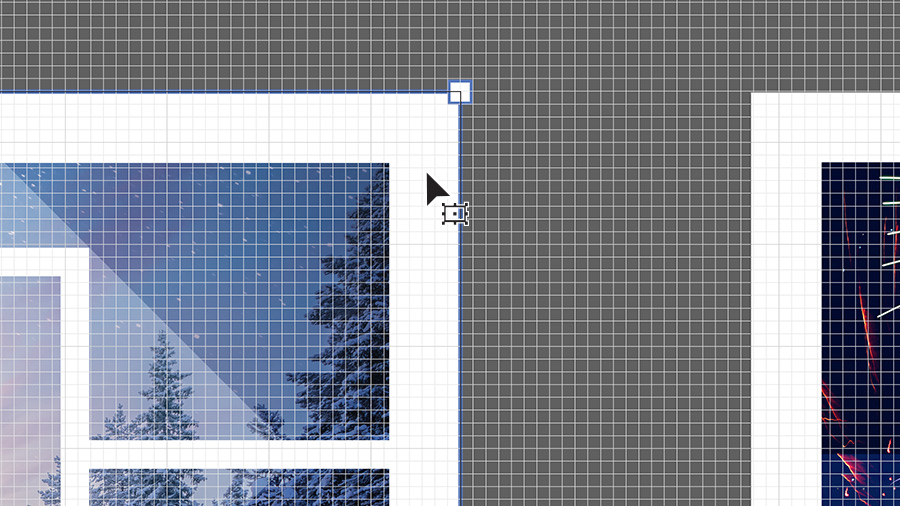
Digitale Grafiken müssen pixelgenau sein. Im Bedienfeld „Eigenschaften“ kannst du ein Raster einblenden und deine Grafiken mit der Ausrichtungsoption präzise und einheitlich anordnen.
Tipp: Wenn das Projekt in ein Rasterformat wie PNG exportiert werden soll, siehst du in der Pixel-Vorschau, wie die Designs gerastert aussehen – also nach Umwandlung der Formen und Pfade in Pixel.
Intelligenter arbeiten mit Symbolen.
Wenn du häufig verwendete Design-Elemente im Bedienfeld „Symbole“ speicherst, kannst du sie per Drag-and-Drop als „Instanzen“ in deine Projekte einfügen. Änderungen am Originalsymbol werden automatisch für alle Instanzen im Dokument übernommen. So sparst du wertvolle Zeit beim Bearbeiten, Verfeinern und Optimieren deiner Designs.
Probiere diese Tutorials mit Illustrator aus
Illustrationen und andere Grafiken mit Vektoren erstellen
You can control how Adobe websites use cookies and similar technologies by making choices below. But note that if you disable cookies and similar technologies entirely, Adobe websites may not function properly.
Cookies are small text files stored by your web browser when you use websites. There are also other technologies that can be used for similar purposes like HTML5 Local Storage and local shared objects, web beacons, and embedded scripts. These technologies help us do things like remembering you and your preferences when you return to our sites, measure how you use the website, conduct market research, and gather information about the ads you see and interact with.
You can make choices in the menu below about what cookies and other technologies you want us to use on Adobe sites when you visit them from this browser. You can always change those choices later by clicking on the Cookie Preferences link at the bottom of the page.
If enabled:
We can improve your experience by tailoring the site and the content to things we think might be of interest
We can better keep track of your preferences — like what language you prefer to use
We will better understand your likely interests so we can provide you more relevant Adobe ads and content on non-Adobe websites and in non-Adobe apps
It will help us improve the performance of our website and those of our partners who use the Adobe Experience Cloud
If disabled:
We won’t be able to remember you from session to session so the experience may not be tailored to your interests
You’ll still have access to the content of the site but certain features that depend on cookies may not function
You’ll still see ads, they just may not be as relevant to you
General information
You can control how Adobe websites use cookies and similar technologies by making choices below. But note that if you disable cookies and similar technologies entirely, Adobe websites may not function properly.
Cookies are small text files stored by your web browser when you use websites. There are also other technologies that can be used for similar purposes like HTML5 Local Storage, web beacons, and embedded scripts. These technologies help us do things like remembering you and your preferences when you return to our sites, measure how you use the website, conduct market research, and gather information about the ads you see and interact with.
You can make choices in the menu below about what cookies and other technologies you want us to use on Adobe sites when you visit them from this browser. You can always change those choices later by clicking on the Cookie Preferences link at the bottom of the page.
If enabled:
We can improve your experience by tailoring the site and the content to things we think might be of interest
We can better keep track of your preferences — like what language you prefer to use
We will better understand your likely interests so we can provide you more relevant Adobe ads and content on non-Adobe websites and in non-Adobe apps
It will help us improve the performance of our website and those of our partners who use the Adobe Experience Cloud
If disabled:
We won’t be able to remember you from session to session so the experience may not be tailored to your interests
We’ll still count your use of our site and services
You’ll still have access to the content of the site but certain features that depend on cookies may not function
You’ll still see ads, they just may not be as relevant to you
Operate the site and core servicesOperate site and measure engagement
Always active
These cookies are required, and they are used to enable the site and related services core functionality. Without them the site could not operate, so they cannot be disabled.
These cookies enable the site and related services’ core functionality and collect statistics about user engagement, such as counting active use to help us understand trends. These cookies cannot be disabled.
Measure performance
These cookies are used to analyze site usage to measure and improve performance. Without them Adobe cannot know what content is most valued and how often unique visitors return to the site, making it hard to improve information we offer to you.
These cookies are used to analyze site usage to measure and improve performance. Without them Adobe cannot know what content is most valued, making it hard to improve information we offer to you.
Extend functionality
These cookies are used to enhance the functionality of Adobe sites such as remembering your settings and preferences to deliver a personalized experience; for example, your username, your repeated visits, preferred language, your country, or any other saved preference.
Personalize advertising
These cookies are used to enable Adobe and our partners to serve ads more relevant to your interests. Without them you will still see ads, but they might not be as relevant to you.
Personalize advertising
These cookies are used to enable Adobe and our partners to serve ads more relevant to your interests. Without them you will still see ads, but they might not be as relevant to you.