Bildkompositionen mit Misch- und Farbeffekten erstellen.
Experimentiere mit den Mischmodi von Photoshop, um aus zwei Bildern eine Komposition zu machen.
Veröffentlicht am
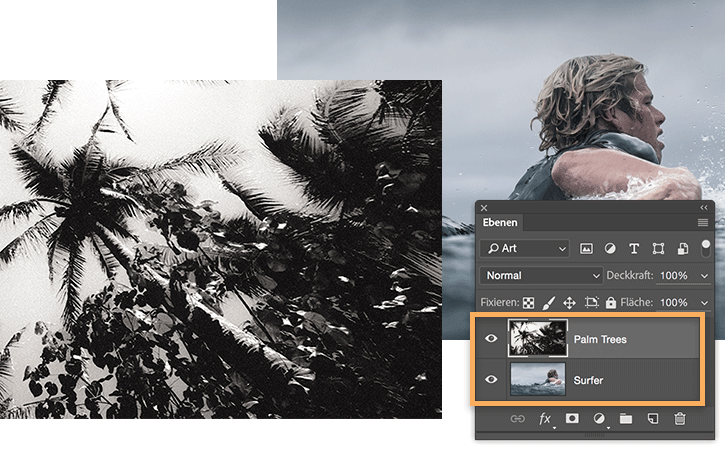
Zwei Bilder auswählen.
Erstelle ein neues Dokument in Photoshop. Ziehe zwei Bilder von deiner Festplatte in das neue Dokument. Für jedes Bild wird eine eigene Ebene angelegt und im Bedienfeld „Ebenen“ rechts neben dem Arbeitsbereich angezeigt. Falls das Bedienfeld nicht sichtbar ist, wähle „Fenster > Ebenen“.
Mischmodi ausprobieren.
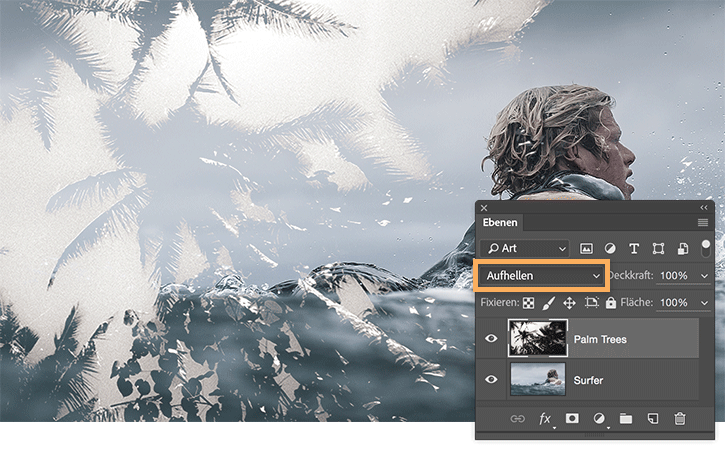
Wähle die oberste Ebene. Öffne das Popup-Menü „Mischmodi“ im Bedienfeld „Ebenen“. Probiere verschiedene Mischmodi für die oberste Ebene aus, um ihre Auswirkung auf die untere Ebene zu sehen.
„Aufhellen“ bewirkt in diesem Beispiel, dass das Bild des Surfers durch die dunklen Bereiche der Palmen sichtbar wird. Da jeder Modus einen anderen Effekt hat, solltest du jeden einmal ausprobieren.
Die Belichtung anpassen.
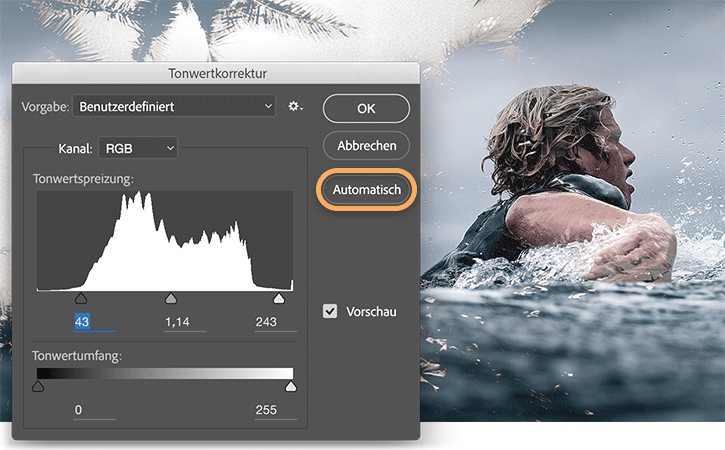
Wähle die untere Ebene und dann im Hauptmenü „Bild > Korrekturen > Tonwertkorrektur“.
Klicke im Dialogfeld „Tonwertkorrektur“ auf „Automatisch“. Die dunklen und hellen Bildbereiche werden automatisch korrigiert und machen das Bild kontrastreicher. Mit den Reglern „Tonwertspreizung“ und „Tonwertumfang“ kannst du die Korrektur anpassen. Wenn der Effekt wunschgemäß ausfällt, klicke auf „OK“, um die Korrektur anzuwenden.
Farbton und Sättigung anpassen.
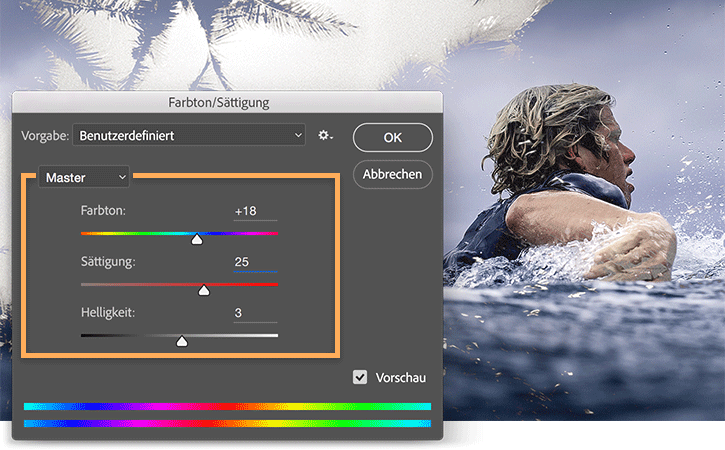
Wähle „Bild > Korrekturen > Farbton/Sättigung“.
Experimentiere mit den Reglern für Farbton, Sättigung und Helligkeit, um dem Bild die gewünschte Dynamik zu verleihen. Klicke zum Abschluss auf „OK“.
Herzlichen Glückwunsch. Du bist ein Naturtalent.
Du hast mit Farbkorrekturen und Mischmodi aus zwei Bildern ein Kunstwerk geschaffen. Diese Technik kannst du für Print- und Digitalprojekte nutzen.
Das Foto mit dem Surfer stammt aus dem Making-of-Material zum Film „View From A Blue Moon“, einem der bis dato ehrgeizigsten Action-Sport-Filme. Mehr zum Film erfährst du unter viewfromabluemoon.com.
Probiere diese Tutorials mit Photoshop aus
Fotos bearbeiten, um neue Bilder und Grafiken zu schaffen
You can control how Adobe websites use cookies and similar technologies by making choices below. But note that if you disable cookies and similar technologies entirely, Adobe websites may not function properly.
Cookies are small text files stored by your web browser when you use websites. There are also other technologies that can be used for similar purposes like HTML5 Local Storage and local shared objects, web beacons, and embedded scripts. These technologies help us do things like remembering you and your preferences when you return to our sites, measure how you use the website, conduct market research, and gather information about the ads you see and interact with.
You can make choices in the menu below about what cookies and other technologies you want us to use on Adobe sites when you visit them from this browser. You can always change those choices later by clicking on the Cookie Preferences link at the bottom of the page.
If enabled:
We can improve your experience by tailoring the site and the content to things we think might be of interest
We can better keep track of your preferences — like what language you prefer to use
We will better understand your likely interests so we can provide you more relevant Adobe ads and content on non-Adobe websites and in non-Adobe apps
It will help us improve the performance of our website and those of our partners who use the Adobe Experience Cloud
If disabled:
We won’t be able to remember you from session to session so the experience may not be tailored to your interests
You’ll still have access to the content of the site but certain features that depend on cookies may not function
You’ll still see ads, they just may not be as relevant to you
General information
You can control how Adobe websites use cookies and similar technologies by making choices below. But note that if you disable cookies and similar technologies entirely, Adobe websites may not function properly.
Cookies are small text files stored by your web browser when you use websites. There are also other technologies that can be used for similar purposes like HTML5 Local Storage, web beacons, and embedded scripts. These technologies help us do things like remembering you and your preferences when you return to our sites, measure how you use the website, conduct market research, and gather information about the ads you see and interact with.
You can make choices in the menu below about what cookies and other technologies you want us to use on Adobe sites when you visit them from this browser. You can always change those choices later by clicking on the Cookie Preferences link at the bottom of the page.
If enabled:
We can improve your experience by tailoring the site and the content to things we think might be of interest
We can better keep track of your preferences — like what language you prefer to use
We will better understand your likely interests so we can provide you more relevant Adobe ads and content on non-Adobe websites and in non-Adobe apps
It will help us improve the performance of our website and those of our partners who use the Adobe Experience Cloud
If disabled:
We won’t be able to remember you from session to session so the experience may not be tailored to your interests
We’ll still count your use of our site and services
You’ll still have access to the content of the site but certain features that depend on cookies may not function
You’ll still see ads, they just may not be as relevant to you
Operate the site and core servicesOperate site and measure engagement
Always active
These cookies are required, and they are used to enable the site and related services core functionality. Without them the site could not operate, so they cannot be disabled.
These cookies enable the site and related services’ core functionality and collect statistics about user engagement, such as counting active use to help us understand trends. These cookies cannot be disabled.
Measure performance
These cookies are used to analyze site usage to measure and improve performance. Without them Adobe cannot know what content is most valued and how often unique visitors return to the site, making it hard to improve information we offer to you.
These cookies are used to analyze site usage to measure and improve performance. Without them Adobe cannot know what content is most valued, making it hard to improve information we offer to you.
Extend functionality
These cookies are used to enhance the functionality of Adobe sites such as remembering your settings and preferences to deliver a personalized experience; for example, your username, your repeated visits, preferred language, your country, or any other saved preference.
Personalize advertising
These cookies are used to enable Adobe and our partners to serve ads more relevant to your interests. Without them you will still see ads, but they might not be as relevant to you.
Personalize advertising
These cookies are used to enable Adobe and our partners to serve ads more relevant to your interests. Without them you will still see ads, but they might not be as relevant to you.