Inhaltsbasiertes Freistellen innerhalb eines Bildes
Mit dem Werkzeug für inhaltsbasiertes Freistellen in Photoshop CC werden Bereiche innerhalb eines Bildes entfernt und automatisch mit passendem Inhalt ergänzt.
Veröffentlicht am
1 Schritt 1 von 4
Foto öffnen
In diesem Tutorial lernen Sie, wie Sie Bildbereiche eines Bildes mit dem Werkzeug für inhaltsbasiertes Freistellen entfernen. Leere Bereiche des Bildes werden automatisch mit passendem Inhalt ergänzt.
Öffnen Sie ein Foto in Photoshop CC, in dem Bildbereiche entfernt werden sollen.
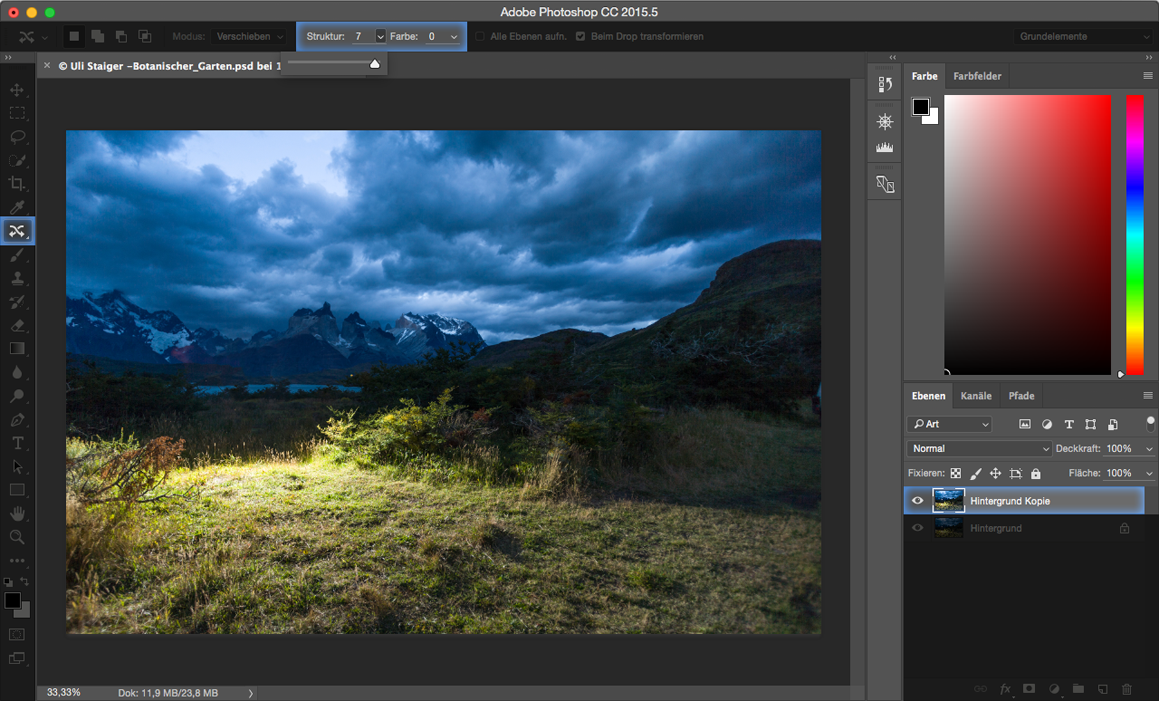
Danach wählen Sie mit dem Werkzeug für inhaltsbasiertes Freistellen den Bildbereich aus, den Sie entfernen möchten. Stellen Sie sicher, dass in der oberen Optionsleiste der Modus Verschieben aktiviert ist.
EXPERTENTIPP 1: Falls Sie bestimmte Bildbereiche erhalten möchten, dann duplizieren Sie diese vorher mit dem Lasso- oder Pfadwerkzeug auf eine separate Ebene.
2 Schritt 2 von 4
Bildbereich inhaltsbasiert füllen
Verschieben Sie den Bildbereich an eine Stelle, die der Bildersetzung ähnelt. Öffnen Sie im Menü Bearbeiten das Fenster Fläche füllen. Im geöffneten Fenster wählen Sie die Option inhaltsbasiert aus und aktivieren darunter das Kontrollkästchen Farbanpassung
. Die verbesserte Technologie für inhaltsbasierte Korrekturen füllt die Bereiche mit dem passenden Bildmaterial und schafft so nahtlose Übergänge.
3 Schritt 3 von 4
Bildkorrektur mit dem Werkzeug für inhaltsbasiertes Freistellen
In der oberen Menüleiste können Sie Struktur und Farbe getrennt voneinander nachkorrigieren, indem Sie die Werte jeweils höher oder niedriger korrigieren.
Wenn es sich um ein sehr detaillreiches Bild handelt, kann es mit den altbekannten Ausbesserungswerkzeugen final optimiert werden.
Weitere Option: Verschieben eines Teiles innerhalb eines Bildes
Mit dem Werkzeug für inhaltsbasiertes Freistellen können auch Teile innerhalb von einem Bild verschoben werden.
Wählen Sie mit dem Werkzeug für inhaltsbasiertes Freistellen den Bildbereich aus, den Sie versetzen möchten. Anschließend verschieben Sie den ausgewählten Bereich an die gewünschte Stelle im Bild. Die verbesserte inhaltsbasierte Technologie füllt die Bereiche mit Inhalt, so dass ein homogenes Gesamtbild entsteht.
Auch hier können Sie in der oberen Menüleiste Struktur und Farbe getrennt voneinander nachkorrigieren, indem Sie jeweils höhere oder niedrigere Werte eingeben.
EXPERTENTIPP2: Die inhaltsbasierte Technologie ermöglicht es auch Bildteile in ein anderes Bild zu verschieben, wenn die Hintergründe ähnlich sind.
Probiere diese Tutorials mit Photoshop aus
Fotos bearbeiten, um neue Bilder und Grafiken zu schaffen
You can control how Adobe websites use cookies and similar technologies by making choices below. But note that if you disable cookies and similar technologies entirely, Adobe websites may not function properly.
Cookies are small text files stored by your web browser when you use websites. There are also other technologies that can be used for similar purposes like HTML5 Local Storage and local shared objects, web beacons, and embedded scripts. These technologies help us do things like remembering you and your preferences when you return to our sites, measure how you use the website, conduct market research, and gather information about the ads you see and interact with.
You can make choices in the menu below about what cookies and other technologies you want us to use on Adobe sites when you visit them from this browser. You can always change those choices later by clicking on the Cookie Preferences link at the bottom of the page.
If enabled:
We can improve your experience by tailoring the site and the content to things we think might be of interest
We can better keep track of your preferences — like what language you prefer to use
We will better understand your likely interests so we can provide you more relevant Adobe ads and content on non-Adobe websites and in non-Adobe apps
It will help us improve the performance of our website and those of our partners who use the Adobe Experience Cloud
If disabled:
We won’t be able to remember you from session to session so the experience may not be tailored to your interests
You’ll still have access to the content of the site but certain features that depend on cookies may not function
You’ll still see ads, they just may not be as relevant to you
General information
You can control how Adobe websites use cookies and similar technologies by making choices below. But note that if you disable cookies and similar technologies entirely, Adobe websites may not function properly.
Cookies are small text files stored by your web browser when you use websites. There are also other technologies that can be used for similar purposes like HTML5 Local Storage, web beacons, and embedded scripts. These technologies help us do things like remembering you and your preferences when you return to our sites, measure how you use the website, conduct market research, and gather information about the ads you see and interact with.
You can make choices in the menu below about what cookies and other technologies you want us to use on Adobe sites when you visit them from this browser. You can always change those choices later by clicking on the Cookie Preferences link at the bottom of the page.
If enabled:
We can improve your experience by tailoring the site and the content to things we think might be of interest
We can better keep track of your preferences — like what language you prefer to use
We will better understand your likely interests so we can provide you more relevant Adobe ads and content on non-Adobe websites and in non-Adobe apps
It will help us improve the performance of our website and those of our partners who use the Adobe Experience Cloud
If disabled:
We won’t be able to remember you from session to session so the experience may not be tailored to your interests
We’ll still count your use of our site and services
You’ll still have access to the content of the site but certain features that depend on cookies may not function
You’ll still see ads, they just may not be as relevant to you
Operate the site and core servicesOperate site and measure engagement
Always active
These cookies are required, and they are used to enable the site and related services core functionality. Without them the site could not operate, so they cannot be disabled.
These cookies enable the site and related services’ core functionality and collect statistics about user engagement, such as counting active use to help us understand trends. These cookies cannot be disabled.
Measure performance
These cookies are used to analyze site usage to measure and improve performance. Without them Adobe cannot know what content is most valued and how often unique visitors return to the site, making it hard to improve information we offer to you.
These cookies are used to analyze site usage to measure and improve performance. Without them Adobe cannot know what content is most valued, making it hard to improve information we offer to you.
Extend functionality
These cookies are used to enhance the functionality of Adobe sites such as remembering your settings and preferences to deliver a personalized experience; for example, your username, your repeated visits, preferred language, your country, or any other saved preference.
Personalize advertising
These cookies are used to enable Adobe and our partners to serve ads more relevant to your interests. Without them you will still see ads, but they might not be as relevant to you.
Personalize advertising
These cookies are used to enable Adobe and our partners to serve ads more relevant to your interests. Without them you will still see ads, but they might not be as relevant to you.