Mustergültig: Mit Gruppenmasken in Photoshop Kleidung bedrucken
Lerne Schritt für Schritt, wie du in Photoshop mithilfe einer Gruppenmaske und Mischmodi Muster auf dein Kleidungsstück übertragen kannst.
Veröffentlicht am
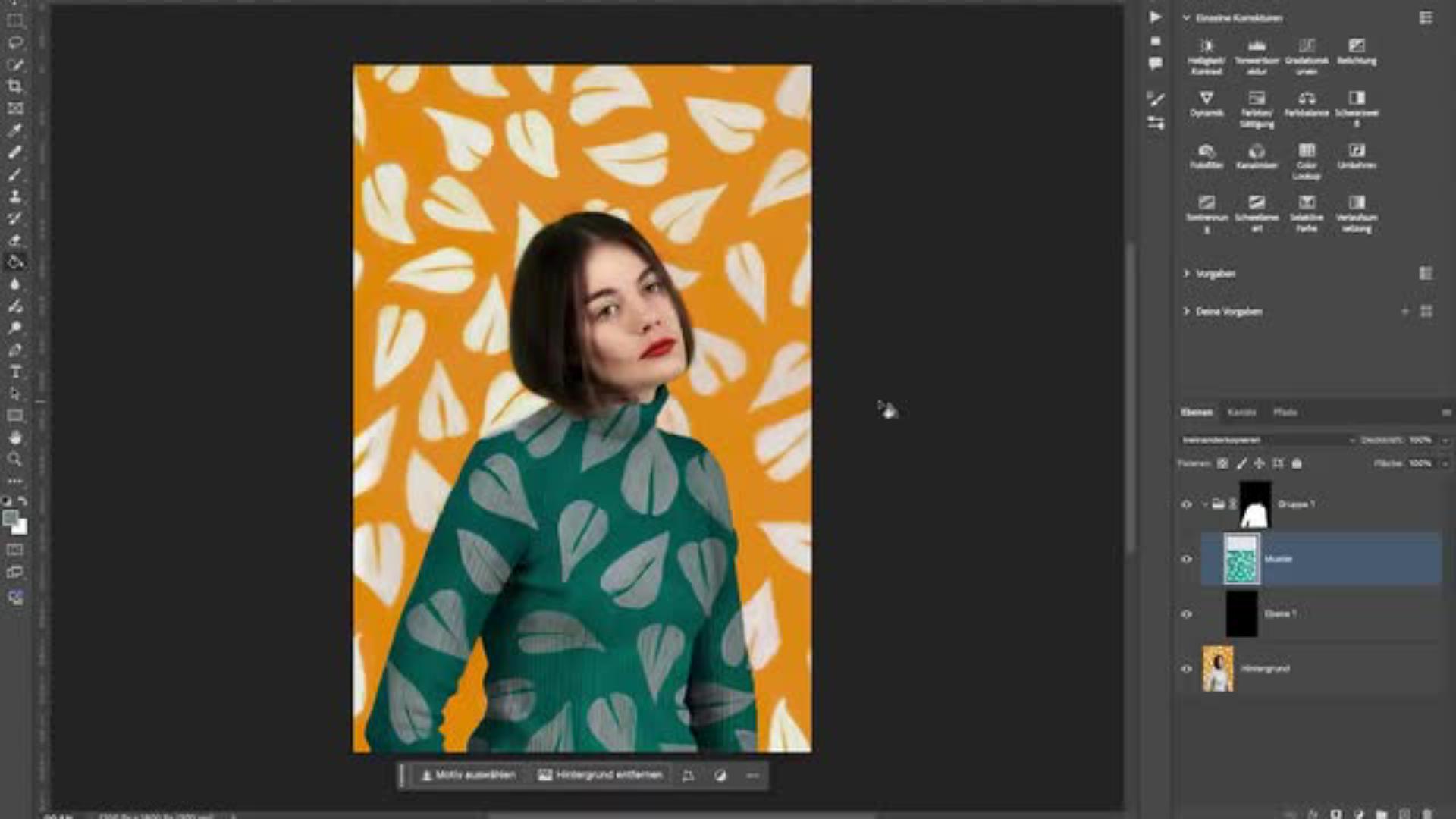
In diesem Photoshop-Tutorial zeigt dir Fotokünstlerin Amelie Satzger, wie sich mithilfe des Schnellauswahlwerkzeugs und einer Gruppenmaske das Blatt-Muster im Hintergrund auf den Pulli übertragen lässt.
Muster haben mich schon immer inspiriert.
Das habe ich als Anstoß für meine Fotostrecke Forms and Patterns genommen.
Hi, mein Name ist Amelie, ich bin eine Fotokünstlerin und kreiere surrealistische farbenfrohe Selbstporträtfotografien.
Für diese Fotostrecke habe ich ganz viele Hintergründe mit verschiedenen Mustern bemalt.
Die Idee war, dass sich die Muster auf meiner Kleidung wiederholen, allerdings wollte ich natürlich meine Kleidung nicht anmalen.
Dementsprechend habe ich das einfach im Nachhinein mit Photoshop gemacht und in diesem Tutorial zeige ich euch genau wie.
Zuerst zeige ich dir, wie man mit dem Schnellauswahlwerkzeug ganz einfach die gewünschte Fläche auswählen kann und in ganz wenigen Schritten mit dem Verändern des Mischmodus ganz einfach das Muster auf die Fläche anwendet.
Am Ende werde ich dir noch zeigen, wie ich kleine Verbesserungen vornehme.
Also los geht's!
Für ihre Fotostrecke „Forms and Patterns“ hat Künstlerin Amelie Satzger verschiedene Fotohintergründe selbst mit Mustern bemalt. Ihre Idee: Das Blattmotiv sollte sich später auf ihrer Kleidung wiederfinden. Allerdings ohne diese anzumalen.
In Photoshop lässt sich das im Nachhinein realistisch umsetzen: Mithilfe der Schnellauswahl, einer Gruppenmaske und einem passenden Mischmodus überträgt Amelie die Blätter täuschend echt auf ihren Strickpulli. Wie das geht, erfährst du im interaktiven Tutorial. Viel Spaß!
Transkript nicht verfügbar
Muster auf Pulli übertragen Im ersten Schritt des Tutorials zeigt dir Amelie, wie du mit dem Schnellauswahlwerkzeug arbeitest, um den Pullover auszuwählen. Mit einer Gruppenmaske wird anschließend der Bereich definiert, auf den das Blattmuster übertragen werden soll.
Für das Bedrucken des Strickpullis in Photoshop musst du außerdem eine neue, schwarze Ebene erstellen, die mithilfe des Mischmodus „Ineinanderkopieren“ mit den Blättern des Hintergrundes verschmilzt.
Der Feinschliff
Amelie zeigt dir im Tutorial außerdem, wie sie ihrem mustergültigen Selbstporträt mit verschiedenen Einstellungsebenen den letzten Schliff verliehen hat: Mithilfe verschiedener Einstellungsebenen lässt sich der Blatt-Print noch verbessern, die Belichtung anpassen und die Farbdynamik regeln.
Probier’s selbst aus und öffne jetzt das interaktive Tutorial von Amelie Satzger in deiner Photoshop App!
Transkript nicht verfügbar
Über die Künstlerin
Amelie Satzger ist eine Fotokünstlerin und Videografin, die mit ihren farbenfrohen, inszenierten Bildern in surreale Welten entführt. Ihre Werke erzählen Geschichten, die oft autobiografische Elemente enthalten, und lassen Worte aus Literatur und Songtexten in visuelle Kunstwerke verwandeln.Ihre Fotografien wurden bereits international ausgestellt, darunter bei der Fotofever in Paris und der United Photo Industries Gallery in New York. Als Speakerin und Workshop-Leiterin gibt sie Einblicke in ihre kreative Bildgestaltung und zeigt, wie sie mit Photoshop und KI-gestützter Bildbearbeitung neue Wirklichkeiten erschafft.
You can control how Adobe websites use cookies and similar technologies by making choices below. But note that if you disable cookies and similar technologies entirely, Adobe websites may not function properly.
Cookies are small text files stored by your web browser when you use websites. There are also other technologies that can be used for similar purposes like HTML5 Local Storage and local shared objects, web beacons, and embedded scripts. These technologies help us do things like remembering you and your preferences when you return to our sites, measure how you use the website, conduct market research, and gather information about the ads you see and interact with.
You can make choices in the menu below about what cookies and other technologies you want us to use on Adobe sites when you visit them from this browser. You can always change those choices later by clicking on the Cookie Preferences link at the bottom of the page.
If enabled:
We can improve your experience by tailoring the site and the content to things we think might be of interest
We can better keep track of your preferences — like what language you prefer to use
We will better understand your likely interests so we can provide you more relevant Adobe ads and content on non-Adobe websites and in non-Adobe apps
It will help us improve the performance of our website and those of our partners who use the Adobe Experience Cloud
If disabled:
We won’t be able to remember you from session to session so the experience may not be tailored to your interests
You’ll still have access to the content of the site but certain features that depend on cookies may not function
You’ll still see ads, they just may not be as relevant to you
General information
You can control how Adobe websites use cookies and similar technologies by making choices below. But note that if you disable cookies and similar technologies entirely, Adobe websites may not function properly.
Cookies are small text files stored by your web browser when you use websites. There are also other technologies that can be used for similar purposes like HTML5 Local Storage, web beacons, and embedded scripts. These technologies help us do things like remembering you and your preferences when you return to our sites, measure how you use the website, conduct market research, and gather information about the ads you see and interact with.
You can make choices in the menu below about what cookies and other technologies you want us to use on Adobe sites when you visit them from this browser. You can always change those choices later by clicking on the Cookie Preferences link at the bottom of the page.
If enabled:
We can improve your experience by tailoring the site and the content to things we think might be of interest
We can better keep track of your preferences — like what language you prefer to use
We will better understand your likely interests so we can provide you more relevant Adobe ads and content on non-Adobe websites and in non-Adobe apps
It will help us improve the performance of our website and those of our partners who use the Adobe Experience Cloud
If disabled:
We won’t be able to remember you from session to session so the experience may not be tailored to your interests
We’ll still count your use of our site and services
You’ll still have access to the content of the site but certain features that depend on cookies may not function
You’ll still see ads, they just may not be as relevant to you
Operate the site and core servicesOperate site and measure engagement
Always active
These cookies are required, and they are used to enable the site and related services core functionality. Without them the site could not operate, so they cannot be disabled.
These cookies enable the site and related services’ core functionality and collect statistics about user engagement, such as counting active use to help us understand trends. These cookies cannot be disabled.
Measure performance
These cookies are used to analyze site usage to measure and improve performance. Without them Adobe cannot know what content is most valued and how often unique visitors return to the site, making it hard to improve information we offer to you.
These cookies are used to analyze site usage to measure and improve performance. Without them Adobe cannot know what content is most valued, making it hard to improve information we offer to you.
Extend functionality
These cookies are used to enhance the functionality of Adobe sites such as remembering your settings and preferences to deliver a personalized experience; for example, your username, your repeated visits, preferred language, your country, or any other saved preference.
Personalize advertising
These cookies are used to enable Adobe and our partners to serve ads more relevant to your interests. Without them you will still see ads, but they might not be as relevant to you.
Personalize advertising
These cookies are used to enable Adobe and our partners to serve ads more relevant to your interests. Without them you will still see ads, but they might not be as relevant to you.