Videos kostenlos bearbeiten – so einfach wie nie zuvor.
Erstelle mit Adobe Premiere Mobile Social-Videos, die zu gut aussehen, um kostenlos zu sein. Verbessere ganz einfach den Sound, bearbeite auf einer flüssigen Timeline und teile Inhalte, die so professionell wirken, dass alle ein ganzes Team dahinter vermuten.
Scanne den QR-Code, um die kostenlose Mobile App herunterzuladen.
Wie ein Studio in deiner Hosentasche.
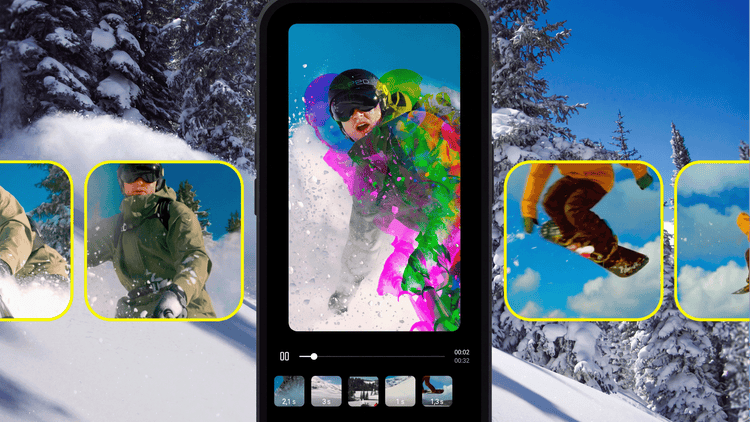
Timelines blitzschnell bearbeiten.
Mit deinem Stil ein Statement setzen.
Epische Videos mit Effekten und Übergängen bearbeiten.
Beliebig viele Spuren. Grenzenlose Kreativität.
style
four up, l-spacing, two up mobile
Content, der zum Teilen gemacht ist.
Adobe Premiere Mobile ist für Social Media gemacht – mit Hintergrundentfernung per Tipp, kostenlosen unbegrenzten Untertiteln und mehr. Bearbeite Videos für Instagram Reels, TikTok, YouTube Shorts und überall, wo du postest.
Nahtloser Schnitt. Von Anfang bis Ende.
Bleib im kreativen Flow – ganz ohne störende Wasserzeichen oder Pop-up-Werbung. Kürze, sortiere und überlagere Clips auf einer Timeline, die alles auf einen Blick zeigt. Exporte und Funktionen sind kostenlos – nur für Werkzeuge mit generativer KI fallen Kosten an.
Endlose Möglichkeiten, deinen Stil zu entfalten.
Teile Videos, die beeindrucken. Mit einer riesigen Auswahl an Bildern, Videos, Stickern, Schriftarten und mehr lässt du deine Videos lebendig werden – oder probierst mithilfe generativer KI neue Ideen aus.
Perfekter Sound in Sekunden.
Kein Tonstudio? Kein Problem. Verbessere Dialoge und reduziere Hintergrundgeräusche ganz einfach mit Audio verbessern. Entdecke direkt in der App angesagte Musiktracks und erschaffe mit deiner eigenen Stimme perfekt getimte Soundeffekte.
style
xl-spacing-bottom
Entdecke die wichtigsten Funktionen in Adobe Premiere Mobile.
Bereit für Social Media.
Premiere Mobile ist auf Social Media zugeschnitten – mit exklusiven Effekten und Übergängen, unbegrenzten automatischen Untertiteln und Schriften für jeden Stil.
carousel
Pr-editorial-cards-02
Bearbeitung mit unbegrenzt vielen Spuren.
Im Multitrack-Schnittfenster kannst du Clips überlagern und deine Inhalte schnell und präzise organisieren.
carousel
Pr-editorial-cards-02
Kostenlose Videobearbeitung. Ohne Ablenkungen.
Keine Wasserzeichen, aufdringliche Pop-up-Werbung oder Unordnung. Du zahlst nur, wenn du generative KI-Credits nutzen möchtest. Freue dich auf eine nahtlose Bearbeitung, bei der du dich voll auf deinen Content konzentrieren kannst.
carousel
Pr-editorial-cards-02
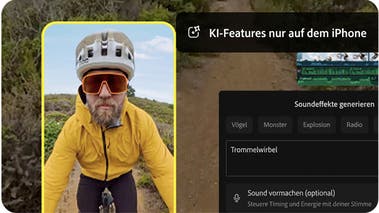
Deine Stimme als Sound-Effekt.
Mit dem Feature „Soundeffekte generieren“ kannst du eigene Sound-Effekte für deine Videos erstellen. Nutze einfach das Mikrofon deines iPhone für eine Aufnahme mit dem gewünschten Timing sowie der passenden Stimmlage und Betonung. Die KI erledigt den Rest.
carousel
Pr-editorial-cards-02
Kreativität ohne Risiko.
Adobe beansprucht kein Eigentum an deinem Content. Wir trainieren die generativen KI-Modelle von Adobe Firefly ausschließlich mit lizenzierten Inhalten.
carousel
Pr-editorial-cards-02
Im Handumdrehen zu herausragenden Visuals.
Nutze die KI-gestützten Features von Adobe Firefly, um Sticker und Bilder zu generieren, Hintergründe zu erweitern oder Bilder in Clips zu verwandeln. Außerdem hast du Zugriff auf eine riesige In-App-Bibliothek mit kostenlosen kreativen Assets.
carousel
Pr-editorial-cards-02
background
style
m-spacing-top
ADOBE PREMIERE – OFFIZIELLER PARTNER VON YOUTUBE SHORTS
YouTube Shorts ganz einfach erstellen.
Adobe Premiere Mobile bietet einen eigenen Bereich zum Bearbeiten von YouTube Shorts – mit exklusiven Vorlagen, Effekten, Übergängen und Titelvoreinstellungen. Remixe Vorlagen anderer Creator und veröffentliche deine Inhalte direkt auf YouTube.
Arbeite nahtlos mit allen Programmen der Premiere-Familie.
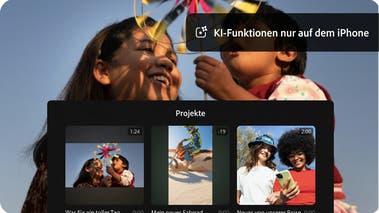
Projekte, die du auf dem Smartphone begonnen hast, kannst du jederzeit in Premiere auf dem Desktop weiterbearbeiten. Dabei steht dir der volle Funktionsumfang zur Verfügung.
background
bottom, center, contain
Von angesagten Vorlagen inspirieren lassen.
Füge deine Inhalte zu anpassbaren Vorlagen hinzu und veröffentliche sie direkt auf YouTube Shorts – alles in einer App.
Template displays a close up video of someone icing a Christmas tree cookie. The text "Happy" appears one letter at a time and then the word "Holidays".
Kostenlos
Template 4
Kostenlos
Template displays short videos of pleasant things like a beach, lingering on the first and showing the rest quickly. Text reads "Sorry, I have plans" and then "These are the plans."
Kostenlos
Template displays a series of waterfront landscape videos with a dreamy pink hued filter applied. Overlaid text in mixed fonts reads “Mentally, I’m here.”
Kostenlos
Template displays a series of still images of a fluffy brown and white dog in quick succession. Overlaid text reads "POV: My camera roll".
Kostenlos
Template displays short videos of a person making cinnamon buns, lingering on each section long enough to see each step.
Kostenlos
Template 3
Kostenlos
Template 2
Kostenlos
Template displays short videos of coffee beverages swiping in to frame from left to right. Text indicates different days of the week over each video.
Kostenlos
Template1
Kostenlos
Template 5
Kostenlos
Template displays a series of beautiful landscape photos with quick zoom ins on each and the text "happy place".
Kostenlos
Template displays a series of videos of an urban stroll with several seconds devoted to each clip. Overlaid text on the first frame reads “Let’s take a walk”.
Kostenlos
Template1
Kostenlos
Template 6
background
black
header
off
footer
off
Häufig gestellte Fragen.
Ja, Adobe Premiere Mobile ist eine kostenlose, eigenständige App zur Videobearbeitung. In der kostenlosen Version kannst du alle Kern-Bearbeitungsfunktionen nutzen und unbegrenzt Videos in 4K-Auflösung ohne Wasserzeichen exportieren. KI-Funktionen auf Basis von Firefly nutzen Generative Credits, die per Abo erworben oder in den meisten Creative Cloud-Abo-Varianten enthalten sind. Generative-KI-Funktionen sind derzeit nur auf iOS verfügbar.
Um Adobe Premiere Mobile herunterzuladen und zu installieren, scanne den QR-Code oben, oder rufe auf deinem Gerät den Apple App Store oder Google Play auf.
Adobe Premiere Mobile enthält Bilder, Effekte, Musiktracks, Schriften und Videoelemente. Mit Adobe Firefly kannst du außerdem eigene Soundeffekte, Sticker, Bilder und mehr erstellen. Generative-KI-Funktionen auf Basis von Firefly nutzen Generative Credits, die per Abo erworben oder in bestehenden Creative Cloud-Abo-Varianten enthalten sind. Generative-KI-Funktionen sind derzeit nur auf iOS verfügbar.
Adobe Premiere Mobile unterstützt dich bei der Erstellung einzigartiger Inhalte durch KI-Funktionen für generative Videos, Bilder, Sticker oder Sound-Effekte. Außerdem helfen dir integrierte KI-Features beim Verbessern der Sprachverständlichkeit, Entfernen von Hintergründen, Erstellen von Untertiteln u. a.
Ja. Wenn du ein Abo von Adobe Premiere auf dem Desktop hast, kannst du Projekte und Medien aus Adobe Premiere Mobile importieren.
Adobe Premiere Mobile ist perfekt für Kreative, die auch von unterwegs aus Zugriff auf professionelle Video-Tools brauchen. Die Funktionen umfassen präzise Steuerung im Schnittfenster, Export ohne Wasserzeichen und kommerziell sichere KI-generierte Inhalte, alles in einer kostenlosen App. Ideal für all, die auch mit den Desktop-Programmen von Adobe Content erstellen und nahtlos zwischen Desktop und Mobile App wechseln wollen.
Im Vergleich zu anderen mobilen Video-Editoren bietet Adobe Premiere Mobile ein professionelleres Editing-Erlebnis – mit mehrspuriger, skalierbarer Timeline, unbegrenzten kostenlosen Auto-Untertiteln sowie kostenlosen Exporten ohne Wasserzeichen. Die KI-Funktionen von Adobe Firefly sind kommerziell sicher, da Adobe Firefly ausschließlich mit lizenzierten Inhalten trainiert. Generative KI-Funktionen sind derzeit nur auf iOS verfügbar.
Adobe Premiere ist auf mobilen Geräten sowohl für iOS als auch für Android verfügbar. Einige Funktionen können je nach Plattform variieren. Besuche Adobe Help Center, um mehr zu erfahren.
style
Center, xl spacing, static links
Alles für deine Videos.
Erstelle Videos, die immer herausstechen – von überall aus. Erlebe die Power von Premiere auf dem Desktop und auf Mobilgeräten mit einem einzigen Abo.
Schnellere Video-Workflows mit der generativen KI von Adobe Firefly.
Visualisiere Aufnahmen und Effekte schon vor dem Dreh. Generiere in der Postproduktion fehlende Assets, um deinen Schnitt zu perfektionieren, und automatisiere lästige Routineaufgaben – so bleibt dein Kopf frei für kreative Ideen.
You can control how Adobe websites use cookies and similar technologies by making choices below. But note that if you disable cookies and similar technologies entirely, Adobe websites may not function properly.
Cookies are small text files stored by your web browser when you use websites. There are also other technologies that can be used for similar purposes like HTML5 Local Storage and local shared objects, web beacons, and embedded scripts. These technologies help us do things like remembering you and your preferences when you return to our sites, measure how you use the website, conduct market research, and gather information about the ads you see and interact with.
You can make choices in the menu below about what cookies and other technologies you want us to use on Adobe sites when you visit them from this browser. You can always change those choices later by clicking on the Cookie Preferences link at the bottom of the page.
If enabled:
We can improve your experience by tailoring the site and the content to things we think might be of interest
We can better keep track of your preferences — like what language you prefer to use
We will better understand your likely interests so we can provide you more relevant Adobe ads and content on non-Adobe websites and in non-Adobe apps
It will help us improve the performance of our website and those of our partners who use the Adobe Experience Cloud
If disabled:
We won’t be able to remember you from session to session so the experience may not be tailored to your interests
You’ll still have access to the content of the site but certain features that depend on cookies may not function
You’ll still see ads, they just may not be as relevant to you
General information
You can control how Adobe websites use cookies and similar technologies by making choices below. But note that if you disable cookies and similar technologies entirely, Adobe websites may not function properly.
Cookies are small text files stored by your web browser when you use websites. There are also other technologies that can be used for similar purposes like HTML5 Local Storage, web beacons, and embedded scripts. These technologies help us do things like remembering you and your preferences when you return to our sites, measure how you use the website, conduct market research, and gather information about the ads you see and interact with.
You can make choices in the menu below about what cookies and other technologies you want us to use on Adobe sites when you visit them from this browser. You can always change those choices later by clicking on the Cookie Preferences link at the bottom of the page.
If enabled:
We can improve your experience by tailoring the site and the content to things we think might be of interest
We can better keep track of your preferences — like what language you prefer to use
We will better understand your likely interests so we can provide you more relevant Adobe ads and content on non-Adobe websites and in non-Adobe apps
It will help us improve the performance of our website and those of our partners who use the Adobe Experience Cloud
If disabled:
We won’t be able to remember you from session to session so the experience may not be tailored to your interests
We’ll still count your use of our site and services
You’ll still have access to the content of the site but certain features that depend on cookies may not function
You’ll still see ads, they just may not be as relevant to you
Operate the site and core servicesOperate site and measure engagement
Always active
These cookies are required, and they are used to enable the site and related services core functionality. Without them the site could not operate, so they cannot be disabled.
These cookies enable the site and related services’ core functionality and collect statistics about user engagement, such as counting active use to help us understand trends. These cookies cannot be disabled.
Measure performance
These cookies are used to analyze site usage to measure and improve performance. Without them Adobe cannot know what content is most valued and how often unique visitors return to the site, making it hard to improve information we offer to you.
These cookies are used to analyze site usage to measure and improve performance. Without them Adobe cannot know what content is most valued, making it hard to improve information we offer to you.
Extend functionality
These cookies are used to enhance the functionality of Adobe sites such as remembering your settings and preferences to deliver a personalized experience; for example, your username, your repeated visits, preferred language, your country, or any other saved preference.
Personalize advertising
These cookies are used to enable Adobe and our partners to serve ads more relevant to your interests. Without them you will still see ads, but they might not be as relevant to you.