


QR codes are everywhere—from menus to tickets and ads. Given their increasing popularity, it only makes sense to ask this question: Are QR codes safe? A QR code’s primary function is to store data. The risk comes from where that data leads, like unsafe websites. In this guide, we cover how QR codes work, highlight real risks, and teach you how to scan and create QR codes responsibly.

Are QR codes safe? How to use them securely in 2026.
Are QR codes safe to scan? Learn the real risks, how to spot malicious codes, and how to create safe QR codes with Adobe Express.

Easy all-in-one editor

One-click edits from any device

Fast creation with generative AI

Thousands of professionally-designed templates
What are QR codes and how do they work.
A QR code, short for Quick Response code, is a two-dimensional barcode that stores information in a grid of black and white squares.
Barcodes can only be read/scanned in one direction, while QR codes can be read horizontally and vertically. This means that barcodes can only hold limited data (like price), while QR codes can hold much more, like a web address, contact details, or Wi-Fi credentials.
QR codes were invented in 1994 by Denso Wave, a Toyota subsidiary. Denso Wave wanted a more efficient way to track vehicles and automotive parts in their assembly lines than barcodes. Unlike regular barcodes, QR codes can be scanned more quickly, without worrying about angles.
Today, they’re everywhere. In 2025, 93% of marketers used QR codes in their campaigns. Meanwhile, in a 2024 report, more than two-thirds of consumers said they used a QR code at least once in the previous 12 months.
What happens when you scan a QR code.
When your phone’s camera detects the three large squares in the corners (called the finder pattern), it recognizes the QR code.
It decodes the grid of black and white squares, which represent binary data. It identifies the data encoded, whether it’s a URL, payment information, or contact details.
The phone then prompts you to take action, like opening a link or making a payment.
This whole process happens under a second.
What QR codes can store.
QR codes can store about 200 times more information than a regular barcode. It can be used to hold the following information:
- Website URLs
- Phone numbers (tap to call), email addresses (tap to compose), SMS messages (pre-filled text message that’s ready to send)
- Wi-Fi credentials (network name and password—tap to connect automatically)
- App download links (directs to App Store or Google Play)
- Payment information
- Event tickets and boarding passes
- Login and authentication data (two-factor verification)
- Geographic coordinates and map locations
- Calendar events (tap to save to your calendar)
- Social media profile links
- Cryptocurrency wallet addresses
- Document and file links (PDFs, videos, images hosted online)
- Augmented reality (AR) triggers
In terms of raw capacity, this is what QR codes can store:
| Data type | Max characters |
|---|---|
| Numbers only | 7,089 |
| Letters and numbers | 4,296 |
| Text/symbols (binary) | 2,953 |
| Japanese Kanji/Kana characters | 1,817 |
QR codes can also combine multiple data types in a single code.
Anatomy of a QR code.
Knowing how a QR code is built helps explain how it works and why it can be vulnerable if misused. Here’s a quick breakdown of what every QR code includes.
- Quiet zone: the empty white border surrounding the code; tells the scanner where the code begins.
- Finder pattern: three large black squares at the bottom-left, top-left, and top-right corners.
- Alignment pattern: a smaller square near the bottom-right corner that helps the code be read when it’s skewed or at an angle.
- Timing pattern: L-shaped line running between the three finder squares; helps identify individual cells.
- Version information: field near the top-right finder pattern; identifies the QR code version.
- Data cells: the rest of the grid, where the actual encoded information is stored.
Most parts of a QR code are structural, helping the scanner recognize it. The data cells, where the information lives, aren’t human-readable. Since you can’t tell if a code leads to a legitimate site or a malicious one, this invisibility is what attackers usually exploit.
Are QR codes safe? Understanding the real risks.
QR codes are just a way to store and share information. Think of the QR code as a delivery mechanism, like an envelope. However, having a “safe” delivery mechanism doesn’t guarantee the safety of its contents. An envelope might be harmless, but what’s inside could be dangerous.
Since QR codes aren’t human-readable, attackers can exploit them for phishing or quishing (QR phishing). In 2023, quishing rose 587%, making up 22% of phishing attacks.
Main threats.
The most common tactics of attackers include:
- Quishing. This involves embedding malicious QR codes in phishing emails. Because the code is an image rather than a clickable URL, it bypasses traditional email security filters that would otherwise flag a suspicious link. Once scanned, the code directs the victim to a fake website designed to steal personal information.
- Malicious redirects. Some QR codes don’t always take you directly to their final destination. Attackers can route you through multiple URLs before landing on a harmful page, making it difficult to spot the danger—even from the URL preview on your phone.
- Fake payment portals. Scammers sometimes cover real QR codes with fake ones at parking meters, restaurant tables, or retail displays. Since the fake code looks real, people may end up entering their payment details into a fraudulent page.
- Credential harvesting. Attackers create QR codes that link to fake login pages mimicking real brands (like banks and email providers) that capture usernames and passwords.
- Drive-by downloads. Not all malicious QR codes lead to a website. Some trigger an automatic file download the moment you land on the destination page without your explicit consent. These downloads can contain malware, spyware, or ransomware that compromises your device.
- Unexpected device actions. QR codes can prompt actions like adding contacts, pre-composing emails, initiating payments, or connecting to a Wi-Fi network.
It’s also worth noting that mobile devices are the main target for QR code attacks. Phones often have fewer visible security controls than desktop computers, and people tend to act more quickly on mobile, which makes it easier to miss warning signs.
At the end of the day, the technology itself isn’t the biggest vulnerability. The QR code is simply the entry point. The risk comes from rushing or trusting a link without verifying it first.
What attackers can’t do.
While attackers can misuse QR codes, there are limits to what they can do. They act like gateways to malicious content because you’d typically need to download a file, click a malicious link, install an app, or enter information first.
They also can’t collect personal data like your name, passwords, or contacts just by scanning. However, dynamic QR codes can log location data, scan count, timestamps, and device operating system.
Is it safe to scan QR codes? How to stay protected.
A few simple habits go a long way in helping you stay secure when you scan a QR code.
Before scanning.
- Check the physical code for tampering. Is a sticker placed over the surface? Are the edges clean and flush with the surrounding design?
- Avoid scanning codes with no context. Don’t scan codes from unsolicited emails, texts, or random stickers in public, especially if they promise prizes or urgent rewards.
- Consider the source. A QR code on a printed menu at a restaurant is very different from one in an unsolicited email from an unknown sender.
After scanning.
- Check the URL preview. Read the full link your phone displays before opening it.
- Verify the domain. Look for HTTPS and make sure the domain matches the brand. Watch for typos (“paypa1.com” vs “paypal.com”) and unusual subdomains.
- Inspect the landing page. Check for spelling errors, mismatched logos, and generic stock photography
- Be cautious with your personal info. Only enter login or payment details if the URL and page look legitimate.
Device safety.
- Keep your phone's OS updated. Security patches help close browser and system vulnerabilities.
- Use your phone's native camera app. Avoid third-party scanner apps from unverified developers.
- Consider a dedicated QR scanner with built-in security screening. Some apps evaluate the destination link before opening it, flagging phishing attempts, forced app downloads, and dangerous links.
Static vs dynamic QR codes: Which is safer.
If you’re creating QR codes for your business, the type you choose matters. There are static and dynamic QR codes, and they each work differently.
Static QR codes.
A static QR code has a fixed destination. When you create one with a code generator like the Adobe Express free QR code generator, the information is encoded directly into the code and can’t be changed.
Pros.
- Simple to create.
- Free to generate with tools like Adobe Express.
- The code works as long as the destination URL is live.
- No scan data collected at the code level (better for privacy.)
- The destination can’t be altered by anyone after creation.
Cons.
- Has a permanent destination; a typo or changed URL means starting over.
- Can’t be deactivated if compromised.
- No scan analytics; you can’t track how many times it was scanned, where, or when.
Dynamic QR codes.
A dynamic QR code contains a short redirect URL managed by a third-party platform. That redirect points to the actual destination. Because the redirect is managed externally, you can change where the QR code leads at any time without creating a new one.
Pros.
- Destination can be updated anytime without reprinting the QR code.
- Can be deactivated immediately if needed.
- Tracks scan analytics: location, scan count, timestamps, device OS.
- Ideal for marketing campaigns, menus, or content that changes over time.
Cons.
- Often managed through third-party platforms (which may involve a paid subscription).
- If the platform goes down or you cancel your subscription, the code stops working.
- Collects scan data, which raises privacy considerations.
- The redirect layer introduces an additional point of potential vulnerability.
- Requires more advanced technology to support editable URLs, integrations, and analytics, according to Bitly.
The bottom line: Each QR code type has different security considerations, so overall safety depends on the destination and how well the code is managed. Static codes are simpler, more private, and sufficient for most personal or permanent use. Dynamic codes are more powerful and flexible, making them the better choice for business campaigns, but they require careful management.
| Static | Dynamic | |
|---|---|---|
| Editable destination | No | Yes |
| Can be deactivated | No | Yes |
| Depends on third-party platform | No | Yes |
| Scan analytics | No | Yes |
| Best for | Permanent links, print, personal use | Campaigns, menus, evolving content |
How to use a safe QR code generator.
Creating a QR code takes less than a minute with the right tool. But before you generate and share one, it’s worth following a few simple steps to make sure it’s safe, functional, and trustworthy for everyone who scans it.
- Use a reputable platform. Choose an established tool with a clear privacy policy. Avoid generators with no privacy policy, no terms of service, or no recognizable name behind them.
- Double-check the destination URL. Even a small typo can send users to the wrong place. Verify the link is correct before generating the code.
- Link only to HTTPS destinations. Confirm the destination page is SSL-secured. Pages using HTTP aren’t encrypted.
- Test before publishing. Scan the code on both iOS and Android and confirm the landing page loads correctly. Never distribute at scale without scanning it yourself first.
- Monitor active codes. Periodically check that physical codes haven’t been tampered with and that their destinations remain accurate. If a destination page changes or goes down, your QR code becomes a broken or misleading experience for your audience.
How to design QR codes that build trust.
A well-designed QR code tells people that it’s safe to scan. Here’s what to keep in mind when designing one:
- Always add a clear call-to-action label. For example, use “Scan to view our menu,” “Scan to register,” or “Scan to pay.” Labeling is both a UX best practice and a trust signal.
- Include context. Add elements like your logo, brand colors, and a descriptor.
- Maintain high contrast. Use a dark pattern on a light background. Low contrast can reduce scan reliability and make your code look unpolished.
- Preserve the quiet zone. The white border on your QR code is essential. Cropping it might make your code unreadable.
- Avoid over-styling. Heavy fills, excessive color, or oversized logo overlays can reduce error correction capacity and may cause scan failures.
- Respect the minimum print size. For printed materials, a QR code should be approximately 2 x 2 cm.
- Keep branding consistent. QR codes on business cards, flyers, and posters should look like they belong to one brand.
Best practices for businesses using QR codes.
If your brand is using QR codes, follow these guidelines to make sure you’re deploying them responsibly.
- Use dynamic codes for campaigns. This allows you to update the destination link, fix errors after printing, or deactivate the code.
- Audit physical placements regularly. Have someone on your team routinely check QR codes displayed in public to make sure they haven’t been tampered with.
- Avoid linking directly to payment pages. Send users to a branded landing page first, so they can verify where they are before entering any payment details.
- Train employees about quishing. Staff should verify any QR codes in emails with IT before scanning, especially if the code is asking them to log in or verify an account.
- Document everything. Keep a record of every QR code, its destination, and where it’s placed. This makes it easier to spot and fix problems quickly.
- Address consumer barriers proactively. Label your codes clearly and always give context. Bitly research shows 55% of marketers say consumers struggle with QR codes because they don’t know how to use them, while 47% cite code overload.
Create functional QR codes with Adobe Express.
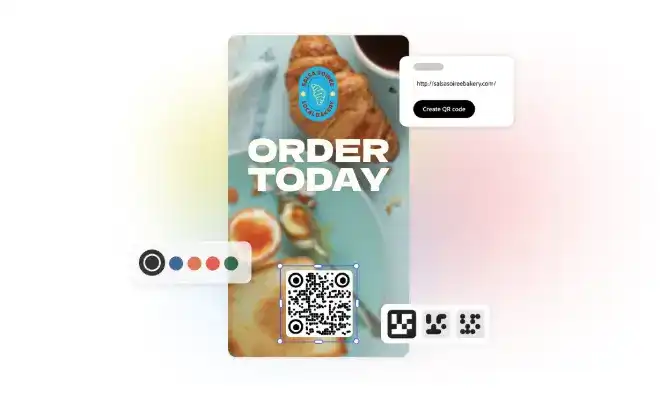
Creating a working QR code begins with using a reliable tool. With Adobe Express, you can generate a QR code in seconds and add it to your existing template. There's no need for app switching or importing/exporting files. Whether you’re creating a flyer, business card, poster, or menu, your QR code and your design live in the same workspace from start to finish.
You can customize your code to match your brand, adjusting colors, adding your logo, and maintaining consistency across every format.
With Adobe Express, you can create static QR codes and link them to your secure, verified destination URL. The tool generates the code and handles the design. Before sharing the code, make sure to verify the destination link.
Create your QR code with Adobe Express today.
You might also like...


FAQs.
Are QR codes safe in 2026?

QR codes can generally be safe, as long as they’re created and scanned responsibly. By checking links, following basic safety steps, and staying aware of common scams, you can reduce risks when using QR codes.
Are QR codes safe to scan in public places?

Is it safe to scan QR codes from emails?
How do you choose a QR code generator?
Can QR codes contain viruses?
Are dynamic QR codes safer than static ones?
How can businesses prevent QR code fraud?
Are QR codes safe in 2026? opened

