
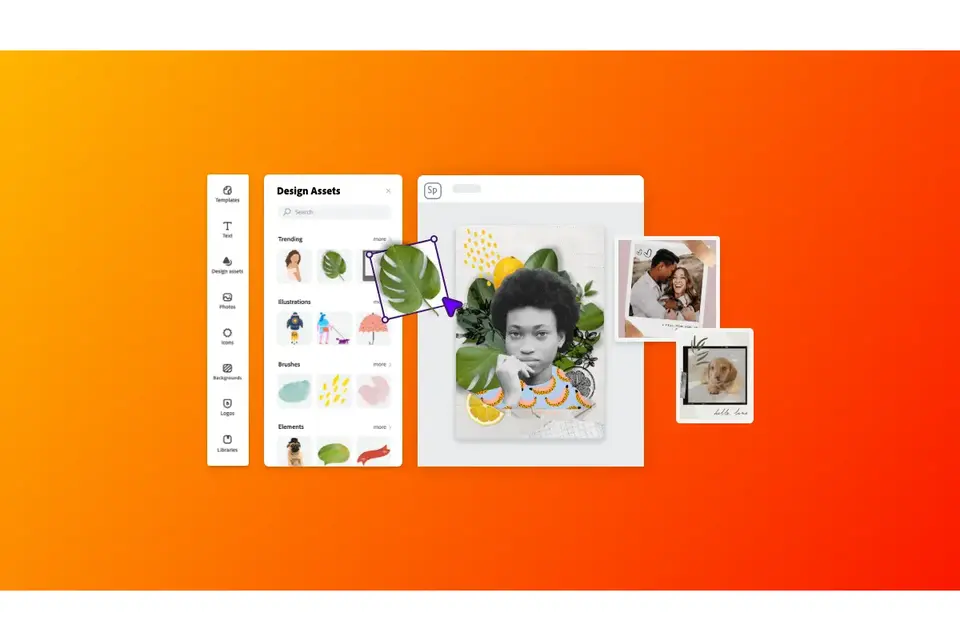
When it comes to creating standout content, it’s all in the details: The just-right font that matches your copy and tone. The color that evokes the perfect mood. The brush stroke, border, or other accent that sets the vibe. And sometimes you don’t even know what will give your content that certain je ne sais quoi until you see it.
That’s why we’ve introduced over 20,000 new design assets to Adobe Express on the web. These graphic elements are here to help you create an aesthetic that makes people stop and listen. Think of them as the perfect accessories or pieces of flair for your message.
From frames to brush strokes to illustrations and shapes, we’ve got accents to match your style that you can arrange and play with in just a few taps. Looking for realistic foliage to amp up your organic, all-natural vibe? We got it. Maybe something a little more abstract to match your big thinking? We definitely have that. From gritty to polished, there are design assets to match your aesthetic. As time goes on, we’ll be adding new ones to this menu, so there will always be new design ingredients to spice up your content.
style
long-form, long-form-blog, xxl-spacing-top
20,000+ Design assets at your fingertips
The best way to explore the design possibilities is to start creating! Open a project on the web and look for the menu on the left-hand side labeled Design Assets. From there you can search and browse thousands of design elements exclusive to Adobe Spark. Add an asset to your project by tapping and arranging it anywhere on your canvas. Clicking on an asset will allow you to bring it forward or backward through your canvas layers, duplicate it, or change other dimensions. You’ll need to find the assets on the web, but you can always refine further on mobile once they are added to your projects.
style
long-form, long-form-blog, l-spacing
Get a taste of the design possibilities
Here’s a taste of the kinds of assets we’ve added to the system. Try searching by type of asset, such as “frame,” “shape” or “illustration” or by aesthetic, such as “grunge,” “metallic,” “holographic”, “decorative.” Or browse by theme by tapping the Asset Type folder to discover assets organized by different categories. Want to give it a whirl? Tapping the images below will open the project with all of those assets in it, so you can get started in seconds.
style
long-form, long-form-blog, l-spacing
Frames and borders for every style
Frames and borders are great tools to draw attention to photos or text in a design. Art deco and decorative frames are perfect for fancy invitations, certificates, and formal announcements. Film photo frames instantly add a vintage, nostalgic quality to any photo. Whatever your style, there’s a frame for you.
Shapes and accents help you draw the eye where you want it. Use brushstrokes, circles, arrows and other shapes to highlight important pieces of text or create an organic, collage look with shapes that look like torn paper or washi tape.
Transform photos or even a simple solid color background with textures and overlays. Be sure to play with the opacity to get just the right look for your design. Oh, and these elements work great for the minimalist and maximalist alike!
Stay tuned for seasonal collections, based on the latest social trends, and even collections from some of our favorite artists. As always, you’ll also see these assets in ready-made templates for even more inspiration and one-tap creativity!
You can control how Adobe websites use cookies and similar technologies by making choices below. But note that if you disable cookies and similar technologies entirely, Adobe websites may not function properly.
Cookies are small text files stored by your web browser when you use websites. There are also other technologies that can be used for similar purposes like HTML5 Local Storage and local shared objects, web beacons, and embedded scripts. These technologies help us do things like remembering you and your preferences when you return to our sites, measure how you use the website, conduct market research, and gather information about the ads you see and interact with.
You can make choices in the menu below about what cookies and other technologies you want us to use on Adobe sites when you visit them from this browser. You can always change those choices later by clicking on the Cookie Preferences link at the bottom of the page.
If enabled:
We can improve your experience by tailoring the site and the content to things we think might be of interest
We can better keep track of your preferences — like what language you prefer to use
We will better understand your likely interests so we can provide you more relevant Adobe ads and content on non-Adobe websites and in non-Adobe apps
It will help us improve the performance of our website and those of our partners who use the Adobe Experience Cloud
If disabled:
We won’t be able to remember you from session to session so the experience may not be tailored to your interests
You’ll still have access to the content of the site but certain features that depend on cookies may not function
You’ll still see ads, they just may not be as relevant to you
General information
You can control how Adobe websites use cookies and similar technologies by making choices below. But note that if you disable cookies and similar technologies entirely, Adobe websites may not function properly.
Cookies are small text files stored by your web browser when you use websites. There are also other technologies that can be used for similar purposes like HTML5 Local Storage, web beacons, and embedded scripts. These technologies help us do things like remembering you and your preferences when you return to our sites, measure how you use the website, conduct market research, and gather information about the ads you see and interact with.
You can make choices in the menu below about what cookies and other technologies you want us to use on Adobe sites when you visit them from this browser. You can always change those choices later by clicking on the Cookie Preferences link at the bottom of the page.
If enabled:
We can improve your experience by tailoring the site and the content to things we think might be of interest
We can better keep track of your preferences — like what language you prefer to use
We will better understand your likely interests so we can provide you more relevant Adobe ads and content on non-Adobe websites and in non-Adobe apps
It will help us improve the performance of our website and those of our partners who use the Adobe Experience Cloud
If disabled:
We won’t be able to remember you from session to session so the experience may not be tailored to your interests
We’ll still count your use of our site and services
You’ll still have access to the content of the site but certain features that depend on cookies may not function
You’ll still see ads, they just may not be as relevant to you
Operate the site and core servicesOperate site and measure engagement
Always active
These cookies are required, and they are used to enable the site and related services core functionality. Without them the site could not operate, so they cannot be disabled.
These cookies enable the site and related services’ core functionality and collect statistics about user engagement, such as counting active use to help us understand trends. These cookies cannot be disabled.
Measure performance
These cookies are used to analyze site usage to measure and improve performance. Without them Adobe cannot know what content is most valued and how often unique visitors return to the site, making it hard to improve information we offer to you.
These cookies are used to analyze site usage to measure and improve performance. Without them Adobe cannot know what content is most valued, making it hard to improve information we offer to you.
Extend functionality
These cookies are used to enhance the functionality of Adobe sites such as remembering your settings and preferences to deliver a personalized experience; for example, your username, your repeated visits, preferred language, your country, or any other saved preference.
Personalize advertising
These cookies are used to enable Adobe and our partners to serve ads more relevant to your interests. Without them you will still see ads, but they might not be as relevant to you.