Adobe Acrobat
What document management really means for Indian businesses today.
Document management has evolved beyond simple file storage. This article explores what modern document management looks like for Indian Small & Medium Businesses (SMBs) and solo professionals, why it matters, and how integrated, scalable approaches are helping businesses work more efficiently.

Published by Adobe Acrobat India on 17 Feburary 2026
JUMP TO SECTION
Why document management is becoming more complex in India
Common document management challenges for SMBs and solo professionals
How modern document management solutions improve business efficiency and productivity
Practical document management solutions for SMBs: how to make it work?
Modern document management goes far beyond simply storing files. For Indian SMBs and solo professionals, it now means handling documents seamlessly across devices, formats, and workflows while keeping costs in check, enabling smooth collaboration, and boosting overall productivity.
Managing this complexity presents real challenges: disconnected tools, scattered files, and manual processes that slow down work and increase errors. Integrated solutions like Adobe Acrobat Studio address these pain points by combining core document tools with AI-powered features and mobile workflows. This enables businesses to streamline processes, scale efficiently, and maintain productivity every day, all while keeping operations cost-effective.
In this article, we dive into what modern document management truly looks like, the challenges businesses face, and how smart, integrated solutions can transform the way Indian SMBs and professionals work with documents.
What is document management?
Document management is the process of organizing, storing, and controlling documents throughout their entire lifecycle: from creation and editing to sharing, archiving, and eventual disposal. It involves not just keeping files in order, but also ensuring they are easily accessible, secure, and compliant with regulations.
Why document management is becoming more complex in India.
Document workflows in India have changed significantly in recent years. Many businesses now:
- Receive documents as scans or photos shared over WhatsApp
- Work across both mobile and desktop devices
- Collaborate with clients, vendors, and partners remotely
- Manage increasing documentation for audits, compliance, and record-keeping
As a result, document management has shifted from simple storage to ongoing coordination. Without a clear approach, teams spend time searching for files, chasing approvals, and recreating documents that already exist.
Common document management challenges for SMBs and solo professionals.
For Indian SMBs and solo professionals, document challenges tend to show up in practical, everyday ways. These include:
- Files scattered across email, chat apps, and cloud folders
- Multiple tools required for basic tasks like editing, converting, or signing documents
- Manual processes for reviews and approvals
- Rising software costs as document needs grow
Over time, these inefficiencies slow productivity and make document work harder to manage.
How modern document management solutions improve business efficiency and productivity.
Cost efficiencies: Reducing spend across a range of tools.
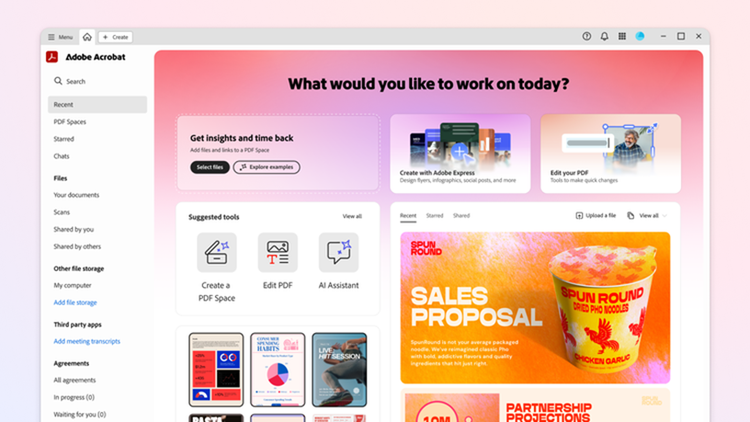
Many SMBs and solo professionals rely on separate tools to review documents, create client-facing files, edit PDFs, and collect signatures. While each tool addresses a specific task, managing multiple subscriptions increases cost and complexity.
An integrated document management approach helps reduce this fragmentation. With Acrobat Studio, businesses can:
- Summarise documents, surface insights, and ask questions using PDF Spaces with a prebuilt AI Assistant to review contracts, reports, or compliance files
- Create professional, on-brand documents such as reports, invoices, proposals, or presentations using design tools and templates available through Adobe Express
- Edit, convert, and sign PDFs using a complete set of PDF tools that support everyday productivity
By supporting document review, creation, collaboration, and finalisation in one place, businesses can manage document costs more effectively without sacrificing capability.
Ease of integration: Working with the systems you already use.

For many SMBs in India, adding a new tool often means learning another platform and adjusting existing processes. Teams already rely on familiar tools such as email, cloud storage, and messaging apps. Introducing a separate system can slow work rather than simplify it.
Adobe Acrobat works alongside the tools businesses already use, allowing document tasks to fit into existing workflows.
For example, a marketing team may need to update a campaign plan based on client feedback before sharing it for final sign-off. Previously, this often involved downloading the latest version, editing it in a separate tool, converting it back into a PDF, sending it out for approval using another platform, and then saving the signed file again for records.
With Acrobat, the team can edit the latest PDF directly, send it for sign-off, and store the final version within the same workflow, without moving the file between multiple tools.
This reduces unnecessary handoffs and version confusion, while allowing teams to complete approvals without disrupting how they already work.
Scalability: Supporting your business as it grows.

As small businesses grow, they take on more clients, process more transactions, and manage a higher volume of documents. What may have started with a handful of invoices or contracts can quickly expand into managing documents across multiple clients, projects, and reporting periods.
For many Indian SMBs, this shift becomes especially clear during GST filings and audits. Invoices, receipts, agreements, and supporting documents need to be organised, reviewed, and retained consistently. Informal or ad-hoc file handling that worked earlier often becomes difficult to manage at this stage.
Modern document management solutions support this transition by allowing businesses to start with essential document tasks and introduce more structured workflows as requirements increase. This helps small businesses stay organised as they scale, without needing to replace tools or redesign document processes every time their operations grow.
Enhanced productivity: Using AI for small business to work through documents faster.
As document volumes increase, a large part of day-to-day work shifts from creating documents to reviewing, checking, and analysing them. Teams spend time reading long files, locating specific details, and comparing information across documents.
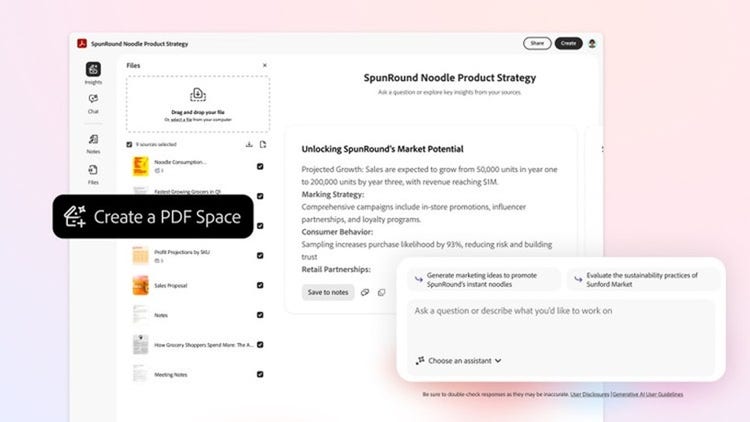
AI-assisted document workflows help reduce this effort by making documents easier to understand and navigate. With an AI Assistant, teams can:
- Ask questions to quickly locate details such as payment terms in a contract or totals across invoices
- Generate summaries of long files like agreements, audit reports, or project plans to understand key points at a glance
- Extract key points such as clauses, figures, or action items to support reviews, approvals, or decisions
- Reduce repetitive manual checks across multiple invoices, contracts, or reports by surfacing relevant information automatically
Here are some examples of AI prompts that users can use when conversing with an AI Assistant:
- “Summarise all payment terms in this contract.”
- “List all action items from this audit report.”
- “Show totals for all invoices in this folder.”
These capabilities support faster reviews and more informed decisions, especially for small businesses and growing teams.
Flexibility: Managing work wherever it happens.
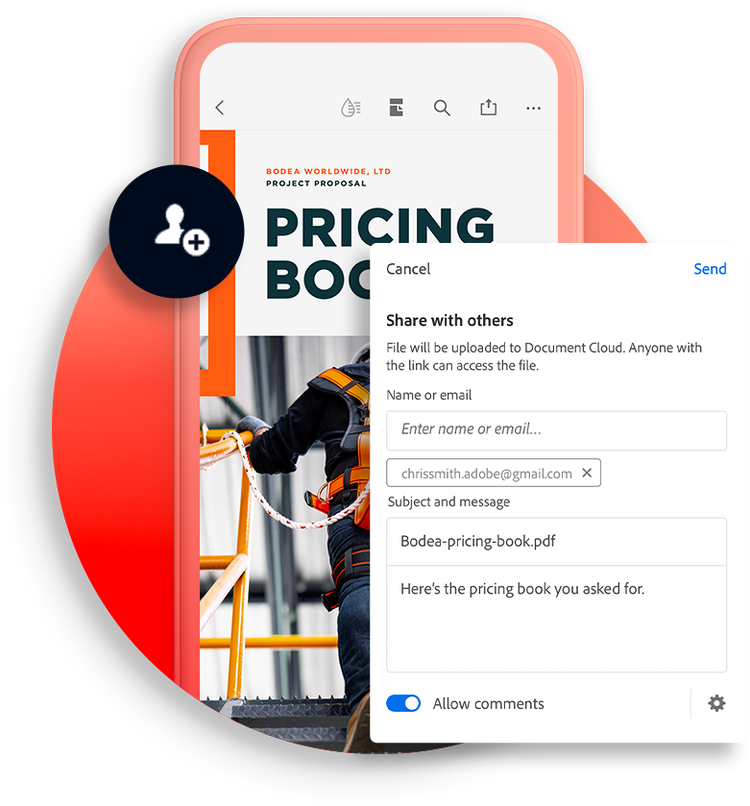
In many Indian businesses, files are often shared quickly through messaging apps such as WhatsApp, especially when teams or clients are on the move.
For example, a team member may receive an image of an invoice through a messaging app. Team members can carry out these tasks using the Acrobat mobile app or device on the go:
- Convert the image into a PDF: The image is turned into a clean, searchable PDF that is easier to review and work with.
- Edit or annotate the PDF: Updates, corrections, or notes can be added directly to the file if changes are needed.
- Send the file for approval or signature: Once finalised, the PDF is sent for sign-off without exporting it to another tool.
- Share or store the completed file: The signed version is shared with the relevant stakeholders or saved for records.
This portability allows teams to move from image to final file without switching between tools, helping work continue smoothly even when tasks start on mobile and finish elsewhere.
Try our online tools to level up your PDF experience.
https://main--da-dc--adobecom.aem.page/in/dc-shared/fragments/roc/blog/online-tools/edit-pdf
https://main--da-dc--adobecom.aem.page/in/dc-shared/fragments/roc/blog/online-tools/jpg-to-pdf
https://main--da-dc--adobecom.aem.page/in/dc-shared/fragments/roc/blog/online-tools/chat-with-pdf
https://main--da-dc--adobecom.aem.page/in/dc-shared/fragments/roc/blog/online-tools/pdf-ai
Practical document management solutions for SMBs: How to make it work?
For small businesses and solo professionals, document management only works when it is practical, affordable, and easy to adopt. By bringing core document tools, AI-assisted capabilities, and mobile workflows together, Adobe Acrobat Studio helps businesses handle everyday document tasks without needing to invest in multiple platforms.
By simplifying how documents are handled across teams and devices, Acrobat Studio reduces manual effort, improves consistency, and provides a flexible foundation that supports productivity today while scaling as business needs grow.
Frequently asked questions.