What is displacement mapping?
In this guide, we’ll explain what displacement maps are, why they’re beneficial and how to use them in your designs.
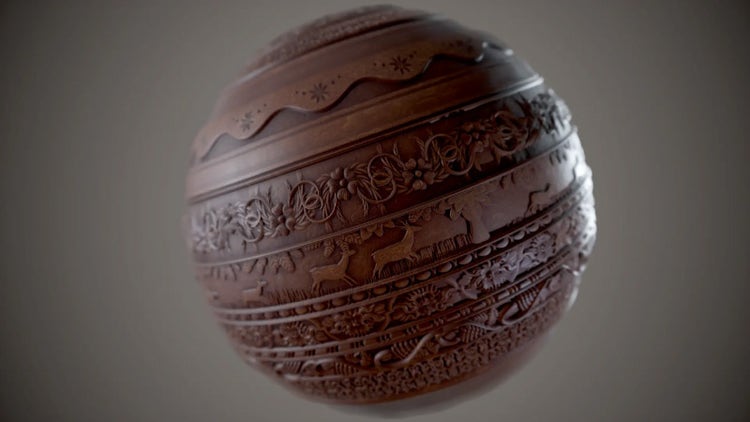
The line between reality and virtual worlds is becoming increasingly blurred and realistic 3D design has never been more important. Whether for gaming, films or architecture, textured 3D objects help designers tell deeper, more compelling stories.
Displacement mapping is a 3D design technique that creates life-like textures in 3D environments. Platforms like Adobe Substance 3D make it possible to create realistic displacement maps, but it’s still good to understand why this technique matters and how to use it properly. In this guide, we’ll explain what displacement maps are, why they’re beneficial and how to use them in your designs.
Understanding displacement mapping.
Definition of displacement mapping.
Displacement mapping is a 3D modelling technique that adds detail to a model by manipulating its geometry based on a texture map. Think of a displacement map as a topographical map, where peaks and valleys correspond to details on the model’s surface.
Benefits of using displacement mapping in 3D design.
Enhanced realism.
Displacing the actual geometry of a model can create a more life-like look and feel. Objects in nature are seldom smooth or perfect, so adding variable texture makes 3D objects look more realistic.
Detailed textures.
Displacement maps add intricate details that would otherwise be impossible — or time-consuming — to achieve manually.
Improved depth and dimensionality.
Displacement maps have peaks and valleys that add depth, light and shadow to the texture of a surface.
Displacement map vs. normal map.
Use of normal maps in 3D design.
Normal maps focus on how light bounces off surfaces. This gives the illusion of depth without changing the model’s geometry. It paints shadows and highlights to trick the eye into seeing a texture that isn’t physically there.
Comparison between displacement maps and normal maps.
Both techniques provide depth and texture, but they’re executed differently. Displacement maps alter the actual mesh of an object’s surface, while normal maps only affect the lighting.
For example, let’s say you’re building a 3D model of a brick wall. A normal map will show light and shadow on the bricks to give it a 3D appearance, but a displacement map will physically push out each brick from the surface to create a more dynamic, realistic effect.
Advantages of combining displacement and normal maps.
Displacement maps and normal maps are different, but that doesn’t mean you can’t use both. In fact, combining the two can lead to spectacular results and give you ultra-realistic outputs. Surfaces will look both physically and optically textured to create life-like 3D models.
How displacement mapping works.
Displacement mapping brings out a model’s finer details by altering its geometry. Instead of simulating the appearance of texture, it adds real texture to the model’s surface.
Input: high-resolution displacement map.
A displacement map is a grayscale image where the different shades of grey represent the level of displacement or movement, the part of an object should have.
- White areas are the highest points or peaks.
- Black areas are the lowest points or valleys.
- Grey areas vary on a spectrum. The darker the grey, the lower it is, and vice versa.
Output: detailed 3D model with surface details.
Once you have the displacement map, it’s time to apply it to your model.
- Read the map. Your 3D modelling software will read the grayscale values of the displacement map.
- Alter the geometry. Based on these values, the software pushes or pulls vertexes on the model’s mesh. This gives the model a new, textured surface.
- Render. Once you adjust the geometry, render the model. See how light interacts with the new surface details to cast realistic highlights and shadows.
Step-by-step guide on implementing displacement mapping.
Software tools required.
- 3D modelling software. To create or import your base 3D model, you’ll need software like Blender, Maya or 3ds Max.
- Texture painting software. You can then use Adobe Substance 3D to create high-quality displacement maps for your model.
- Rendering software. any 3D modelling tools come with built-in renderers, but you can always go for specialised software like V-Ray or Render Man.
Preparing your 3D model.
Choose a model that would benefit from added texture. The model must also have a high polygon count for the displacement map to work properly. Use UV unwrapping to dictate how the displacement map will wrap around the 3D model.
Importing and applying the displacement map.
Load the displacement map into your 3D software. Assign a material to the displacement map and do a quick render to see how the displacement map will look. It won’t be the final look, but it should give you a general idea before you move forward.
Adjusting settings for desired results.
- Displacement strength or height. This controls how pronounced the displacement effect is.
- Subdivision levels. If your software allows for subdivision, use this feature to refine the mesh in areas that need more detail.
- Smoothing. Prevent overly sharp transitions by using smoothing options that blend the displacement seamlessly with the model.
Examples and use cases.
Displacement mapping is a powerful, versatile technique used across many industries.
Architectural visualisation.
Architects use displacement mapping to add texture to brick walls, stone pathways and roof tiles in their models.
Character modelling.
Film animators and artists use displacement maps to add fine lines, wrinkles, scars and pores to a character’s face. This technique is also great for making realistic clothing, armour or creature skins.
Game design.
Video game designers build immersive 3D environments with mountains, valleys and craters using displacement maps. They bring tree bark, cobblestone paths, weapons and more to life to create immersive digital experiences.
Tips and best practices.
- Maintain consistent lighting. Make sure the lighting hits the displacement map uniformly. Shadows and highlights can distort the displacement, so double-check the lighting before finalising your design.
- Go for high resolution. The more detailed your displacement map, the better the results. However, consider the use case — high-resolution models might be overkill or take too long to load in some cases.
- Remember polygon density. Displacement physically alters geometry. If the model doesn’t have enough polygons, the result will look blocky or distorted.
Elevate realism: Adobe Substance displacement mapping unleashed.
Displacement mapping is a must-try technique that breathes life into 3D models by adding intricate details and depth. Tools like Adobe Substance 3D simplify displacement maps, so the only limit is your imagination. The Substance 3D intuitive interface makes it possible for both beginners and professionals to apply high-quality displacement maps with precision.
Bring life to your designs. Embrace the power of displacement mapping in Adobe Substance 3D.